Installation Requirements

This section contains the following topics:

Cisco Crosswork Infrastructure Requirements

This section explains the requirements for installing the Cisco Crosswork.

The Crosswork cluster for 4.0 release consists of at least 3 VMs operating in a hybrid configuration. This is the minimum configuration necessary to support the applications in a typical network. Additional worker nodes can be added later to scale your deployment, as needed, to match the requirements of your network or as other applications are introduced.

In addition, at least 1 VM is needed to deploy Crosswork Data Gateway. This configuration can be scaled by adding additional resources if it is determined that your use case requires more resources and to support Crosswork Data Gateway high availability (HA).

The data center resources need to run NSO are addressed in the NSO installation Guide and are not addressed in this document.

Data Center Requirements

Cisco Crosswork can be deployed in either a vCenter managed data center or onto Cisco CSP. To aid in the deployment, Cisco has developed a cluster installation tool. This tool works in both environments. However, there are limitations to the tool which are detailed later in this section.


Note

The machine where you run the installer must have network connectivity to the Cisco Crosswork cluster in order to complete the installation. If this mandatory requirement cannot be met, you must manually install the cluster. For more information on manual installation, see Install Cisco Crosswork Manually.


VMware Data Center Requirements

This section explains the data center requirements to install Cisco Crosswork on VMware vCenter.


Note

The following requirements are mandatory if you are planning to install Cisco Crosswork using the cluster installer. If your vCenter data center does not meet these requirements, then the VMs have to be deployed individually, and connectivity has to be established manually between the VMs.


  • VMware vSphere 6.5 or above.

  • vCenter Server 6.5 (Update 2d or later) and ESXi 6.5 Update 2 installed on hosts, OR vCenter Server 6.7 (Update 3g or later) and ESXi 6.7 Update 1 installed on hosts.

  • All the physical host machines must be organized within the same VMware Data Center, and while it is possible to deploy all the cluster nodes on a single physical host (provided it meets the requirements), it is recommended that the nodes be distributed across multiple physical hosts.

  • The networks required for the Crosswork Management and Data networks need to be built and configured within the data center, and must allow L2 communication. A single pair of network names is required for these networks to be used across all the physical host machines hosting the Crosswork VMs.

  • To allow use of VRRP, DVS Port group needs to be set to allow Forged Transmits setting as follows:

    Property Value

    Promiscuous mode

    Reject

    MAC address changes

    Reject

    Forged transmits

    Accept

  • Ensure the user account you use for accessing vCenter have the following privileges:

    • VM (Provisioning): Clone VM on the VM you are cloning.

    • VM (Provisioning): Customize on the VM or VM folder if you are customizing the guest operating system.

    • VM (Provisioning): Read customization specifications on the root vCenter server if you are customizing the guest operating system.

    • VM (Inventory): Create from the existing VM on the data center or VM folder.

    • VM (Configuration): Add new disk on the data center or VM folder.

    • Resource: Assign VM to resource pool on the destination host, cluster, or resource pool.

    • Datastore: Allocate space on the destination datastore or datastore folder.

    • Network: Assign network to which the VM will be assigned.

    • Profile-driven storage (Query): This permission setting needs to be allowed at the root of the DC tree level.

  • We also recommend you to enable vCenter storage control.

CSP Data Center Requirements

This section explains the data center requirements to install Cisco Crosswork on Cisco Cloud Services Platform (CSP).

  • Cisco CSP, Release 2.8.0.276

  • Allowed hardware list:

    UCSC-C220-M4S, UCSC-C240-M4SX

    N1K-1110-X, N1K-1110-S

    CSP-2100, CSP-2100-UCSD, CSP-2100-X1, CSP-2100-X2

    CSP-5200, CSP-5216, CSP-5228

    CSP-5400, CSP-5436, CSP-5444, CSP-5456

  • CSP host or cluster is setup and installed with a minimum of 2 physical ethernet interfaces - one ethernet connected to the Management network, and the other to the Data network.

VM Host Requirements

This section explains the VM host requirements.

Table 1. VM Host Requirements

Requirement

Description

CPU/Memory/Storage Profiles (per VM)

The data center host platform has to accommodate 3 VMs of the following minimum configuration (applicable to VMware vCenter and Cisco CSP):

VMware vCenter:

  • Small (for lab deployments only): 8 vCPUs | 48 GB RAM Memory| 1 TB disk space | (Optional) 2 GB RAM disk

  • Large: 12 vCPUs | 96 GB RAM Memory | 1 TB disk space

Cisco CSP:

  • Small (for lab deployments only): 8 CPU cores | 48 GB RAM Memory| 1 TB disk space | (Optional) 2 GB RAM disk

  • Large: 12 CPU cores | 96 GB RAM Memory | 1 TB disk space

Note 

For assistance in adjusting VM Memory and CPU sizes post installation, contact your Cisco Customer Experience team.

Few things to note:

  • Storage requirements vary based on factors such as the number of devices being supported and the type of deployment selected. However, 1 TB disk space should work for most deployments.

  • Due to their performance, solid state drives (SSD) are preferred over traditional hard disk drives (HDD).

  • If you are using HDD, the minimum speed should be over 10,000 RPM.

  • The VM data store(s) need to have disk access latency of < 10 ms.

Additional Storage

10 GB (approximately) of storage is required for the Crosswork OVA (in vCenter), OR the Crosswork QCOW2 image on each CSP node (in CSP).

Network Connections

For production deployments, we recommend that you use dual interfaces, one for the Management network and one for the Data network.

For optimal performance, the Management and Data networks should use links configured at a minimum of 10 Gbps.

IP Addresses

2 IP subnets, one for the Management network and one for Data network, with each allowing a minimum of 4 assignable IP addresses (IPv4 or IPv6). A Virtual IP (VIP) address is used to access the cluster, and then 3 IP addresses for each VM in the cluster. If your deployment requires worker nodes, you will need a Management and Data IP address for each worker node.

  • The IP addresses must be able to reach the gateway address for the network where Cisco Crosswork Data Gateway will be installed, or the installation will fail.

  • When deploying a IPv6 cluster, the installer needs to run on an IPv6 enabled container/VM.

  • At this time, your IP allocation is permanent and cannot be changed without re-deployment. For more information, contact your Cisco Customer Experience team.

NTP Servers

The IPv4 or IPv6 addresses or host names of the NTP servers you plan to use. If you want to enter multiple NTP servers, separate them with spaces. These should be the same NTP servers you use to synchronize the Crosswork application VM clock, devices, clients, and servers across your network.

  • Ensure that the NTP servers are reachable on the network before attempting installation. The installation will fail if the servers cannot be reached.

  • The ESXi hosts that will run the Crosswork application and Crosswork Data Gateway VM must have NTP configured, or the initial handshake may fail with "certificate not valid" errors.

DNS Servers

The IPv4 or IPv6 addresses of the DNS servers you plan to use. These should be the same DNS servers you use to resolve host names across your network.

  • Ensure that the DNS servers are reachable on the network before attempting installation. The installation will fail if the servers cannot be reached.

DNS Search Domain

The search domain you want to use with the DNS servers, for example, cisco.com. You can have only one search domain.

Important Notes

  • Kubernetes runs within the Crosswork application VM and uses Docker for containerization. The number of containers varies as applications are added or deleted.

  • Dual stack configuration is not supported in Crosswork Platform Infrastructure. Therefore, all addresses for the environment must be either IPv4 or IPv6.

Port Requirements

As a general policy, ports that are not needed should be disabled. To view a list of all the open listening ports, log in as a Linux CLI admin user on any Crosswork cluster VM, and run the netstat -aln command.

The following ports are needed by Cisco Crosswork to operate correctly.

Table 2. External Ports
Port Protocol Usage

22

TCP

Remote SSH traffic

111

TCP/UDP

GlusterFS (port mapper)

179

TCP

Calico BGP (Kubernetes)

500

UDP

IPSec

2379/2380

TCP

Kubernetes etcd

4500

UDP

IPSec

6443

TCP

kube-apiserver (Kubernetes)

9100

TCP

Kubernetes metamonitoring

10250

TCP

kubelet (Kubernetes)

24007

TCP

GlusterFS

30603

TCP

User interface (NGINX server listens for secure connections on port 443)

30604

TCP

Used for Classic Zero Touch Provisioning (Classic ZTP) on the NGINX server.

30606

TCP

Docker Registry

30607

TCP

Crosswork Data Gateway vitals collection

30608

TCP

Data Gateway gRPC channel with Data Gateway VMs

30617

TCP

Used for Secure Zero Touch Provisioning (Secure ZTP) on the ZTP server.

30649

TCP

To set up and monitor Crosswork Data Gateway collection status.

30650

TCP

astack gRPC channel with astack-client running on Data Gateway VMs

30993, 30994, 30995

TCP

Crosswork Data Gateway sending the collected data to Crosswork Kafka destination.

49152:49170

TCP

GlusterFS

Table 3. Destination Ports
Port Protocol Usage

7

TCP/UDP

Discover endpoints using ICMP

22

TCP

Initiate SSH connections with managed devices

53

TCP/UDP

Connect to DNS

123

UDP

Network Time Protocol (NTP)

830

TCP

Initiate NETCONF

2022

TCP

Used for communication between Crosswork and Cisco NSO (for NETCONF).

8080

TCP

REST API to SR-PCE

8888

TCP

Used for communication between Crosswork and Cisco NSO (for HTTPS).

20243

TCP

Used by the DLM Function Pack for communication between DLM and Cisco NSO

20244

TCP

Used to internally manage the DLM Function Pack listener during a Reload Packages scenario on Cisco NSO

Supported Web Browsers

Cisco Crosswork supports the following web browsers:

The recommended display resolution: 1600 x 900 pixels or higher (minimum: 1366 x 768).

Table 4. Supported Web Browsers
Browser Version

Google Chrome

(recommended)

75 or later

Mozilla Firefox

70 or later

In addition to using a supported browser, all client desktops accessing geographical map information in the Crosswork applications must be able to reach the mapbox.com map data URL directly, using the standard HTTPS port 443. Similar guidance may apply if you choose a different map data provider, as explained in "Configure Geographical Map Settings" in the Crosswork application user guides.
Cisco Crosswork Data Gateway Requirements

You can deploy Crosswork Data Gateway on both VMware and Cisco Cloud Services Platform (Cisco CSP). This section provides information about the general guidelines and minimum requirements for installing Crosswork Data Gateway on both platforms.

Cisco Crosswork Data Gateway VM Requirements

Cisco Crosswork Data Gateway provides two On-Premise deployment options:

  1. Standard: Choose this option to install Crosswork Data Gatewayfor use with all Crosswork applications, except Cisco Crosswork Health Insights.

  2. Extended: Choose this option to install Cisco Crosswork Data Gateway for use with Cisco Crosswork Health Insights.


Note

The VM resoure requirements for Crosswork Data Gateway differ between Standard and Extended deployments. As a result, Crosswork Data Gateway must be re-installed when moving from standard to extended configuration.


Requirements for both types of deployments are listed below.


Note

The requirements are same for both VMware and Cisco CSP, unless stated otherwise.


Table 5. Cisco Crosswork Data Gateway VM Requirements

Requirement

Description

Data Center

VMware

  • VMware vCenter Server 6.7 (Update 3g or later), ESXi 6.7 Update 1 installed on hosts

  • VMware vCenter Server 6.5 (Update 2d or later), ESXi 6.5 Update 2 installed on hosts

Cisco CSP

  • Cisco CSP 2.8.0.276 or later

    Allowed_hardware_list = ['UCSC-C220-M4S', 'UCSC-C240-M4SX', 'N1K-1110-X', 'N1K-1110-S','CSP-2100', 'CSP-2100-UCSD', 'CSP-2100-X1', 'CSP-2100-X2','CSP-5200', 'CSP-5216', 'CSP-5228','CSP-5400', 'CSP-5436', 'CSP-5444', 'CSP-5456']

    Note 

    CSP host or cluster is setup and installed with a minimum of 2 physical ethernet interfaces. If you plan to install Crosswork Data Gateway on Cisco CSP, plan also for a third ethernet interface.

Memory

  • Standard: 32 GB

  • Extended: 96 GB

Disk space

  • Standard: 55 GB (Minimum)

  • Extended: 550 GB (Minimum)

vCPU

  • Standard: 8

  • Extended: 16

Interfaces

Minimum: 1

Maximum: 3

Cisco Crosswork Data Gateway can be deployed with either 1, 2, or 3 interfaces as per the combinations below:

Note 

If you use one interface on your Crosswork cluster, you must use only one interface on the Crosswork Data Gateway. If you use two interfaces on your Crosswork Cluster, then you can use two or three interfaces on the Crosswork Data Gateway as per your network requirements.

No. of NICs

vNIC0

vNIC1

vNIC2

1
  • Management Traffic

  • Control/Data Traffic

  • Device Access Traffic

—

—

2
  • Management Traffic

  • Control/Data Traffic

  • Device Access Traffic

—

3
  • Management Traffic

  • Control/Data Traffic

  • Device Access Traffic

  • Management traffic: for accessing the UIs and command line and passing Control/Data information between servers (for example, a Crosswork application to Crosswork Data Gateway or NSO).

  • Control/Data traffic: for data and configuration transfer between Cisco Crosswork Data Gateway and Crosswork applications and other external data destinations.

  • Device access traffic: for device management (NSO or a Crosswork application to the devices as a result of KPI configuration or playbook execution) and telemetry data being forwarded to the Cisco Crosswork Data Gateway.

IP Addresses

1, 2, or 3 IPv4/IPv6 addresses based on the number of interfaces you choose to use.

Note 

Crosswork does not support dual stack configurations. Therefore, ALL addresses for the environment must be either IPv4 or IPv6.

During installation, you will need to provide IP address for Management Traffic and Control/Data Traffic only. IP address for Device Access Traffic is assigned during Crosswork Data Gateway pool creation as explained in Section: Create a Cisco Crosswork Data Gateway Pool.

NTP Servers

The IPv4/IPv6 addresses or host names of the NTP servers you plan to use. If you want to enter multiple NTP servers, separate them with spaces. These should be the same NTP servers you use to synchronize devices, clients, and servers across your network. Confirm that the NTP IP address or host name is reachable on the network or installation will fail.

Also, the ESXi hosts that will run the Crosswork application and Cisco Crosswork Data Gateway VM must have NTP configured, or the initial handshake may fail with "certificate not valid" errors.

DNS Servers

The IPv4 or IPv6 addresses of the DNS servers you plan to use. These should be the same DNS servers you use to resolve host names across your network. Confirm that the DNS servers are reachable on the network before attempting installation. The installation will fail if the servers cannot be reached.

DNS Search Domain

The search domain you want to use with the DNS servers, for example, cisco.com. You can have only one search domain.

Crosswork Data Gateway Ports Requirements

The following tables show the minimum set of ports required for Crosswork Data Gateway to operate correctly.


Note

SCP port can be tuned.


Table 6. Ports to be Opened for Management Traffic

Port

Protocol

Used for...

Direction

22

TCP

SSH server

Inbound

22

TCP

SCP client

Outbound

123

UDP

NTP Client

Outbound

53

UDP

DNS Client

Outbound

30607

TCP

Crosswork Controller

Outbound

Table 7. Ports to be Opened for Device Access Traffic

Port

Protocol

Used for...

Direction

161

UDP

SNMP Collector

Outbound

1062

UDP

SNMP Trap Collector

Inbound

9010

TCP

MDT Collector

Outbound

22

TCP

CLI Collector

Outbound

6514

TLS

Syslog Collector

Inbound

9898

TCP

9514

UDP

Site Specific

Default ports differ from XR, XE to vendor. Check platform-specific documentation.

TCP

gNMI Collector

Outbound

Table 8. Ports to be Opened for Control/Data Traffic

Port

Protocol

Used for...

Direction

30649

TCP

Crosswork Controller

Outbound

30993

TCP

Crosswork Kafka

Outbound

Site Specific

Site Specific

Kafka and gRPC Destination

Outbound

Cisco NSO and NED Requirements

The requirements in the following table are applicable if you plan to use Cisco Network Services Orchestrator.

Table 9. Cisco NSO and NED requirements
Software/Driver Version/Notes

Cisco Network Services Orchestrator (Cisco NSO)

5.4.2 or 5.4.4.1

Cisco Network Element Driver (NED)

Cisco IOS XR:

  • CLI: 7.33, 7.33.1

  • NETCONF: 6.6, 6.6.3, 7.3, 7.3.1

Cisco IOS:

  • CLI: 6.67, 6.67.8

The following table explains the Function Packs (FP) required for the Cisco Crosswork products:

Table 10. List of required Function Packs

Crosswork Product

Required Function Pack

Cisco Crosswork Network Controller

Cisco Crosswork Change Automation and Health Insights

Cisco Crosswork Optimization Engine

Crosswork Portfolio Dependency matrix

The table below explains the dependencies for each Crosswork product.

Table 11. Dependency matrix

Cisco Crosswork Product

SR-PCE setup

NSO setup

Crosswork Data Gateway Deployment

Cisco Crosswork Network Controller

Mandatory

Mandatory

Standard

Cisco Crossowork Change Automation

Optional

Mandatory

Standard

Cisco Crosswork Health Insights

Optional

Mandatory

Extended

Cisco Crosswork Optimization Engine

Mandatory

Optional

Standard

Cisco Crosswork Zero Touch Provisioning

Optional

Optional

Standard

Network Topology Models

The following figures show the different topology models, and the corresponding network components and connections needed to install and use Cisco Crosswork.

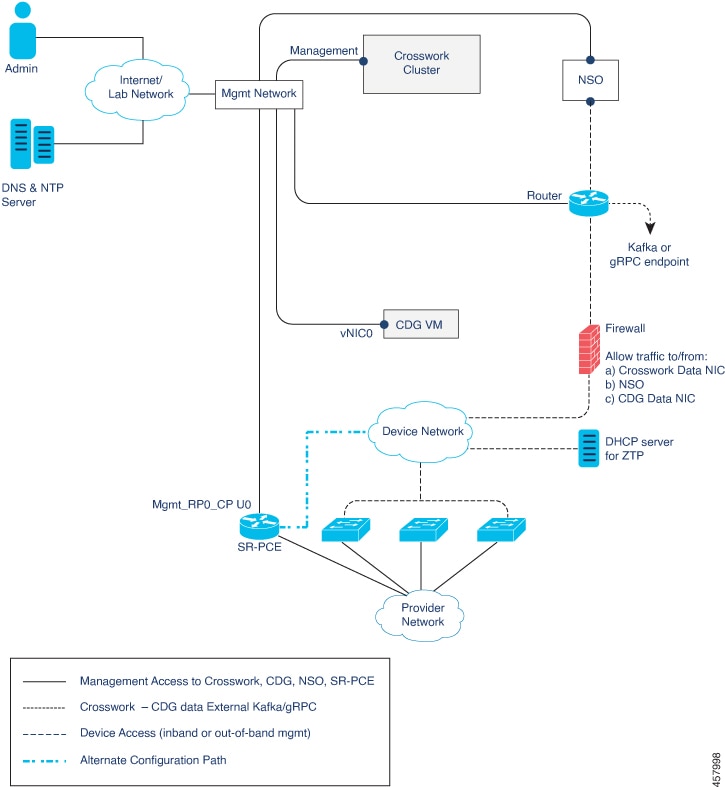
Figure 1. Cisco Crosswork - 1 NIC Network Topology
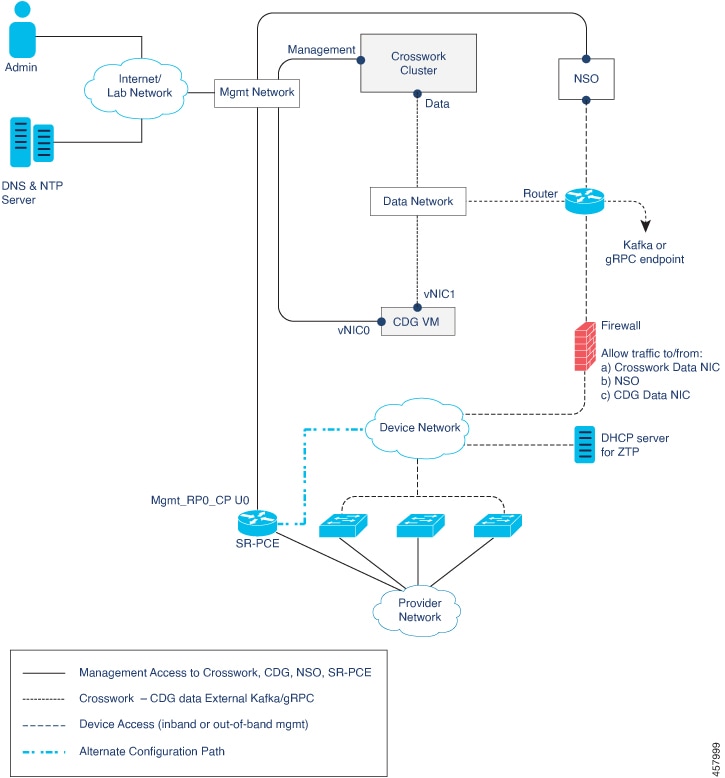
Figure 2. Cisco Crosswork - 2 NIC Network Topology
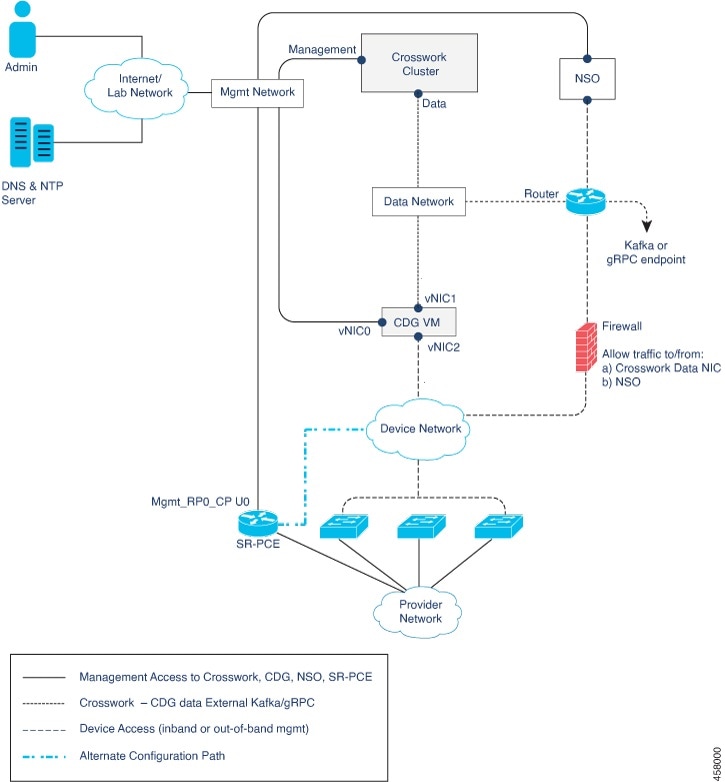
Figure 3. Cisco Crosswork - 3 NIC Network Topology

There are three types of traffic flowing between the network components, as explained below:

Table 12. Types of Network Traffic

Traffic

Description

Management

For accessing the UI and command line, and passing Data information between servers (for example, Cisco Crosswork to Crosswork Data Gateway or NSO)

Data

Data and configuration transfer between Crosswork Data Gateway and Cisco Crosswork, and other data destinations (external Kafka/gRPC).

Device Access

Device configuration and management, and telemetry data being forwarded to the Crosswork Data Gateway.

Cisco Crosswork Virtual Machine (VM)

The Cisco Crosswork VM has the following vNIC deployment options:

Table 13. Cisco Crosswork vNIC deployment modes

No. of vNICs

vNIC

Description

1

Management

Management, Data, and Device access passing through a single NIC

2

Management

Management

Data

Data and Device access

Cisco Crosswork Data Gateway VM

The Cisco Crosswork Data Gateway VM has the following vNIC deployment options:

Table 14. Cisco Crosswork Data Gateway vNIC deployment modes

No. of vNICs

vNIC

Description

1

vNIC0

Management, Data, and Device access passing through a single NIC

2

vNIC0

Management

vNIC1

Data and Device access

3

vNIC0

Management

vNIC1

Data

vNIC2

Device Access

Cisco Network Services Orchestrator (NSO) VM

The NSO VM has the following vNICs:

  • Management: Used for Crosswork applications to reach NSO.

  • Device Access: Used for NSO to reach devices or NSO Resource Facing Services (RFS).


Note

Preference for the number of vNICs can vary from one deployment to another. The number of vNICs can be dependent on the security and traffic isolation needs of the deployment. Crosswork Data Gateway and Crosswork accommodates this variability by introducing a variable number of vNICs.


Routed and Device Networks

Connectivity between the various components should be accomplished via an external routing entity. The figures show various line styles suggesting possible routing domains within the routed network.

  • Solid - Management routing domain.

  • Dotted - Data/Control routing domain (information transferred between Cisco Crosswork and Cisco Crosswork Data Gateway, and other data destinations (external Kafka or gRPC)).

  • Dashes - Device access routing domain (from Cisco Crosswork Data Gateway and NSO).

  • Blue dashes - Alternate SR-PCE configuration path

The IP/subnet addressing scheme on each of these domains depends on the type of deployment.

Routing between domains is needed for Crosswork and NSO to reach the devices. However, proper firewall rules need to be in place to allow only select sources (for example, Crosswork and NSO) to reach the devices.

On the device network, devices can be reached in-band or using out-of-band management interfaces, depending on the local security policies of each deployment.

SR-PCE Configuration

A controller supporting Segment Routing Path Computation Element (SR-PCE) is both a device and a Software-Defined Networking (SDN) controller. Some deployments may want to treat an SR-PCE instance as a device, in which case they would need access via the device network. Some deployments may want to treat an SR-PCE instance as an SDN controller and access it on the Management routing domain. Crosswork supports both models. By default, Crosswork will use eth0 (Management) to access SR-PCE as an SDN controller on the Management domain (shown in the figures). To enable Crosswork access to an SR-PCE instance as a device on the device network (shown as alternate path in the figures): When adding an SR-PCE as a provider, add the Property Key and Property Value as outgoing-interface and eth1 (Data) respectively.

ZTP Requirements

If you plan to use Zero Touch Provisioning, the device network needs to be equipped with a DHCP server.