Configure Virtual DNN on Ultra Cloud Core 5G SMF & UPF
Available Languages
Contents
Introduction
This document describes the steps to configure the virtual DNN/APN in the Cisco SMF and UPF network elements.
Background Information
In 3GPP 5G architecture, a Data Network Name (DNN) is the 5G equivalent of an Access Point Name (APN) in 4G/LTE. It identifies the data network to which a PDU session is established. In a standard deployment, a single DNN is used uniformly across all Network Functions (NFs) involved in session management — including Unified Data Management (UDM), AMF, SMF, CHF, UPF, RADIUS, and PCF.
A Virtual DNN allows the network to present a different DNN identity to specific network functions while using a Base DNN for subscriber interactions with other network functions. This enables charging differentiation, selective policy enforcement, and service separation without requiring separate physical infrastructure or modifications to subscriber subscription data in the UDM.
This document provides a technical solution for:
- Creating a new Virtual DNN on Cisco SMF and UPF
- Modifying an existing Virtual DNN configuration (for example, changing the NF list, disabling PCF interaction, removing RADIUS authentication)
Deployment Models Supported:
| Model |
Description |
Instances |
|---|---|---|
| Geo-Replicated SMF |
Two SMF sites paired for redundancy. Changes applied to both sites simultaneously. |
2 instances per SMF (_inst1, _inst2) |
| Standalone SMF |
Single SMF without geo-replication. |
1 instance (_inst1 only) |
Implementation Methods Supported:
| Method |
Description |
|---|---|
| NSO MoP Automation |
Configuration deployed via Cisco NSO RESTful API using MoP automation payloads |
| Direct CLI |
Configuration applied directly on SMF/UPF CLI |
Problem
In a standard 5G Core deployment, when an UE initiates a PDU session with a specific DNN, that same DNN identity is sent to all Network Functions involved in the session lifecycle — UDM, CHF, UPF, RADIUS, and PCF. This creates specific challenges.
- Charging Differentiation: Operators must apply different charging treatments via the Charging Function (CHF) for specific services or enterprise customers without modifying the UDM subscription profile of the subscriber. With a single DNN, the same identity is sent to both the UDM and the CHF, making it impossible to differentiate charging without creating entirely separate DNN subscriptions.
- Policy Enforcement Flexibility: In some scenarios, PCF policies are not to be applied for certain virtual or enterprise DNNs, or different policies must be applied based on the DNN identity sent to the PCF—independent of what the UDM observes.
- Service Separation without Infrastructure Duplication: Operators want to logically separate services (for example, IoT, enterprise B2B, rulebase mobility) using distinct DNN identities at the charging and user plane level, while sharing the same SMF/UPF infrastructure and base subscription data in UDM.
- Selective RADIUS/AAA Handling: Different RADIUS AAA groups can be targeted based on the service DNN, independent of the base subscription DNN used for UDM lookup.
Without a Virtual DNN capability, operators need to:
- Create separate physical DNN deployments for each service variant
- Modify UDM subscription data for every new service DNN
Solution
The Virtual DNN feature solves these problems by allowing selective DNN identity presentation to individual Network Functions. The key mechanism is:
- The Virtual DNN (configured via dnn <VIRTUAL-DNN-NAME>) is presented to NFs specified in the network-function-list.
- The Base DNN (configured via dnn rmgr <BASE-DNN-RMGR>) is used for UDM subscription lookup and resource management
- The pcf-interaction false parameter optionally disables PCF communication for the DNN
NF Interaction Behavior
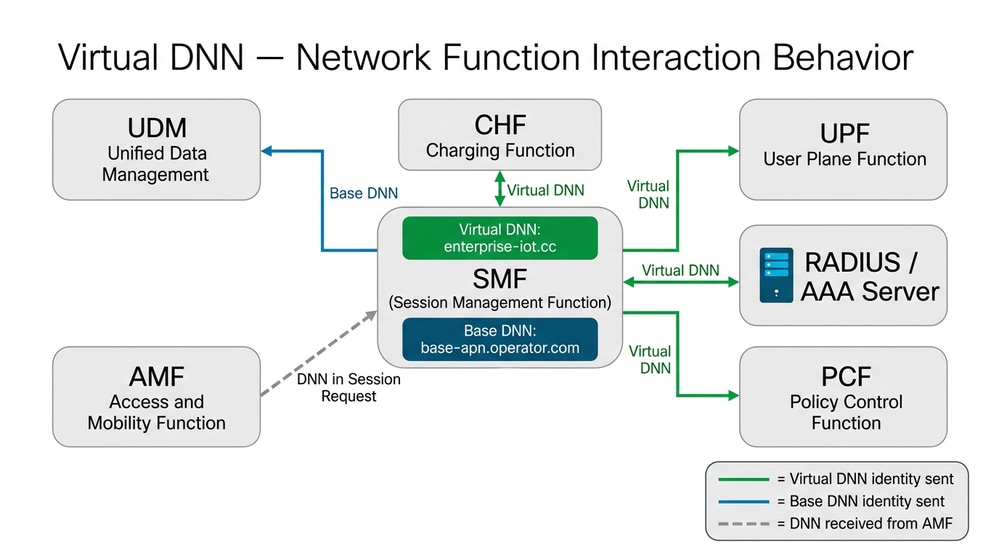 Virtual DNN - Network Function Interaction Behavior
SMF Base DNN > Virtual DNN Resolution Flow
The process for the SMF to resolve a Base DNN (received from AMF) into a Virtual DNN is:
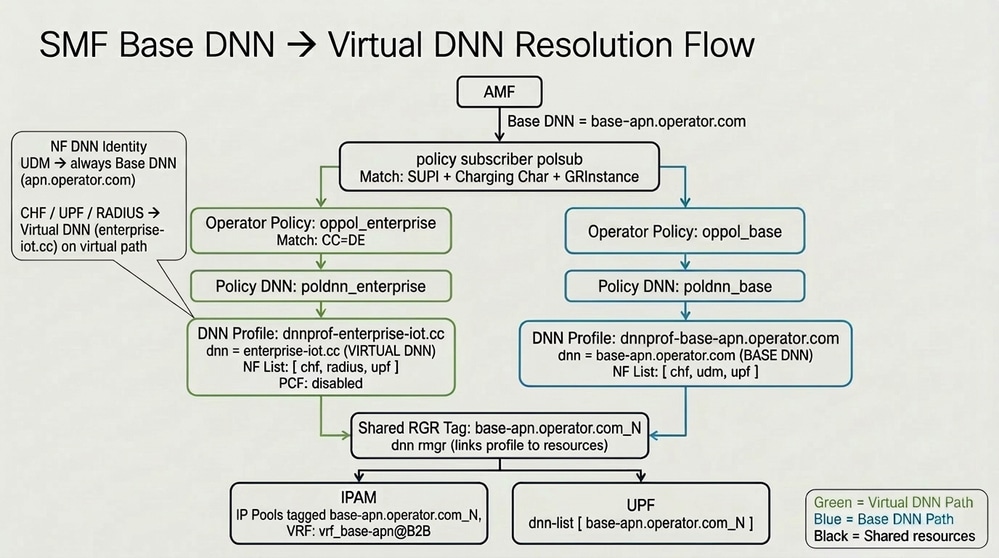 SMF Base DNN to Virtual DNN Resolution Flow
Solution Part 1. Creating a New Virtual DNN
High-Level Steps:
- Verify SMF is online, registered, and UPFs have correct priority/capacity.
- Add the new Virtual DNN profile configuration on SMF (both instances for geo-replicated; single instance for standalone).
- Verify SMF system status post-commit.
- Add the corresponding DNN/APN configuration on all UPFs.
- Save configuration on all UPFs.
- Verify and test using monitor subscriber.
Configuration Options
| Option |
NF List |
PCF Interaction |
RADIUS Auth |
Use Case |
|---|---|---|---|---|
| Option A |
[ chf upf radius ] |
Disabled |
Enabled |
UDM uses Base DNN; no PCF; RADIUS enabled |
| Option B |
[ chf udm upf pcf ] |
Enabled |
Disabled |
No RADIUS auth; PCF enabled |
| Option C |
[ chf upf ] |
Disabled |
Disabled |
Minimal NF interaction (CHF + UPF only) |

Note: Make the changes in the configuration based on the requirement.
Session Type Options
| Session Type |
SMF Configuration |
UPF pdp-type |
|---|---|---|
| IPv4 Only |
session type IPV4 |
pdp-type ipv4 |
| IPv6 Only |
session type IPV6 |
pdp-type ipv6 |
| IPv4v6 (Dual Stack) |
session type IPV4V6 |
pdp-type ipv4 ipv6 |
SMF Configuration – New Virtual DNN
Method 1. Direct CLI on SMF
Execute on all target SMFs (both geo-replicated sites simultaneously).
Policy Subscriber Precedence
Add precedence entries in policy subscriber polsub to map the subscriber (by SUPI range, Country Code, and instance) to the Virtual DNN operator policy.
config
policy subscriber polsub
 precedence 1
  supi-start-range     <SUPI-START>
  supi-stop-range      <SUPI-STOP>
  cc-start-range       <CC-VALUE>
  cc-stop-range        <CC-VALUE>
  instance-start-range 1
  instance-stop-range  1
  operator-policy      oppol_<VDNN>_inst1
 exit
 precedence 2
  supi-start-range     <SUPI-START>
  supi-stop-range      <SUPI-STOP>
  cc-start-range       <CC-VALUE>
  cc-stop-range        <CC-VALUE>
  instance-start-range 2
  instance-stop-range  2
  operator-policy      oppol_<VDNN>_inst2
 exit
exit
Operator Policy
Create the Operator Policy for each instance, pointing to the Virtual DNN Policy DNN.
config
policy operator oppol_<VDNN>_inst1
 policy dnn poldnn_<VDNN>_inst1
exit
policy operator oppol_<VDNN>_inst2
 policy dnn poldnn_<VDNN>_inst2
exit
Policy DNN
This is where the Virtual DNN substitution is defined. The incoming Base DNN (from AMF) is mapped to the Virtual DNN profile.
config
policy dnn poldnn_<VDNN>_inst1
 dnn <BASE-DNN-NAME> profile dnnprof-<VDNN>_inst1
exit
policy dnn poldnn_<VDNN>_inst2
 dnn <BASE-DNN-NAME> profile dnnprof-<VDNN>_inst2
exit
Profile DNN (Virtual DNN Definition)
The DNN profile defines the Virtual DNN name, the NF list (which NFs receive the Virtual DNN), the RMGR tag (shared resource linkage), and other session parameters.
config
profile dnn dnnprof-<VDNN>_inst1
 dns primary ipv4 <PRIMARY-DNS-IP>
 dns secondary ipv4 <SECONDARY-DNS-IP>
 network-element-profiles chf <CHF-PROFILE>
 network-element-profiles amf <AMF-PROFILE>
 network-element-profiles udm <UDM-PROFILE>
 network-element-profiles scp <SCP-PROFILE>
 dnn <VIRTUAL-DNN-NAME> network-function-list [ chf radius upf ]
 dnn rmgr <RMGR-TAG>_1
 timeout up-idle <UP-IDLE-TIMEOUT> cp-idle <CP-IDLE-TIMEOUT>
 charging-profile           <CHARGING-PROFILE>
 wps-profile                <WPS-PROFILE>
 ssc-mode 1 allowed [ 2 ]
 session type <SESSION-TYPE>
 upf apn <VIRTUAL-DNN-NAME>
 qos-profile                <QOS-PROFILE>
 authentication secondary radius group <RADIUS-GROUP>
 authentication algorithm pap 1
 always-on                  false
 dcnr                       true
 pcf-interaction            false
 userplane-inactivity-timer <INACTIVITY-TIMER>
 only-nr-capable-ue         false
 eventmgmt-policy           <EVENT-POLICY>
exit
profile dnn dnnprof-<VDNN>_inst2
 dns primary ipv4 <PRIMARY-DNS-IP>
 dns secondary ipv4 <SECONDARY-DNS-IP>
 network-element-profiles chf <CHF-PROFILE>
 network-element-profiles amf <AMF-PROFILE>
 network-element-profiles udm <UDM-PROFILE>
 network-element-profiles scp <SCP-PROFILE>
 dnn <VIRTUAL-DNN-NAME> network-function-list [ chf radius upf ]
 dnn rmgr <RMGR-TAG>_2
 timeout up-idle <UP-IDLE-TIMEOUT> cp-idle <CP-IDLE-TIMEOUT>
 charging-profile           <CHARGING-PROFILE>
 wps-profile                <WPS-PROFILE>
 ssc-mode 1 allowed [ 2 ]
 session type <SESSION-TYPE>
 upf apn <VIRTUAL-DNN-NAME>
 qos-profile                <QOS-PROFILE>
 authentication secondary radius group <RADIUS-GROUP>
 authentication algorithm pap 1
 always-on                  false
 dcnr                       true
 pcf-interaction            false
 userplane-inactivity-timer <INACTIVITY-TIMER>
 only-nr-capable-ue         false
 eventmgmt-policy           <EVENT-POLICY>
exit
apn <VIRTUAL-DNN-NAME>
gtpp group gtpp_group
active-charging rulebase rulebase-mobility
exit
Method 2: NSO MoP Automation
Configuration File: virtual_dnn_new_optionA.cfg
Path: /var/opt/ncs/mops
(File contents same as CLI as earlier)
NSO Payload (Geo-Replicated – both sites):
POST: http://<NSO-SERVER>:8080/restconf/operations/mop-mop:action/mop-automation

{
  "mop-automation": {
    "mop-file-name": [
      {
        "file-name": "virtual_dnn_new_optionA.cfg",
        "order": 1,
        "target-devices-list": [
          { "target-device-name": "<SMF-NODE-SITE-A>" },
          { "target-device-name": "<SMF-NODE-SITE-B>" }
        ]
      }
    ],
    "operation-type": "dry-run"
  }
}

Caution: First execute with 'operation-type: dry-run' in order to validate the delta configuration. Once validated, change to 'operation-type: commit' to apply.
SMF Post-Commit Verification
After committing the new Virtual DNN profile on SMF:
show system status
show running-status info | nomore
show running-config profile dnn <VIRTUAL-DNN-PROFILE-INST1>
show running-config profile dnn <VIRTUAL-DNN-PROFILE-INST2>
Confirm: System status at 100%, no BGP or CDL pod restarts.
UPF Configuration – New Virtual DNN
Add the Virtual DNN APN configuration on all UPFs serving the Virtual DNN across both sites.
For IPV4 Only:
config
  context <UPF-CONTEXT>
    apn <VIRTUAL-DNN-NAME>
      pdp-type ipv4
      selection-mode subscribed sent-by-ms chosen-by-sgsn
      gtpp group <GTPP-GROUP>
      ip access-group <IPV4-ACL-NAME> in
      ip source-violation ignore
      ip context-name <UPF-CONTEXT>
      active-charging rulebase <RULEBASE-NAME>
    exit
  exit
end
For IPV6 Only:
config
  context <UPF-CONTEXT>
    apn <VIRTUAL-DNN-NAME>
      pdp-type ipv6
      selection-mode subscribed sent-by-ms chosen-by-sgsn
      gtpp group <GTPP-GROUP>
      ipv6 access-group <IPV6-ACL-NAME> in
      ip source-violation ignore
      ip context-name <UPF-CONTEXT>
      active-charging rulebase <RULEBASE-NAME>
    exit
  exit
end
For IPV4V6 (Dual Stack):
config
  context <UPF-CONTEXT>
    apn <VIRTUAL-DNN-NAME>
      pdp-type ipv4 ipv6
      selection-mode subscribed sent-by-ms chosen-by-sgsn
      gtpp group <GTPP-GROUP>
      ip access-group <IPV4-ACL-NAME> in
      ip source-violation ignore
      ip context-name <UPF-CONTEXT>
      ipv6 access-group <IPV6-ACL-NAME> in
      active-charging rulebase <RULEBASE-NAME>
    exit
  exit
end
NSO MoP Automation (UPF):
Configuration File: virtual_dnn_upf_new.cfg
Path: /var/opt/ncs/mops
POST: http://<NSO-SERVER>:8080/restconf/operations/mop-mop:action/mop-automation

{
  "mop-automation": {
    "mop-file-name": [
      {
        "file-name": "virtual_dnn_upf_new.cfg",
        "order": 1,
        "target-devices-list": [
          { "target-device-name": "<UPF-NODE-SITE-A-1>" },
          { "target-device-name": "<UPF-NODE-SITE-A-2>" },
          { "target-device-name": "<UPF-NODE-SITE-A-3>" },
          { "target-device-name": "<UPF-NODE-SITE-A-4>" },
          { "target-device-name": "<UPF-NODE-SITE-B-1>" },
          { "target-device-name": "<UPF-NODE-SITE-B-2>" },
          { "target-device-name": "<UPF-NODE-SITE-B-3>" },
          { "target-device-name": "<UPF-NODE-SITE-B-4>" }
        ]
      }
    ],
    "operation-type": "dry-run"
  }
}
UPF Post-Commit Verification
show configuration context <UPF-CONTEXT> apn <VIRTUAL-DNN-NAME>
show system status
show session summary
UPF Configuration Save
After successful configuration on all UPFs, save the configuration to persist across reboots. Execute on each UPF:
show boot
show dir /flash
show dir /sftp
cp /flash/<PRODUCTION-CONFIG>.cfg /sftp/<PRODUCTION-CONFIG>_Backup-<DATE>.cfg
save configuration /flash/<PRODUCTION-CONFIG>.cfg -noconfirm
Solution Part 2. Modifying an Existing Virtual DNN
Use this section when the Virtual DNN already exists on the SMF and you need to modify its configuration (for example, change the NF list, disable/enable PCF interaction, change RADIUS settings).
High-Level Steps:
- Verify SMF is online, registered, and system status is 100%.
- Take the existing Virtual DNN profile offline (prevents new sessions; existing sessions unaffected).
- Verify system status – no impact on existing calls.
- Apply the modified configuration and bring the profile back online (no mode offline).
- Verify system status and KPIs.
Step 1. Take Existing Virtual DNN Profile Offline
Purpose: Prevents new PDU session establishments on the Virtual DNN while configuration changes are applied. Existing sessions remain unaffected.
Method 1. Direct CLI on SMF
Execute on all target SMFs:
config
profile dnn <VIRTUAL-DNN-PROFILE-INST1>
  mode offline
exit
profile dnn <VIRTUAL-DNN-PROFILE-INST2>
  mode offline
exit
show config diff | nomore
commit
Method 2. NSO MoP Automation
Configuration File: virtual_dnn_offline.cfg
Path: /var/opt/ncs/mops
POST: http://<NSO-SERVER>:8080/restconf/operations/mop-mop:action/mop-automation

{
  "mop-automation": {
    "mop-file-name": [
      {
        "file-name": "virtual_dnn_offline.cfg",
        "order": 1,
        "target-devices-list": [
          { "target-device-name": "<SMF-NODE-SITE-A>" },
          { "target-device-name": "<SMF-NODE-SITE-B>" }
        ]
      }
    ],
    "operation-type": "dry-run"
  }
}
Caution: First execute with 'operation-type: dry-run' in order to validate. Then change to 'operation-type: commit' in order to apply.
Post-Step Verification:
show system status
show running-status info | nomore
System status must remain at 100%. No BGP or CDL pod restarts and no impact on existing calls.
Step 2. Modify Virtual DNN Profile and Bring Online
Scenario 1. Remove UDM from NF List and Disable PCF Interaction
Purpose: Virtual DNN sent to CHF, UPF, and RADIUS only. UDM uses Base DNN. PCF disabled.
Direct CLI:
config
profile dnn <VIRTUAL-DNN-PROFILE-INST1>
  no mode offline
  dnn <VIRTUAL-DNN-NAME>
  network-function-list [ chf upf radius ]
  pcf-interaction false
exit
profile dnn <VIRTUAL-DNN-PROFILE-INST2>
  no mode offline
  dnn <VIRTUAL-DNN-NAME>
  network-function-list [ chf upf radius ]
  pcf-interaction false
exit
show config diff | nomore
commit
NSO MoP Automation:
Configuration File: virtual_dnn_modify_no_udm_no_pcf.cfg
POST: http://<NSO-SERVER>:8080/restconf/operations/mop-mop:action/mop-automation

{
  "mop-automation": {
    "mop-file-name": [
      {
        "file-name": "virtual_dnn_modify_no_udm_no_pcf.cfg",
        "order": 1,
        "target-devices-list": [
          { "target-device-name": "<SMF-NODE-SITE-A>" },
          { "target-device-name": "<SMF-NODE-SITE-B>" }
        ]
      }
    ],
    "operation-type": "dry-run"
  }
}
Expected Post-Modification Configuration:
profile dnn <VIRTUAL-DNN-PROFILE-INST1>
  dns primary ipv4 <PRIMARY-DNS-IP>
  dns secondary ipv4 <SECONDARY-DNS-IP>
  network-element-profiles chf <CHF-PROFILE>
  network-element-profiles amf <AMF-PROFILE>
  network-element-profiles udm <UDM-PROFILE>
  network-element-profiles scp <SCP-PROFILE>
  dnn <VIRTUAL-DNN-NAME>
  network-function-list [ chf upf radius ]
  dnn rmgr <BASE-DNN-RMGR-INST1>
  timeout up-idle <UP-IDLE-TIMEOUT> cp-idle <CP-IDLE-TIMEOUT>
  charging-profile <CHARGING-PROFILE>
  wps-profile <WPS-PROFILE>
  ssc-mode 1 allowed [ 2 ]
  session type <SESSION-TYPE>
  upf apn <VIRTUAL-DNN-NAME>
  qos-profile <QOS-PROFILE>
  authentication secondary radius group <RADIUS-GROUP>
  authentication algorithm pap 1
  always-on false
  dcnr true
  pcf-interaction false
  userplane-inactivity-timer <INACTIVITY-TIMER>
  only-nr-capable-ue false
  eventmgmt-policy <EVENT-POLICY>
exit
Post-Modification Verification
show system status
show running-status info | nomore
show running-config profile dnn <VIRTUAL-DNN-PROFILE-INST1>
show running-config profile dnn <VIRTUAL-DNN-PROFILE-INST2>
Confirm: System status at 100%, no BGP or CDL pod restarts, no impact on existing calls.
Post-Change Validation and Testing
Test Call Validation Using Monitor Subscriber
Start monitor subscriber on the SMF CLI:
monitor subscriber supi imsi-<TEST-IMSI>
Expected Behavior in Trace:
| Check Point |
Expected Result |
|---|---|
| PDU Session Establishment Request |
DNN = <Base-DNN-NAME> received from AMF |
| UDM Interaction (Nudm_SDM) |
DNN sent to UDM = Base DNN (via dnn rmgr) |
| CHF Interaction (Nchf_ConvergedCharging) |
DNN sent to CHF = <VIRTUAL-DNN-NAME> |
| UPF (PFCP Session Establishment) |
APN = <VIRTUAL-DNN-NAME> |
| RADIUS Access-Request (if enabled) |
Called-Station-Id = <VIRTUAL-DNN-NAME> |
| PCF Interaction (Npcf_SMPolicyControl) (if enabled) |
DNN = <VIRTUAL-DNN-NAME> |
| PCF Interaction (if disabled) |
No pcf messages in trace |
| PDU Session Establishment Accept |
Session established successfully |
| IP Address Allocation |
Valid IP assigned from correct pool |
Sample Monitor Subscriber Output (Key Fields):
--- PDU Session Establishment Request ---
  DNN: <VIRTUAL-DNN-NAME>
  S-NSSAI: SST=1, SD=<SD-VALUE>
  PDU Session Type: <SESSION-TYPE>

--- Nudm_SDM (Subscription Data) ---
  DNN: <BASE-DNN-NAME>    <-- Base DNN used for UDM lookup

--- Nchf_ConvergedCharging_Create ---
  DNN: <VIRTUAL-DNN-NAME>  <-- Virtual DNN sent to CHF

--- PFCP Session Establishment Request (to UPF) ---
  APN: <VIRTUAL-DNN-NAME>  <-- Virtual DNN sent to UPF

--- RADIUS Access-Request (if applicable) ---
  Called-Station-Id: <VIRTUAL-DNN-NAME>  <-- Virtual DNN sent to RADIUS

--- Npcf_SMPolicyControl_Create (if applicable) ---
  DNN: <VIRTUAL-DNN-NAME>  <-- Virtual DNN sent to PCF

--- PDU Session Establishment Accept ---
  PDU Address: <ALLOCATED-IP>
  DNN: <VIRTUAL-DNN-NAME>
Verify Session on UPF:
show subscribers imsi <TEST-IMSI>
show subscribers user-plane-only full callid <callid>
Variable Reference
| Variable |
Description |
Example Value |
|---|---|---|
| <VIRTUAL-DNN-NAME> |
The virtual DNN identifier |
enterprise-iot.cc |
| <VIRTUAL-DNN-PROFILE-INST1> |
DNN profile name, instance 1 |
dnnprof-enterprise-iot.cc_inst1 |
| <VIRTUAL-DNN-PROFILE-INST2> |
DNN profile name, instance 2 |
dnnprof-enterprise-iot.cc_inst2 |
| <BASE-DNN-RMGR-INST1> |
Resource manager for base DNN, instance 1 |
base-apn.operator_1 |
| <BASE-DNN-RMGR-INST2> |
Resource manager for base DNN, instance 2 |
base-apn.operator_2 |
| <SMF-NODE-SITE-A> |
SMF node name at Site A |
SMF-SITE-A |
| <SMF-NODE-SITE-B> |
SMF node name at Site B |
SMF-SITE-B |
| <UPF-NODE-SITE-A-1> to <UPF-NODE-SITE-A-4> |
UPF nodes at Site A |
UPF1A through UPF1D |
| <UPF-NODE-SITE-B-1> to <UPF-NODE-SITE-B-4> |
UPF nodes at Site B |
UPF1A through UPF1D |
| <PRIMARY-DNS-IP> |
Primary DNS IP for the DNN |
10.x.x.x |
| <SECONDARY-DNS-IP> |
Secondary DNS IP for the DNN |
10.x.x.x |
| <CHF-PROFILE> |
CHF network element profile name |
nfprf-chf2 |
| <AMF-PROFILE> |
AMF network element profile name |
nfprf-amf1 |
| <UDM-PROFILE> |
UDM network element profile name |
nfprf-udm1 |
| <SCP-PROFILE> |
SCP network element profile name |
nfprf-scp1 |
| <CHARGING-PROFILE> |
Charging profile name |
chgprof-b2b |
| <QOS-PROFILE> |
QoS profile name |
5qi-to-dscp-mapping-table |
| <RADIUS-GROUP> |
RADIUS AAA group name |
aaa_group_iot |
| <UP-IDLE-TIMEOUT> |
User plane idle timeout (seconds) |
3600 |
| <CP-IDLE-TIMEOUT> |
Control plane idle timeout (seconds) |
7320 |
| <INACTIVITY-TIMER> |
Userplane inactivity timer (seconds) |
3600 |
| <EVENT-POLICY> |
Event management policy name |
em_duplicateip |
| <WPS-PROFILE> |
Wireless Priority Service profile |
dynamic-wps |
| <NSO-SERVER> |
NSO server hostname/IP |
nso-server.mgmt |
| <UPF-CONTEXT> |
UPF context name for the DNN |
B2B |
| <GTPP-GROUP> |
GTPP group for CDR generation |
gtpp_group |
| <RULEBASE-NAME> |
Active charging rulebase |
rulebase-mobility |
| <IPV4-ACL-NAME> |
IPv4 access control list name |
ue_acl_B2B |
| <IPV6-ACL-NAME> |
IPv6 access control list name |
ipv6_acl_B2B |
| <SESSION-TYPE> |
PDU session IP type |
IPV4 / IPV6 / IPV4V6 |
| <TEST-IMSI> |
Test subscriber IMSI for validation |
10000XXXXXXXXX |
Configuration Option Summary
| Option |
NF List |
PCF Interaction |
RADIUS Auth |
pcf-interaction Setting |
|---|---|---|---|---|
| A |
[ chf udm upf radius ] |
Enabled (default) |
Enabled |
Not configured (default) |
| B |
[ chf upf radius ] |
Disabled |
Enabled |
pcf-interaction false |
| C |
[ chf udm upf pcf ] |
Enabled |
Disabled |
Not configured (default) |
| D |
[ chf upf ] |
Disabled |
Disabled |
pcf-interaction false |
Modification Scenario Summary
| Scenario |
Change Description |
NF List After |
PCF Setting |
|---|---|---|---|
| 1 |
Remove UDM + Disable PCF |
[ chf upf radius ] |
pcf-interaction false |
| 2 |
Remove UDM, Keep PCF |
[ chf upf radius pcf ] |
Default (enabled) |
| 3 |
Disable PCF Only |
[ chf udm upf radius ] |
pcf-interaction false |
| 4 |
Remove RADIUS |
[ chf udm upf pcf ] |
Default (enabled) |
Revision History
| Revision | Publish Date | Comments |
|---|---|---|
1.0 |
01-Sep-2026
|
Initial Release |

 Feedback
Contact Cisco
- Open a Support Case

- (Requires a Cisco Service Contract)