Use Configuration Guide for Multi-Vendor DRA Integration
Available Languages
Contents
Introduction
This document describes configuration steps along with best practices for multi-vendor DRA integration with Cisco Policy Suite (CPS) PCRF cluster.
Prerequisites
Requirements
Cisco recommends that engineers working with this solution have familiarity with these topics:
- Linux operating system
- Cisco Policy Suite (CPS) platform and cluster architecture
- Policy and Charging Rules Function (PCRF)
- Use of the Vi editor
- Wireshark network analysis tool
Components Used
The information in this document is based on CPS 25.1 version and AlmaLinux release 8.10.
The information in this document was created from the devices in a specific lab environment. All of the devices used in this document started with a cleared (default) configuration. If your network is live, ensure that you understand the potential impact of any command.
Configuration Steps and Best Practices
Step 1: Determine DRA Connectivity Mode (Inbound vs. Outbound Peers)
- Inbound Peers: The PCRF is configured to accept connection requests from designated Diameter peers. The peer node initiates the Diameter Capabilities-Exchange-Request (CER) to the PCRF.
- Outbound Peers: The PCRF is configured to initiates the CER towards its peers.
Best Practice:
For most multi-vendor DRA integrations, configure the DRA as an Inbound Peer, where the DRA initiates the CER to the PCRF.
Step 2: Configure Inbound Peer in Policy Builder
Within the Policy Builder GUI, configure the inbound peer name and peer realm, referencing the Inbound Peers and Realms tables.

Note: For detailed parameter descriptions, consult the CPS Mobile Configuration Guide, Release 25.1.0, under the section Diameter Stack Configuration.
These parameters can be configured under Inbound Peers:
Peers Table
| Parameter |
Description |
| Peers |
Defines which peer names are allowed to initiate connections towards PCRF. |
| Local Host Name |
Identifies the local host name of the Policy Director (load balancer) that identifies and allows an incoming connection from the Peer. |
| Instance Number |
Indicates the assigned number of the Policy Server (QNS) process that initiates a connection with the Outbound Peer.
Note: Local Host Name and Instance Number must be specified if the intention is for only a single Policy Server (QNS) process on Policy Builder (load balancer) to allow/initiate a connection with the said peer else Instance number can be kept as 0. In which case all the Policy Server (QNS) processes on Policy Director (load balancer) shall attempt/allow connection with the peer. Default value is 0. |
| Rating |
Priority assigned to this peer for delivering a PCRF initiated request. The higher the rating value the higher is the priority assigned to the peer. Default value is 1. |
| Port Range |
Must be specified only when the underlying transport connection Is SCTP and not required when the same is TCP . |
| Response Timeout |
Cisco recommends not to use this parameter. |
| Name Pattern |
Origin-Host A VP value in CER needs to validate against this pattern in order for the connection to be established. If that does not happen, the CER is silently discarded and the TCP connection is reset by PCRF. Name pattern check does not happen if Accept Undefined Peer option described in Diameter Stack Configuration. The Name Pattern needs to be the standard Java regular expression syntax described here. |
Realms Table
| Parameter |
Description |
| Realms |
Defines which peer realms are allowed to initiate connections towards PCRF. |
| Peer Type |
Not used with inbound realms. |
| Processing Protocol |
Mapping between the realm name and the specific PCRF logic that can be applied for the message, for more information on processing protocol. When a Diameter Stack with a diameter realm is imported with no protocol assigned, it takes the default value as GX_TGPP . |
| Rating |
Priority assigned to this realm for delivering a PCRF initiated request. This is only used with SY_PRIME processing protocol. Default value is 0. The lower the rating value, the higher is the priority assigned to the realm. For example, a realm having Rating=10 is used after a realm having Rating=1. |
| Stats Alias |
Whatever the statistics that gets generated for the respective realm gets the name that is configured in Stats Alias appended to those statistics. This is applicable for com.broadhop.message mbean statistics only. |
| Name Pattern |
Origin-Realm A VP value in CER needs to validate against this pattern in order for the incoming message to be processed. If that does not happen, the message is silently discarded and the TCP connection is reset by PCRF. The Name Pattern needs to be the standard Java regular expression syntax described here. |
Best Practice:
For more granular control, configure specific peer and realm entries as per requirement, also to allow peer creation only from specific peers uncheck the Accept Undefined Peer.
Example:
Figure 1: Inbound Peers Table
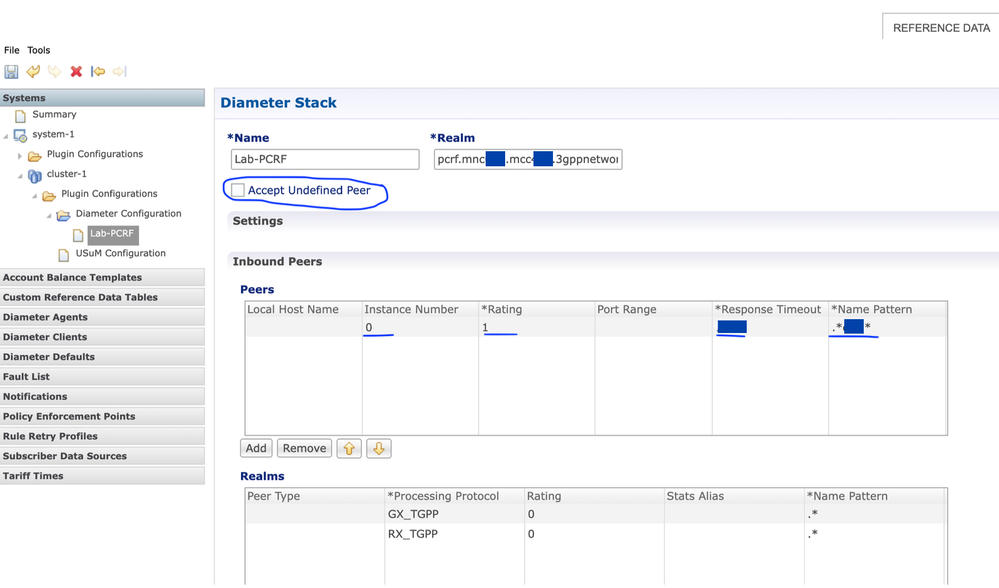 Figure1: Inbound Peers table
Step 3: Configure Host-IP-Address AVP
The Diameter Host-IP-Address AVP communicates the node’s IP address during CER/CEA exchanges (RFC 3588) for SCTP-based connections. In Cisco CPS PCRF, this address is by default the internal interface IP, which is different from the expected Diameter service IP for certain DRA vendors.
In Cisco CPS PCRF, you can use either the Load Balancer Virtual IP (LbVIP) or the physical IP of the load-balancer VMs as the diameter-source-endpoint IP.
By default, the internal interface IP is communicated as the Host-IP-Address in Diameter CER/CEA messages as shown in the picture, where one can see the Source IP in the capture is different from the IP seen in the Host-IP-Address AVP.
Figure 2: CEA message with Internal IP as Host-IP-Address
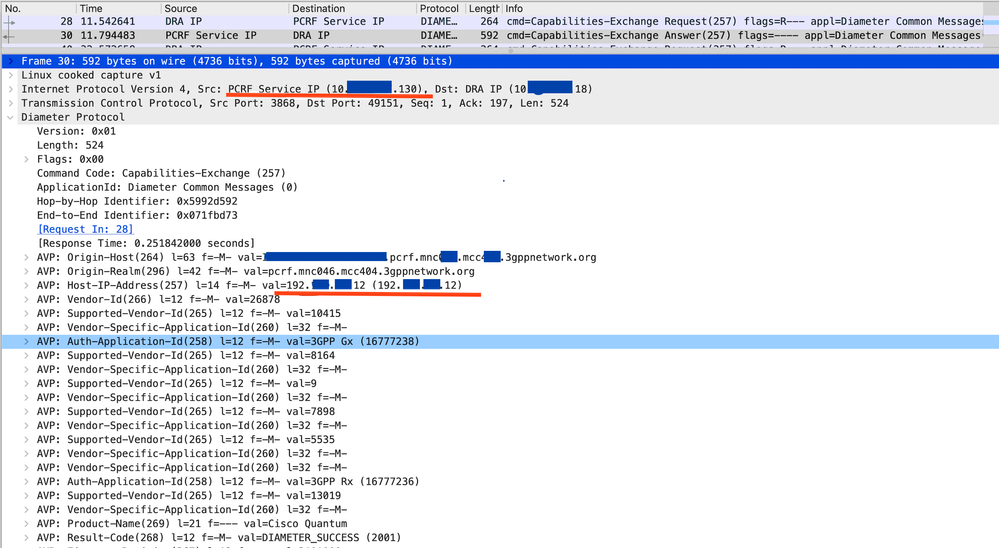 Figure2: CEA message with Internal IP as Host-IP-Address
Although this AVP is not mandatory when TCP is used as the transport protocol (refer RFC 3588), some DRA vendors refer to this AVP while establishing Diameter connection and expect the Diameter service IP of PCRF instead of internal IP. If this expectation is not met, the peers would fail to establish.
Best Practice:
To advertise the Diameter service IP in the Host-IP-Address AVP from PCRF, update the /etc/hosts file with an entry mapping the PCRF source FQDN (as defined in the Diameter Stack Local End Points) to the desired IP address.
Note: Refer to the Local End Points tables in the CPS Mobile Configuration Guide, Release 25.1.0, under the section Diameter Stack Configuration for further details.
To update additional-hosts entries in Openstack based CPS PCRF:
- Verify the CPS cluster is in a deployed state.
curl -X GET installer API system.
- Retrieve and update the additional-hosts.yaml via REST API.
curl -X GET http://<Cluster Manager IP>:8458/api/system/config/additional-hosts >> additional-hosts.yaml
- Apply changes with curl commands as described in the product documentation.
curl -X PUT API system additional hosts -H "Content-Type: application/yaml" --data-binary @additional-hosts.yaml
When this API call completes, the Cluster Manager is configured with the new /etc/hostsfile and all the other deployed VMs are then updated asynchronously.
Note: For detailed instructions, refer to CPS Installation Guide for OpenStack, section Orchestration API.
To update additional-hosts entries in Vmware based CPS PCRF:
- Add the entry in the AdditionalHosts.csv file located at path /var/qps/config/deploy/csv/
- To import changes into the Cluster Manager VM:
/var/qps/install/current/scripts/import/import_deploy.sh
- Apply changes from Cluster Manager:
/var/qps/install/current/scripts/build_all.sh
/var/qps/install/current/scripts/upgrade/reinit.sh
Note: For detailed instructions, refer to CPS Installation Guide for VMware, section Additional Hosts Configuration.
Example:
Figure 3: GUI Diameter Stack Local End Points
 Figure3: GUI Diameter Stack Local End Points
Sample /etc/hosts Entry:
10.x.x.130HOSTNAME.pcrf.mncXXX.mccYYY.3gppnetwork.orgHOSTNAME.pcrf.mncXXX.mccYYY.3gppnetwork.org
192.x.x.16 HOSTNAME-cluman installer
#END_QPS_OTHER_HOSTS
[root@Hostname-cluman ~]#
Step 4: Validate Peer Capabilities Exchange
The DRA must explicitly advertise support for Diameter applications such as Gx (16777238) and Rx (16777236) in Capabilities-Exchange-Request (CER) and Capabilities-Exchange-Answer (CEA) messages.
The Relay application, with Application Identifier 0xffffffff, is not supported by Cisco PCRF. If only the Relay application (4294967295) is exchanged and not Gx/Rx, the peer connection would be establish as relay-only mode and PCRF would not repspond to CCR-I messages.
Refer to section Next Hop Routing in CPS Mobile Configuration Guide for more details.
Best Practice:
During peer connection establishment phase always capture the pcap on PCRF to ensure that DRA is sending diameter Capabilities-Exchange-Request (CER) message with AVP Auth-Application-ID value set Diameter applications such as Gx (16777238) or Rx (16777236) or both and PCRF is responding with similar values in Capabilities-Exchange-Answer (CEA) message.
Figure 4: CER message with Wrong Value in Auth-Application-Id as Relay
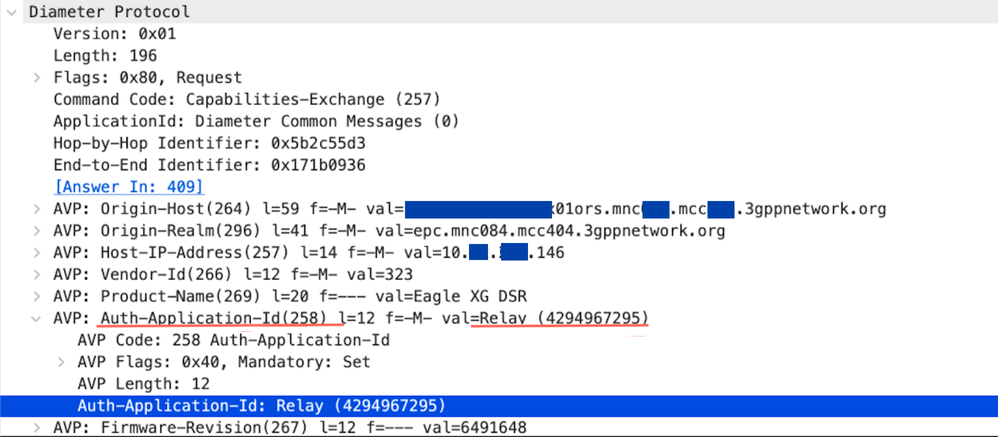 Figure4: CER message with wrong value in Auth-Application-Id as Relay
Figure 5: CER Message with Correct Values in Auth-Application-Id: Gx and Rx
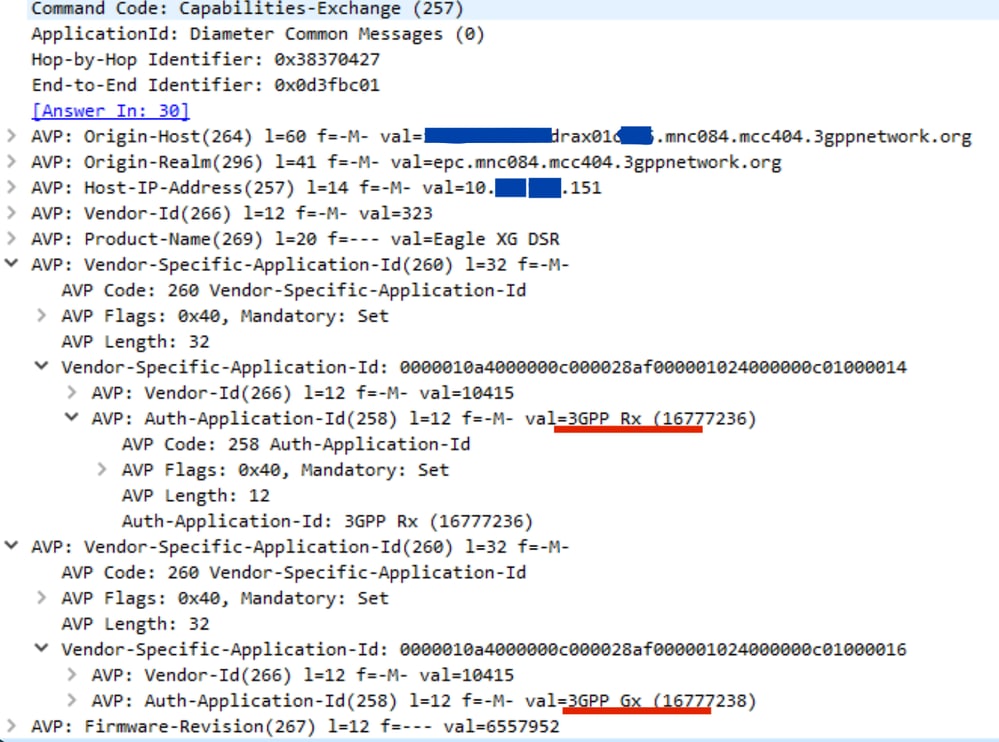 Figure 5: CER message with correct values in Auth-Application-Id: Gx and Rx
Step 5: Ensure Diameter Unique Source Hostname is Defined at each Diameter Peer Node
Cisco CPS PCRF supports an environment where each of connected peer node requires a unique diameter source hostname.
If the migration is to be done for diameter peer connections from existing direct Gx or Rx connectivity to DRA-mediated links, the DRA link for each Diameter interface (Gx or Rx) between PCEF or P-CSCF and DRA ideally must use a unique source hostname for diameter application (the value of the AVP Origin-Host) which would be different from that used for direct PCRF connectivity with same peer node.
This ensures that requests from peer nodes are routed through the correct DRA peer link and not dropped if old direct link down entries are present in the PCRF show_peers.py list.
Best practice:
If it is not feasible to change the hostname for DRA links on the peer, perform a full restart of all four QNS services sequentially on each load balancer VM after removing direct peer links.
This would ensure that old obsolete (Origin host:) entries of peers used earlier for direct diameter interface (Gx/Rx) between PCEF/P-CSCF and PCRF are no more present in the PCRF diameter peer connection list, and show_peers.py output would have only DRA peer connections and hence proper routing of diameter application messages (for example: Gx_CCA-I, Gx_CCA-T ) from newly created diameter links between DRA and PCRF.
Note: Restarting QNS services on LB VMs is traffic impacting and resets all Diameter peer connections on those QNS instances. Perform this step during a planned maintenance window.
Step 6: Configure Next Hop Routing Table for DRA Peers
This feature allows interworking with a DRA that is not in topology hiding mode. When a DRA establishes a connection, it advertises its own Origin-Host and Realm values. However, Diameter application messages use the Origin-Host and Realm (for example, PCEF, TDF, AF) of actual application host, so PCRF needs to determine which DRA connection to use for delivering messages to the correct host.
Note: The Next Hop Routes table is only used for PCRF-initiated requests. Responses to incoming requests are always sent over the same connection they were received on, to prevent asymmetric routing.
These parameters can be configured under Next Hop Routing table:
| Parameter |
Description |
| Next Hop Realm |
DRA realm name as received in Origin-Realm AVP in CER or CEA message.
Note: All the next hop realms (Next Hop Realm) must match the Origin-Realm A VP value in the incoming CER/CEA message. |
| Next Hop Hosts |
DRA hosts name list as received in Origin-Host AVP in CER or CEA message.
Note: All the next hop host names (Next Hop Hosts) must match the Origin-Host A VP value value in the incoming CER/CEA message. |
| Application Id |
Diameter application Id advertised as being supported by the DRA. It contains information that identifies the particular service that the service session belongs to. |
| Destination Realms Pattern |
Actual destination realm name pattern as received in Origin-Realm AVP in AAR message. The pattern needs to be the standard Java regular expression syntax. |
| Destination Host Pattern |
Actual destination host name pattern as received in Origin-Host AVP in AAR message. The pattern needs to be standard Java pattern conventions. The pattern needs to be the standard Java regular expression syntax. |
Best Practice:
Always try to use correct regex pattern (wildcard matching) while making entries in the Destination Realms Pattern and Destination Host Pattern column in
Next Hop Routing table to minimize configuration entries for Gx andRx peers multiple connections and prevent configuration errors.
Note: Refer to the CPS Mobile Configuration Guide, Release 25.1.0, under the section Next Hop Routing for detailed configuration guidance.
Revision History
| Revision | Publish Date | Comments |
|---|---|---|
1.0 |
19-Aug-2026
|
Initial Release |
 Feedback
Contact Cisco
- Open a Support Case

- (Requires a Cisco Service Contract)