Introduction
This document details paging logic and enhancements that optimize paging during MME CPU congestion, ensuring network stability, and continuity.
Problem Description
Paging Storm Impact on MME Resources due to eNB/RAN Failure
In large-scale mobile networks, paging procedure is critical for locating idle User Equipments (UEs) when there is downlink data. This procedure involves multiple paging stages and a fallback logic that extends across the network under certain failure conditions.
A significant issue can be observed due to any critical failure at the Evolved Node B (eNB)/Radio Access Network (RAN) level, where all paging attempts during paging stage 1 failed. According to the standard fallback mechanism, these paging failures were escalated to paging stage 2, then to paging stage 3, and eventually led to simultaneous paging attempts at paging stage 4.
Network operators typically configure paging stage 3 and stage 4 with wide-area logic—triggering paging to all eNBs or all Tracking Area Identities (TAIs). In scenarios where the Control Plane Virtual Machine (CPVM) reloads (due to Evolved GPRS Tunnelling Protocol Control (EGTPC) path failure) or RAN is unresponsive, the fallback logic results in mass paging across the network.
Impact
- This paging storm leads to an unexpected surge of paging messages and reattach requests, putting immense load on the Mobility Management Entity (MME) manager.
- High CPU and memory utilization is observed, often pushing the system into overload or warning states.
- Under these stressed conditions, the MME manager (component of MME which handles paging) enters a 'busy-out' state, causing it to reject new connections or sessions, resulting in temporary capacity downgrades and service degradation.
Key Takeaway for Network Operators
This case underlines the importance of:
- Implementing rate control and throttling mechanisms for paging.
- Monitoring for early indicators like CPVM reloads, RAN paging responsiveness, and paging retry patterns in order to preemptively manage load.
Graphical Representation of Impact
Here it is assumed that paging profile has been configured from paging stage 1, 2, 3, and 4.
These graphs represents the total paging attempts and failures for different paging stages.
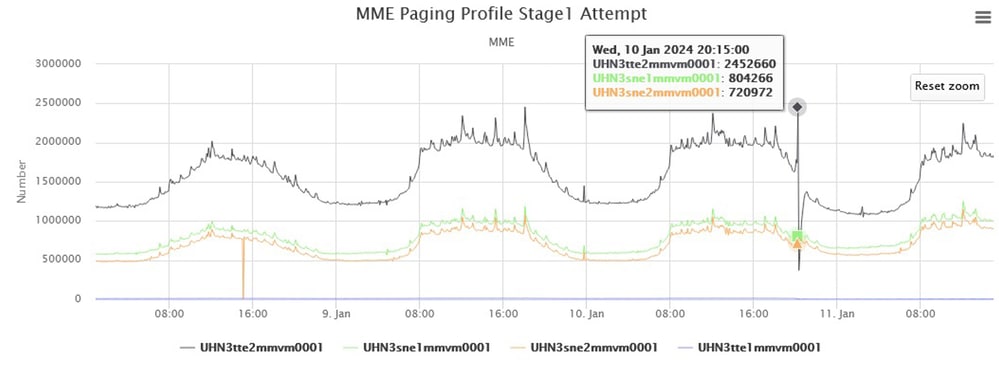 MME Paging Profile Stage1 Attempt
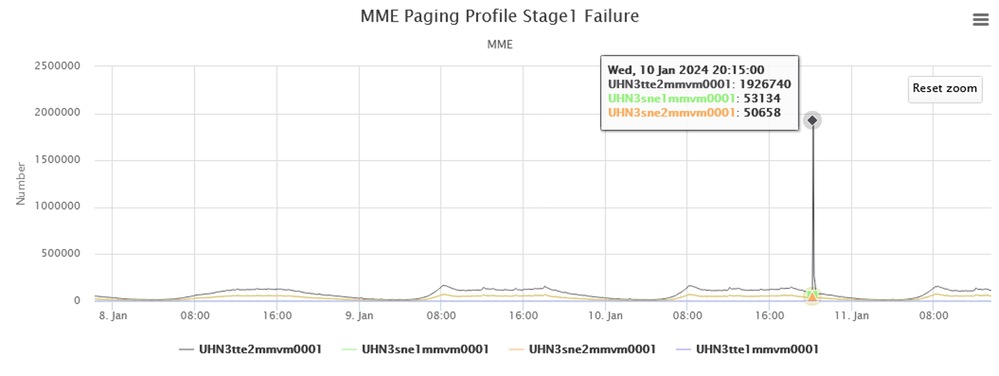 MME Paging Profile Stage1 Failure
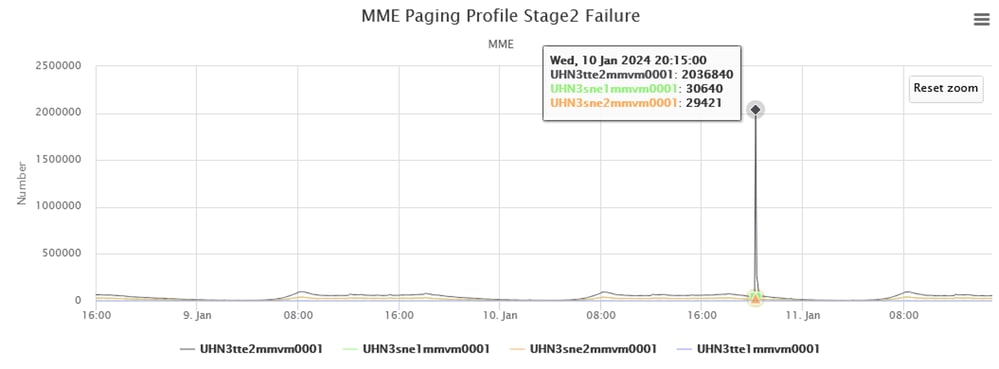 MME Paging Profile Stage2 Failure
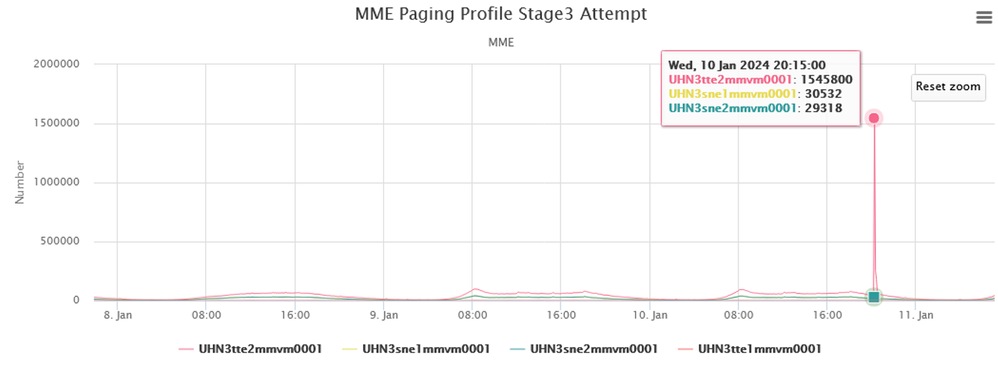 MME Paging Profile Stage3 Attempt
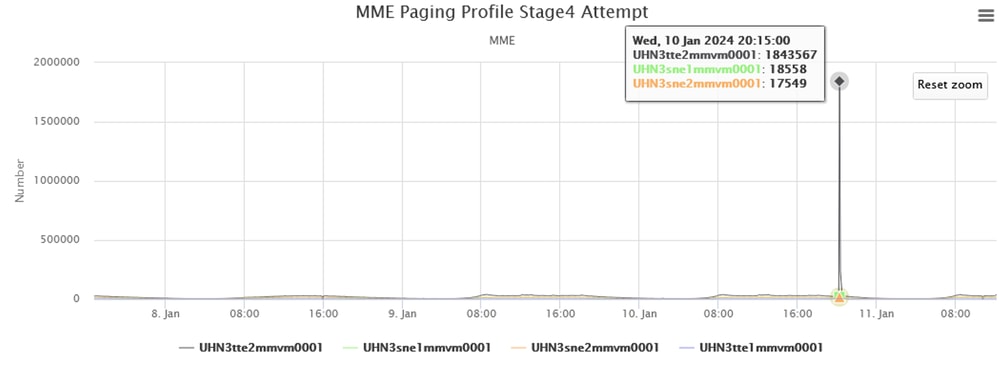 MME Paging Profile Stage4 Attempt
MME Manager CPU Utilization Graph
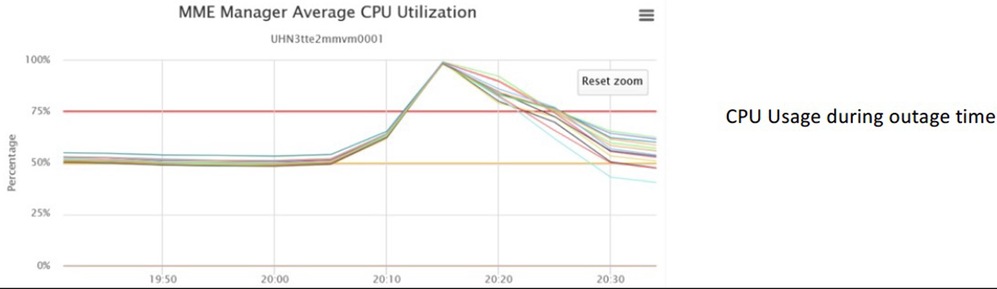 MME Manager CPU Utilization Graph
MME Manager Memory Utilization – logs:
2024-01-11T22:18:10.575996+09:00 UHNxxxmmvm0001 evlogd: [local-60sec10.022] UHN3tte2mmvm0001 [resmgr 14508 error] [17/0/10121 <rmmgr:170> _resource_cpu.c:4421] [software internal system critical-info syslog] The task mmemgr-8 is way over its memory limit! Allocated 409600K, Using 624696K

2024-01-11T22:18:10.069772+09:00 UHN3xxxmmvm0001 evlogd: [local-60sec9.695] UHN3tte2mmvm0001 [resmgr 14508 error] [8/0/10120 <rmmgr:80> _resource_cpu.c:4421] [software internal system critical-info syslog] The task mmemgr-6 is way over its memory limit! Allocated 409600K, Using 584680K

2024-01-11T22:18:09.998162+09:00 UHN3xxxmmvm0001 evlogd: [local-60sec9.634] UHN3tte2mmvm0001 [resmgr 14508 error] [10/0/10132 <rmmgr:100> _resource_cpu.c:4421] [software internal system critical-info syslog] The task mmemgr-2 is way over its memory limit! Allocated 409600K, Using 543404K
Sample Configuration
paging-profile paging-ps

paging-stage 1 match-criteria ue-contact-time 1200 action last-n-enb-last-tai max-n-enb 1 t3413-timeout 2 max-paging-attempts 1.

paging-stage 2 match-criteria all action last-n-enb-last-tai max-n-enb 5 t3413-timeout 2 max-paging-attempts 1

paging-stage 3 match-criteria all action all-enb-last-tai t3413-timeout 2 max-paging-attempts 1

paging-stage 4 match-criteria all action all-enb-all-tai t3413-timeout 3 max-paging-attempts 1
How is Paging Managed within the MME
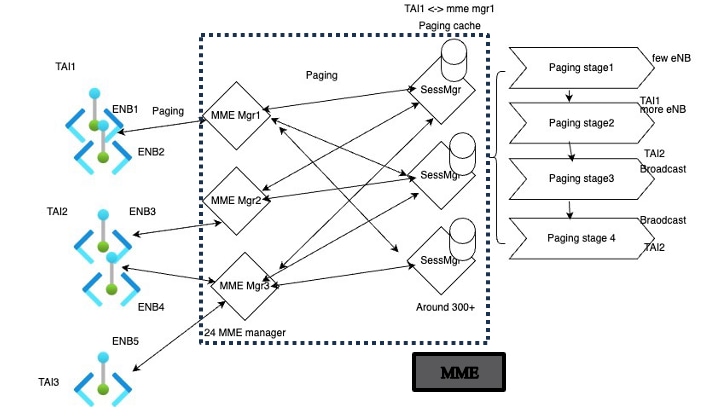
Funtional Logic
It is important to understand the general paging logic, especially when dealing with exceptional conditions under critical paging scenarios. As described, Session Managers handle the paging cache and maintain the mapping between TAIs and MME managers. This mapping is updated after every successful paging attempt/response but remains unchanged in the event of a paging failure. During the first paging attempt, the Session Manager broadcasts the paging request to all MME managers and uses the responses to build the paging cache and establish the TAI–MME manager mapping.
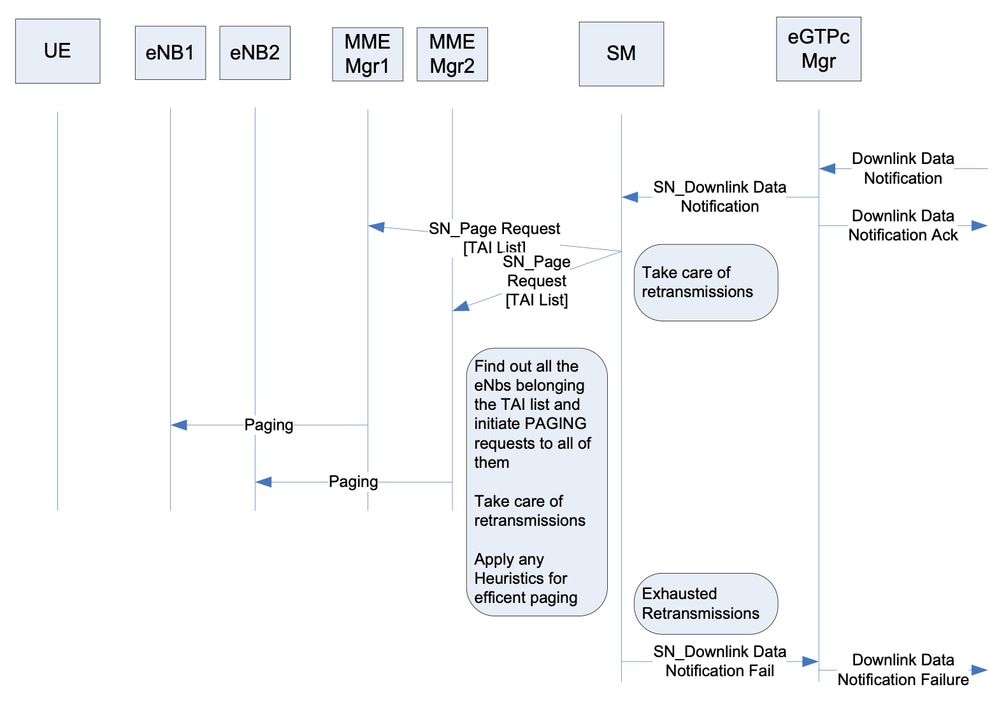 Paging Message flow
Building the Cache
Whenever the Sessmgr wants to page the UE, it will check whether the cache information is present for all the TACs that need to be paged. If yes, and the cache entry pass validity check, Sessmgr sends unicast/multicast paging request to the relevant MMEMgr. If no, then Sessmgr broadcasts the paging request to all the MMEMgrs. In response, MMEMgr must indicate the TACs in the paging request that it serves, so that the Sessmgr builds the cache.
Validity of the Cache
Each cache entry includes an origin timestamp. When the cache is accessed, it is validated based on its creation timestamp and the configured cache validity timeout. If the timeout has expired, the entry must not be used. The entire cache must be cleared when all MME services are stopped.
Solution
How Auto Disable of Paging Feature Works
As mentioned earlier, only paging stage which is configured under critical paging configuration only be triggered but it is not the case and it is seen there is a dependency of paging cache in this feature. So if any particular TAI-MME manager mapping is already available under Sessmgr paging cache, then critical paging uses the paging trigger only for the configured paging stages. But, in case there is no TAI-MMEMgr mapping available for any particular TAI, then attempts can be seen on subsequent paging stages too even if it is not configured under paging stages. And, once the mapping builds under paging cache, then the normal logic of critical paging takes place.
Configuration
mme-manager

    congestion-control cpu-utilization threshold 90 tolerance 10

  #exit


Configuration: critical paging need to configure under paging-profile to allow the configured paging stages while skip the unconfigured paging stages.


configure

   lte-policy

      paging-profile paging_profile_name

         [ no ] critical paging_stage

         end
Sample Configuration
paging-profile paging-ps

      paging-stage 1 match-criteria ue-contact-time 1200 action last-n-enb-last-tai max-n-enb 1 t3413-timeout 2 max-paging-attempts 1

      paging-stage 2 match-criteria all action last-n-enb-last-tai max-n-enb 5 t3413-timeout 2 max-paging-attempts 1

      paging-stage 3 match-criteria all action all-enb-last-tai t3413-timeout 2 max-paging-attempts 1

      paging-stage 4 match-criteria all action all-enb-all-tai t3413-timeout 3 max-paging-attempts 1

critical 1 2
Here, paging stage 1 and 2 is triggered whenever conditions hit for critical paging. In case paging attempts failed on Stage 1 and 2, then, as per paging logic, attempts are triggered on next paging stage. In this scenario, it is paging stage 3 and 4. But if critical paging is configured then no further paging is attempted after paging stage 2. But there are exceptional conditions where paging attempts on unconfigured paging stages also can be seen. Please refer the 'Critical Paging Exceptional Condition' section for details.
Critical Paging Exceptional Condition
As mentioned earlier, only paging stage which is configured under critical paging is triggered, but it is not the case and it is seen there is a dependency of paging cache in this feature. So if any particular TAI-MME manager mapping is already available under Sessmgr paging cache, then critical paging uses the paging trigger only for the configured paging stages. But, in case there is no TAI-MMEMgr mapping available for any particular TAI, then attempts can be seen on subsequent paging stages too even if it is not configured under paging stages. And once the mapping builds under paging cache, then, it again uses the normal logic of critical paging.
Feature Testing
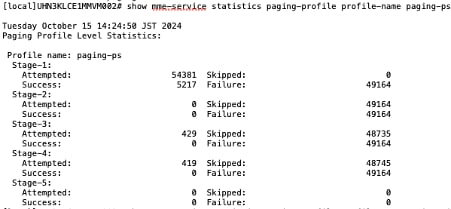
As mentioned earlier, paging stage 1 and 2 are configured under paging profile paging-ps. So, in case of paging failure on stage 1 and 2, other paging attemtps have been skipped on other paging stage 3 and 4. But, still you can see few attemps are made. And it is due to conditions as defined under 'Critical Paging Exceptional condition'.
 Feedback