Troubleshoot SSID Broadcast Issues on Catalyst 9800 Wireless LAN Controllers
Available Languages
Contents
Introduction
This document describes how to troubleshoot SSID broadcast issue on Cisco Catalyst 9800 Wireless LAN Controllers (WLC).
Components Used
The information in this document is based on these software and hardware versions:
- Cisco Catalyst 9800 Series Wireless LAN Controller
- Software Release 17.15.4d & 26.1.1
- C9130AXI-D
The information in this document was created from the devices in a specific lab environment. All of the devices used in this document started with a cleared (default) configuration. If your network is live, ensure that you understand the potential impact of any command.
Overview
If an SSID is not broadcasting from the AP, begin by checking the AP radio operational status. If the radio status is UP and the SSID is still not visible, validate whether the SSID is correctly pushed to the AP and verify its operational state at the AP level.
On the AP, execute these commands:
#show dot11 wlan
Radio Vap SSID State Auth Assoc Switching DHCP
0 0 Power UP Central Central Central Local
0 1 guestTest UP Central Central Central Local
0 2 DOWN Central Central Central Local
1 0 Power UP Central Central Central Local
1 1 guestTest UP Central Central Central Local
1 2 DOWN Central Central Central Local
2 0 Power UP Central Central Central Local
2 1 guestTest UP Central Central Central Local
2 2 DOWN Central Central Central Local
For Flex APs:
#show flexconnect wlan
Flexconnect WLANs:
Radio Vap SSID State Auth Assoc Switching
0 0 Power UP Central Local Central
0 1 GuestTest UP Central Local Central
0 2 DOWN Central Local Central
0 3 DOWN Central Local Central
0 4 DOWN Central Local Central
1 0 Power UP Central Local Central
1 1 GuestTest UP Central Local Central
1 2 DOWN Central Local Central
1 3 DOWN Central Local Central
1 4 DOWN Central Local Central
Common Causes for SSID Broadcast Failure
The most common reasons for an SSID not broadcasting are:
AP Operational Status Down Due To:
-
Insufficient power
-
Regulatory domain mismatch
-
Country code not supported for the AP
-
No regulatory domain support for Wi-Fi 7 APs
-
Antenna not connected
Tag/Profile Configuration Issues
-
Policy profile configuration mismatch
- Misconfigured Tags
-
AP is in Local mode but Local Switching is not enabled in the Policy Profile.
-
VLAN missing in Flex Profile
Other Issues
In some situations, even if the AP radio operational status is UP and there are no visible misconfigurations, the SSID can still not broadcast due to:
-
Unsupported channels or channel widths on the client device
-
AP not transmitting beacons
AP Operational Status Down
Scenario 1: Country Code Not Configured Correctly
Validate if the country code is correctly configured on the WLC for the respective country. It is necessary for the APs to broadcast the SSID. The country code dictates the regulatory domain, which defines the legal channels, bandwidth, and transmit power levels allowed in your specific region.
Without a defined country code, the AP cannot determine which frequencies it is legally permitted to use, so it keeps its radios disabled to ensure regulatory compliance.
From GUI
Configuration > Wireless > Access Points > Country
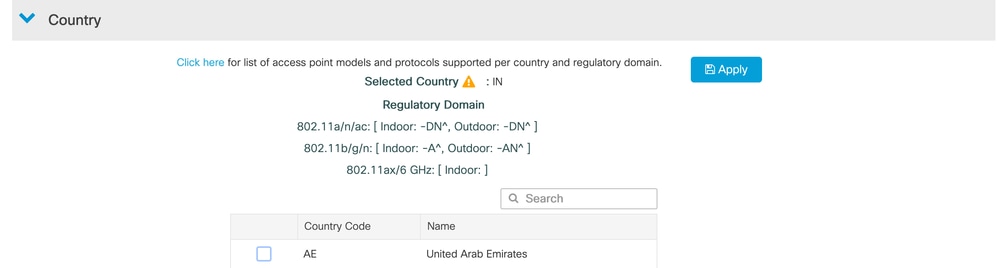
If the intended country is not configured, select and add it from the available list.
From CLI
#show wireless country configured CLI Example :
#show wireless country configured
Configured Country..........................   IN - India
Configured Country Codes
        IN  - India                               802.11a Indoor,Outdoor/ 802.11b Indoor,Outdoor/ 802.11g Indoor,Outdoor/
If the correct country is not configured, configure it as shown below:
#conf t
#wireless country <country code>
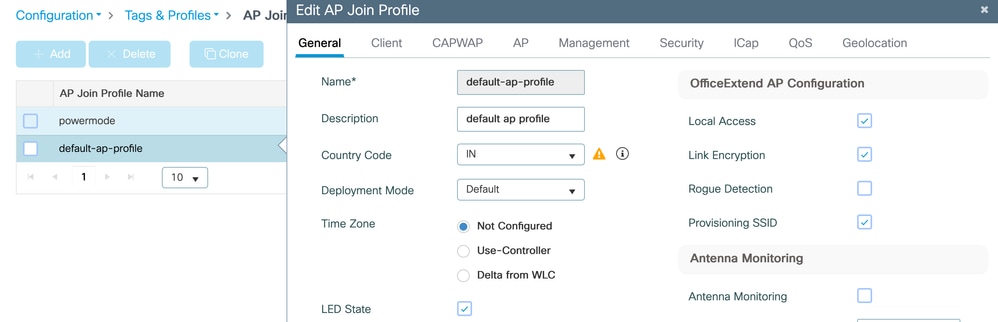
Validate Country Code in AP Join Profile

Note: This configuration specifically applies to APs with -ROW regulatory domain.
For -ROW APs, configuring the country code in the AP Join Profile is mandatory to ensure compliance with local RF regulations.
From GUI
Navigate to:
Configuration > Tags & Profiles > AP Join > Select AP Join Profile > General > Country Code

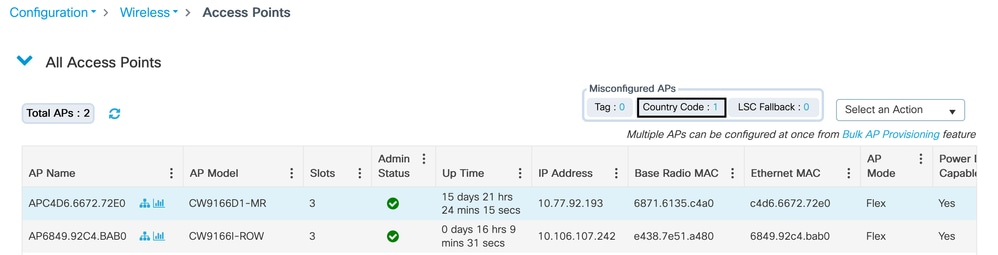
Tip: If there is a country code mismatch, it can also be verified from:
WLC GUI > Wireless > Access Points
Scenario 2: Country Not Supported
Validate whether the AP regulatory domain is supported in the intended country.
Refer to these tools:
AP Channel Lookup (Wi-Fi 6 / 6E / 7 and Meraki APs)
Scenario 3: Wi-Fi 7 APs
First, validate AP support for the specific country and minimum software version using: https://apchannels.cisco.com/
CW917x series APs use a single SKU/PID and can operate globally because regulatory enforcement is not hardware-based.
These APs determine the country code using one of these methods:
-
GPS/GNSS geolocation
-
Proximity-based discovery from nearby APs
-
Migration from Meraki Dashboard
-
Regulatory Activation File
Validate Country Code on AP
#show ap summary

#show ap name <ap name> config general | inc Country

#show ap name AP8C88.814F.04E0 config general | include Country
Country Code : Multiple Countries : IN,RO,SR,UA,US
Regulatory Domain Allowed by Country : 802.11bg:-AE^ 802.11a:-ABDEN^ 802.11 6GHz:-BE
AP Country Code : US - United States
Country Code Resolution Method : Regulatory Activation File
If the country code is not configured, refer to this guide: https://www.cisco.com/c/en/us/td/docs/wireless/access_point/technical-reference/global-use-ap-dg.html
Scenario 4: AP is Not Getting Sufficient Power
APs require a minimum amount of power for radios to remain operational. Power requirements vary depending on the AP model.
Validate:
-
AP power requirements from the datasheet
-
Power delivered from the switch or power injector
Note: If a power injector is used, ensure it is a supported model.
Check Power Received by AP
APB811.4B52.CB38#show cdp inline_power

Power_Requested(mW) Power_Available(mW) Power_request-ID Power_management-ID

              22500               22500            34980                  10
Check Power Delivered from Switch Interface
Switch#show power inline <int>Example Output:
Switch#show power inline tenGigabitEthernet 3/0/7

Interface Admin  Oper       Power   Device              Class Max

                            (Watts)

--------- ------ ---------- ------- ------------------- ----- ----

Te3/0/7   auto   on         22.5    AIR-AP2802I-D-K9    4     60.0
If the AP is not receiving sufficient power, this can also be confirmed from AP console logs.
Example Logs:
Jun 10 15:06:54 MarineTower-AP1 powerd: send ipc_socket_process: 7

Jun 10 15:06:54 MarineTower-AP1 powerd: ps: Power mode: Degraded/Reduced Power, power_detection: DC_adapter(FALSE), PoE+/802.3at(30000 mWatt)

Jun 10 15:06:54 MarineTower-AP1 powerd: ps: End: System running on low power @ 30000 mWatt from port0

Jun 10 15:17:09 MarineTower-AP1 kernel: [*06/10/2025 15:17:09.6554] systemd[1]: Starting Check /tmp directory space...
Scenario 5: Antenna Not Connected (External APs)
For external APs, antennas must be connected for clients to detect and connect to SSIDs. Validate supported antenna models using the installation guide for the respective AP model.
To validate from AP CLI :
#show controllers dot11Radio <0-3> antenna
Tag/Profile Configuration Issues
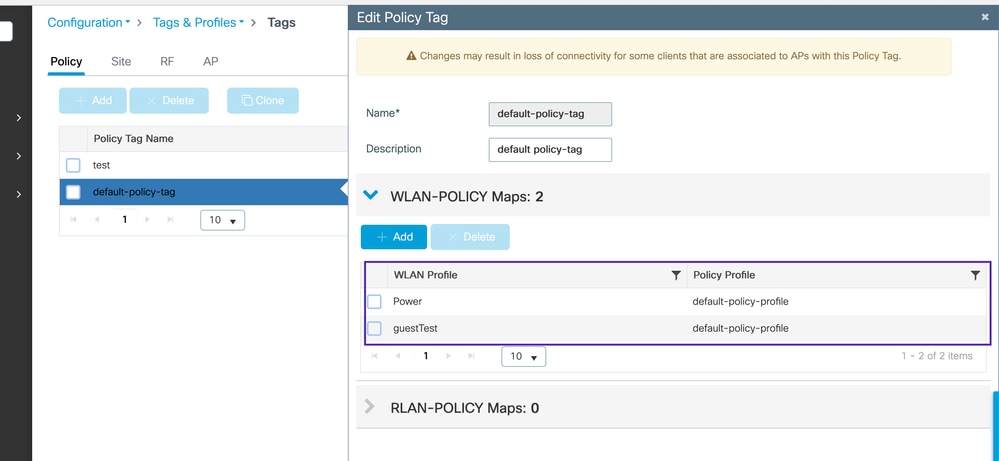
Scenario 1: WLAN Not Mapped to the Policy Tag Used by the AP
On Catalyst 9800 controllers, APs broadcast SSIDs only if the WLAN is included in the Policy Tag assigned to the AP. Policy Tags bind WLANs to Policy Profiles.
Configurations > Tags & Profiles > Tags > Policy > Policy Tag
Scenario 2: Misconfigured Tags
Validate that AP tags are correctly configured and that no profiles referenced by the tags are missing.
CLI Command
#show ap name APB811.4B52.CB38 tag info
Example Output:
#show ap name APB811.4B52.CB38 tag info
AP Name            : APB811.4B52.CB38
AP Mac             : b811.4b52.cb38
Applied Tags :
-------------------------------------------
Tag Type             Tag Name
-----------------------------------------
RF Tag               default-rf-tag
Site Tag             default-site-tag
Policy Tag           default-policy-tag

Tag/Profile Type          Misconfigured
-----------------------------------------
RF Tag                       No
Policy Tag                   No
Site Tag                     Yes
Flex profile                 No
AP join profile              No
2.4GHz Rf Profile            No
5 GHz Rf Profile             No
6 GHz Rf Profile             No
2.4GHz slot 0 Radio Profile  No
5 GHz slot 1 Radio Profile   No
5 GHz slot 2 Radio Profile   No
6 GHz slot 2 Radio Profile   No
6 GHz slot 3 Radio Profile   No
AP Country Misconfig         No

Resolved Tags :
-------------------------------------------
Tag Source         : AP
Tag Type             Tag Name
-----------------------------------------
RF Tag               default-rf-tag
Site Tag             flex-qos
Policy Tag           default-policy-tag
Configuration > Wireless > Access Point
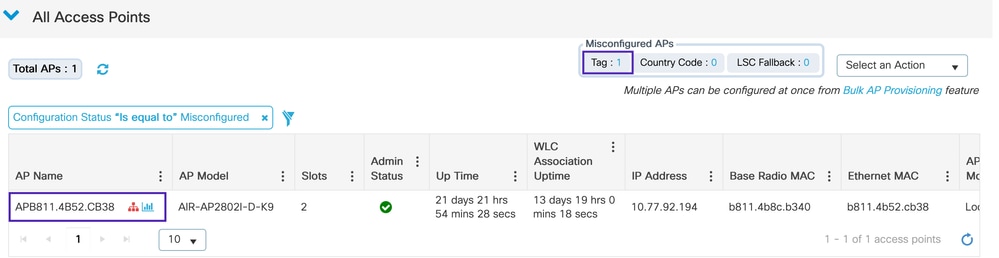
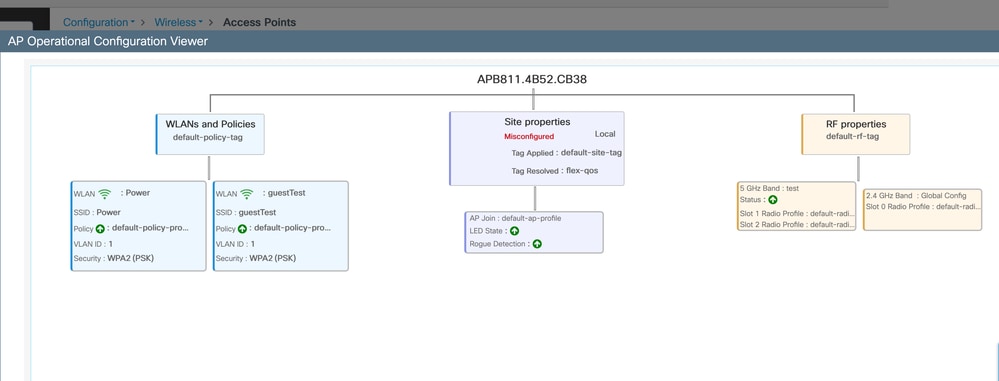
In this example, the Site Tag is marked as misconfigured. The AP attempts to resolve the tag to flex-qos, but that tag no longer exists on the WLC.
Reconfiguring the AP with valid tags present on the WLC resolves the issue.
Validation Checklist
-
Ensure profiles mapped to tags exist on the WLC
-
Verify correct tags are mapped with the intended configuration
Scenario 3: Misconfiguration in Local Mode APs
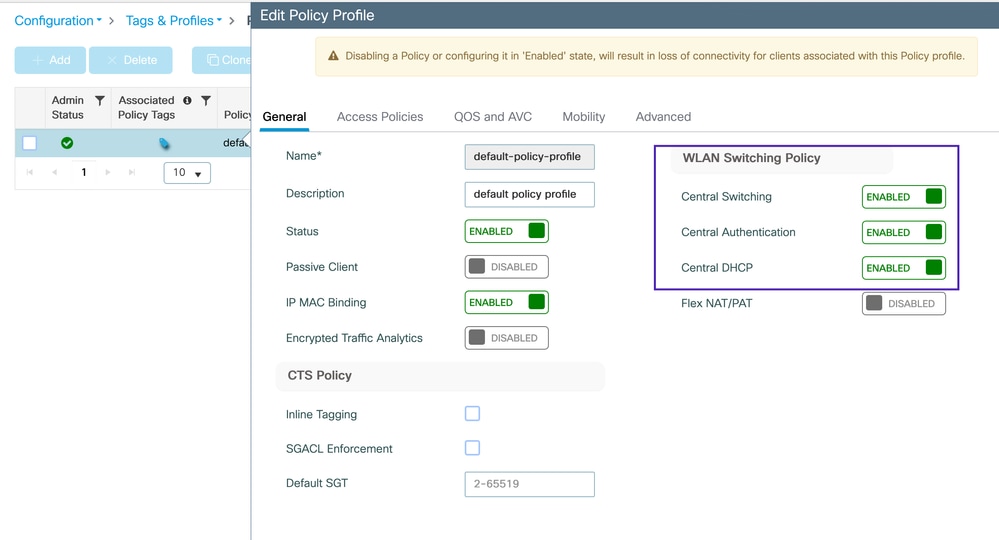
For local mode APs, ensure the policy profile is configured for central switching, central authentication, and central DHCP. In this mode, the WLC pushes the configuration—including SSID, security settings—to the AP via the CAPWAP control tunnel.
Configuration > Tags & Profiles > Policy
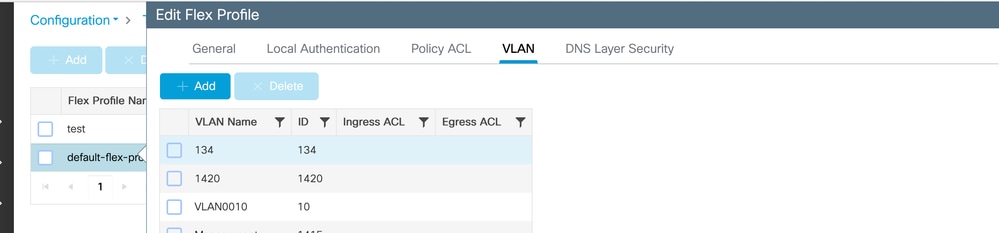
Scenario 4: No Valid VLAN Defined in the Flex Profile
Ensure that the VLAN is configured in both the Flex profile and the Policy profile when using a Flex AP. Note that if the VLAN is not in the Flex profile, a warning message is generated in the WLC GUI events.
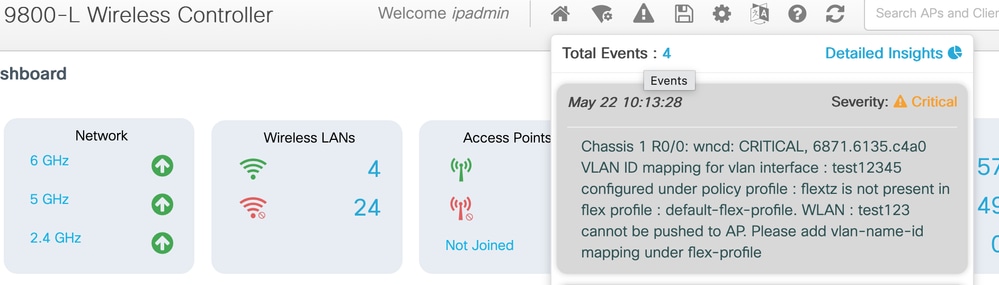
Configuration > Tags & Profiles > Flex
Other Issues
Unsupported Channels or Channel Width
Some client devices do not support specific channels or channel widths depending on the client vendor and hardware capabilities.
- Depending on the manufacturer, some client devices do not support all wireless channels. In such cases, the client fails to detect the AP beacons, even when the AP is broadcasting on those channels.
- It is essential to verify the capabilities of your client devices and ensure that your channel and channel width configurations are compatible with those devices.
- Mismatched configurations can lead to roaming difficulties and "sticky client" issues, as the client could be unable to receive essential beacon frames or probe responses from the AP.
AP Not Sending Beacons
You can validate whether the client is hearing beacons using this command on the client device:
netsh wlan show networks mode=BssidThis command displays all BSSIDs detected by the client. If the output shows all other BSSIDs except the target AP BSSID, there is a possibility that the AP is not transmitting beacons.
To identify the WLAN BSSID on the AP, SSH into the AP and execute:
show controllers dot11 <0-3> wlan Example Output:
WLANs and stats:

====================

radio vap id               mac           ssid state

    1      0 90:E9:5E:85:FF:6F       Guest_test  UP

    1      1 90:E9:5E:85:FF:6E       Guest_BYOD  UP

    1      2 90:E9:5E:85:FF:6D       PSK_Client  UP

    1      3 90:E9:5E:85:FF:6C       test123     UP

    1      5 90:E9:5E:85:FF:6A        test123    UP
The next step would be to take the OTA capture to further validate if AP is sending the beacons.
Revision History
| Revision | Publish Date | Comments |
|---|---|---|
3.0 |
19-Aug-2026
|
Fixed a formatting problem |
2.0 |
14-Aug-2026
|
Fixing formatting issues |
1.0 |
14-Aug-2026
|
Initial Release |

 Feedback
Contact Cisco
- Open a Support Case

- (Requires a Cisco Service Contract)