Configure and Troubleshoot AP Power Profile
Available Languages
Contents
Introduction
This document describes how to configure and troubleshoot AP Power Profile on Cisco Catalyst 9800 Wireless LAN Controllers (WLC).
Components Used
The information in this document is based on these software and hardware versions:
- Cisco Catalyst 9800 Series Wireless LAN Controller
- Software Release 17.15.4d & 26.1.1
- C9130AXI-D
- CW9178I
- C9300-48UXM
The information in this document was created from the devices in a specific lab environment. All of the devices used in this document started with a cleared (default) configuration. If your network is live, ensure that you understand the potential impact of any command.
Overview
Access Point Power Save is a power management capability that:
- Reduces energy consumption during periods of inactivity
- Supports flexible scheduling and policy-driven low-power operation
- Optimizes network efficiency without compromising performance
Types of Power Profiles
- Fixed Power Policy
The Fixed Power Policy defines predefined operating states for an AP. For each AP type, the state of interfaces (such as radios, USB, Ethernet and so on) is preconfigured under these conditions. The AP first applies the interface states based on the Fixed Power Policy before considering any configurations defined in the Calendar Profile.
- AP Power Profile
The AP Power Profile allows users to define a prioritized list of rules that control power derating and behaviour during active calendar periods.
- Rules are applied sequentially until the AP’s power requirements are met
- The configuration is generic and applied at the AP profile level
- The AP profile is associated with a site tag
This profile determines how APs operate when the Power over Ethernet (PoE) budget from the switch is insufficient.
It also supports Green AP functionality, where the AP transitions into a low-power mode based on an associated calendar schedule (for example, after working hours).
- Calendar Profile
The Calendar Profile enables time-based control of AP interface activity.
- Allows configuration of which interfaces remain active or inactive
- Applies settings based on defined time schedules
This helps automate power-saving operations without manual intervention.

Tip: For information about the APs that support the AP Power Save feature, see https://www.cisco.com/c/en/us/td/docs/wireless/access_point/feature-matrix/ap-feature-matrix.html.
Use Cases
- Power Save Mode – Regular Power Profile
With the introduction of tri-radio and quad-radio Access Points, the power required for full functionality often exceeds what 802.3at can provide. However, many deployments still lack 802.3bt support.
Currently, AP behaviour (such as transmit power, radio chains, USB ports, SFP usage and so on ...) is statically defined when operating on lower power levels (non-802.3bt), and users have limited control over these parameters.
The Regular Power Profile addresses this by allowing controlled power derating based on available power.

Note: Regular Power Profile for AP power saving feature has been supported for 17.10 or later.
- Green / Eco Mode AP – Power Save Mode (Calendar Profile)
The Green AP feature provides an energy-saving mode where APs automatically enter low-power operation when there are no connected clients.
- When enabled, APs can transition into a sleep or reduced-power state during low-usage periods (for example, after office hours)
- If a client attempts to connect (based on configured thresholds), the AP automatically exits power save mode and switches to the appropriate Fixed Policy
- Once all clients disconnect, the AP returns to power save mode
- Only the AP handling the client connection exits low-power mode; other APs remain unaffected
The overall goal of the power policy is to allow users to efficiently allocate and manage the available power budget across different power sources such as: 802.3af, 802.3at, 802.3bt (multiple levels).
Configuration

Caution: For the AP power profile to be applied on AP the WLC and AP clock must be in sync.
Use Case 1: Regular Power Profile
- The Regular Power Profile operates independently of the Calendar Profile
- The switch port must provide derated power for the profile to be applied on the AP
Note: Only one Regular Power Profile can be applied at a time.
In the example below, the 9130AXI access point is operating in a degraded power state of 24,000 mW. Because the AP is receiving degraded power, the system automatically applies the standard power profile without the need of any calendar profile.
On AP
xo9130#show cdp inline_power

Power_Requested(mW) Power_Available(mW) Power_request-ID Power_management-ID

              30000               24000             7114                   5
Regular Profile Mapping (CLI )
- Configure power profile as per the requirement and apply as regular profile.
 (config)# wireless profile power simran-regular-profile-1

 (config-wireless-power-profile)# 10 ethernet GigabitEthernet0 speed 2500Mbps

 (config-wireless-power-profile)# 20 radio 24ghz state shutdown

 (config-wireless-power-profile)# 30 radio 5ghz spatial-stream 4

 (config-wireless-power-profile)# 40 radio 5ghz state shutdown

 (config-wireless-power-profile)# exit

 (config)# ap profile powermode

(config-ap-profile)# power-profile simran-regular-profile-1

 (config-ap-profile)# end
- Show regular profile
#show ap profile name powermode detailed | sec Power profile

           Power profile name            : simran-regular-profile-1
Regular Profile Mapping (GUI )
- Configuration > Tags & profiles > Power Profile
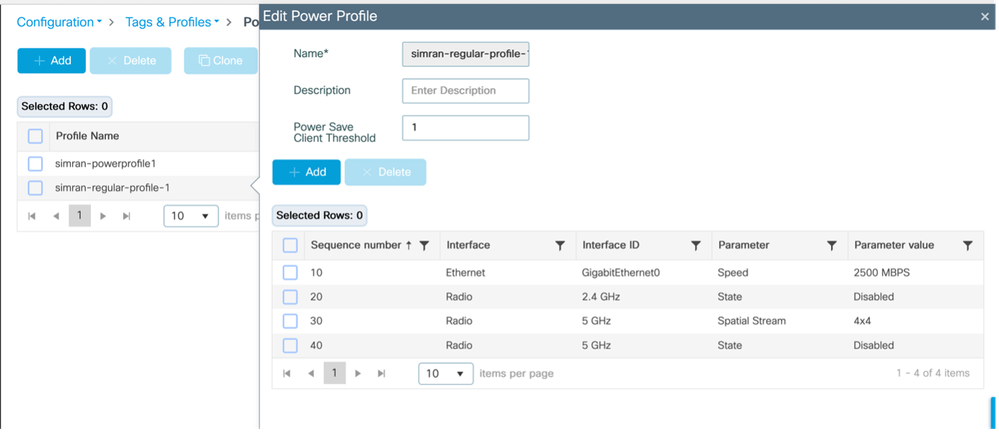
- Apply and show regular profile
Configuration > Tags & Profiles > AP JOIN > AP > Power Management
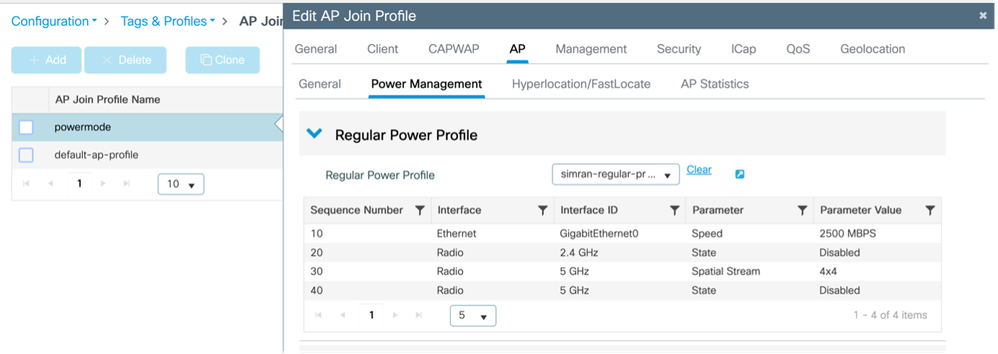
- Validate the Profile getting applied on AP
Monitoring > Wireless > AP statistics
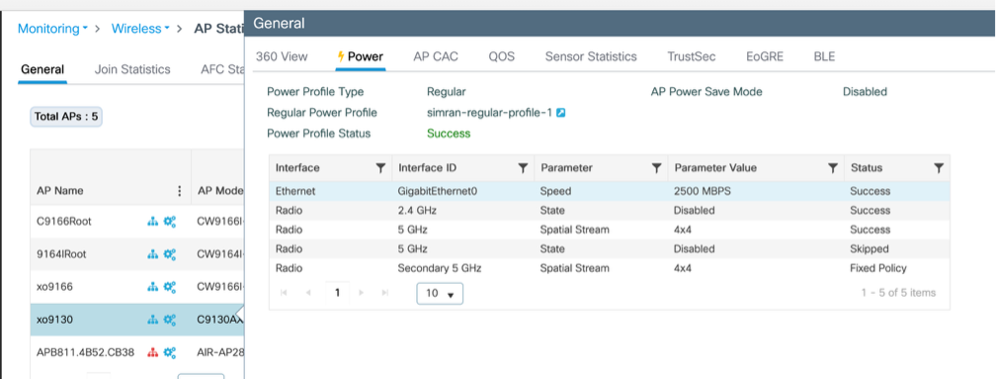
Configuration > Wireless > Access Points > Select the AP > Interfaces
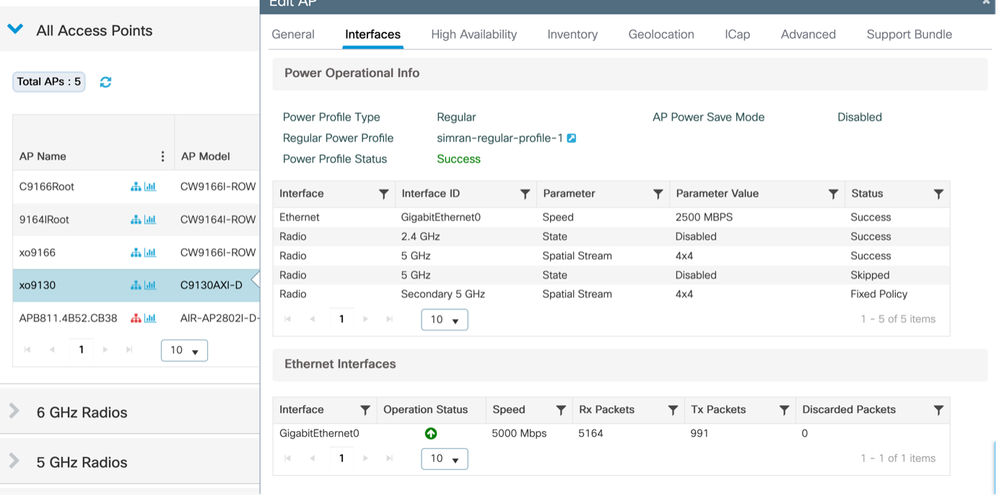
Use Case 2: Green / Eco Mode (Calendar Profile)
- Multiple/different recurrent calendar power profiles can be applied.
- When the calendar schedule is active, APs enter power-saving mode. If a client connects (based on configured thresholds), the AP exits power save mode and applies the Fixed Policy. Once the client disconnects, the AP returns to power-saving mode
- Only the AP serving the client transitions out of power save mode.
Example 1:
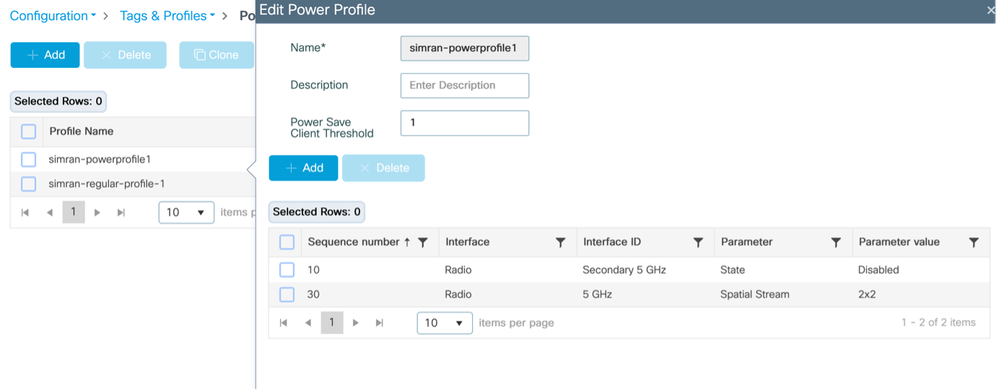
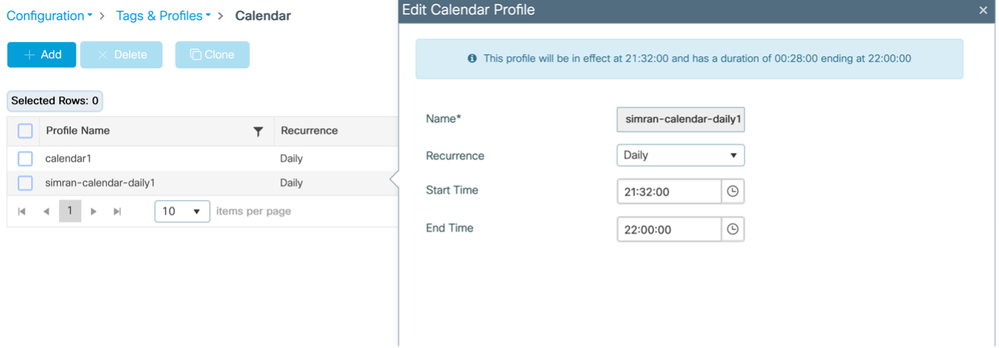
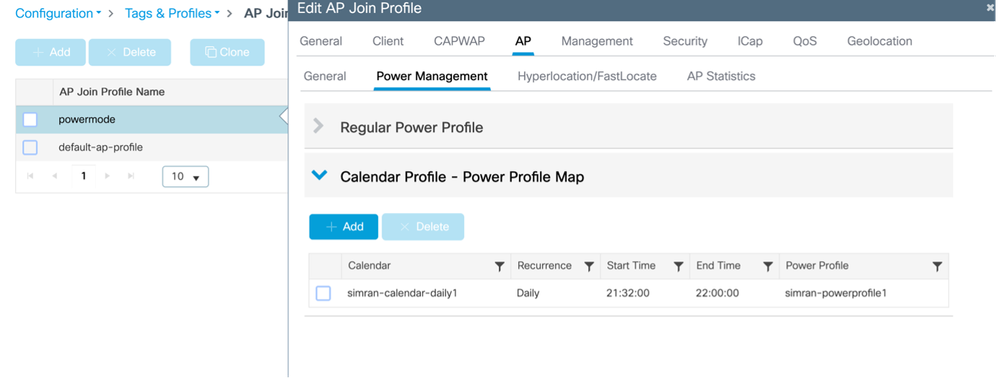
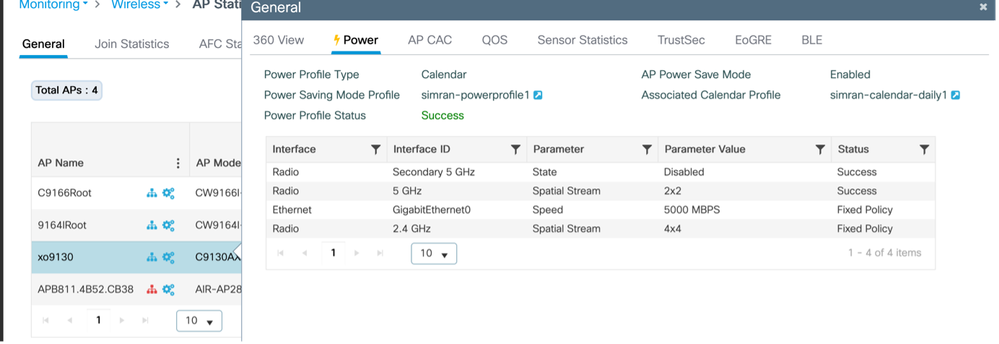
This example illustrates a power profile configuration that disables the secondary 5GHz radio and operates the primary 5GHz radio in 2x2 mode. This configuration is tied to a daily schedule running from 21:32:00 to 22:00:00. Similar profiles can be adapted to accommodate different network scenarios as needed.
Calendar Profile Mapping (CLI)
Configure and map power and calendar profile
 (config)# wireless profile power simran-powerprofile1

 (config-wireless-power-profile)# 10 radio secondary-5ghz state shutdown

 (config-wireless-power-profile)# 30 radio 5ghz spatial-stream 2

 (config-wireless-power-profile)# exit

 (config)# wireless profile calender-profile name simran-calendar-daily1

 (config-calendar-profile)# recurrance daily

 (config-calendar-profile)# start 21:32:00 end 22:00:00

 (config-calendar-profile)# exit

 (config)# ap profile powermode

 (config-ap-profile)# calendar-profile simran-calendar-daily1

 (config-ap-profile-calendar)# action power-saving-mode po

 (config-ap-profile-calendar)# action power-saving-mode power-profile simran-powerprofile1

(config-ap-profile-calendar)# end
Calendar Profile Mapping (GUI)
Configure Power Profile
Configuration > Tags & profiles > Power Profile
Configure Calendar Profile
Configuration > Tags & profiles > Calendar
Map the power profile & calendar profile to AP join profile
Configuration > Tags & profiles > AP Join > Select the AP join profile > AP > Power Management
Validate the Profile getting applied on AP
Monitoring > Wireless > AP Statistics > AP > Power
Console logs from AP when the calendar kicks in
xo9130#[*04/13/2026 21:35:31.1536] DOT11_CFG[1]: poe_power_mode: low_pwr_mode=5, allowed_tx_ant=3, allowed_rx_ant=3

[*04/13/2026 21:35:31.1615] DOT11_DRV[1]: Stop Radio1 - Begin

[*04/13/2026 21:35:31.1634] wlan: [0:I:CMN_MLME] mlme_ext_vap_down: VAP (mon1) is down

[*04/13/2026 21:35:31.1647] DOT11_DRV[1]: Stop Radio1 - End

[*04/13/2026 21:35:31.1792] wlan: [0:I:CMN_MLME] mlme_ext_vap_down: VAP (apr1v0) is down

[*04/13/2026 21:35:31.1840] DOT11_DRV[1]: Start Radio1 - Begin

[*04/13/2026 21:35:31.1852] wlan: [7277:I:ANY] ol_ath_set_config_param: OL_ATH_PARAM_RTT_SKIP_VDEV_RESTART: value: 1

[*04/13/2026 21:35:31.1870] wlan: [0:I:ANY] ol_ath_pdev_is_multi_band_supported: 2 GHz modes: 0, 5GHz/6GHz modes: 391f9001

[*04/13/2026 21:35:31.1876] wlan: [7277:I:ANY] ieee80211_ucfg_setparam_util: rtt_enable = 0 already configured, skip configuration

[*04/13/2026 21:35:31.1880] wlan: [7277:I:ANY] ieee80211_ucfg_setparam_util: KERN_DEBUG

[*04/13/2026 21:35:31.1880]  setting the lci enble flag

[*04/13/2026 21:35:31.1896] DOT11_DRV[1]: Start Radio1 - End

[*04/13/2026 21:35:31.2121] DOT11_DRV[2]: Stop Radio2 - Begin

[*04/13/2026 21:35:31.2137] wlan: [0:I:CMN_MLME] mlme_ext_vap_down: VAP (mon2) is down

[*04/13/2026 21:35:31.2152] DOT11_DRV[2]: Stop Radio2 - End

[*04/13/2026 21:35:31.2167] wlan: [0:E:ANY] mlme_ext_vap_up: VAP (mon1) is up, vdev_id:33 pdev_id:0 psoc_id:0

[*04/13/2026 21:35:31.2200] wlan: [0:I:CMN_MLME] mlme_ext_vap_down: VAP (apr1v0) is down

[*04/13/2026 21:35:31.2202] wlan: [0:I:ANY] ol_ath_pdev_is_multi_band_supported: 2 GHz modes: 0, 5GHz/6GHz modes: 391f9001

[*04/13/2026 21:35:31.2290] wlan: [0:I:CMN_MLME] mlme_ext_vap_down: VAP (apr2v0) is down
On Switch
##### Before applying power profile
Switch#show power inline tenGigabitEthernet 3/0/23 detail | i Meas

 Measured at the port: 11.8
##### After applying power profile
Switch#show power inline tenGigabitEthernet 3/0/23 detail | in Meas

 Measured at the port: 10.8
# Connected a client on the AP ; the AP automatically switches back to fixed policy
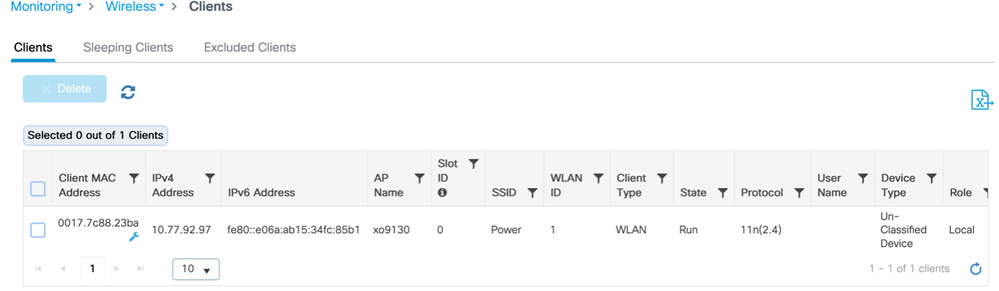
Logs from AP
[*04/13/2026 21:42:27.8792] DOT11_DRV[2]: Start Radio2 - Begin

[*04/13/2026 21:42:27.8802] wlan: [7277:I:ANY] ol_ath_set_config_param: OL_ATH_PARAM_RTT_SKIP_VDEV_RESTART: value: 1

[*04/13/2026 21:42:27.8820] wlan: [0:I:ANY] ol_ath_pdev_is_multi_band_supported: 2 GHz modes: 0, 5GHz/6GHz modes: 391f9001

[*04/13/2026 21:42:27.8827] wlan: [7277:I:ANY] ieee80211_ucfg_setparam_util: rtt_enable = 0 already configured, skip configuration

[*04/13/2026 21:42:27.8828] wlan: [7277:I:ANY] ieee80211_ucfg_setparam_util: KERN_DEBUG

[*04/13/2026 21:42:27.8828]  setting the lci enble flag

[*04/13/2026 21:42:27.8841] DOT11_DRV[2]: Start Radio2 - End

[*04/13/2026 21:42:27.8854] DOT11_CFG[2]: poe_power_mode: low_pwr_mode=5, allowed_tx_ant=15, allowed_rx_ant=15

[*04/13/2026 21:42:27.8974] wlan: [0:E:ANY] mlme_ext_vap_up: VAP (mon2) is up, vdev_id:50 pdev_id:2 psoc_id:0
On switch
Power consumed after client is connected :
Switch#show power inline tenGigabitEthernet 3/0/23 detail | in Measu

 Measured at the port: 11.8
On WLC
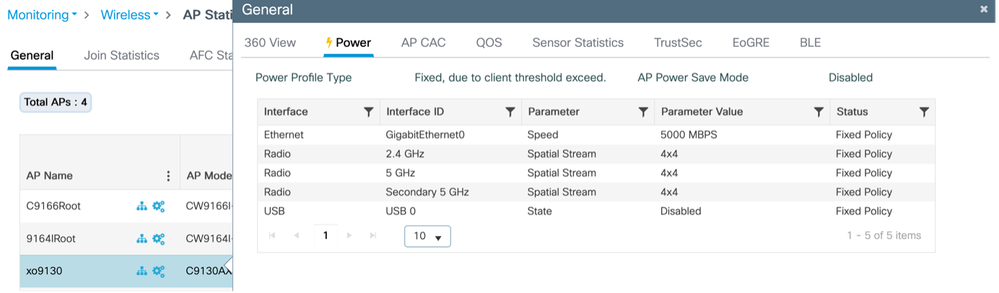
Disconnected the client, Ap switches automatically to power save mode :
From AP
 xo9130#[*04/13/2026 21:46:47.2003] DOT11_CFG[1]: poe_power_mode: low_pwr_mode=5, allowed_tx_ant=3, allowed_rx_ant=3

[*04/13/2026 21:46:47.2088] DOT11_DRV[1]: Stop Radio1 - Begin

[*04/13/2026 21:46:47.2106] wlan: [0:I:CMN_MLME] mlme_ext_vap_down: VAP (mon1) is down

[*04/13/2026 21:46:47.2120] DOT11_DRV[1]: Stop Radio1 - End

[*04/13/2026 21:46:47.2264] wlan: [0:I:CMN_MLME] mlme_ext_vap_down: VAP (apr1v0) is down

[*04/13/2026 21:46:47.2452] DOT11_DRV[1]: Start Radio1 - Begin

[*04/13/2026 21:46:47.2464] wlan: [7277:I:ANY] ol_ath_set_config_param: OL_ATH_PARAM_RTT_SKIP_VDEV_RESTART: value: 1

[*04/13/2026 21:46:47.2494] wlan: [0:I:ANY] ol_ath_pdev_is_multi_band_supported: 2 GHz modes: 0, 5GHz/6GHz modes: 391f9001

[*04/13/2026 21:46:47.2504] wlan: [7277:I:ANY] ieee80211_ucfg_setparam_util: rtt_enable = 0 already configured, skip configuration

[*04/13/2026 21:46:47.2506] wlan: [7277:I:ANY] ieee80211_ucfg_setparam_util: KERN_DEBUG

[*04/13/2026 21:46:47.2506]  setting the lci enble flag

[*04/13/2026 21:46:47.2522] DOT11_DRV[1]: Start Radio1 - End

[*04/13/2026 21:46:47.2637] wlan: [0:E:ANY] mlme_ext_vap_up: VAP (mon1) is up, vdev_id:33 pdev_id:0 psoc_id:0

[*04/13/2026 21:46:47.2676] wlan: [0:I:CMN_MLME] mlme_ext_vap_down: VAP (apr1v0) is down

[*04/13/2026 21:46:47.2678] wlan: [0:I:ANY] ol_ath_pdev_is_multi_band_supported: 2 GHz modes: 0, 5GHz/6GHz modes: 391f9001

[*04/13/2026 21:46:47.2729] DOT11_DRV[2]: Stop Radio2 - Begin

[*04/13/2026 21:46:47.2744] wlan: [0:I:CMN_MLME] mlme_ext_vap_down: VAP (mon2) is down

[*04/13/2026 21:46:47.2760] DOT11_DRV[2]: Stop Radio2 - End

[*04/13/2026 21:46:47.2895] wlan: [0:I:CMN_MLME] mlme_ext_vap_down: VAP (apr2v0) is down
On WLC
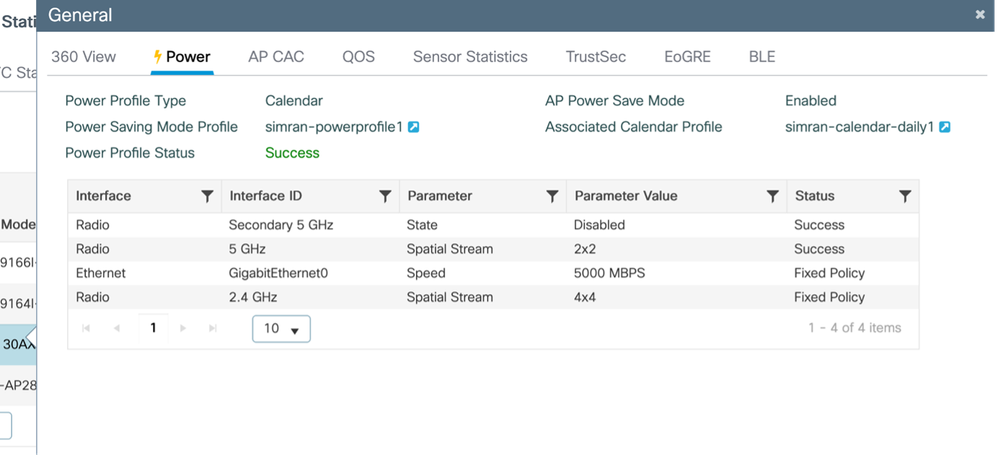
Example 2:
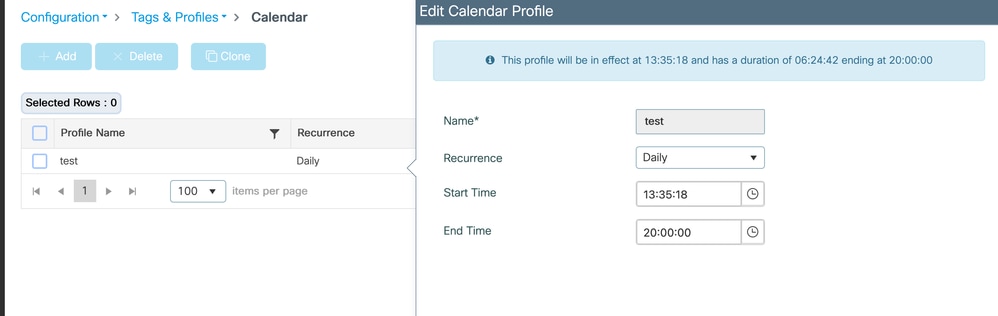
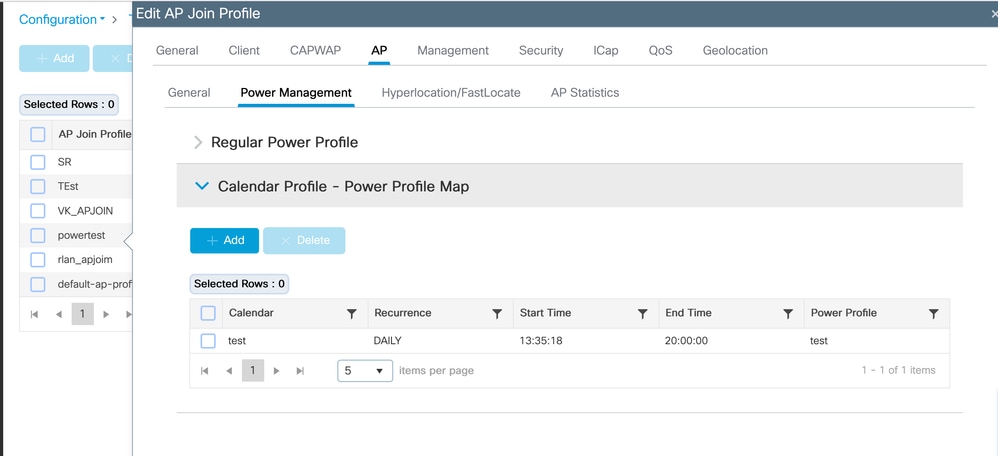
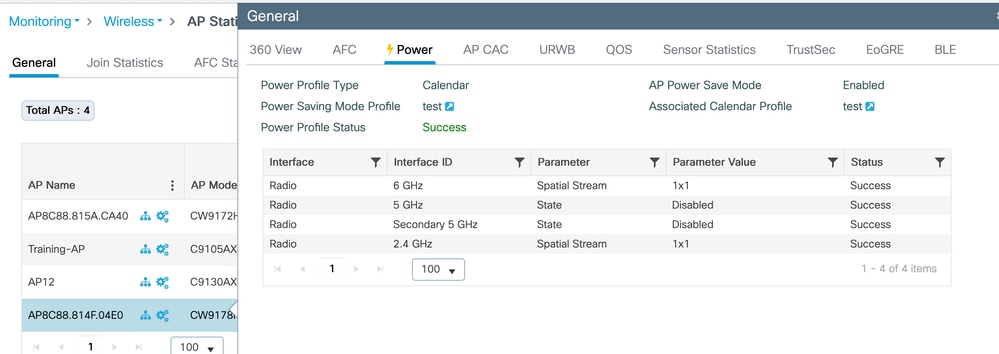
This test validates the AP power and calendar profile for the CW9178I access point. The power profile is configured to disable both 5GHz radios while enabling the 2.4GHz and 6GHz radios in a 1x1 spatial stream (SS) mode. This configuration is governed by a daily schedule active from 13:35:18 to 20:00:00. These profiles can be adapted to accommodate various network requirements as needed.
Calendar Profile Mapping (CLI)
Configure and map power and calendar profile
(config)#wireless profile power test
(config-wireless-power-profile)#0 radio 6ghz spatial-stream 1
(config-wireless-power-profile)#10 radio 5ghz state shutdown
(config-wireless-power-profile)#20 radio secondary-5ghz state shutdown
(config-wireless-power-profile)#30 radio 24ghz spatial-stream 1
(config-wireless-power-profile)# exit
(config)# wireless profile calender-profile name test
(config-calendar-profile)# recurrance daily
(config-calendar-profile)# start 13:35:18 end 20:00:00
(config-calendar-profile)# exit
(config)# ap profile powertest
(config-ap-profile)# calendar-profile test
(config-ap-profile-calendar)# action power-saving-mode power-profile test
(config-ap-profile-calendar)# end
Calendar Profile Mapping (GUI)
Configure Power Profile
Configuration > Tags & profiles > Power Profile
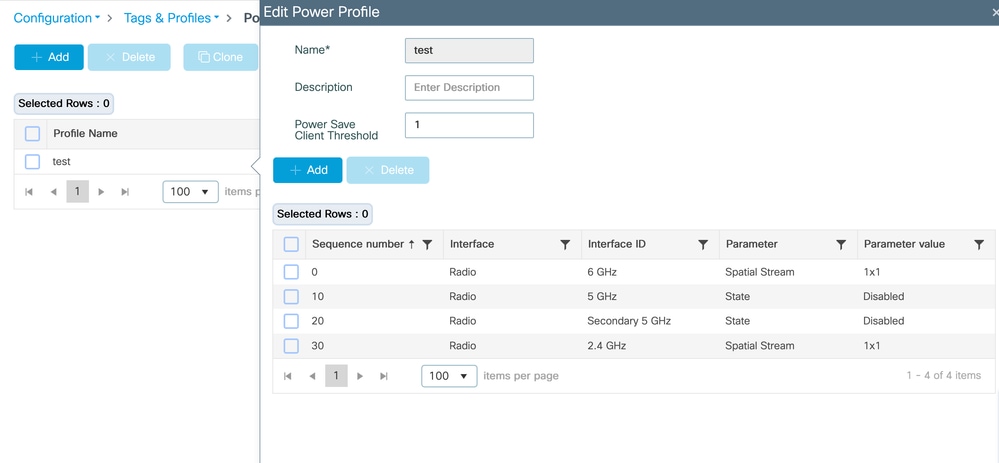
Configure Calendar Profile
Configuration > Tags & profiles > Calendar
Map the power profile & calendar profile to AP join profile
Configuration > Tags & profiles > AP Join > Select the AP join profile > AP > Power Management
Validate the Profile getting applied on AP
Monitoring > Wireless > AP Statistics > AP > Power
On Switch
##### Before applying power profile
Switch#show power inline twoGigabitEthernet 1/0/2 detail | i Mea
Measured at the port(watts) (Alt-A,B): 16.5
##### After applying power profile
Switch#show power inline twoGigabitEthernet 1/0/2 detail | in Mea
Measured at the port(watts) (Alt-A,B): 14.8
PoE Allocated Power vs Actual Consumption
On Catalyst switches, PoE power is tracked in two different ways: allocated power and actual consumption.
Allocated power is the amount of power the switch reserves for a device based on IEEE class and CDP/LLDP power negotiation. This value is used for PoE budget calculations and appears as Used in
show power inline module.
Example:
Module Available Used Remaining
1 525.0 315.9 209.1
Here, 315.9 W is the total PoE budget reserved for connected devices.
For example, the CW9178I AP on interface Tw1/0/2 has 60 W allocated:
Power Allocated
Admin Value: 60.0
Allocated Power: 60.0
However, the actual power being consumed by the AP can be much lower:
Actual consumption
Measured at the port: 16.9 W
Maximum since power-on: 18.6 W
A switch wide view of real time consumption can be seen with:
show power inline police
Example:
Totals: 103.8 W
This means that although 315.9 W is reserved, the devices are currently consuming only 103.8 W.
This behavior is expected because PoE switches reserve power based on the maximum negotiated power requirement, not the instantaneous draw.
This ensures devices such as access points can immediately increase power usage (for example during radio activity spikes) without losing power.
When an AP power save profile is applied, only the actual consumption decreases because some AP components operate in a reduced state.
The allocated power remains unchanged, since the negotiated maximum power envelope between the AP and switch has not changed.
PoE budget calculations use allocated (reserved) power, not real-time consumption. Therefore it is normal to see a large difference between Used power and measured power draw.
Validation
On Wireless LAN Controller (WLC)
- show ap profile name default-ap-profile detailed
- show ap name <ap-name> power-profile summary
- show wireless profile power summary
- show wireless profile power detailed <power-profile-name>
- show wireless profile calendar-profile summary
On Access Point
- show ap power policy config
- show ap power policy status
- show ap power calendar config
On Switch
To verify actual power consumption:
- show power inline gig <interface> detail | include Measured
Troubleshooting
On AP
#Console logs
#debug capwap client payload
#debug powerpolicy logging level trace
#debug powerpolicy logging level info
#debug powerpolicy logging console enable
#terminal monitor
On WLC
#RA Traces (AP Radio MAC)
# WNCD Logs at debug level :
 #set platform software trace wncd <0/1/2/3> chassis active/Standby R0 ap-pwr-prof-main debug`
`#set platform software trace wncd <0/1/2/3> chassis active/Standby R0 ap-pwr-prof-db debug`
`#set platform software trace wncd <0/1/2/3> chassis active/Standby R0 ap-pwr-prof-wcnm debug`
`#set platform software trace wncd <0/1/2/3> chassis active/Standby R0 apcfg-profile-db debug`
`#set platform software trace wncd <0/1/2/3> chassis active/Standby R0 apmgr-db debug`
Note: Once the issue has been reproduced revert the software trace levels to 'notice'.
Known Issues
- Unexpected "Insufficient De-rating" seen for AP power profile status: Cisco Bug ID CSCwf92519
- "Regular Power Profile" feature not yet support for 17.9 but "Regular Power Profile" appears on GUI :Cisco Bug ID CSCwi51691

Revision History
| Revision | Publish Date | Comments |
|---|---|---|
2.0 |
09-Jun-2026
|
Added clarifications about power budget reservation versus power actual consumed |
1.0 |
22-May-2026
|
Initial Release |

 Feedback
Contact Cisco
- Open a Support Case

- (Requires a Cisco Service Contract)