Configure Smart License on Expressway

Available Languages
Introduction
This document describes how to configure Smart Licensing on Cisco Expressway.
Prerequisites
Requirements
Cisco recommends that you have knowledge of these topics:
- Cisco License Central access
- Smart Account (SA)
- Virtual Account (VA)
Components Used
The information in this document is based on these software and hardware versions:
- Cisco Expressway Version 12.6 and later
The information in this document was created from the devices in a specific lab environment. All of the devices used in this document started with a cleared (default) configuration. If your network is live, ensure that you understand the potential impact of any command.
Background Information
Cisco Smart Software Licensing is a new way to think about licensing. It simplifies the licensing experience across the enterprise and makes it easier to purchase, deploy, track, and renew Cisco Software. It provides visibility into license ownership and consumption through a single, simple user interface.
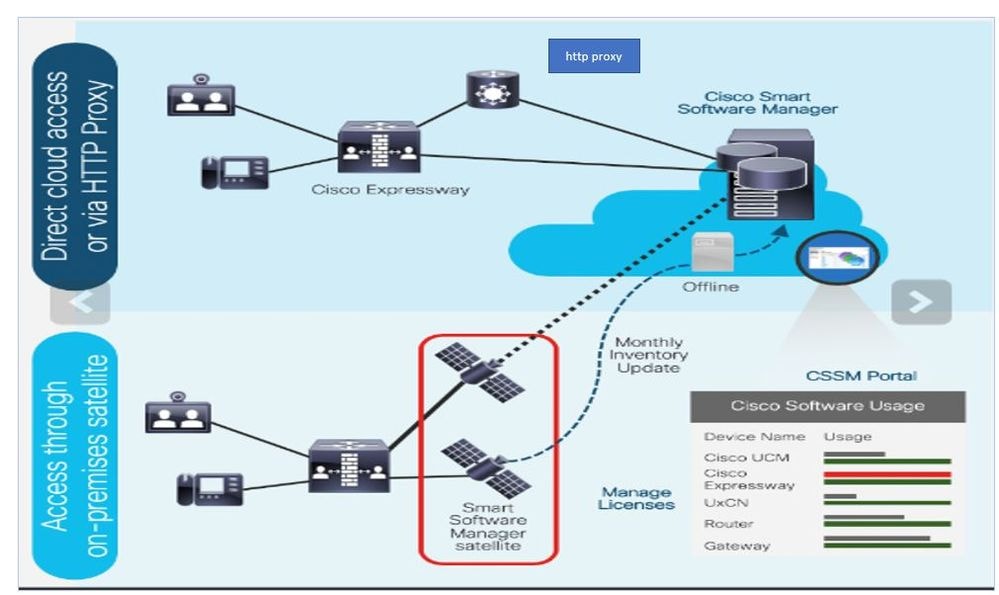
You place an order on Cisco Commerce and the order is associated with the smart account. This information is populated on Cisco License Central which resides on Cisco.com. Now, you have a complete view on what you ordered and purchased.
The product that has Smart Licensing enabled (via CLI or GUI), is registered to Cisco License Central and it reports license consumption to Cisco License Central. Two models exist to report the usage:
Direct Model: Use this model in your environments where devices can communicate directly to the internet or can connect to the internet via an HTTPS proxy. Communication to Cisco.com is via HTTPS, therefore, all traffic is encrypted in transport. If traffic is sent through an HTTPS proxy, all communications between devices and Cisco.com are channeled through a centralized location if additional inspection or security policies must be applied.
Mediated Deployment Model: Use this model in networks where devices do not have any form to connect to the internet and cannot reach Cisco.com. This deployment model requires you to install a Cisco License Central satellite virtual machine on your premises, which are reachable by all internal hosts. The on-premise satellite can be deployed in a connected mode that synchronizes with Cisco License Central on Cisco.com monthly, weekly, or can be deployed in a totally disconnected configuration that requires manual file uploads and downloads to keep the satellite in sync. The recommendation is to sync at least every 30 days.
Configure
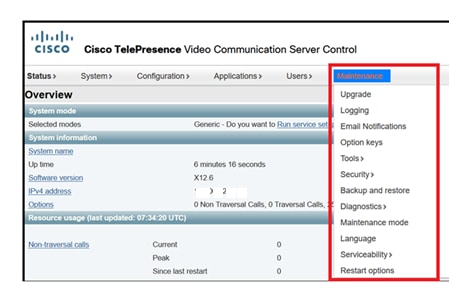
Step 1. Navigate to Maintenance> Smart licensing tab.
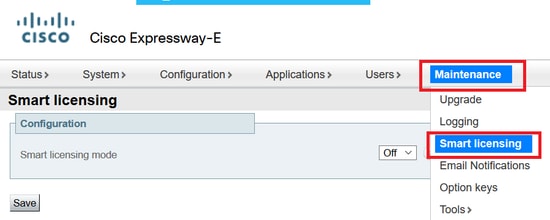
Step 2. Turn Smart Licensing On. Click Save.
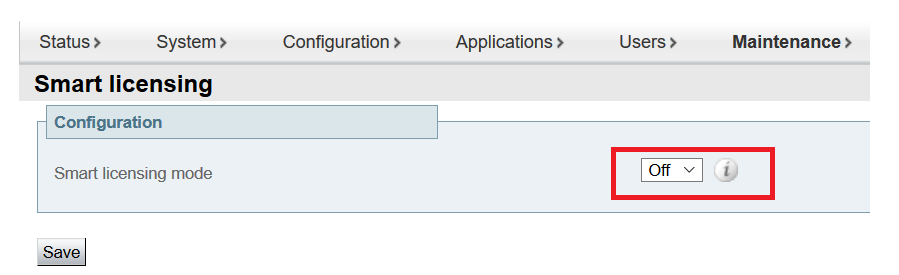
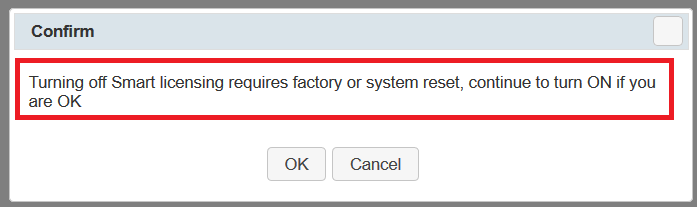
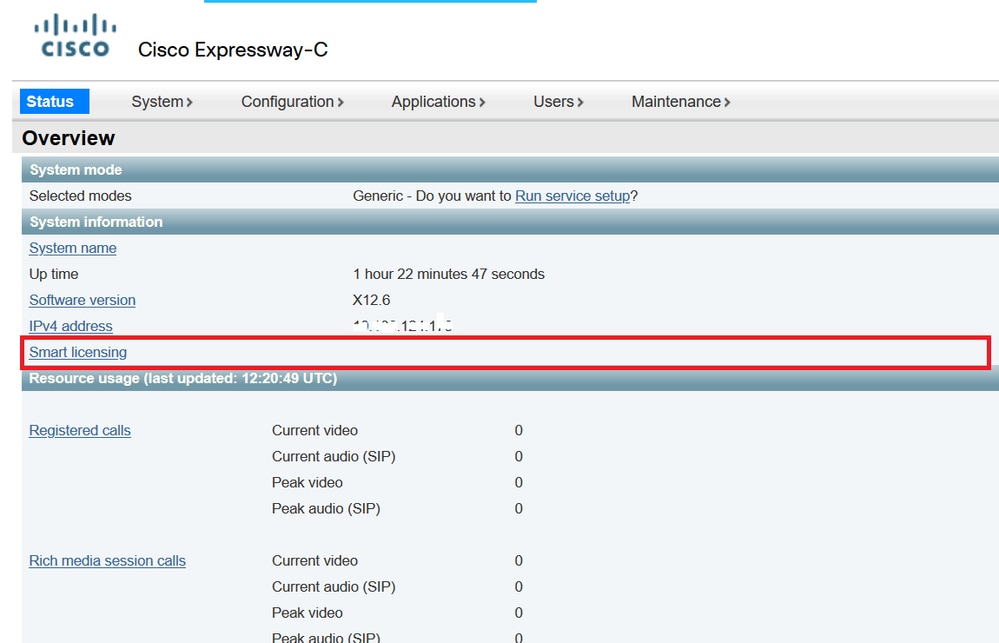
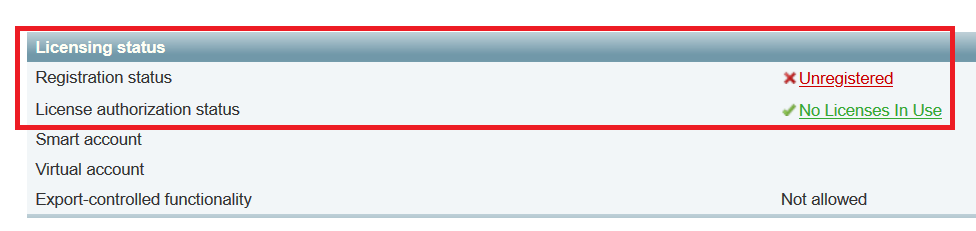
Step 3. Verify the device shows Unregistered to Cisco License Central or Satellite.
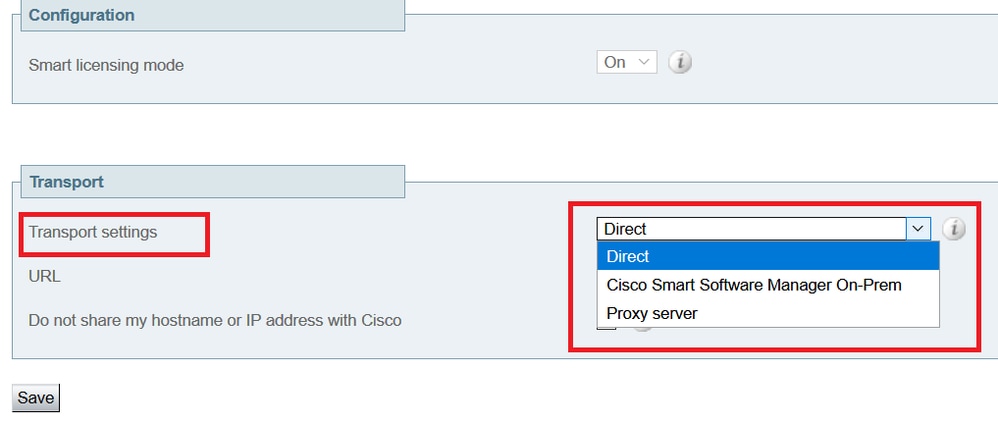
Step 4. Choose Transport settings under the licensing page per your Smart Licensing deployment model.
- Direct: Connects to the cloud directly.
- Satellite: On-Premise solution which talks directly to Cisco License Central.
- Proxy: HTTPS Proxy.
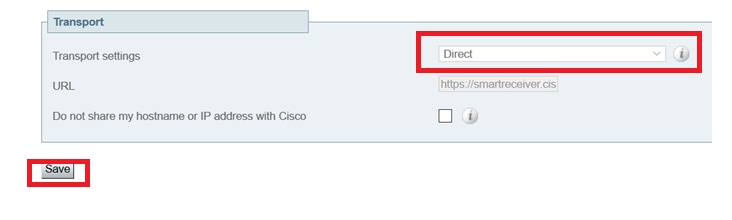
Direct Model
For Direct Model, choose Direct and Save. Check. Do not share my hostname or IP address with Cisco if your security policy does not allow you to share information in the cloud.
Step 5. Create a token on Cisco License Central.
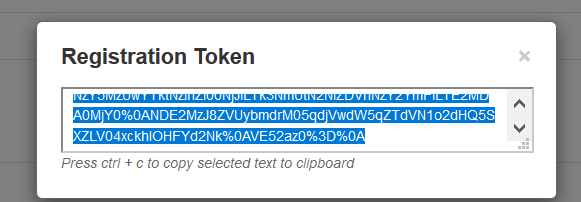
Step 6. Paste the token and click Register.
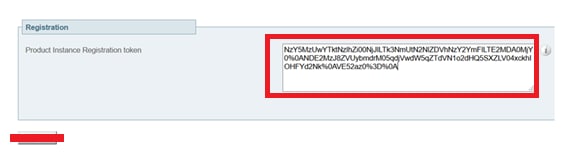

Step 7. Verify the instance registered successfully.

Mediated Deployment Model
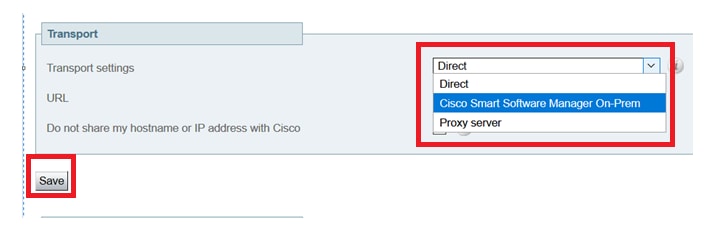
Step 1. Choose On-Prem and Save.
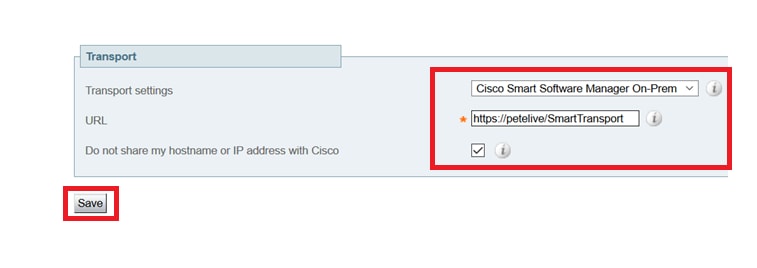
Step 2. Update the onprem URL. Enter the correct URL.
Step 3. Access onprem and generate a token.
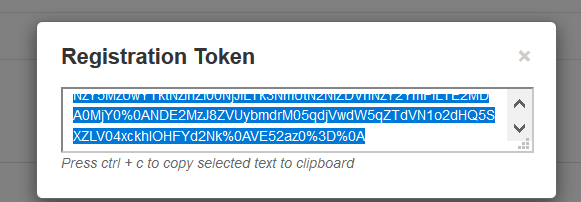
Step 4. Paste the token. Click Register.
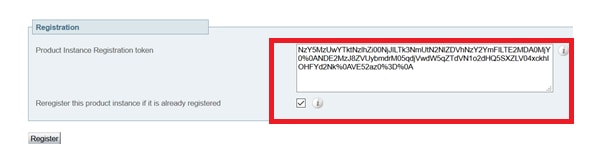
The instance is in process of registering.
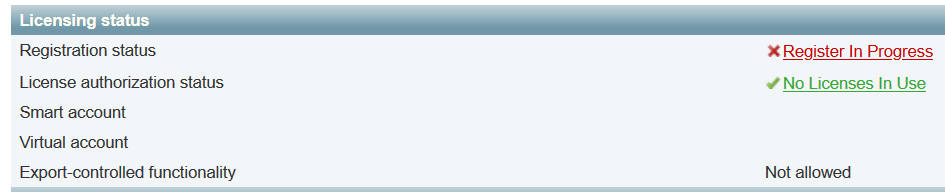
The status shows registered.

Troubleshoot
Verify
You can verify the Smart Licensing status by running the xstatus // license command on the CLI:
xstatus // license
*s Show: /
License:
All:
Smart Licensing Status
======================

Smart Licensing is ENABLED

Registration:
Status: REGISTERED
Smart Account: petelive.cisco.com
Virtual Account: Default
Export-Controlled Functionality: ALLOWED
Initial Registration: SUCCEEDED on Jun 10 2020 07:57:22 UTC
Last Renewal Attempt: None
Next Renewal Attempt: Jul 11 2020 09:08:38 UTC
Registration Expires: Sep 11 2020 11:31:12 UTC

License Authorization:
Status: AUTHORIZED on Jun 10 2020 08:02:32 UTC
Last Communication Attempt: SUCCEEDED on Jun 10 2020 08:02:32 UTC
Next Communication Attempt: Jul 10 2020 08:02:31 UTC
Communication Deadline: Sep 08 2020 07:33:04 UTC

Data Privacy:
Sending Hostname: yes
Callhome hostname privacy: DISABLED
Smart Licensing hostname privacy: DISABLED
Version privacy: DISABLED

Transport:
Type: Smart
URL: https://petelive/SmartTransport
Proxy:
Not Configured
How do Specific Licenses Apply to my Expressways
All licenses are pooled together and each individual node pulls only the licenses it needs. You do not assign a number of licenses to a specific node. If you have, for example, ten UC Manager Enhanced Plus licenses, this allows you to register 10 endpoints.
Q: What if you have 4 Expressways all registered to your Virtual Smart License Account?
A: Whichever node you point the first endpoint to, that node allows the registration. That Expressway connects to the cloud with the token registered from your Virtual Account and reports that one UC Manager Enhanced Plus license is used. On the Cisco License Central portal for your Virtual Account, you can now see you have nine UC Manager Enhanced Plus licenses. If you register another endpoint to a different Expressway node that is registered to the same Virtual License Account, it uses the same process, and reports one UC Manager Enhanced Plus license is used. Look back at the Cisco License Central portal, and you see that you have eight UC Manager Enhanced Plus licenses.
Example
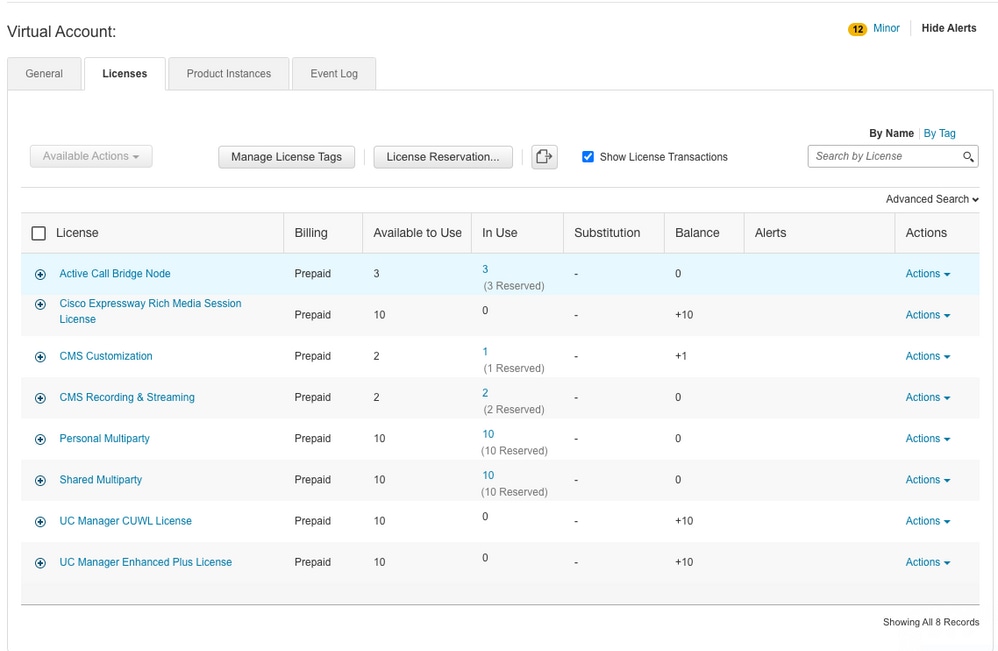
In this example, you can see there are ten UC Manager Enhanced Plus licenses in the virtual account:
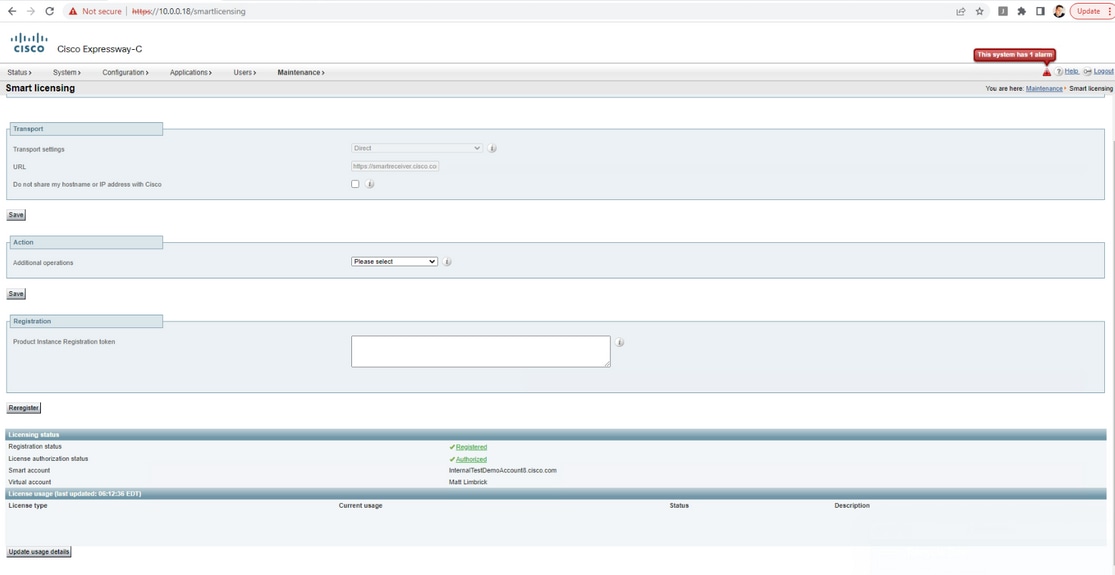
On this Expressway, you do not see any smart licenses under Expressway > Maintenance > Smart Licenses: License Usage used.
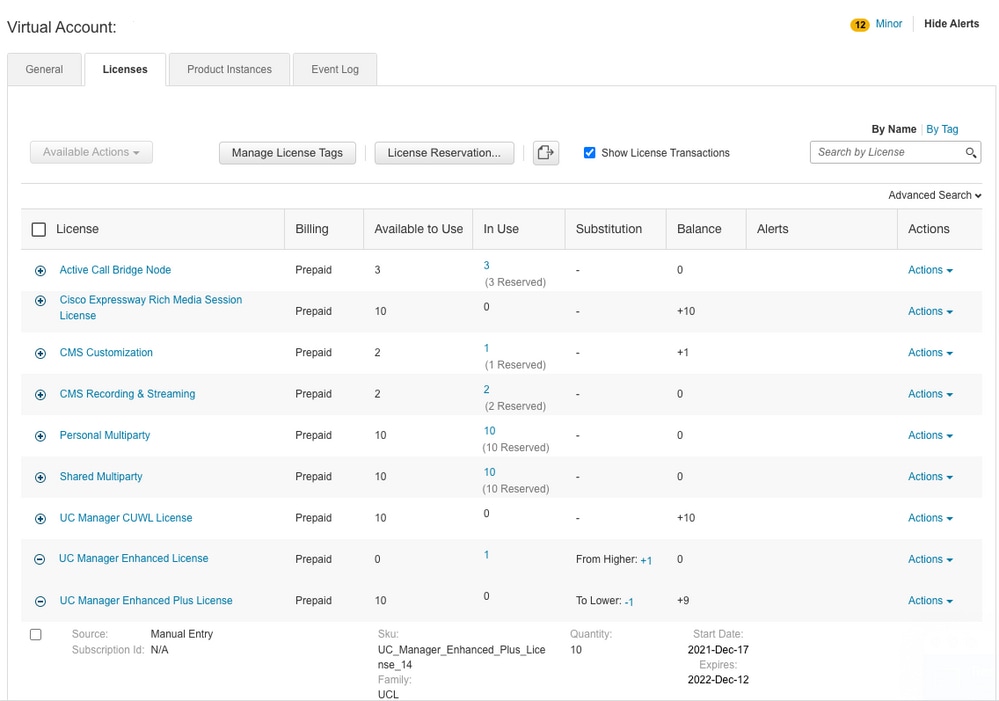
Once you register an endpoint to an Expressway registered to your Virtual account, you must see the UC Manager Enhanced Plus licenses count decrease to nine and the UC Manager Enhanced license now shows one In Use.
You can verify the Expressway registered to this Virtual Account has one endpoint registered under Expressway > Status > Registrations > By alias.

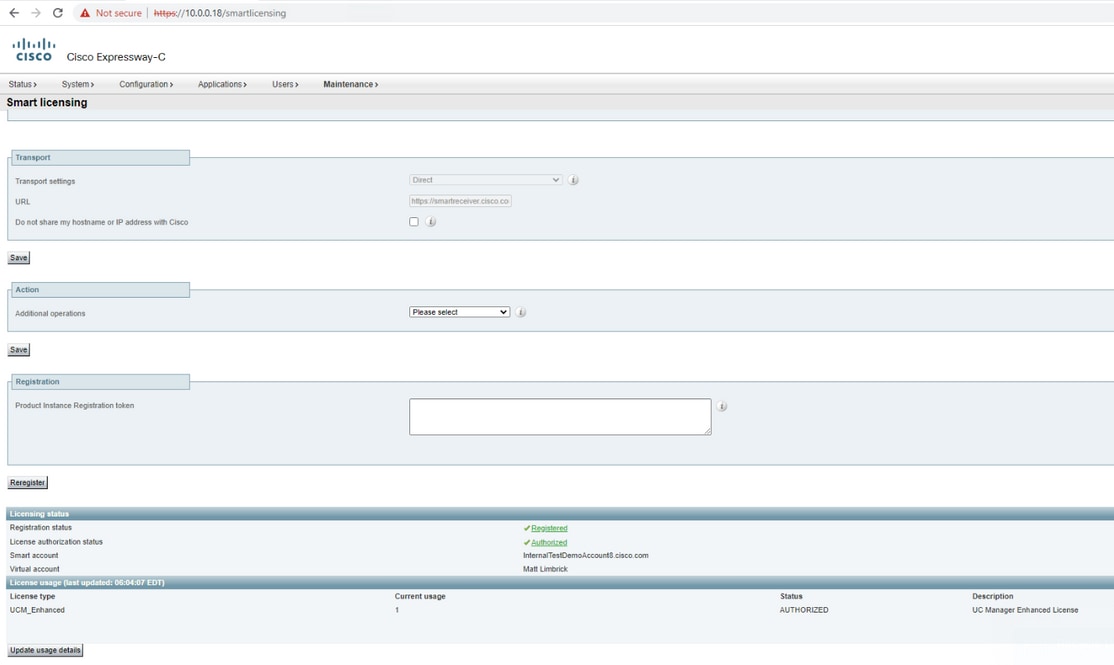
Then navigate to Expressway > Maintenance > Smart Licensing and confirm the registered endpoint utilizes one UC Manager Enhanced license.
If you unregister this endpoint from the Expressway registered to your Virtual Account, the count goes back to ten UC Manager Enhanced Plus licenses and the Expressway entry under Expressway > Maintenance > Smart Licenses: License Usage disappears.
Types of Smart Licenses
- LIC-EXP-DSK
- LIC-EXP-Room
- LIC-EXP-RMS
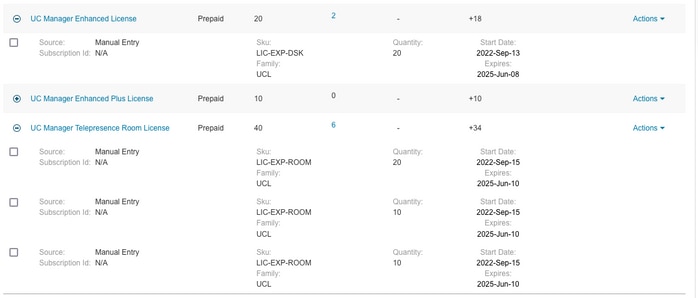
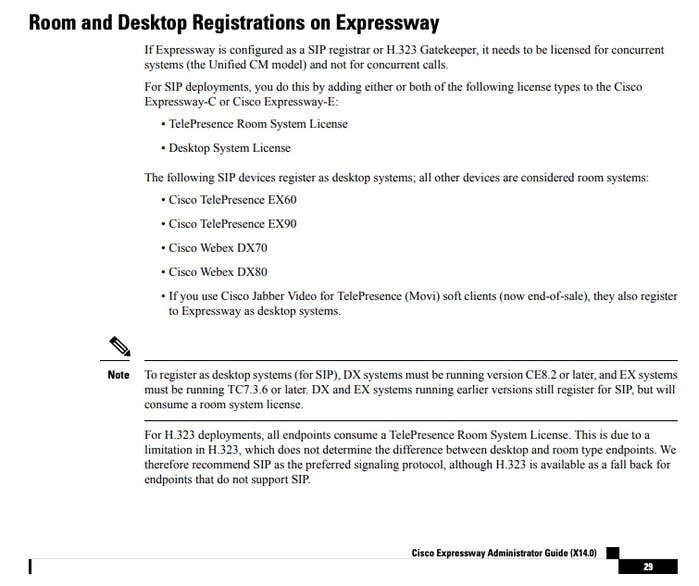
LIC-EXP-DSK is represented as UC Manager Enhanced License on Cisco License Central. These are only for desktop SIP devices such as EX60, EX90, DX70 and DX80. H323 registrations for these devices are consumed as Room Licenses.
LIC-EXP-Room is represented as UC Manager Telepresence Room License on Cisco License Central. These are for all other SIP registrations that are not SIP desktop devices as listed above, as well as all H323 registrations.
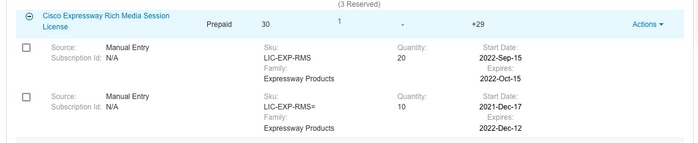
LIC-EXP-RMS is represented as Cisco Expressway Rich Media Session License. These are licenses for Traversal calls/non-Unified Communication calls.
License Usage
Revision History
| Revision | Publish Date | Comments |
|---|---|---|
6.0 |
07-Jul-2026
|
Updated spelling, grammar, spacing, inserted lines to separate sections/legibility, and any CCW alerts. |
5.0 |
05-Jun-2026
|
Recertification, Replace references to "Cisco Smart Software Manager (SSM)" with "Cisco License Central." |
4.0 |
05-May-2025
|
Recertification |
3.0 |
22-Apr-2024
|
Updated Machine Translation and Alt Text. |
2.0 |
13-Mar-2023
|
Added Alt Text.
Updated Introduction, Gerunds, Machine Translation, and Formatting. |
1.0 |
06-Oct-2021
|
Initial Release |
 Feedback