Understand and Use Catalyst Center APIs
Available Languages
Contents
Introduction
This document describes how to access and utilize CaTC Northbound (Intent) APIs using an API client and the built-in developer tools of the platform.
Background Information
It covers foundational HTTP/REST concepts and provides practical examples for automation and testing.
Prerequisites
Requirements
Cisco recommends knowledge of these topics:
- HTTP/1.1 protocols and status codes.
- REST architectural style.
- Basic understanding of Cisco Catalyst Center (CaTC )
- Basic understanding of Bruno (or similar API clients like Postman).
Components Used
The information in this document is based on these hardware and software versions:
- Cisco Catalyst Center versions 2.3.7.x and 3.x
- Bruno version 4.1.0
The information in this document was created from the devices in a specific lab environment. All of the devices used in this document started with a cleared (default) configuration. If your network is live, ensure that you understand the potential impact of any command.
Background Information
Catalyst Center Northbound APIs (Intent APIs) allow users to interact with the controller outside of the graphical user interface. This enables the automation of tailor-made workflows, integration with third-party tools, and efficient network management at scale.
Introduction to HTTP
Hypertext Transfer Protocol (HTTP) is the foundation of data communication for the web. It adheres to a client-server model where the client sends a request and the server returns a response.
The HTTP Request
An HTTP request consists of four parts:
- Request line: Specifies the method (including GET and POST), the URI, and the protocol version (suc as GET /api/v1/nodes HTTP/1.1).
- Headers: Provide metadata such as authentication credentials and content type.
- Empty line: Separates headers from the body.
- Message body (Optional): Contains data sent to the server (common in POST/PUT/PATCH).
The HTTP Response
An HTTP response mirrors the request structure:
- Status line: Includes the status code (such as 200 OK).
- Headers: Details about the server and the response data.
- Message body: The actual data requested (usually in JSON format for Catalyst Center).
HTTP Methods (Verbs)
- GET: Retrieves data from a resource.
- POST: Creates a new resource.
- PUT: Replaces an existing resource.
- PATCH: Applies partial modifications to a resource.
- DELETE: Removes a resource.
HTTP Status Codes
HTTP status codes are standardized numerical codes returned by a server as part of an HTTP response. They indicate the general result of a client request and help understand whether the request was successful, requires additional action or encountered an error.
The codes are grouped into five main categories according to their first digit.
- 1xx codes are informational and indicates that the request has been received and processing is continuing.
- 2xx codes indicate successful request, meaning the server successfully received, understood and processed the request.
- 3xx codes are used for redirection and indicate that additional action can be required to complete the request.
- 4xx codes represent client errors, meaning that there is an issue with the request sent by the client.
- 5xx codes represent sever errors, meaning the server encountered a problem while trying to process a request.
REST Overview
REST (Representational State Transfer) is an architectural style for designing networked applications. RESTful APIs use HTTP as the transport mechanism and typically use JSON for data exchange due to its lightweight nature.
When a client interacts with a REST API, the server returns a representation of the current state of a resource. This representation is transferred to the client as part of the response and can be expressed in a different format.
REST is not a protocol. Instead, it is a hierarchical style that defines a set of principles and constraints for building distributed systems and APIs. In modern APIs, JSON is one of the most commonly formats because it is lightweight and easy to process.
A typical REST interaction adheres to a client – based model (this was mentioned previously on the article). The client sends an HTTP request using methods such as GET, POST, PUT, PATCH, or DELETE. The server process and returns an HTTP response containing the requested information or result of the operation.
RESTful APIs commonly use HTTP as the communication mechanism for performing operations on resources. In this model, the client identifies a resource/endpoint and then uses HTTP method to indicate the action that to perform on that resource. A REST API can be described using several main elements. First, URI is used to identify the resource or endpoint that the client wants to access. The URI provides the location or identifier of that resource within the API. Second, the client uses standard HTTP methods such as GET, POST, PUT, PATCH and DELETE to define the request operation. For example, GET can be used to retrieve a resource, POST to create one, and DELETE to entirely remove one. Finally, the resource is exchange through a representation, which is defined by its media type. This representation is the form in which the resource data is transferred between the client and the server, such as JSON or XML.
Catalyst Center & REST APIs
CaTC helps simply campus network operations by centralizing automation, configuration, policy management, monitoring, and analytics. I allow network administrators to deploy and manage devices more efficiently, maintain consistent policies, monitor network behavior, and improve overall operational visibility. These capabilities can be access through the graphical user interface (GUI) as well as through APIs and external integrations.
CaTC platform also provides APIs that can be used to build custom integrations and automate network operations. By combining CaTC APIs with existing Cisco Solutions or third-party applications, organizations can extend the platform functionality and create tailor-made workflows for specific operations or business requirements.
After covering the foundational concepts, this document focuses on Northbound APIs, also referred to as Intent APIs, within Cisco Catalyst Center. These APIs expose specific Catalyst Center capabilities through a policy-based abstraction of business intent, allowing administrators and developers to focus on the desired outcome rather than the individual configuration steps required to achieve it.
Catalyst Center Intent APIs are RESTful APIs that use the JSON data format to interact with the platform. They can be used to discover network information, retrieve operational data, and perform supported control and automation tasks across the network.
Retrieve an Authentication Token Using Bruno
Before making API calls, you must authenticate to receive a token.
1. Identify the API Endpoint
- Log in to Catalyst Center.
- Navigate to Menu > Platform > Developer Toolkit.
- On the left menu, select Authentication > Authentication API.
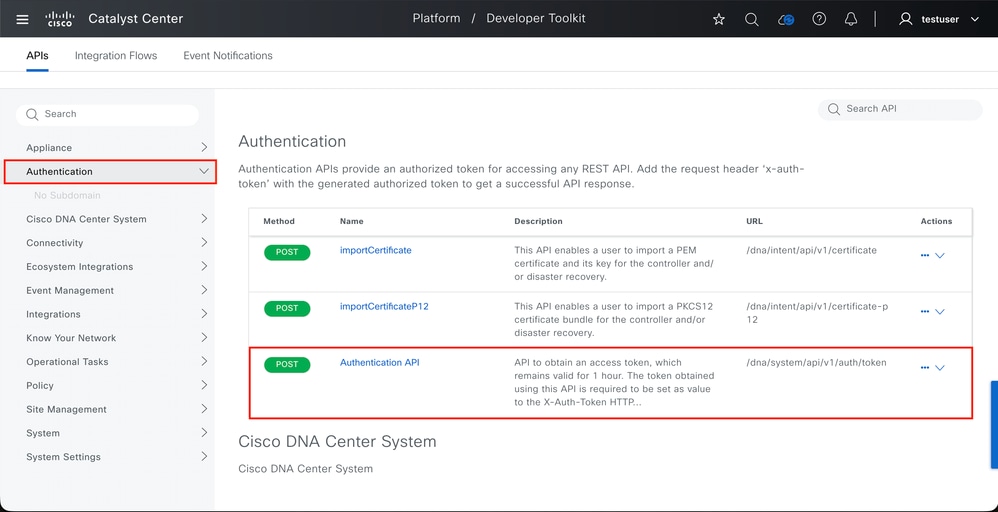 Catalyst Center Developer Toolkit
 - Copy the URL (usually POST /dna/system/api/v1/auth/token).
2. Configure Bruno for Authentication
- In Bruno, create a New Request.
- Set the Type to HTTP and the Method to POST.
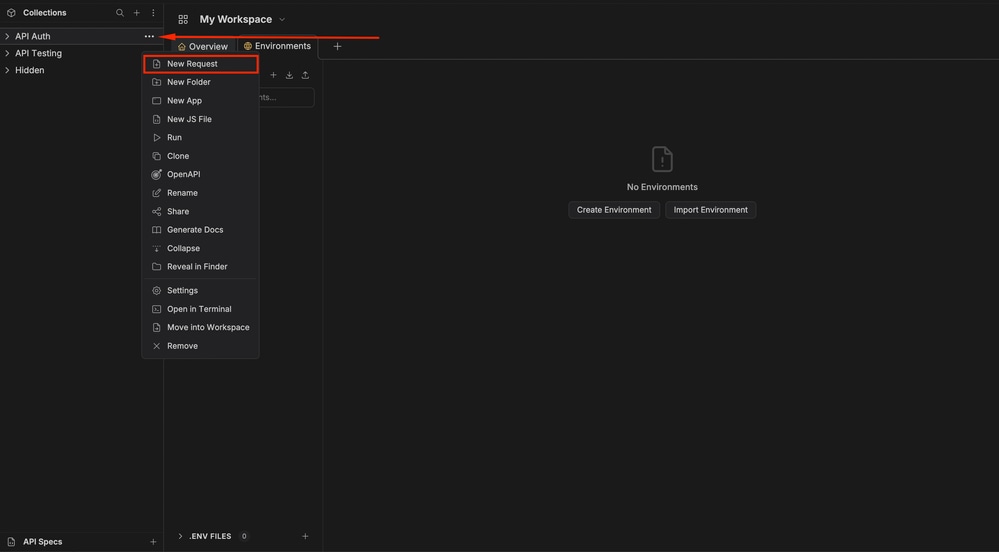 Creating a new request in Bruno
 - Enter the URL for the Authentication API.
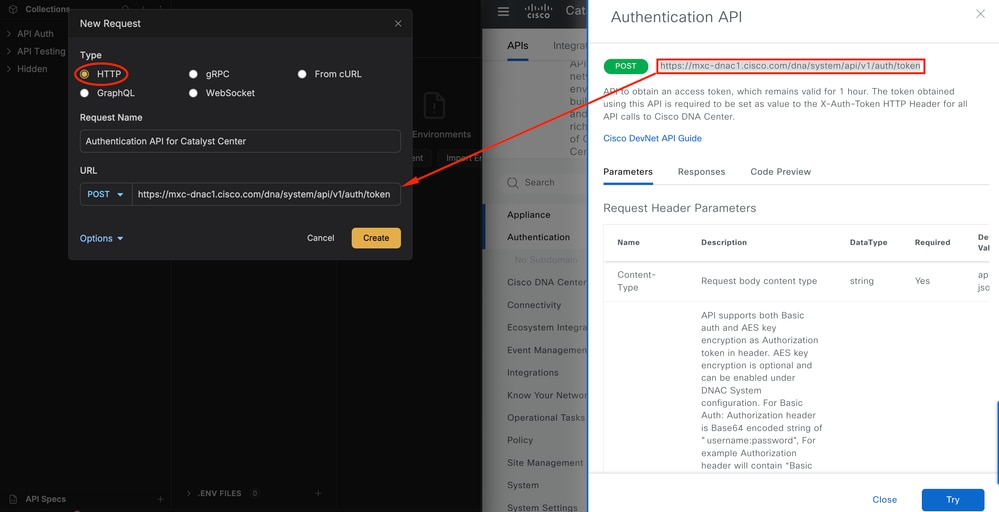 Creating a new request in Bruno
 - Navigate to the Auth tab and select Basic Auth.
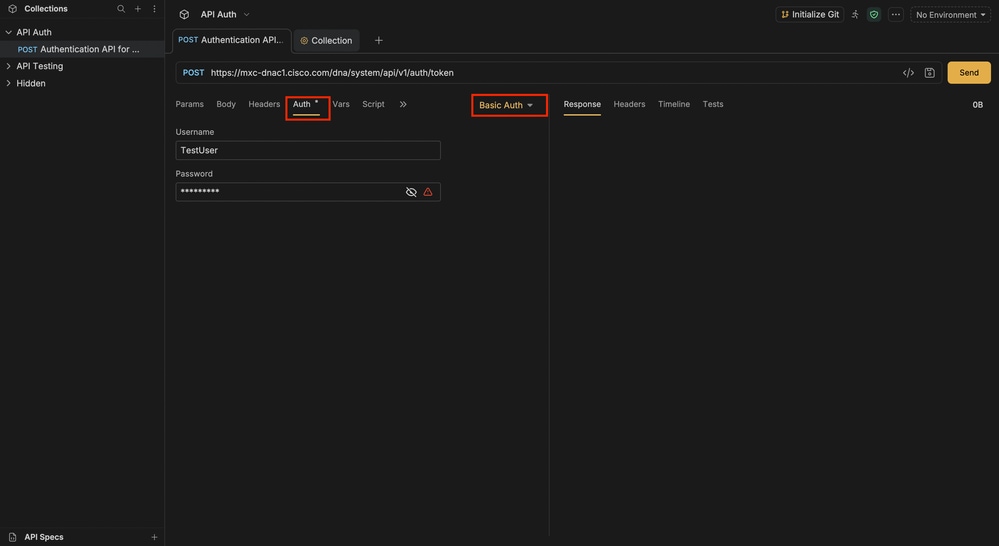 Basic Authentication for Authentication API
 - Enter your Catalyst Center SUPER ADMIN credentials.
- Click Send.
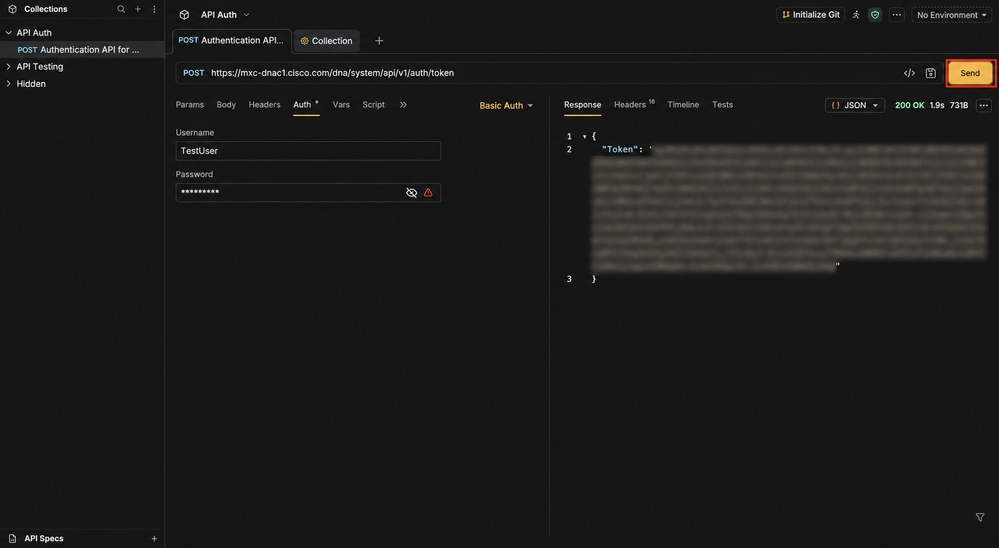 Running the Authentication API
The server returns a 200 OK status and a JSON payload containing the Token.
Alternative (Terminal): You can also generate the token by base64-encoding your `username:password` and sending a cURL request or using the **Try** button in the Catalyst Center GUI to copy the generated token.
 Getting the base64 encoding for the username and password
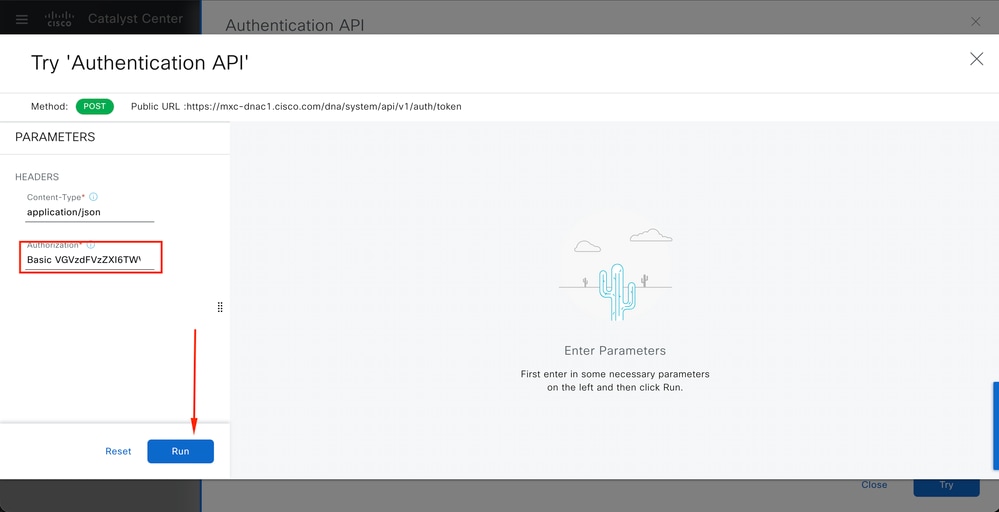 Inputting Basic Auth with encoded base64 username and password
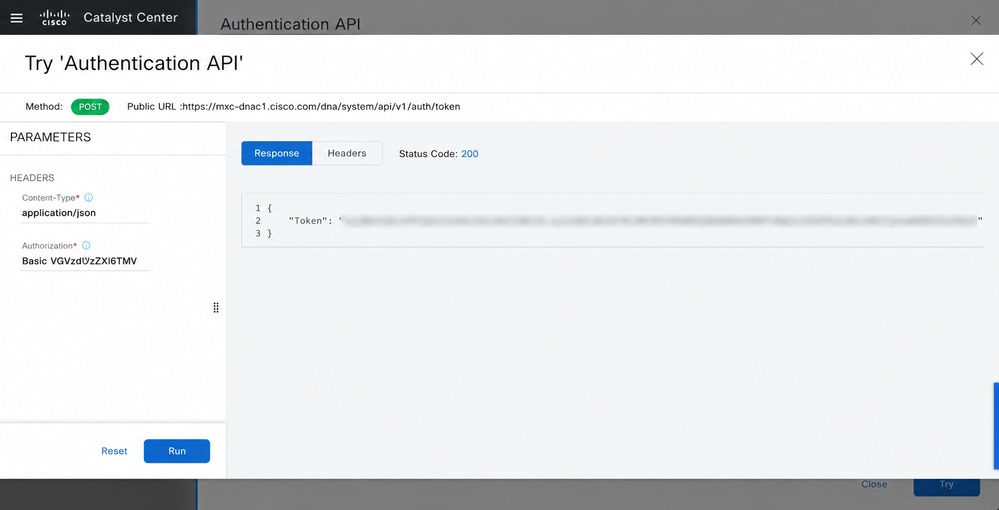 Getting Authentication token from Catalyst Center GUI.
At this point you have the Authentication Token, either on the Bruno response or on the response done from the Catalyst Center Developer Toolkit.
Now add the token as a Header on the collection settings in Bruno, this facilitates any other created request within the collection to use the token, so that you have no need to input the token manually as a header for each request.
3. Set a Global Header in Bruno
To avoid re-authenticating for every request, set the token as a collection-level header:
- Right-click your collection and select Settings.
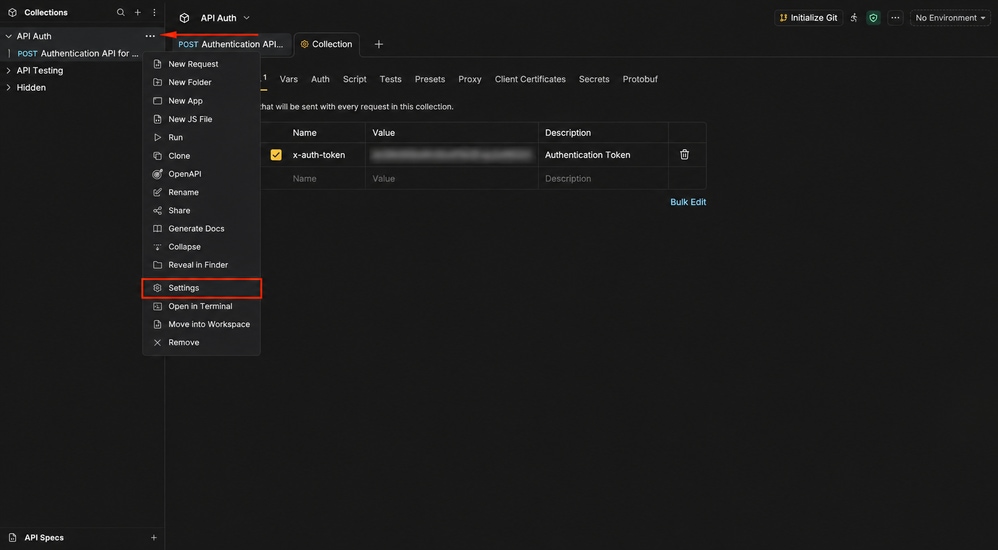 Collection Settings
 - Go to the Headers tab.
- Add a new header:
- Name: x-auth-token
- Value: [Paste your token here]
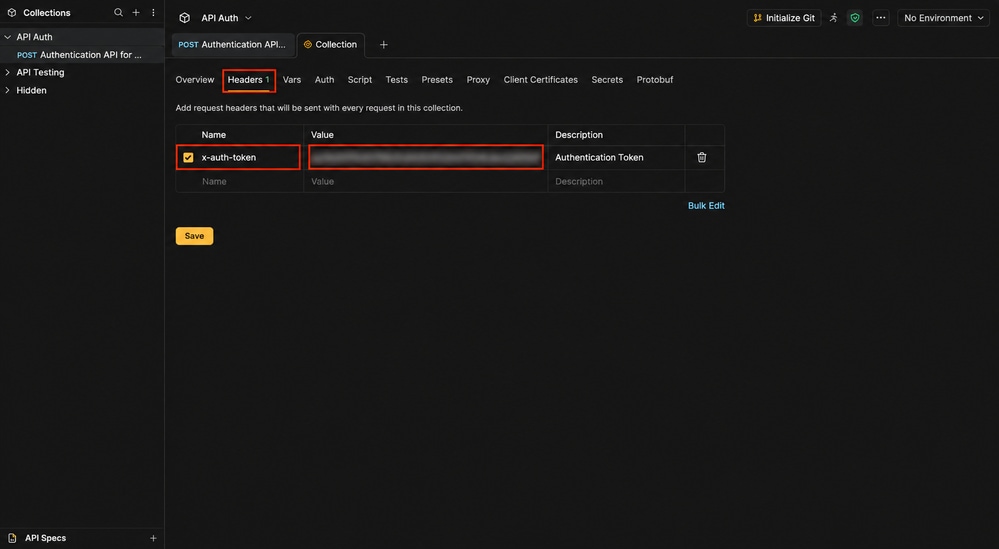 Inputting global headers for the API Collection in Bruno.
- Click Save.
At this point, you have generated the authentication token in order to do any other Catalyst Center API requests.
Example 1: Create a Site Floor
This example demonstrates how to create a floor within the network hierarchy (Global > TestArea > TestBuilding).
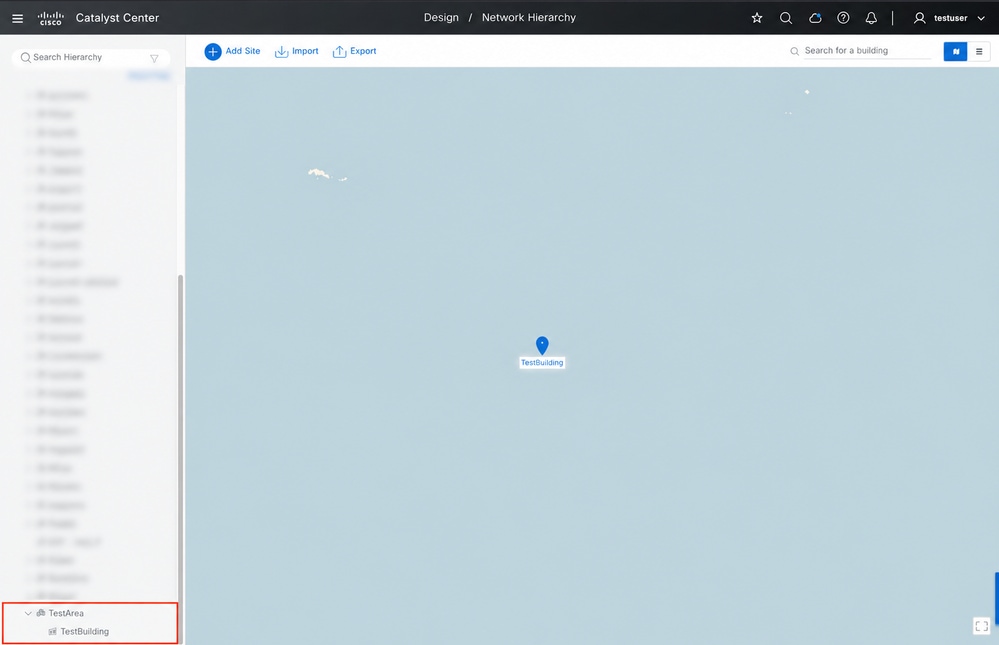 Network Hierarchy
Step 1: Get the Parent ID
Use the GET /dna/intent/api/v1/sites API to find the ID of TestBuilding.
- Query Parameter: nameHierarchy=Global/TestArea/TestBuilding
- Copy the ID from the response; this is your parentId.
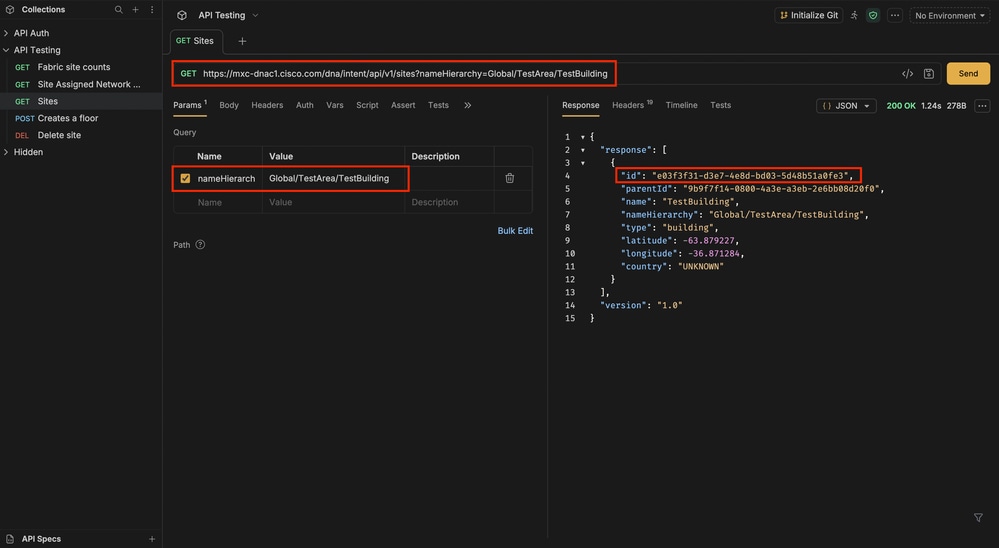 GET request for /dna/intent/api/v1/sites?nameHierarchy=Global/TestArea/TestBuilding
Step 2: Create the Floor
- Create a POST request for /dna/intent/api/v2/floors.
- In the Body tab (JSON), enter the required parameters:
{
  "name": "Floor 1",
  "parentId": "your-building-id-here",
  "floorNumber": 1,
  "rfModel": "Cubic-Office",
  "width": 100,
  "length": 100,
  "height": 10,
  "unitsOfMeasure": "feet"
}- Click Send. A successful response confirms the floor creation.
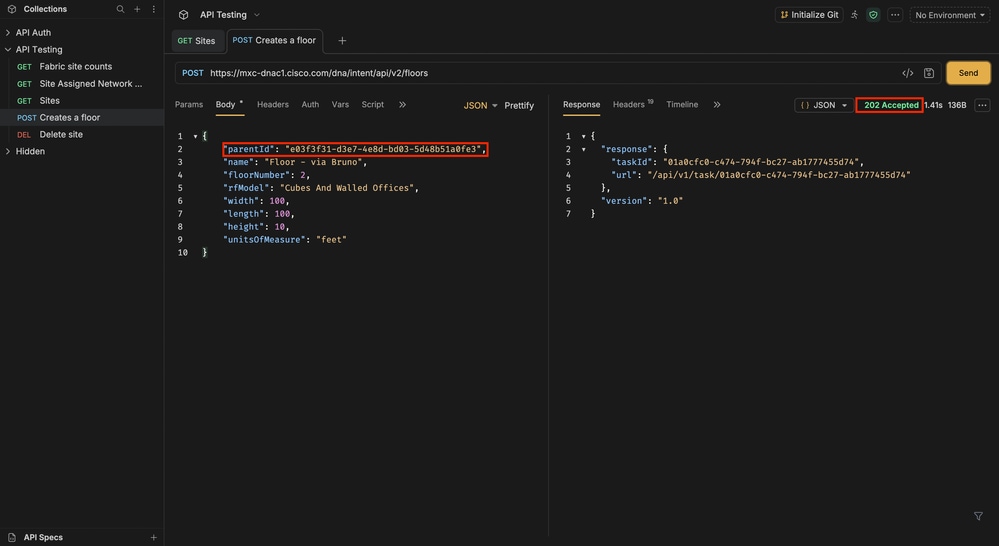 POST request to create the floor
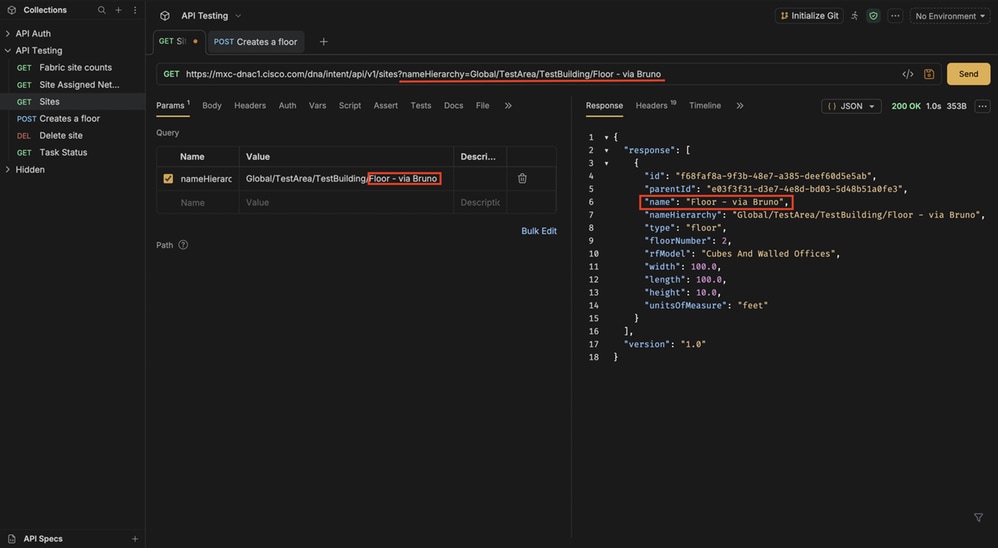 GET API to validate floor creation via a POST request.
Finally, to validate that the floor was successfully created, you can run the previous API and modify the query to match the full hierarchical path as shown above.
Example 2: Retrieve Interface Information
This example shows how to fetch the status of a specific interface on a network device.
Step 1: Identify the Device ID
In the Catalyst Center GUI, go to Inventory, click on your device, and look at the URL in your browser. The last segment is the Device ID.
Step 2: Create a Parameterized Request in Bruno
- Create a GET request for /dna/intent/api/v1/interface/network-device/{{deviceId}}.
- In the Vars tab of the request, add a variable named deviceId and paste your ID.
- To filter for a specific port, add a Query Parameter:
- Key: name
- Value: GigabitEthernet1/0/5
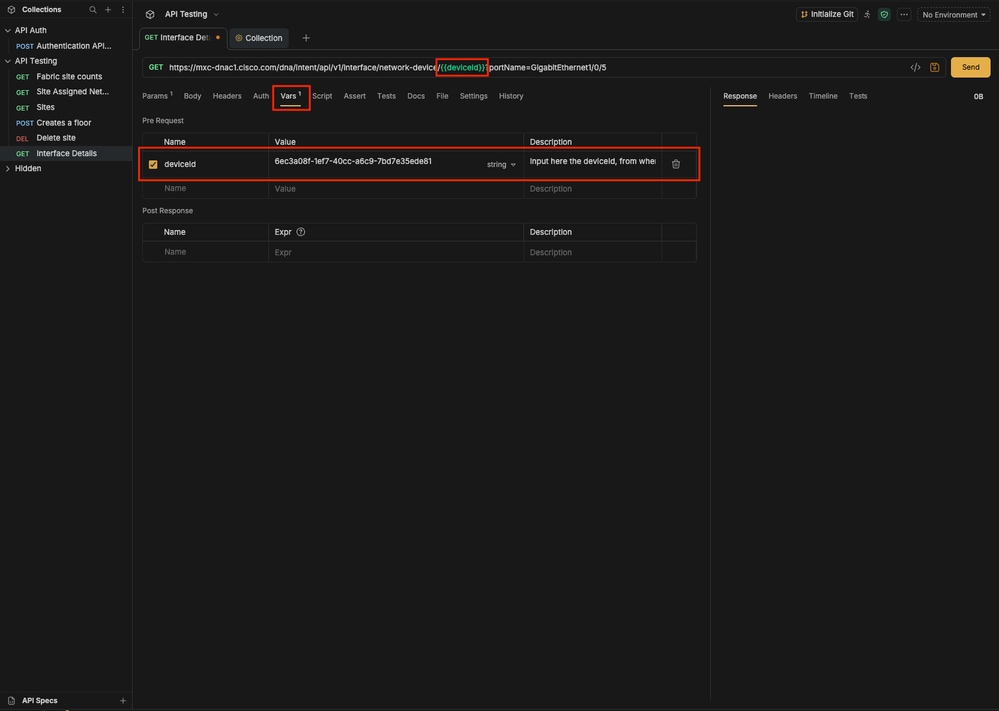 Creating variables in Bruno
- Click Send.
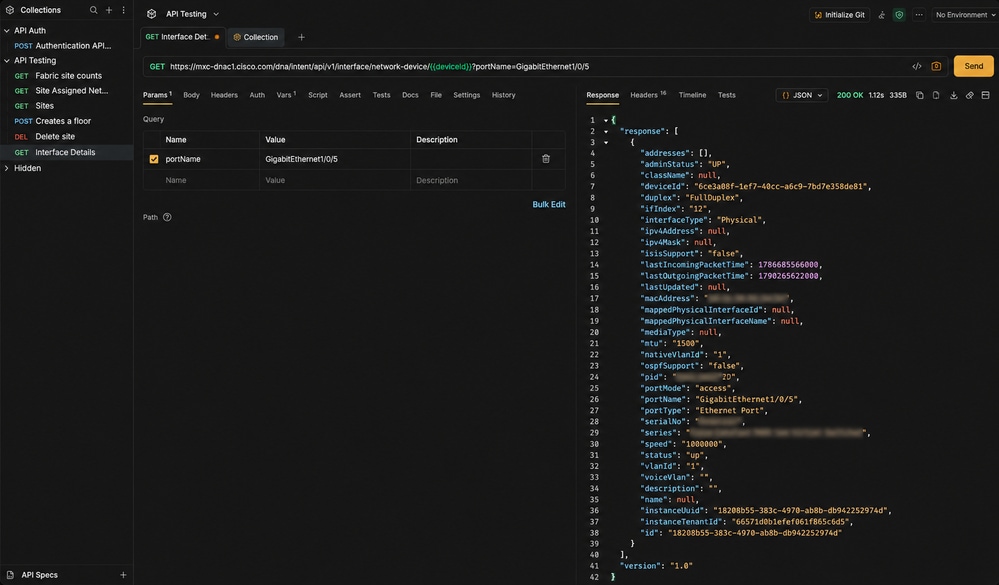 GET request applying a query
Conclusion
Catalyst Center Northbound APIs provide powerful flexibility for network administrators. By transitioning from GUI-based management to API-driven workflows, you can automate repetitive tasks, ensure configuration consistency, and integrate network intelligence into your broader IT ecosystem.
Revision History
| Revision | Publish Date | Comments |
|---|---|---|
1.0 |
14-Oct-2026
|
Initial Release |

 Feedback
Contact Cisco
- Open a Support Case

- (Requires a Cisco Service Contract)