Configure Switched Port Analyzer on ACI
Available Languages
Contents
Introduction
This document describes how to configure Switched Port Analyzer (SPAN) on Cisco Application Centric Infrastructure (ACI).
Background Information
In general, there are three types of SPAN. Local SPAN, Remote SPAN (RSPAN) and Encapsulated Remote SPAN (ERSPAN). The differences between these SPANs are mainly the destination of copy packets. Cisco ACI supports Local SPAN and ERSPAN.

Note: This document assumes that readers are already familiar with SPAN in general such as Local SPAN and ERSPAN differences.
SPAN Type in Cisco ACI
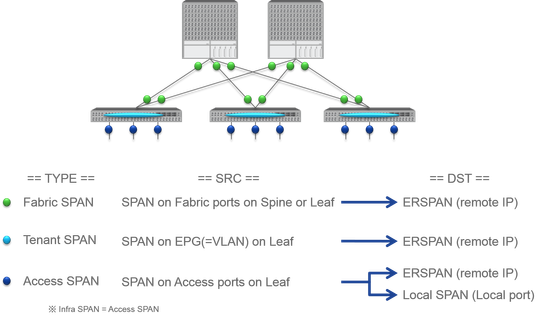
Cisco ACI has three types of SPAN; Fabric SPAN, Tenant SPAN and Access SPAN. The difference between each SPANs is the source of copy packets.
As mentioned previously,
- Fabric SPAN is to capture packets that come in and go out from interfaces between Leaf and Spine switches.
- Access SPAN is to capture packets that come in and go out from interfaces between Leaf switches and external devices.
- Tenant SPAN is to capture packets that come in and go out from EndPoint Group (EPG) on ACI Leaf switches.
This SPAN name corresponds to where to be configured on Cisco ACI GUI.
- Fabric SPAN is configured under Fabric > Fabric Policies.
- Access SPAN is configured under Fabric > Access Policies.
- Tenant SPAN is configured under Tenants > {each tenant}.
As for the destination of each SPAN, only Access SPAN is capable of both Local SPAN and ERSPAN. The other two SPAN (Fabric and Tenant) are only capable of ERSPAN.
Limitations and Guidelines
Please review the Limitations & Guidelines from the Cisco APIC Troubleshooting Guide. It is mentioned in Troubleshooting Tools and Methodology > Using SPAN.
Configuration
This section introduces brief examples that relate to the configuration for each SPAN Type. There are specific sample cases on how to select the span type in the later section.
SPAN Configuration is also described in the Cisco APIC Troubleshooting Guide: Troubleshooting Tools and methodology > Using SPAN.
The UI can appear different than the current versions but the config approach is the same.
Access SPAN (ERSPAN)
Sample Topology
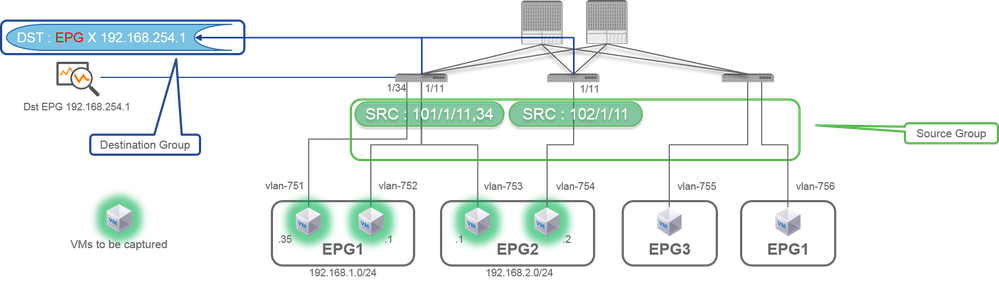
Configuration Example
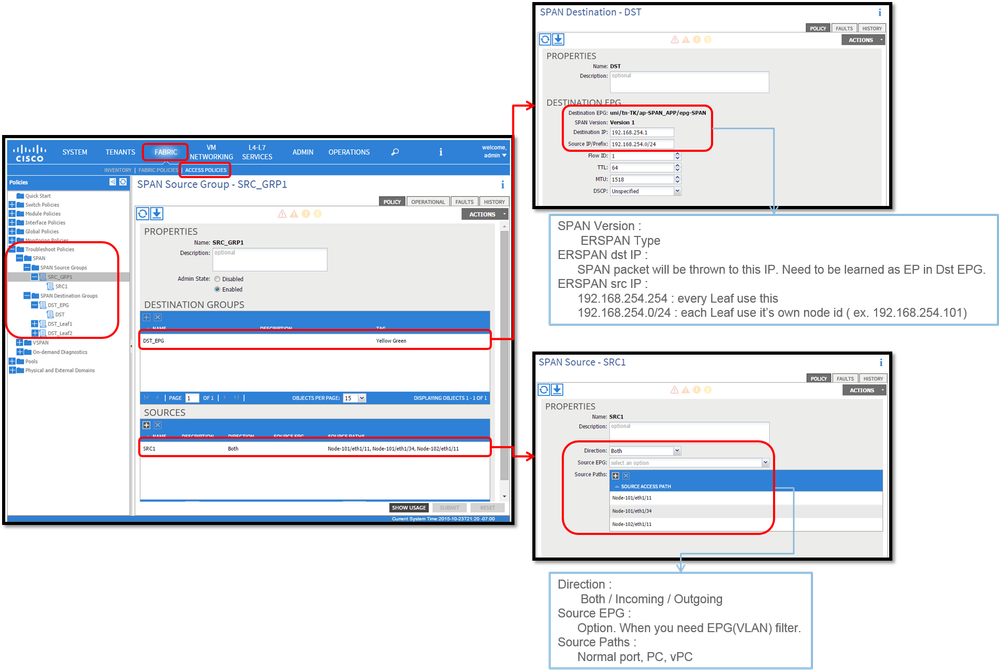
Where:
Navigate to FABRIC > ACCESS POLICIES > Troubleshoot Policies > SPAN.
- SPAN Source Groups
- SPAN Destination Groups
SPAN Source Group ties Destination and Sources.
How:
- Create SPAN Source Group (SRC_GRP1).
- Create SPAN Source (SRC1) under SPAN Source Group (SRC_GRP1).
- Configure these parameters for SPAN Source (SRC1).
- Direction - Source EPG (option)
- Source Paths (could be multiple interfaces)
Note: Please refer to the picture for details of each parameter.
- Create SPAN Destination Group (DST_EPG).
- Create SPAN Destination (DST).
- Configure these parameters for SPAN Destination (DST)
- Destination EPG
- Destination IP
- Source IP/Prefix (This can be any IP. If the prefix is used, node-id of the source node is used for the undefined bits. For example, prefix: 1.0.0.0/8 on node-101 => src IP 1.0.0.101)
- Other parameters can be left as default
Note: Please refer to the picture for details of each parameter.
- Ensure the SPAN Destination Group is tied to an appropriate SPAN Source Group.
- Ensure Admin State is Enabled.
Note: SPAN stops when you select Disabled on this Admin State. There is no need to delete all policies if you re-use them later.
Also please ensure that the destination IP for ERSPAN is learned as an endpoint under the specified destination EPG. In the previously mentioned example, 192.168.254.1 has to be learned under Tenant TK > Application profile SPAN_APP > EPG SPAN. Or the destination IP can be configured as a static EndPoint under this EPG if the destination device is a silent host.
Access SPAN (Local)
Sample Topology
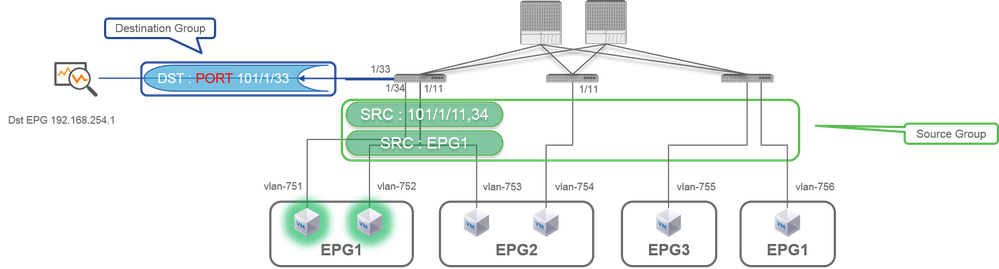
Configuration Example
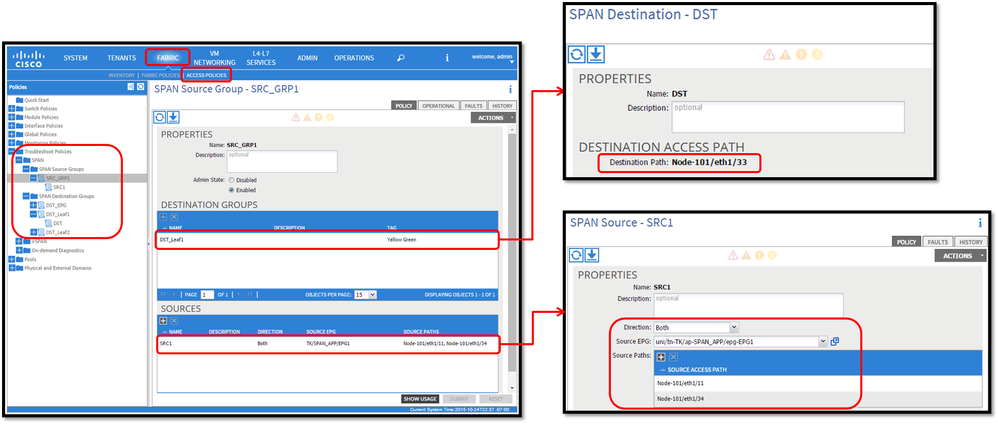
- Where:
Fabric > ACCESS POLICIES > Troubleshoot Policies > SPAN
- SPAN Source Groups
- SPAN Destination Groups
SPAN Source Group ties Destination and Sources.
- How :
- Create SPAN Source Group (SRC_GRP1)
- Create SPAN Source (SRC1) under SPAN Source Group (SRC_GRP1)
- Configure these parameters for SPAN Source (SRC1)
- Direction
- Source EPG (option)
- Source Paths (could be multiple interfaces)
※ please refer to the picture for details of each parameter. - Create SPAN Destination Group(DST_Leaf1)
- Create SPAN Destination (DST)
- Configure these parameters for SPAN Destination (DST)
- Destination interface and node. - Ensure the SPAN Destination Group is tied to an appropriate SPAN Source Group .
-
Ensure Admin State is Enabled.
※ SPAN stops when you select Disabled on this Admin State. There is no need to delete all policies if you re-use them later.
The destination interface does not require any configuration by Interface Policy Groups. It works when you plug a cable into the interface on ACI Leaf.
Limitations:
- For Local SPAN, a destination interface and source interfaces must be configured on the same Leaf.
- The destination interface does not require it to be on an EPG as long as it is UP.
- When the virtual Port-Channel (vPC) interface is specified as a source port, Local SPAN cannot be used
However, there is a workaround. On a first-generation leaf, an individual physical port that is a member of vPC or PC can be configured as a SPAN source. With this Local SPAN can be used for traffic on vPC ports.
This option, however, is not available on a second-generation leaf (Cisco bug ID CSCvc11053). Instead, support for SPAN on "VPC component PC" was added via Cisco bug ID CSCvc44643 in 2.1(2e), 2.2(2e) and forward. With this, any generation leaf can configure a port channel, which is a member of vPC, as a SPAN source. This allows any generation leaf to use Local SPAN for traffic on vPC ports. - Specifying the individual ports of a port channel on second-generation leaves cause only a subset of the packets to be spanned (also due to Cisco bug ID CSCvc11053).
- PC and vPC cannot be used as the destination port for Local SPAN. From 4.1(1), the PC can be used as a destination port for Local SPAN.
Access SPAN - with ACL Filters
You can use ACL filters on access span sources. This feature provides the ability to SPAN a particular flow or flow of traffic in/out of a SPAN source.
Users can apply the SPAN Acl(s) to a source when there is a need to SPAN flow specific traffic.
It is not supported in Fabric SPAN and Tenant Span source groups/sources.
Care must be taken when you add filter entries in a filter group since it could add tcam entries for every source that currently uses the filter group.
A Filter Group can be associated to:
-Span Source: the filter group is used to filter traffic on ALL interfaces defined under this Span Source.
-Span Source Group: the filter group (say x) is used to filter traffic on ALL interfaces defined under each of the Span Source(s) of this Span Source Group.
In this configuration snapshot, the filter group is applied to the Span source group.
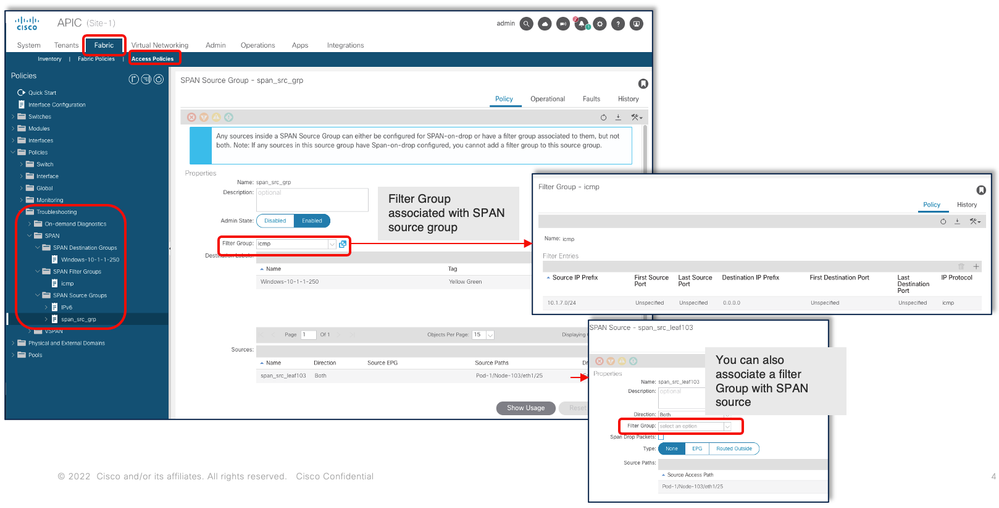
In the case where a particular Span Source already associates with a Filter Group (say y), that filter group (y) is used instead to filter group on all interfaces under this specific Span Source
- A Filter group that is applied at a source group automatically applies to all sources in that source group.
- A Filter group that is applied at a source is applicable to that source only.
- A filter group is applied at both the source group and a source in that source group, the filter group applied at the source takes precedence.
- A filter group applied at a source is deleted, filter group applied at the parent source group is automatically applied.
- A filter group applied at a source group is deleted, it is deleted from all sources currently that inherit in that source group.
Tenant SPAN (ERSPAN)
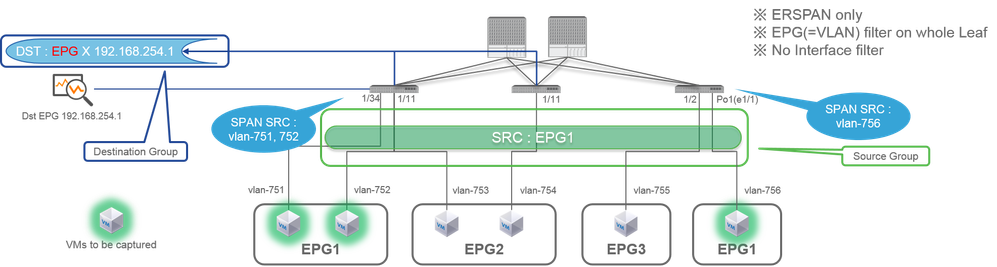
Sample Topology
Configuration Example
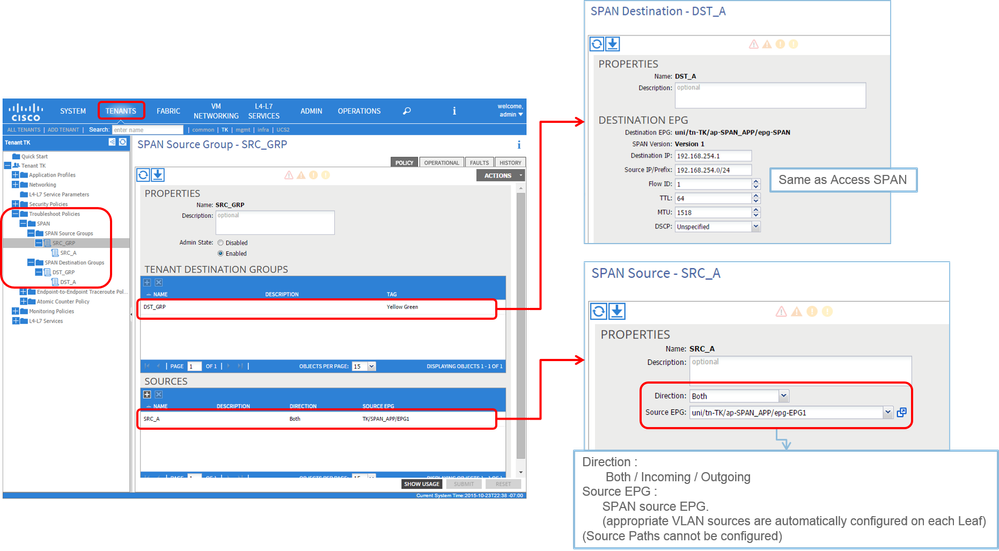
- Where:
Tenants > {tenant name} > Troubleshoot Policies > SPAN
- SPAN Source Groups
- SPAN Destination Groups
※ SPAN Source Group ties Destination and Sources.
- How:
- Create SPAN Source Group (SRC_GRP)
- Create SPAN Source (SRC_A) under SPAN Source Group (SRC_GRP)
- Configure these parameters for SPAN Source (SRC_A)
- Direction
- Source EPG
※ Please refer to the picture for details of each parameter. - Create SPAN Destination Group (DST_GRP)
- Create SPAN Destination (DST_A)
- Configure these parameters for SPAN Destination (DST_A)
- Destination EPG
- Destination IP
- Source IP/Prefix
- Other parameters can be left as default
※ Please refer to the picture for details of each parameter. - Ensure SPAN Destination Group is tied to an appropriate SPAN Source Group.
- Ensure Admin State is Enabled.
※ SPAN stops when you select Disabled on this Admin State. There is no need to delete all policies if you re-use them later.
Fabric SPAN (ERSPAN)
Sample Topology
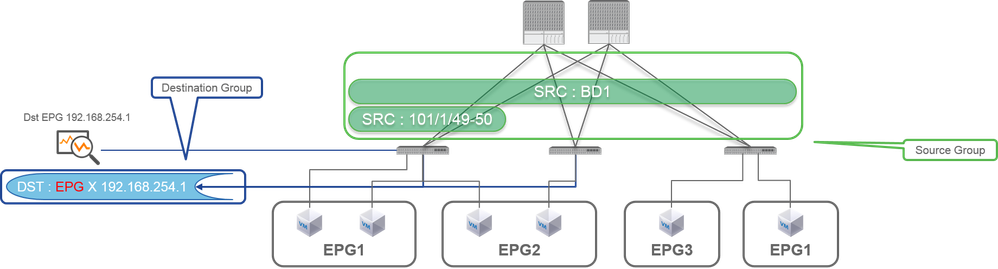
Configuration Example
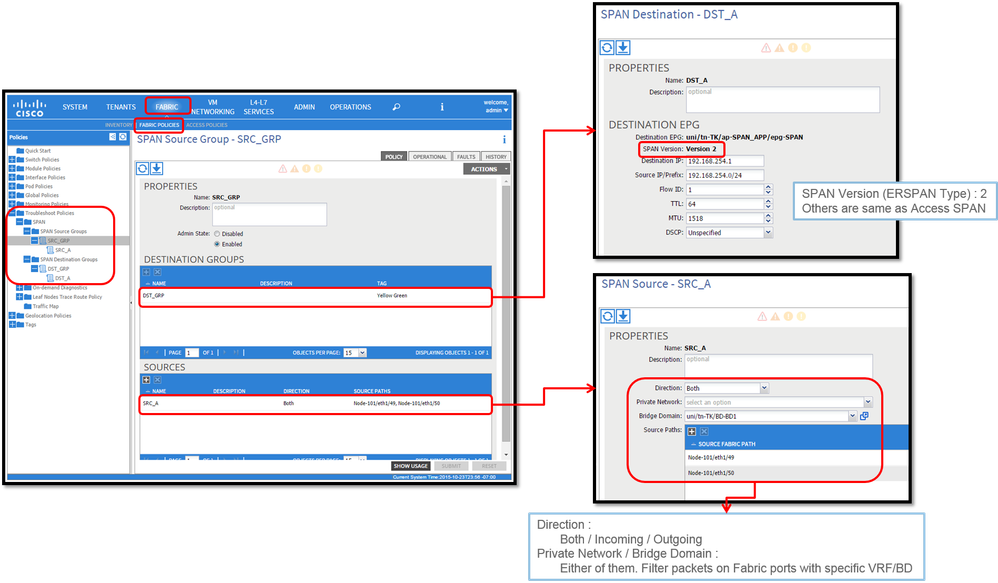
- Where:
Fabric > FABRIC POLICIES > Troubleshoot Policies > SPAN
- Fabric
- SPAN Destination Groups
SPAN Source Group ties Destination and Sources
- How:
- Create SPAN Source Group (SRC_GRP)
- Create SPAN Source (SRC_A) under SPAN Source Group (SRC_GRP)
- Configure these parameters for SPAN Source (SRC_A)
- Direction
- Private Network (option)
- Bridge Domain (option)
- Source Paths (could be multiple interfaces)
※ please refer to the picture for details of each parameter. - Create SPAN Destination Group (DST_GRP)
- Create SPAN Destination (DST_A)
- Configure these parameters for SPAN Destination (DST_A)
- Destination EPG
- Destination IP
- Source IP/Prefix
- Other parameters can be left as default
※ please refer to the picture for details of each parameter. - Ensure SPAN Destination Group is tied to an appropriate SPAN Source Group.
- Ensure Admin State is Enabled.
※ SPAN stops when you select Disabled on this Admin State. There is no need to delete all policies if you re-use them later.
Although it is described in a later section ERSPAN Version (Type), you can tell ERSPAN version II is used for Fabric SPAN and version I is used for Tenant and Access SPAN.
GUI Verification
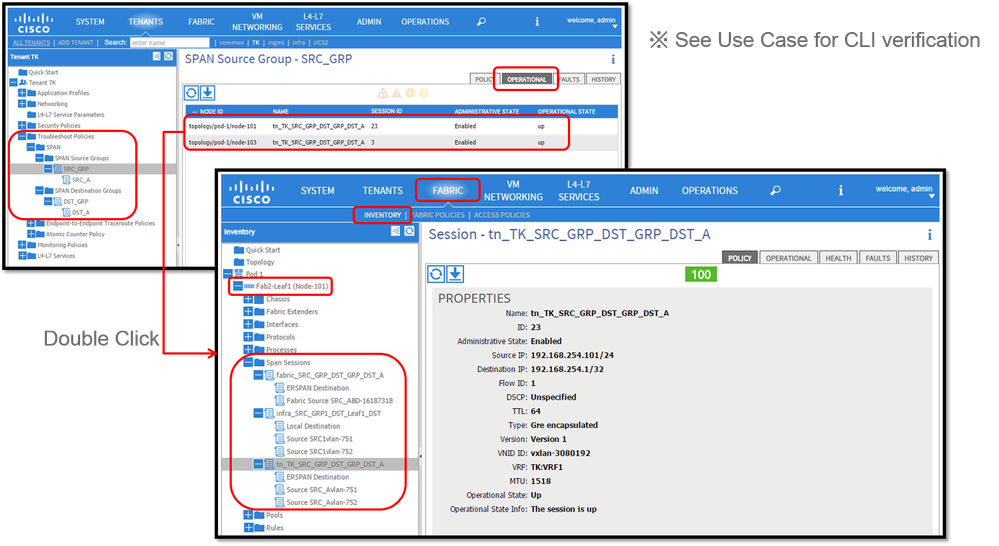
- Verification of SPAN Configuration Policy
- Fabric > ACCESS POLICIES > Troubleshoot Policies > SPAN > SPAN Source Groups > Operational tab
- Fabric > FABRIC POLICIES > Troubleshoot Policies > SPAN > SPAN Source Groups > Operational tab
- Tenants > {tenant name} > Troubleshoot Policies > SPAN > SPAN Source Groups > Operational tab
Please ensure Operational State is up.
- Verification on SPAN Session on the node itself
- Double-click on each session from SPAN Configuration Policy orFabric > INVENTORY > Node > Span Sessions > { SPAN session name }
Please ensure Operational State is up.
SPAN Session naming convention:
- Fabric SPAN: fabric_xxxx
- Access SPAN: infra_xxxx
- Tenant SPAN: tn_xxxx
Select the ACI SPAN Type
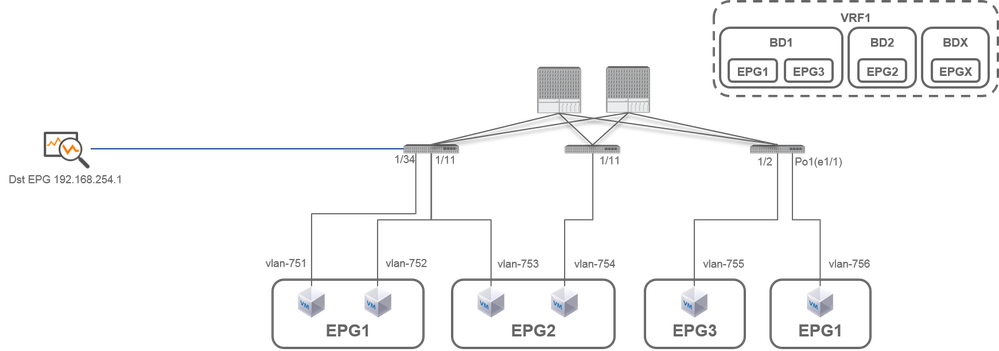
In this section, detailed scenarios are described for each ACI SPAN type (Access, Tenant, Fabric) The base topology for each scenario is mentioned in the previous section.
If you understand these scenarios, you can select the appropriate ACI SPAN type for your requirement such as packets on only specific interfaces must be captured or all packets on a specific EPG regardless of interfaces must be captured, and more.
In Cisco ACI, SPAN is configured with thesource group and destination group. The Source group contains multiple source factors such as interfaces or EPG. The destination group contains destination information such as the destination interface for Local SPAN or destination IP for ESPAN.
After packets are captured, please see the section "How to Read SPAN Data" to decode captured packets.
Note: Please focus on VMs highlighted with a green light in each topology. Each scenario is to capture packets from these highlighted VMs.
Access SPAN (ERSPAN)
Case 1
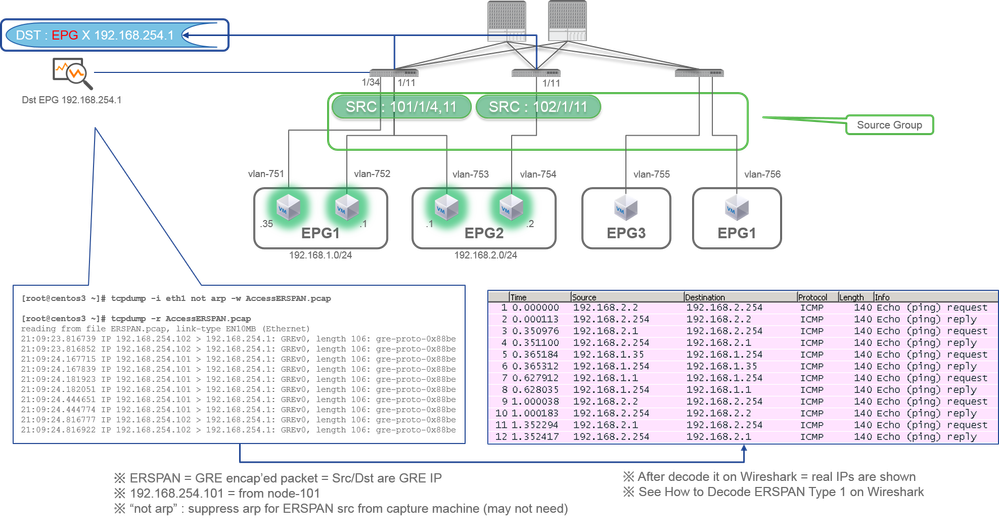
Src "Leaf1 e1/11 e1/34 & Leaf2 e1/11" | Dst "192.168.254.1"
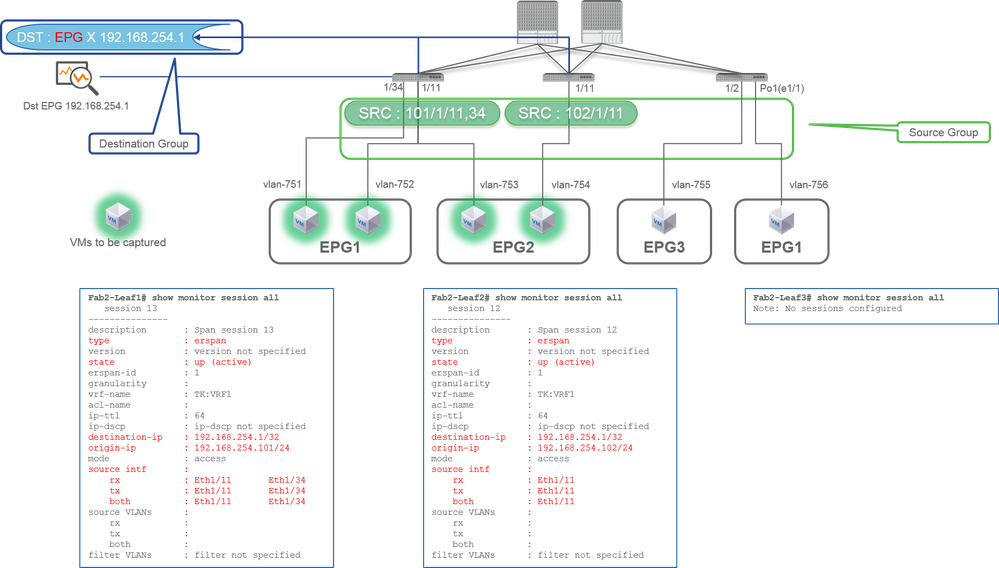
- Source Group
- Leaf1 e1/11
- Leaf1 e1/34
- Leaf2 e1/11
- Destination Group
- 192.168.254.1 on EPG X
Access SPAN can specify multiple interfaces for a single SPAN session. It can capture all packets that come in or go out from specified interfaces regardless of their EPG.
When multiple interfaces are specified as a source group from multiple Leaf switches, the destination group must be ERSPAN, not Local SPAN.
In this example, it copies packets from all VMs on EPG1 and EPG2.
CLI Check Point
- Please make sure the status is up (active)
- destination-ip is destination IP for ERSPAN
- origin-ip is source IP for ERSPAN
Case 2
Src "Leaf1 e1/11 & Leaf2 e1/11" | Dst "192.168.254.1"
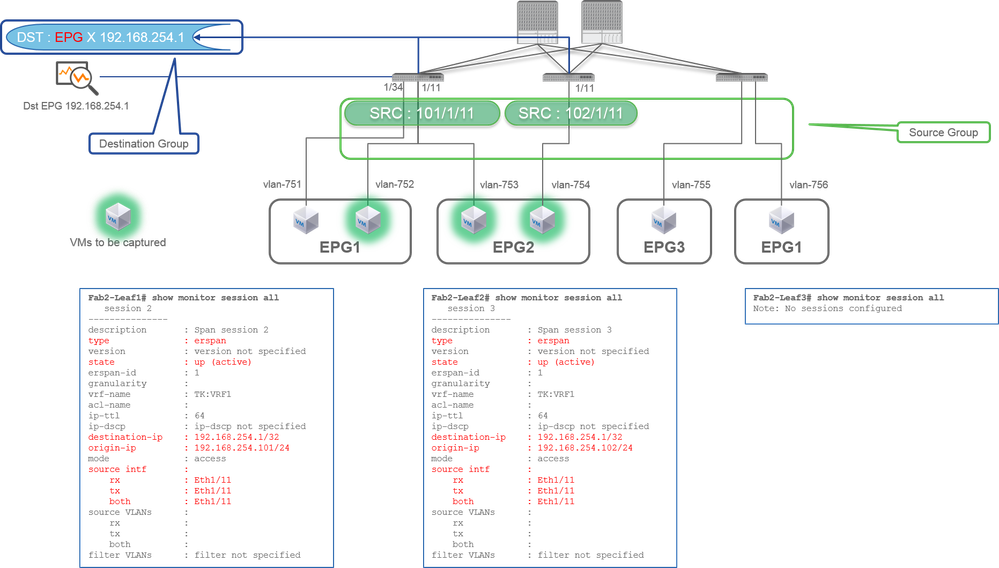
- Source Group
- Leaf1 e1/11
- Leaf2 e1/11
- Destination Group
- 192.168.254.1 on EPG X
In this example, Leaf1 e1/34 is removed from the SPAN Source Group configured at previous Case1.
The key point in this example is that Access SPAN can specify source interfaces regardless of EPG.
CLI Check Point:
- source interface on Leaf1 is changed to "Eth1/11" from "Eth1/11 Eth1/34"
Case 3
Src "Leaf1 e1/11 & Leaf2 e1/11 & EPG1 filter" | Dst "192.168.254.1"
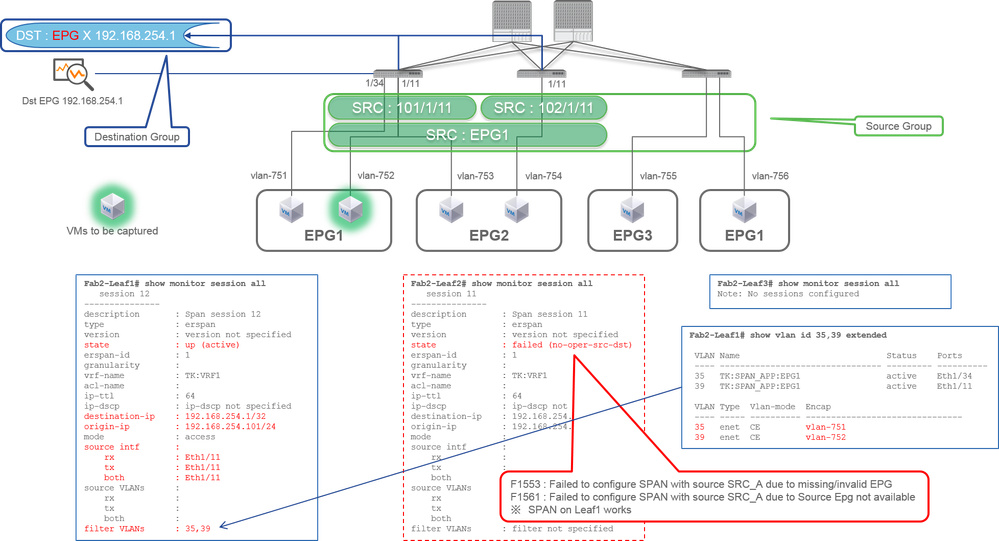
- Source Group
- Leaf1 e1/11
- Leaf2 e1/11
- Filter EPG1
- Destination Group
- 192.168.254.1 on EPG X
This example shows that Access SPAN also can specify a specific EPG on the source ports. This is useful when multiple EPGs flow on a single interface and it is required to capture traffic only for EPG1 on this interface.
Since EPG1 is not deployed on Leaf2, SPAN for Leaf2 fails with faults F1553 and F1561. However, SPAN on Leaf1 still works.
Also, two VLAN filters are automatically added for the SPAN session on Leaf1 because EPG1 uses two VLANs (VLAN-751,752) on Leaf1.
Please be noted that the VLAN ID on CLI (35, 39) is the internal VLAN so-called PI-VLAN(Platform Independent VLAN) which is not the actual ID on the wire. As shown in the picture, show vlan extended command shows the mapping of the actual encap VLAN ID and PI-VLAN.
This SPAN session allows us to capture packets only for EPG1(VLAN-752) on Leaf1 e1/11 even though EPG2 (VLAN-753) flows on the same interface.
CLI Check Point:
- Filter VLANs are added as per the EPGs that are used for the filter.
- If there are no corresponding EPGs on Leaf, the SPAN session on that Leaf fails.
Case 4
Src "Leaf1-Leaf2 vPC" | Dst "192.168.254.1"
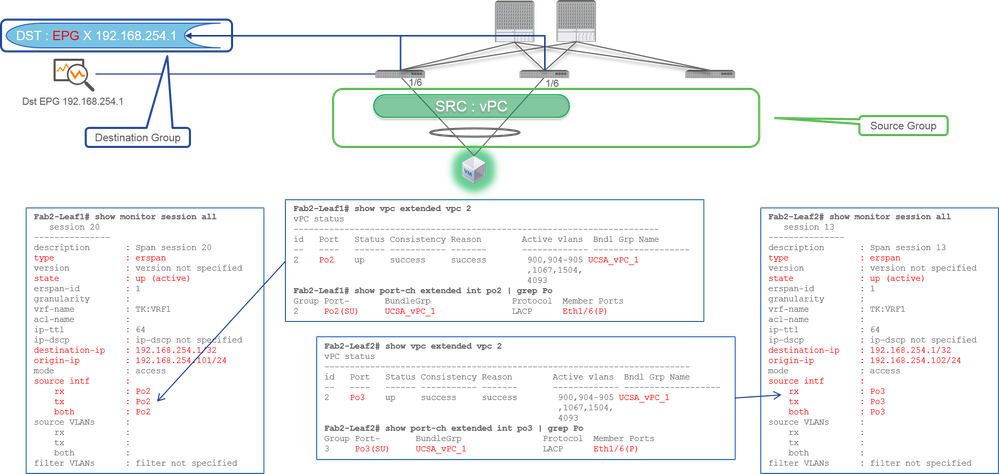
- Source Group
- Leaf1 - 2e1/11
- Destination Group
- 192.168.254.1 on EPG X
When the vPC interface is configured as a source, a destination must be remote IP (ERSPAN) not the interface (Local SPAN)
Access SPAN (Local SPAN)
Case 1
Src "Leaf1 e1/11 e1/34" | Dst "Leaf1 e1/33"
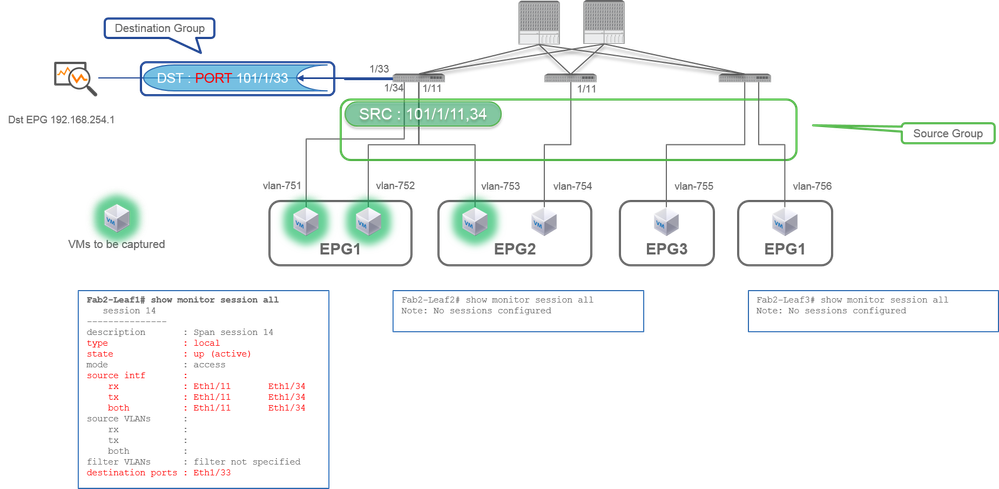
- Source Group
- Leaf1 e1/11
- Leaf1 e1/34
- Destination Group
- Leaf1 e1/33
Access SPAN can also use Local SPAN (that is a specific interface as a destination)
However, in this case, source interfaces must be on the same Leaf as the destination interface.
Case 2
Src "Leaf1 e1/11 e1/34 & EPG1 filter | Dst " Leaf1 e1/33"
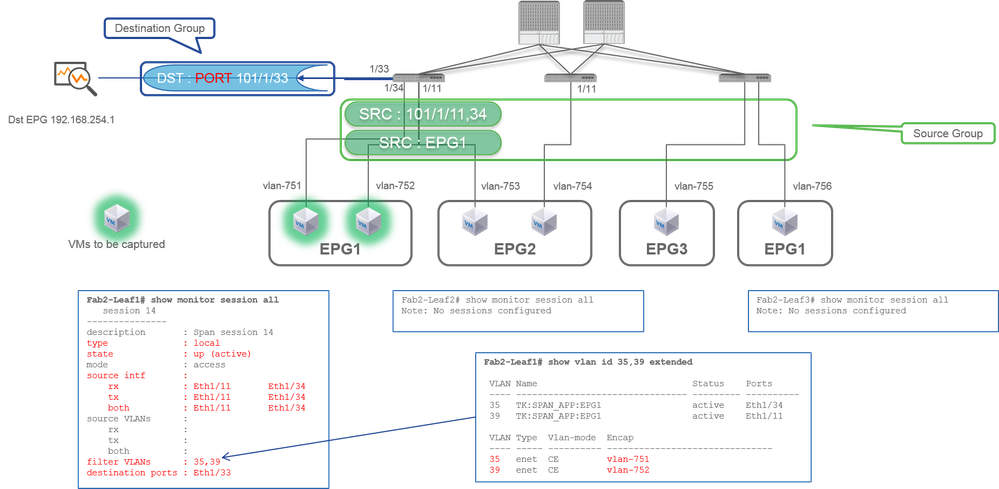
- Source Group
- Leaf1 e1/11
- Leaf1 e1/34
- EPG1 Filter
- Destination Group
- Leaf1 e1/33
Access SPAN with Local SPAN can also use EPG Filter as well as ERSPAN.
Case 3
Src "Leaf1 e1/11 & Leaf2 e/11" | Dst "Leaf1 e1/33" (bad case)
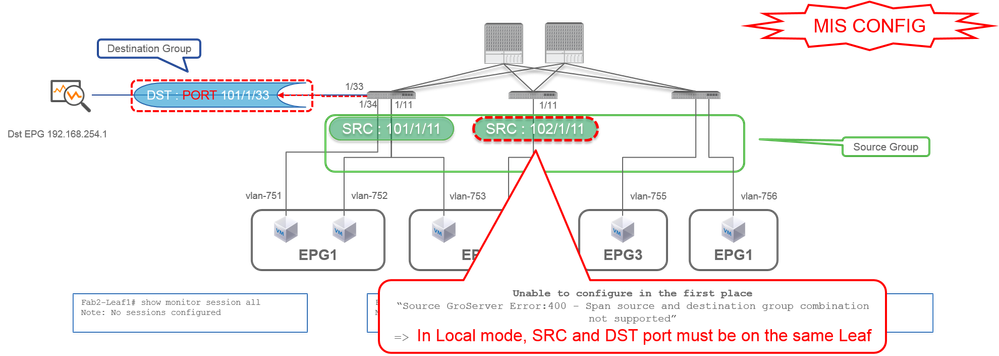
- Source Group
- Leaf1 e1/11
- Leaf2 e1/11
- Destination Group
- Leaf1 e1/33
Case 4
Src "Leaf1 e1/11 & EPG3 filter" | Dst "Leaf1 e1/33" (bad case)
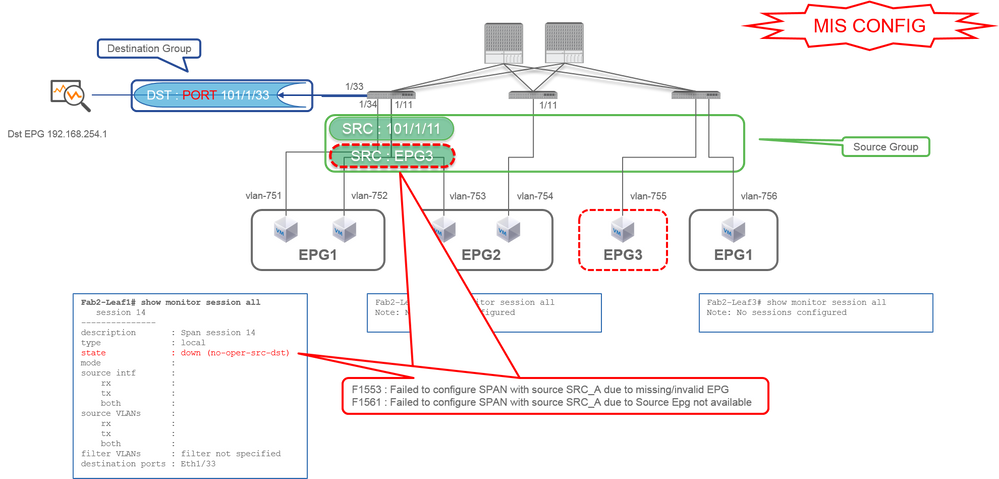
- Source Group
- Leaf1 e1/11
- EPG3 Filter
- Destination Group
- Leaf1 e1/33
It is similar to case 3 on Access SPAN (ERSPAN) but in this example, the one and only SPAN session on Leaf1 fails because EPG3 does not exist on Leaf1. So SPAN does not work at all.
Case 5
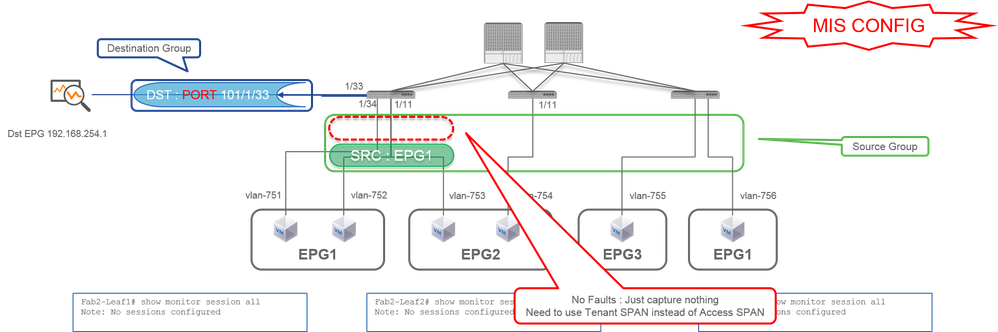
Src "EPG1 filter" | Dst "Leaf1 e1/33" (bad case)
- Source Group
- EPG1 Filter
- Destination Group
- Leaf1 e1/33
EPG filter on Access SPAN works only when source ports are configured. If EPG is the only source to be specified, Tenant SPAN must be used instead of Access SPAN.
Case 6
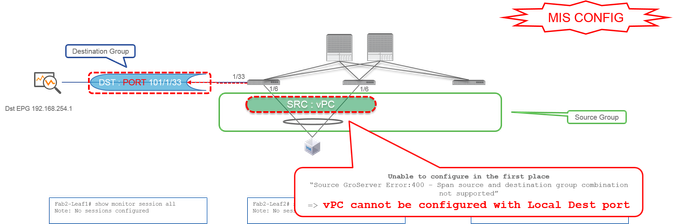
Src "Leaf1 - Leaf2 vPC" | Dst "Leaf1 e1/33" (bad case)
- Source Group
- Leaf1-2 vPC
- Destination Group
- Leaf1 e1/33
A vPC interface cannot be configured as a source with Local SPAN. Please use ERSPAN. Please refer to case4 for Access SPAN (ERSPAN).
Case 7
Src "Leaf1 e1/11 | Dst "Leaf1 e1/33 & e1/33 belongs to EPG" (works with fault)
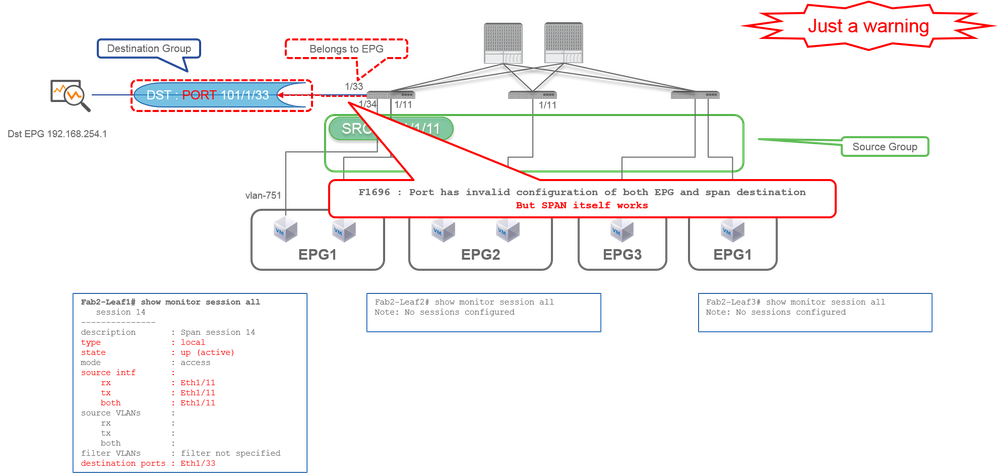
If a destination I/F for SPAN already belongs to EPG, a fault "F1696 : Port has an invalid configuration of both EPG and span destination" is raised under the physical I/F.
But even with this fault, SPAN works without any problems. This fault is just a warning about extra traffic caused by SPAN since it can impact customers' normal EPG traffic on the same I/F.
Tenant SPAN (ERSPAN)
Case 1
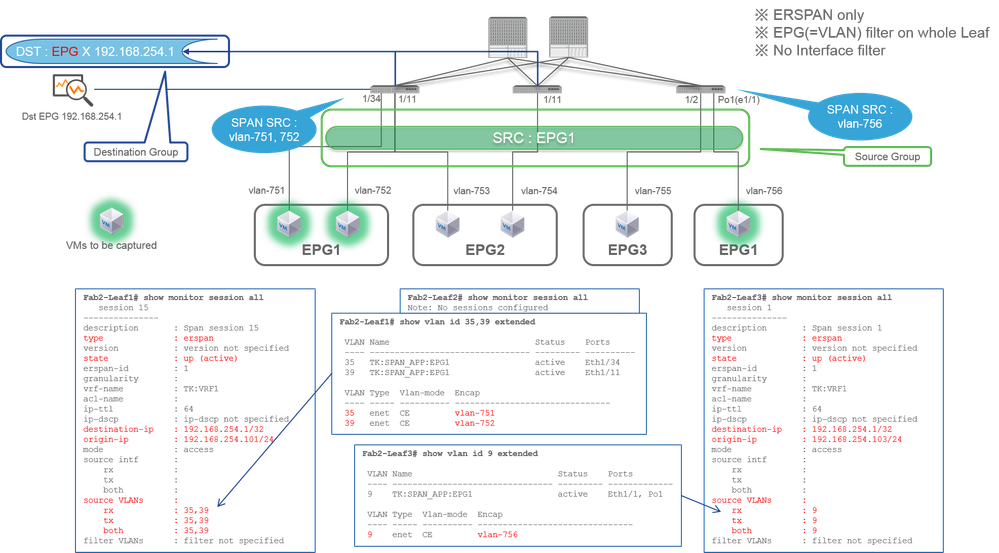
Src "EPG1" | Dst "192.168.254.1"
- Source Group
- EPG1 (no filter)
- Destination Group
- 192.168.254.1 on EPG X
Tenant SPAN uses EPG itself as a source while Access SPAN use EPG just for a filter.
The key point of Tenant SPAN is that you do not have to specify each individual port and ACI automatically detects appropriate VLANs on each Leaf switch. So this would be useful when all packets for specific EPG must be monitored and EndPoints for that EPG belong to multiple interfaces across Leaf switches.
Fabric SPAN (ERSPAN)
Case 1
Src "Leaf1 e1/49-50" | Dst "192.168.254.1"
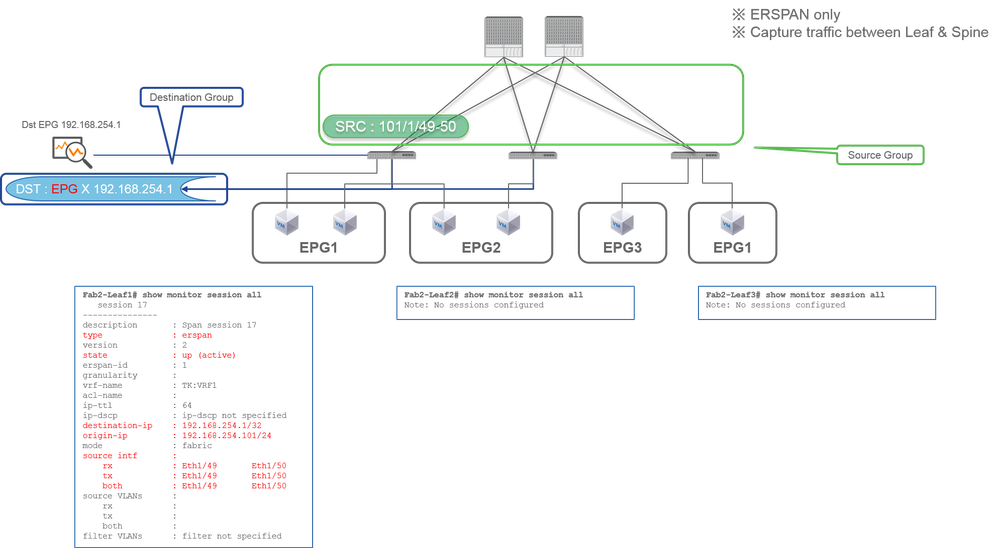
- Source Group
- Leaf1 e1/49-50
- Destination Group
- 192.168.254.1 on EPG X
Fabric SPAN specifies Fabric ports as a source where Fabric ports are interfaces between Leaf and Spine switches.
This SPAN is useful when it is required to copy packets between Leaf and Spine switches. However, packets between Leaf and Spine switches are encapsulated with iVxLAN header. So it is required a bit of a trick to read it. Please refer to "How to Read SPAN Data".
Note: iVxLAN header is an enhanced VxLAN header only for ACI Fabric internal use.
Case 2
Src "Leaf1 e1/49-50 & VRF filter" | Dst "192.168.254.1"
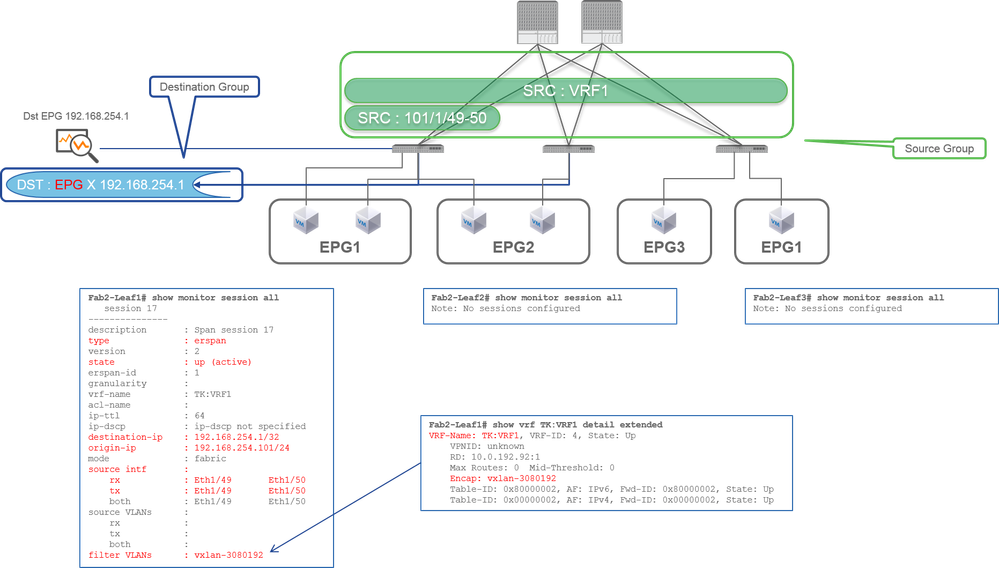
- Source Group
- Leaf1 e1/49-50
- VRF Filter
- Destination Group
- 192.168.254.1 on EPG X
Fabric SPAN can use filters as well as Access SPAN. But the filter type is different. Fabric SPAN uses Virtual Routing and Forwarding (VRF) or BD as a filter.
In Cisco ACI, as described before, packets that go through Fabric ports are encapsulated with iVxLAN header. This iVxLAN header has VRF or BD information as Virtual Network Identifier (VNID). When packets are forwarded as Layer2 (L2), iVxLAN VNID stands for BD. When packets are forwarded as Layer3 (L3), iVxLAN VNID stands for VRF.
So when it is required to capture routed traffic on Fabric ports, use VRF as a filter.
Case 3
Src "Leaf1 e1/49-50 & BD filter" | Dst "192.168.254.1"
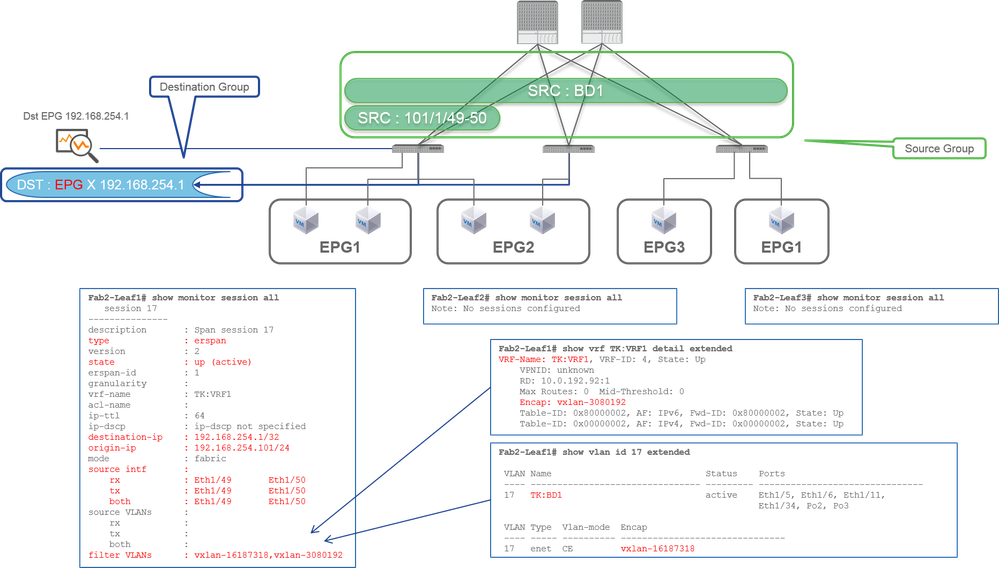
- Source Group
- Leaf1 e1/49-50
- BD Filter
- Destination Group
- 192.168.254.1 on EPG X
As described in previous case 2, Fabric SPAN can use BD as a filter.
When it is required to capture bridged traffic on Fabric ports, use BD as a filter.
Note: Only a single filter of either BD or VRF can be configured at a time.
Span to CPU
- This feature is available starting in version 6.2(1) and later
- Provides a SPAN destination option that sends mirrored traffic to the CPU port (sup-eth0) of the leaf switch instead of an external collector.
- Includes a built-in rate limiter to prevent the SPAN traffic from overwhelming the CPU.
- SPAN statistics (-HX only): A statistics command on HX platform switches confirms that traffic is being mirrored to the CPU.
Configuration Steps
- Create a new SPAN Destination Group.
- When specifying the destination interface, you can now select or input sup-eth0 (the CPU port) as the target.
- Associate this Destination Group with a SPAN Source Group (which defines the traffic to be mirrored).
Video link:
Supported Platforms
SPAN to CPU is only supported on these platforms. This list is not static and could change with time.
- FX2
- FX3
- GX
- GX2
- HX
SPAN Statistics Support
- HX only
There is not CLI to check the policer rate , it is hard coded with 500 Kbps.
Limitations and Restrictions
Please check the version specific release information, such as Cisco APIC Basic Configuration Guide, Release 6.2(x).
- SPAN to CPU is supported only for ACL-based SPAN, not for port-based SPAN. This means, SPAN to CPU is not supported in scale mode, only supported in filter mode.
- Cisco Nexus 9000 FX2 switches and later support the SPAN-to-CPU feature
- A fault is raised if this feature is configured on unsupported switches. Check the Faults tab under System > Faults on the APIC GUI.
- Fabric ports and vPC ports on the leaf are not supported as source interface of SPAN to CPU session. For vPC ports, use the path type VPC component PC as the source per switch instead of Virtual Port Channel.
- Only access port and access port-channels are supported; access port can be a layer 2 or layer 3 port.
- TX multicast is not supported.
- In case of source sharing between SPAN to CPU session and other session(s), the policer is applied on both the sessions. Hence, it is not recommended to share sources of SPAN-to-CPU session with other sessions.
Configuration Summary
Just like configuring local SPAN, you configure:
- A Source Group with an access port as the source path
- A Destination Group where the destination is
sup-eth0
The only difference versus a typical local SPAN destination is selecting sup-eth0 as the destination interface.
Step 1: Configure SPAN to CPU in the GUI
Click Fabric > Access Policies > Troubleshooting > SPAN > SPAN Destination Groups.
Span config with source, destination and filter info:
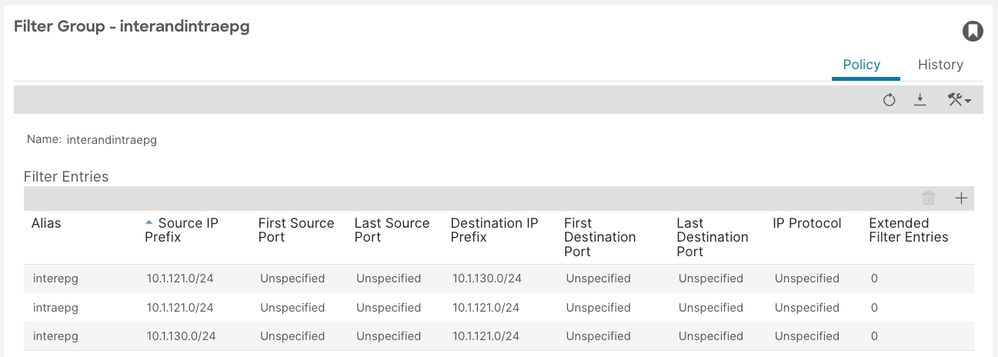
Step 2: Verify the SPAN Session on the Leaf
As with any SPAN configuration, you can verify sessions using the switch CLI:
leaf103# show monitor session all
<snip>
 session 5
---------------
name : spansource_vpc_component
description : Span session 5
type : sup
scale-mode : filter
state : up (active)
mode : access
Filter Group : 4
source intf :
rx : [Po3, FG:4]
tx : [Po3, FG:4]
both : [Po3, FG:4]
source VLANs :
rx :
tx :
both :
filter VLANs : filter not specified
filter L3Outs : filter not specified
destination ports : sup-eth0
tx :
both :
filter VLANs : filter not specified
filter L3Outs : filter not specified
destination ports : sup-eth0
Step 3: Verify the Applied Filter
Verify the filter entries programmed on the leaf switch:
leaf103# show monitor filter 4
______________________________________________________________________________________________________________________________________________________________________________________________________________________________________
Filter name (id): interandintraepg (4)
Filter Entries:
Src IP                                          Dst IP                                          Src port        Dst port           Proto             dscp           dot1p               Routeable       tcpflags
------                                          ------                                          --------        --------           -----             ----           -----               ----------      ---------
10.1.121.0/24                                   10.1.130.0/24                                   -               -                  -                 -              -                   both
10.1.121.0/24                                   10.1.121.0/24                                   -               -                  -                 -              -                   both
10.1.130.0/24                                   10.1.121.0/24                                   -               -                  -                 -              -                   both
______________________________________________________________________________________________________________________________________________________________________________________________________________________________________
Step 4: Verify SPAN Statistics on HX
Per-session mirrored packet counters show whether traffic is matching and being mirrored. HX platform switches only.
aci-HX-leaf# vsh_lc
module-1# show platform internal hal span session all stats
SPAN hardware session id:30 asic:0 slice:0 packet counts:2557
SPAN hardware session id:31 asic:0 slice:0 packet counts:510634359
Step 5: Capture and Decode SPAN'd Traffic on the Leaf
Once configured, all matching traffic (example: ICMP between the subnets passing through eth1/4) is SPAN'd to the CPU.
Where to See the SPAN'd Traffic
- The SPAN'd traffic can be captured using tcpdump on the tahoe0 interface.
-
It can be decoded and filtered using the built-in script:
- /isan/utils/span_to_cpu_parser.py
Example Capture and Decode
The capture example is from a different setup than what was shown in the configuration section
pod16-leaf3# tcpdump -xxxvi tahoe0 | python3 isan/utils/span_to_cpu_parser.py --decoder tahoe --verbose --payload
tcpdump: listening on tahoe0, link-type EN10MB (Ethernet), capture size 262144 bytes
Frame 9
Time: 1970-01-01T19:01:53.944622+00:00
ieth-extn:
sup_code=0x2b sup_qnum=0x6
<snipped>
icmp-request(8): id:0x7710, seq:0xf00
Payload:
Internal Header:
0x0000: 0101 0101 0101 0000 0000 0000 a00e 0000 ................
0x0010: 0404 0404 8889 0000 0000 ae00 0000 0006 ................
0x0020: 2b00 0000 fb00 0000 003f ffff ffc0 0000 +........?......
0x0030: 1000 0000 ....
Frame Data:
0x0000: 0022 bdf8 19ff acf2 c5f8 2e01 8100 0a6d .".............m
0x0010: 0800 4500 0054 ff89 0000 ff01 aec9 c0a8 ..E..T..........
0x0020: 7802 c0a8 1402 0800 a049 7710 0f00 114e x........Iw....N
0x0030: 5d69 7f67 0e00 cdab 0000 cdab 0000 cdab ]i.g............
0x0040: 0000 cdab 0000 cdab 0000 cdab 0000 cdab ................
0x0050: 0000 cdab 0000 cdab 0000 cdab ............
Save Output to a PCAP
You can save the decoded output to a pcap file using the --write option:
pod16-leaf3# tcpdump -xxxvi tahoe0 | python3 /isan/utils/span_to_cpu_parser.py --decoder tahoe --write /data/techsupport/mualshei-SPAN-CPU.pcap
tcpdump: listening on tahoe0, link-type EN10MB (Ethernet), capture size 262144 bytes
^C
Bye!
659 packets captured
662 packets received by filter
0 packets dropped by kernel
Then read it back:
pod16-leaf3# tcpdump -r /data/techsupport/mualshei-SPAN-CPU.pcap
reading from file /data/techsupport/mualshei-SPAN-CPU.pcap, link-type EN10MB (Ethernet)
20:07:43.966489 IP truncated-ip - 10 bytes missing! 192.168.120.2 > 192.168.20.2: ICMP echo request, id 30480, seq 27905, length 64
20:07:43.966901 IP truncated-ip - 10 bytes missing! 192.168.20.2 > 192.168.120.2: ICMP echo reply, id 30480, seq 27905, length 64
20:07:44.966505 IP truncated-ip - 10 bytes missing! 192.168.120.2 > 192.168.20.2: ICMP echo request, id 30480, seq 28161, length 64
20:07:44.966843 IP truncated-ip - 10 bytes missing! 192.168.20.2 > 192.168.120.2: ICMP echo reply, id 30480, seq 28161, length 64
Issues
- SPAN Session down / "no-oper-src-dst": Confirm the source interface is operational, the platform supports SPAN to CPU feature, and a supported source
- Unavailable Destination PathEp fault: Validate that both APIC and leaf switches are on versions that support the feature, and ensure the platform supports SPAN to CPU feature
- No packets observed on tahoe0: Confirm session state is up (active), confirm filter is correct and traffic is matching, ensure you are using Filter Mode, and confirm destination is configured as
sup-eth0and session is local access SPAN (not spine / not fabric / not vPC source)
What do you Need on the SPAN Destination Device?
Just run a packet capture application such as tcpdump, wireshark on it. It is not required to configure the ERSPAN destination session or anything.
For ERSPAN
Please ensure to run a capture tool on the interface with the destination IP for ERSPAN since SPAN packets are forwarded to the destination IP.
The received packet is encapsulated with a GRE header. Please refer to this section "How to Read ERSPAN Data" on how to decode the ERSPAN GRE header.
For Local SPAN
Please ensure to run a capture tool on the interface that connects to the SPAN Destination interface on ACI Leaf.
Raw packets are received in this interface. it is not required to deal with the ERSPAN header.
How to Read ERSPAN Data
ERSPAN Version (Type)
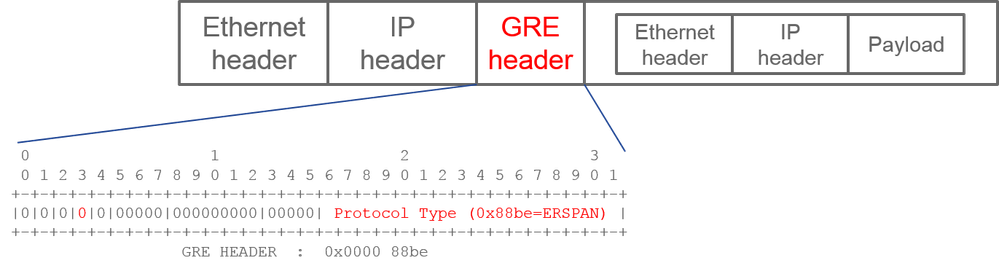
ERSPAN encapsulates copied packets to forward them to the remote destination. GRE is used for this encapsulation. The protocol type for ERSPAN on the GRE header is 0x88be.
In Internet Engineering Task Force (IETF) document, the ERSPAN version is described as type instead of version.
There are three types of ERSPAN. I, II and III. ERSPAN Type is mentioned in this RFC draft. Also, this GRE RFC1701 can be helpful to understand each ERSPAN type as well.
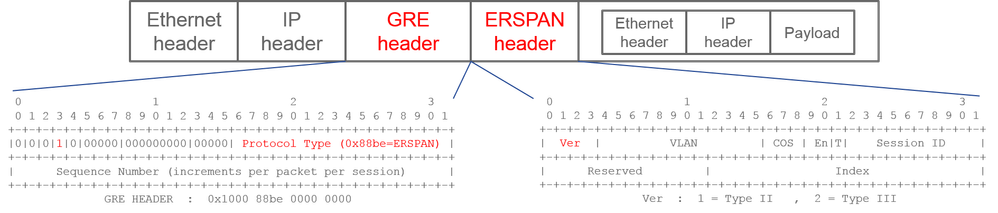
Here is the packet format of each type:
ERSPAN Type I (Used by Broadcom Trident 2)
Type I does not use the sequence field on the GRE header. It does not even use the ERSPAN header which must succeed the GRE header if it was ERSPAN type II and III. Broadcom Trident 2 only supports this ERSPAN type I.
ERSPAN Type II or III
If the sequence field is activated by the S bit, this must be ERSPAN type II or III. The version field on the ERSPAN header identifies the ERSPAN type. In ACI, type III is not supported as of 03/20/2016.
If a SPAN source group for Access or Tenant SPAN has sources on both 1st-gen and 2nd-gen nodes, the ERSPAN destination receives both ERSPAN Type I and II packets from each generation of nodes. However, Wireshark can decode only one of the ERSPAN Types at a time. By default, it only decodes ERSPAN Type II. If you enable the decode of ERSPAN Type I, Wireshark does not decode ERSPAN Type II. See the later section on how to decode ERSPAN Type I on Wireshark.
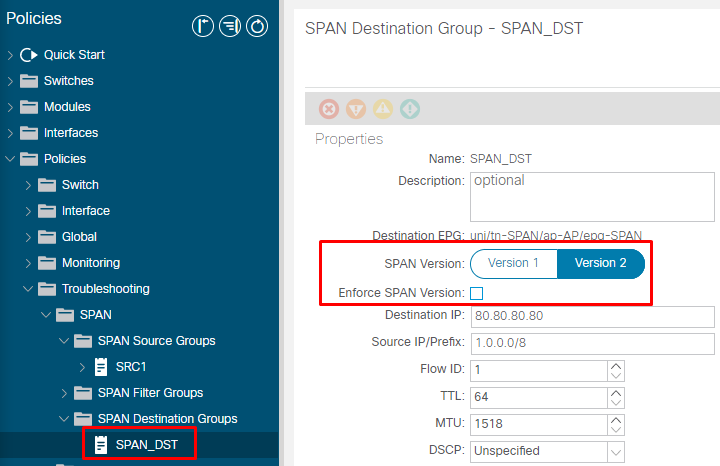
To avoid this type of issue, you can configure ERSPAN Type on a SPAN destination group.
- SPAN Version (Version 1 or Version 2): This refers to the ERSPAN Type I or II
- Enforce SPAN Version (checked or unchecked): This decides if the SPAN session must fail in case the configured ERSPAN Type is not supported on the source node hardware.
By default, SPAN Version is Version 2 and Enforce SPAN Version is unchecked. This means that if the source node is 2nd gen or later which supports ERSPAN Type II, it generates ERSPAN with Type II. If the source node is 1st gen which does not support ERSPAN Type II (except for Fabric SPAN), it falls back to Type I since the Enforce SPAN Version is not checked. As a result, the ERSPAN destination receives a mixed type of ERSPAN.
This table explains each combination for Access and Tenant SPAN.
| SPAN Version |
Enforce SPAN Version |
1st gen source node |
2nd gen source node |
| Version 2 |
Unchecked |
Uses Type I |
Uses Type II |
| Version 2 |
Checked |
Fails |
Uses Type II |
| Version 1 |
Unchecked |
Uses Type I |
Uses Type I |
| Version 1 |
Checked |
Uses Type I |
Uses Type I |
ERSPAN Data Example
Tenant SPAN/Access SPAN (ERSPAN)
Packets need to be decoded since it is encapsulated by ERSPAN Type I. This can be done with Wireshark. Please refer to the section "How to Decode ERSPAN Type 1".
Details of Captured Packet (ERSPAN Type I)
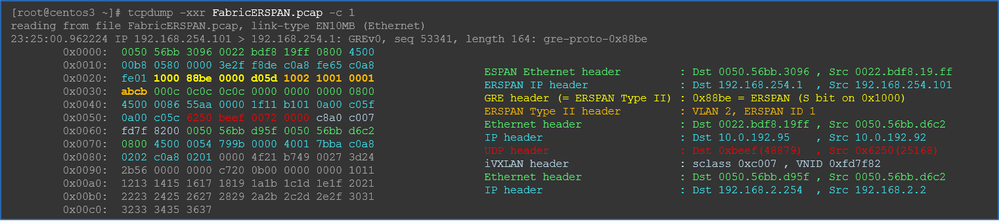
Fabric SPAN (ERSPAN)
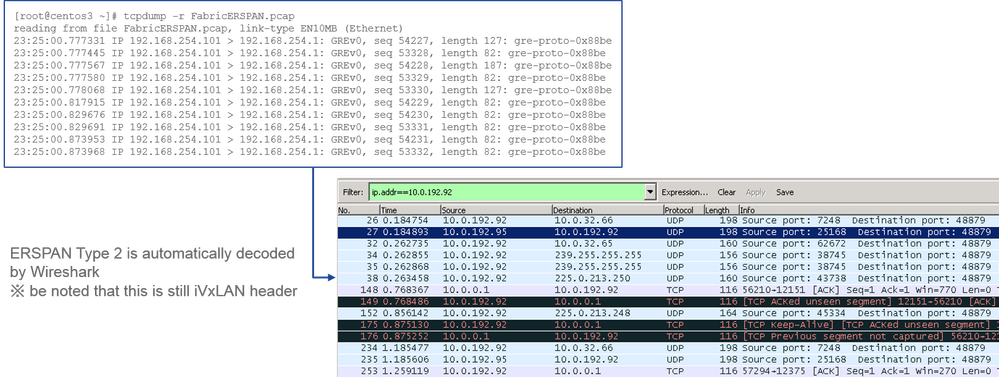
Wireshark automatically decodes ERSPAN Type II. However, it is still encapsulated by iVxLAN header.
By default, Wireshark does not understand the iVxLAN header since it is ACI internal header. Please refer to How to Decode iVxLAN Header.
Details of the Captured Packet (ERSPAN Type II)
How to Decode ERSPAN Type I
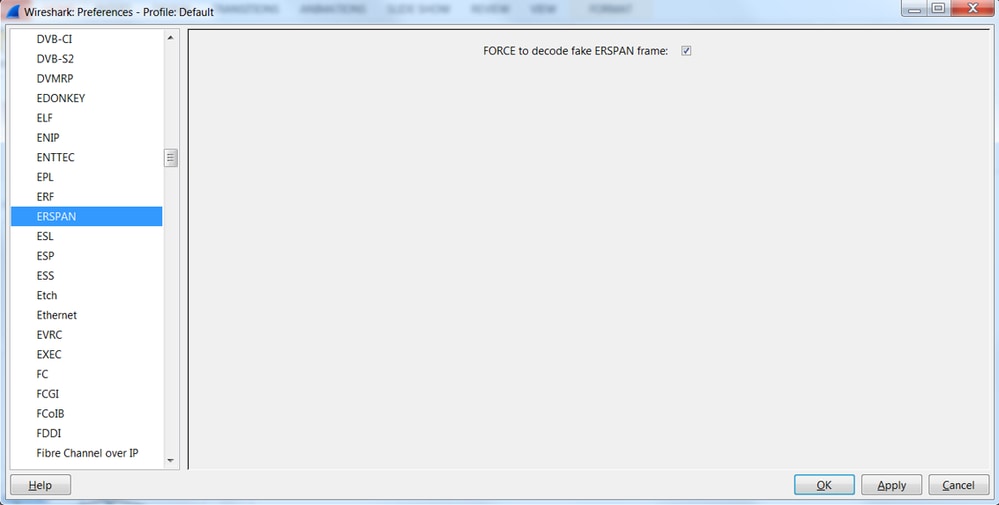
Option 1. Navigate to Edit > Preference > Protocols > ERSPAN and check FORCE to decode the fake ERSPAN frame.
- Wireshark (GUI)
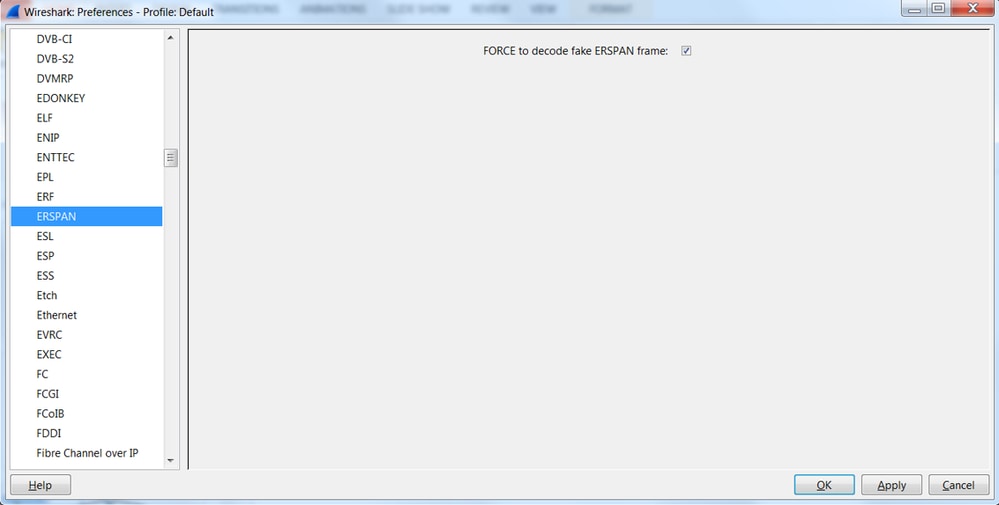
- Tshark (CLI version of Wireshark):
user1@linux# tshark -f 'proto GRE' -nV -i eth0 -o erspan.fake_erspan:true
Note: Please ensure to disable this option when you read ERSPAN type II or III.
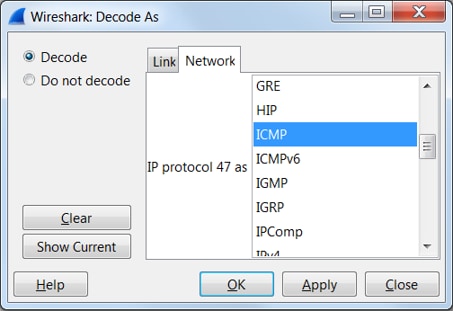
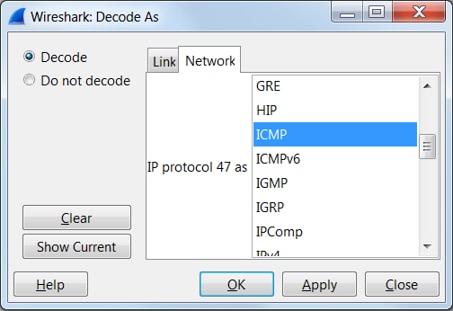
Option 2. Navigate to Decode As > Network > ICMP (if it’s ICMP).
How to Decode iVxLAN Header
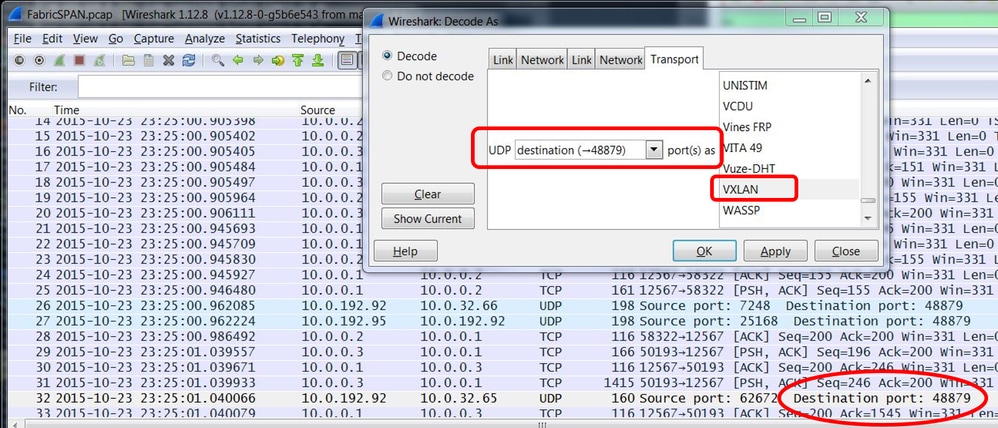
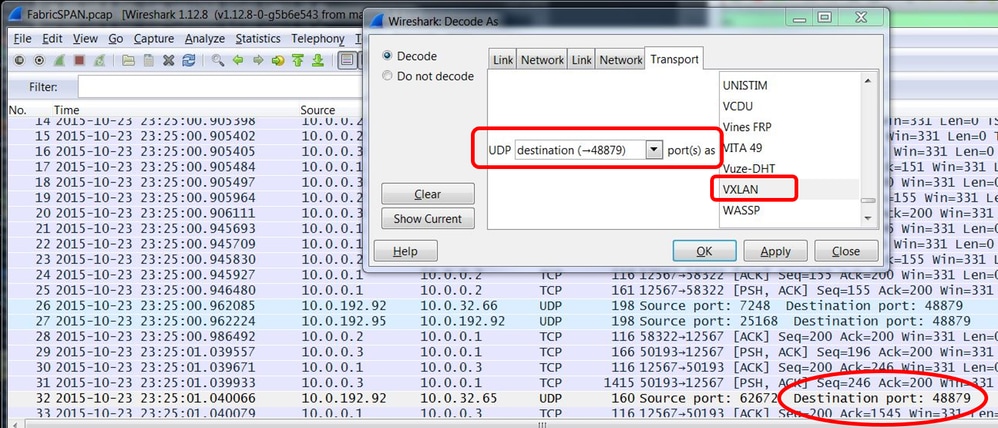
iVxLAN header uses destination port 48879. So, you can decode iVxLAN header as well as VxLAN if you configure UDP destination port 48879 as VxLAN on Wireshark.
- Please ensure that you select iVxLAN encapsulated packets first.
- Navigate to Analyze > Decode As > Transport > UDP destination (48879) > VxLAN.
- And then Apply.
Note: There are communication packets between APICs on Fabric ports. Those packets are not encapsulated by iVxLAN header.
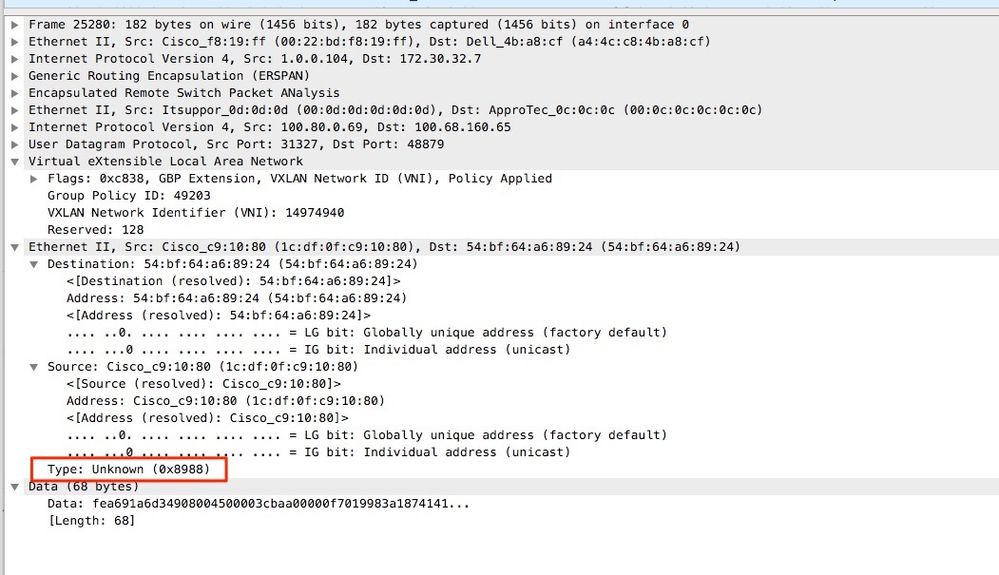
When you take an erspan capture on a user network that runs Precision Time Protocol (PTP) sometimes it is seen that Wireshark does not interpret the data due to an unknown ethertype within the GRE encap (0x8988). 0x8988 is the ethertype for the time tag that is inserted into dataplane packets when PTP is enabled. Decode the ethertype 0x8988 as "Cisco ttag" to expose the details of the packet.
Revision History
| Revision | Publish Date | Comments |
|---|---|---|
3.0 |
07-Oct-2026
|
Reformatting |
2.0 |
06-Aug-2024
|
Renamed to include Call-to-Action word
Removed 'follow'
Updated MDF Tag |
1.0 |
01-Feb-2023
|
Initial Release |

 Feedback
Contact Cisco
- Open a Support Case

- (Requires a Cisco Service Contract)