Troubleshoot UCSM Registration Issues with Central
Available Languages
Introduction
This document describes how to troubleshoot some of the common issues with UCSM registering with UCS Central
Prerequisites
Requirements
Cisco recommends that you have knowledge of these topics:
- Cisco Unified Computing System (UCS)
- UCS Central
Components Used
The information in this document is based on these software and hardware versions:
- Cisco Unified Computing System Manager (UCSM)
- Fabric Interconnect (FI)
- UCS central running on ESXi VM
The information in this document was created from the devices in a specific lab environment. All of the devices used in this document started with a cleared (default) configuration. If your network is live, ensure that you understand the potential impact of any command.
Troubleshooting methods
The troubleshooting is focused on self-signed certificate on UCSM and central and not 3rd party certificates
- Basic troubleshooting
- UCSM stuck registering state with central
- UCSM central status stuck in progress after upgrade
- UCSM lost-visibility with central
- Logs to check
- Troubleshooting commands
Basic Troubleshooting
Please ensure these basic checks are completed:
- Shared secret mismatch.
- UCS Central device is not reachable.
- UCS Central GUID is different from the already registered UCS Central's GUID.
- Time is not in sync between UCSM and UCS Central.
- Expired certificate on UCSM.
- The default keyring certificate is not present. Though third party CAs can be used for HTTPS. UCSM registration uses the default keyring certificate and hence must not be deleted.
- Ensure UCSM is receiving the handshake request from the UCSC.
Central# connect local-mgmt
Central(local-mgmt)# test ucsm-connectivity <ucsm_ip>
Packet capture from UCSM registering successfully with Central Provider

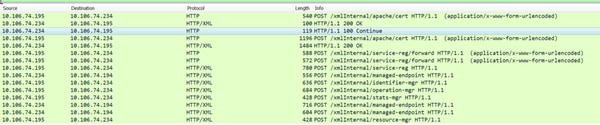
DO NOT unregister the central from UCSM. When you unregister all global service-profiles become local to the UCS domain. It is possible to make a local service-profile global again. However, it is a very complex process and has an impact on the service.
UCSM Stuck Registering State with Central
If UCS Manager is registered to a UCS Central and that UCS Manager is being upgraded to 3.1.1, then the UCS Manager goes to registering state and is stuck there.
Too many curl errors observed in the Central DME logs
  9603: [WARN][0x27699940][Apr  5 18:00:54.714][write:net]  write of 3752 bytes using curl failed, code=7, error: 'Couldn't connect to server', ep:  https://10.106.74.195:443/xmlInternal/managed-endpoint
9604: [WARN][0x27699940][Apr  5 18:00:54.714][write:net]  non-critical curl write error.
From UCSM DME
[INFO][0x682ffb90][Nov  1 16:05:24.886][sam_sec:check_cert_val] X509_verify_cert_error_string - ok
[INFO][0x682ffb90][Nov  1 16:05:24.886][sam_sec:X509VerifyCert] ErrorMsg:ok ErrorNo:0
[INFO][0x682ffb90][Nov  1 16:05:24.886][app_sam_dme:processKey] something wrong with KR-default certificate, status - 18
The problem could be due to the UCSM using old MDS hash instead of SHA1 for the certificates
[WARN][0x674ffb90][Nov 22 19:11:49.227][net:write] write of 546 bytes using curl failed, code=60, error: 'Peer certificate cannot be authenticated with given CA certificates(SSL certificate problem: self signed certificate)', ep:  https://10.106.74.234:443/xmlInternal/service-reg
[INFO][0x674ffb90][Nov 22 19:11:49.227][net:certFailure] certificate is bad for connection to ' https://10.136.58.4:443/xmlInternal/service-reg';
Perform these workaround as it causes the UCS Manager to register successfully to UCS Central and fix the certificate error
The default keyring can be regenerated from the UCS Central CLI under the device profile section.
connect policy-mgr
 scope org
 scope device-profile
 scope security
 scope keyring default
 set regenerate yes
 commit-buffer
If the workaround does not resolve please raise a case with Cisco TAC to validate further
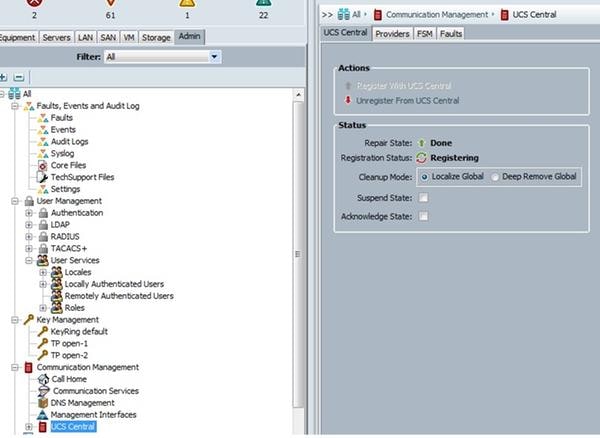
If at any time the UCS Manager have been registered to UCS Central initially at a version of 2.1.3 or below. Then during the upgrade to 3.1.1 the registration problem mentioned is still seen.
For this TAC involvement is needed as UCS 2.1.3 and earlier releases, UCSM does not split certificate. TAC need to rehash the certificate so that creates the right softlinks to the certificate.
UCSM central status stuck in progress after upgrade
The issue is due to database goes out of sync between central and UCS
These errors observed in the resource-manager logs
[WARN][0xbbce9940][Aug 11 10:23:18.194][storeMo:mit_init] SQL error [SQLParamData failure: Error while executing the query (non-fatal);
ERROR:  duplicate key value violates unique constraint "InstanceId2DN_dn_key"] stmt [INSERT INTO "InstanceId2DN"("instanceId","dn","className","parent") VALUES (?,?,?,?)]
[INFO][0xbbce9940][Aug 11 10:23:18.194][report:exception_handl] FATAL[3|150] /ramfs/buildsa/150407-104741-rev219791-FCSa/resMgr/sam/src/lib/framework/core/sql/MitDbImpl.cc(1167):storeMo: Failed to connect to database. Transaction aborted.
[INFO][0xbbce9940][Aug 11 10:23:18.201][report:exception_handl] ERROR[3|150] /ramfs/buildsa/150407-104741-rev219791-FCSa/resMgr/sam/src/lib/framework/core/proc/Doer.cc(795):exceptionCB: exception encountered during processing: "Failed to connect to database. Transaction aborted." [150] Failed to connect to database. Transaction aborted.
[INFO][0xbbce9940][Aug 11 10:23:18.201][failedCb:tx] TX FAILED
This is a database sync issue please raise a case with Cisco TAC to validate further
UCSM Lost Visibility with Central
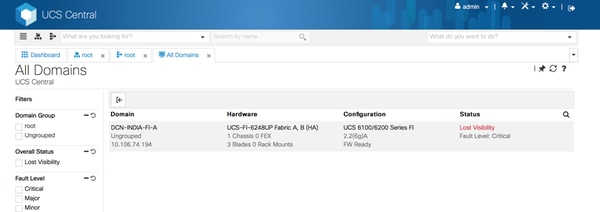
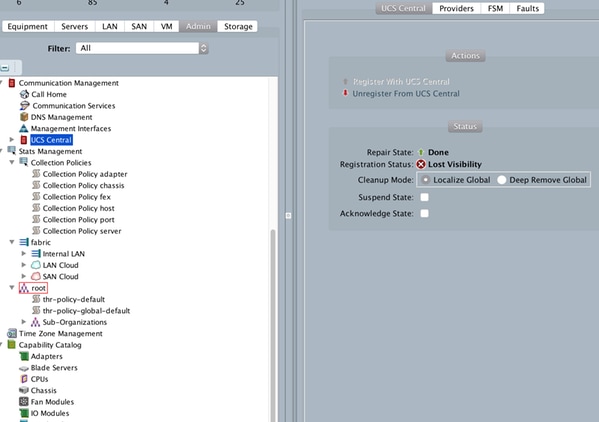
Check the Registration Status
If it shows "lost-visibility" UCS Central cannot be reached on one or more required ports. If UCS Central is using the flash GUI (Flex) these ports need to be open to Central: 443, 80, 843. HTML GUI only requires port 443.
Logs to Check
UCSM
/var/sysmgr/sam_logs/pa_setup.log
svc_sam_dme.log files on FI
Central
Svc_dme_reg.log
Troubleshooting commands
Central# connect policy-mgr
Central# scope org
Central# scope device-profile
Central# scope security
Central# Show keyring detail
UCSM# scope system
UCSM# scope security
UCSM# show keyring detail
connect local-mgmt
telnet <Central IP> <port>
^ (Shift+6) ] with no spaces to exit
  FSM status
       scope system
       scope control-ep policy
       show fsm status
Central# connect service-reg
Central(service-reg)# show fault
Central(service-reg)# show clients detail
Registered Clients:
    ID: 1008
    Registered Client IP: 10.106.74.194
    Registered Client IPV6: ::
    Registered Client Connection Protocol: Ipv4
    Registered Client Name: DCN-INDIA-FI-A
    Registered Client GUID: e832cfc2-548b-11e4-b8f2-002a6a6f6dc1
    Registered Client Version: 2.2(6g)
    Registered Client Type: Managed Endpoint
    Registered Client Capability: Policy Client Module
    Registered Client Last Poll Timestamp: 2016-12-08T12:33:36.417
    Registered Client Operational State: Registered
    Registered Client Suspend State: Off
    Registered Client License State: License Graceperiod
    Registered Client grace period used: 33
    Registered Client Network Connection State: Connected
Known defects
- Cisco Bug ID CSCuy07652 dwngarde-upgrade from ECMR6 to Delmar-mr2 makes domain "registering".
- Cisco Bug ID CSCuv07227 UCSM re-registration failing while doing fw upgrade.
- Cisco Bug ID CSCuu91088 Central unable to refresh inventory.
- Cisco Bug ID CSCut72698 report-full-inventory-failed on classic ucs in low bandwidth environment.
Related Information
Registering Cisco UCS Domains with Cisco UCS Central
Revision History
| Revision | Publish Date | Comments |
|---|---|---|
1.0 |
21-Dec-2016
|
Initial Release |

 Feedback
Contact Cisco
- Open a Support Case

- (Requires a Cisco Service Contract)