Migrate Cisco UCS Fabric Interconnect 6248 to 6332-16UP
Available Languages
Introduction
This document describes how to migrate Cisco Unified Computing System (UCS) Fabric Interconnect (FI) Series 6248 to 6332-16UP.
Prerequisites
Requirements
Cisco recommends that you have knowledge of these topics:
Components Used
Hardware
- UCS 6332-16UP 40-port Fabric Interconnect
- UCS 6248UP 48-port Fabric Interconnect
Firmware
- Infrastructure firmware 6248 FI 3.2(3d)
- 6332 FI 3.1(3b)
- Software/firmware bundle that is required for the 6332 FIs to match with the image version on the 6248 FIs
The information in this document was created from the devices in a specific lab environment. All of the devices used in this document started with a cleared (default) configuration. If your network is live, ensure that you understand the potential impact of any command.
Background Information
The 6248 provides 32 SFP+ universal ports that can operate as 1/10-Gbps fixed Ethernet ports or as 1/2/4/8-Gbps Fibre Channel ports. However, the 6332 provides only 16 SFP+ ports. If you use more than 16 SFP+ ports on the 6248, you must use the breakout ports on the 6332 to meet your requirement for SFP+ ports.
Specifications for the UCS-FI-6332-16UP:
-
Ports 1 through 16 are SFP+ universal ports that can operate as 1/10-Gbps fixed Ethernet ports or as 4/8/16-Gbps Fibre Channel ports.
-
Ports 17 through 34 operate as 40-Gbps QSFP+ ports or as eighteen 4 x 10-Gbps SFP+ breakout ports. Alternatively, they can be outfitted with QSA adapters to provide 10-Gbps operation.
-
Ports 35 through 40 operate as fixed 40-Gbps QSFP+ ports.
Migration Pre-checks
- Confirm that the current setup consists of the two 6248 FIs in place, configured in a single cluster.
- Verify that the cluster high availability (HA) state is ready and that all processes are functioning correctly.
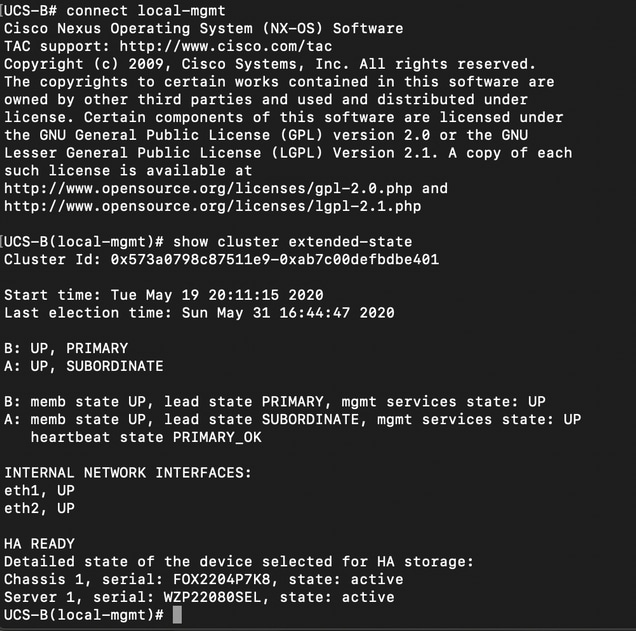 HA should be in the READY state and management services for both FIs should be UP
Migration Procedure
-
Identify the subordinate 6248 FI in the cluster and evacuate it.
-
For the subordinate FI:
-
Remove the connections from the chassis.
-
Remove the L1-L2 with the other 6248 FI and prepare it for replacement with the new 6332 FI.
-
-
Plug in the first 6332 FI with power cables and connect a console cable in order to bring up the first 6332 FI in standalone mode.
-
Get the GUI up for the standalone FI 6332 and upgrade the infrastructure firmware if it is not already matched.
-
Connect the 6332 FI to the chassis to ensure that at least one device is connected. This connection provides access to the SEEPROM in order to establish HA between the current FI and the new FI.
-
Configure the ports on the 6332 FI as server and network to establish the connections.
-
Erase the configuration on the 6332 FI and use the console connection to prepare it to be added to the cluster. Also ensure that L1-L2 are connected.
-
Use the console to allow the FI to be added as an FI to the current cluster.
-
Use the console or GUI method for the configuration. Enter the mgmt IP address.
-
Wait for the FI to come up completely and for HA to be ready.
-
Verify the pmon state. After the status for both FIs is good, the second FI is ready for replacement.
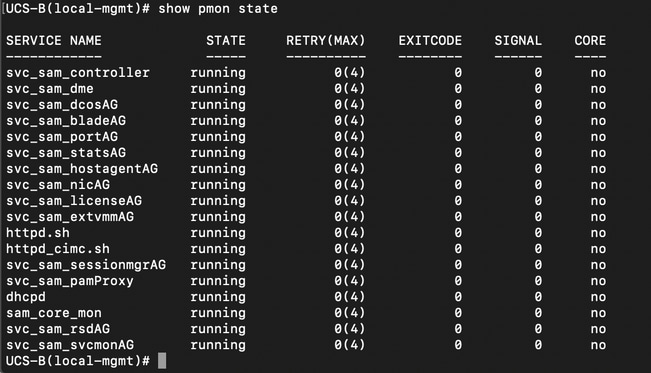 All processes should be in running state
 -
Proceed with cluster failover to 6332 FI as primary.
-
Replace the other 6248 FI in a similar manner.
-
Make the connections to the second 6332 FI:
-
Replace the other 6248 FI with the second 6332 FI.
-
Add the second 6332 FI to the cluster and use the console connection to set it up.
-
-
Use the GUI to verify the cluster state.
Known Issues
If server ports on the 6332 FI go into SDP timeout/SFP mismatch error and the error occurs only for one of the two ports connected to each chassis: Leave the connections as they were after multiple unsuccessful attempts to clear the faults. After the 6332 FI is added to the cluster, the errors clear automatically when the connections are used for discovery.
Related Information
- Using Fabric Evacaution in UCS during Firmware Upgrades
- Cisco UCS Manager GUI Configuration Guide
- Cisco UCS Manager Firmware Management Guide
- Technical Support & Documentation - Cisco Systems
Revision History
| Revision | Publish Date | Comments |
|---|---|---|
1.0 |
04-Jun-2020
|
Initial Release |

 Feedback
Contact Cisco
- Open a Support Case

- (Requires a Cisco Service Contract)