Clear Cache on Secure Web Appliance
Available Languages
Introduction
This document describes steps to clear Proxy Cache, DNS Cache and Authentication Cache in Secure Web Appliance (SWA).
Prerequisites
Requirements
Cisco recommends that you have knowledge of these topics:
- Physical or Virtual SWA installed
- License activated or installed
- Secure Shell (SSH) Client
- The setup wizard is completed
- Administrative Access to the SWA
Components Used
This document is not restricted to specific software and hardware versions.
The information in this document was created from the devices in a specific lab environment. All of the devices used in this document started with a cleared (default) configuration. If your network is live, ensure that you understand the potential impact of any command.
Clear DNS Cache
To increase efficiency and performance, the Cisco SWA stores DNS entries for domains to which you have recently connected. The DNS cache allows the SWA to avoid excessive DNS lookups for the same domains. The DNS cache entries expire according to the Time to Live (TTL) of the record or the DNS configuration in SWA.
However, it is sometimes necessary to clear the DNS cache of entries. Corrupted or expired DNS cache entries can occasionally cause problems with delivery to a remote host or hosts.
Clear DNS Cache From GUI
To Clear the DNS cache from graphical user interface (GUI):
Step 1. Navigate to Network.
Step 2. Choose DNS.
Step 3. Click Clear DNS Cache.
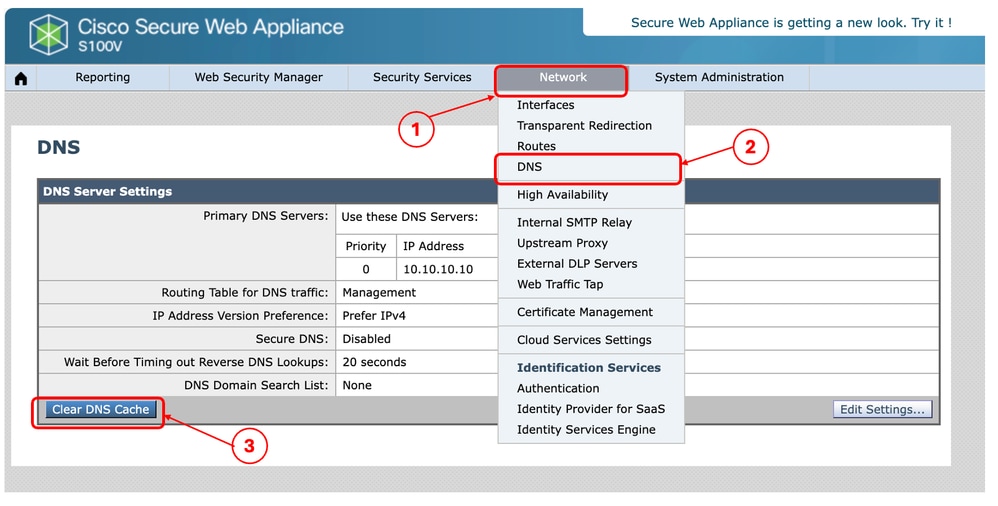 Image- Secure Web Appliance GUI showing the Clear DNS Cache button
Clear DNS Cache From CLI
To Clear the DNS cache from Command Line Interface (CLI):
Step 1. Log in to CLI
Step 2. Run dnsflush
Step 3. Choose Y
SWA_CLI> dnsflush
Are you sure you want to clear out the DNS cache? [N]> Y
Clear Proxy Cache
Clear Proxy Cache From GUI
To clear the Proxy Cache from GUI:
Step 1. Navigate to Security services.
Step 2. Choose Web Proxy.
Step 3. Click Clear Cache.
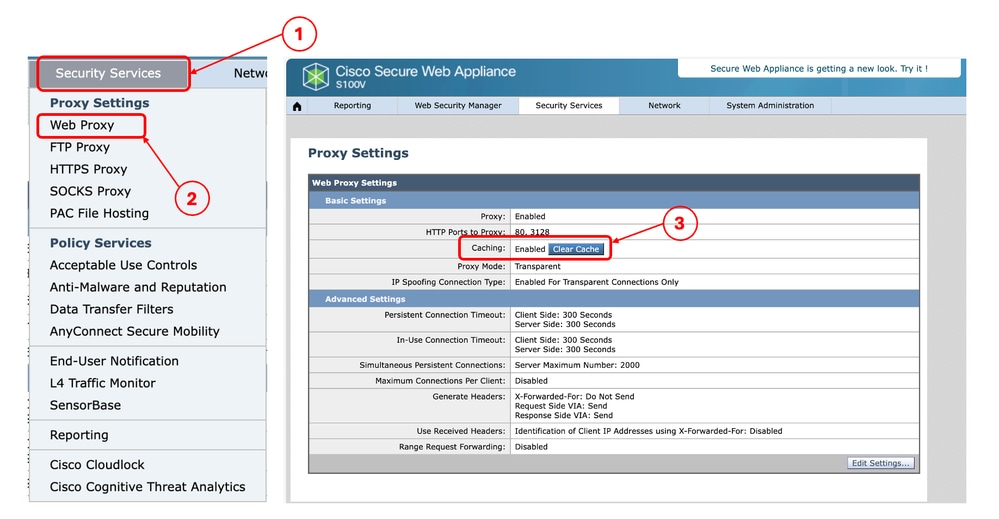 Image - Clear Proxy Cache
Clear Proxy Cache From CLI
To Clear the Proxy Cache from CLI:
Step 1. Log in to CLI.
Step 2. Run diagnostic.
Step 3. Choose PROXY.
Step 4. Choose CACHE.
SWA_CLI> diagnostic

Choose the operation you want to perform:
- NET - Network Diagnostic Utility.
- PROXY - Proxy Debugging Utility.
- REPORTING - Reporting Utilities.
- SERVICES - Service Utilities.
[]> PROXY

Choose the operation you want to perform:
- SNAP - Take a snapshot of the proxy
- OFFLINE - Take the proxy offline (via WCCP)
- RESUME - Resume proxy traffic (via WCCP)
- CACHE - Clear proxy cache
- MALLOCSTATS - Detailed malloc stats in the next entry of the track stat log
- PROXYSCANNERMAP - Show mapping between proxy and corresponding scanners
[]> CACHE

Flushing Proxy cache, prox PID: 55182
Clear Authentication Cache
You can delete one entry or all entries (users) from the authentication cache.

Note: You can also list all users currently stored in the authentication cache.
The Authentication cache can be cleared from CLI.
Step 1. Log in to CLI
Step 2. Run authcache.
Step 3. Choose FLUSHALL or FLUSHUSER depending upon whether you need to clear all cache entries or just a single user.
SWA_CLI> authcache

Choose the operation you want to perform:
- FLUSHALL - Flush all entries from auth cache
- FLUSHUSER - Flush specific user entry from auth cache
- LIST - List all entries from auth cache
- SEARCH - Search all entries from auth cache
- SEARCHDETAIL - Provide detailed information of the user from auth cache
Tip: To find the correct format of the username you want to remove from cache, choose SEARCHDETAIL and find the correct username format first.
Related Content
- User Guide for AsyncOS 15.0 for Cisco Secure Web Appliance - GD(General Deployment)
- Troubleshoot Secure Web Appliance DNS Service - Cisco
Revision History
| Revision | Publish Date | Comments |
|---|---|---|
2.0 |
16-Oct-2026
|
Recertification |
1.0 |
08-May-2024
|
Initial Release |

 Feedback
Contact Cisco
- Open a Support Case

- (Requires a Cisco Service Contract)