Introduction
This document describes how to use Data Matching Exclusions to reduce false positives in Data Loss Prevention (DLP) data classifications.
Overview
Data Matching Exclusions let you exclude specific matched data, which helps you fine-tune DLP data classifications and significantly reduce false positives. This feature provides more accurate data protection by letting you exclude known, non-sensitive data or irrelevant matches from DLP scans.
How Data Matching Exclusions Minimize False Positives
Built-in and custom identifiers can generate false positives when keywords or patterns match non-sensitive data. For example:
- Number-based Identifiers:
Identifiers like U.S. Social Security Number (SSN) may match other 9-digit numbers, such as internal Account IDs. Excluding known Account IDs reduces these false positives.
- Text-based Identifiers:
Healthcare customers using HIPAA-compliant data classification may detect the term “cancer” in non-patient contexts, such as “cancer donation organization.” You can exclude specific terms to prevent such false alerts.
With Data Matching Exclusions, you can specify terms or regex patterns, ensuring that matches on these do not trigger data violation events. This allows precise control over DLP alerts.
How to Use Data Matching Exclusions
-
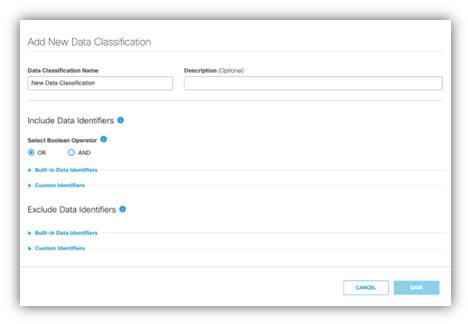
In the Umbrella dashboard, go to theData Classificationpage.
-
In theExclude Data Identifierssection, select either a custom identifier or a built-in identifier to exclude.
-
Enter the specific terms or regular expression patterns you want to exclude.
- Exclusions apply only to the specific matched content, not the entire document.
- For example, if you exclude “Cancer Donation Organization,” only that term is excluded from violations, while the rest of the document is still scanned.
-
If the same data identifier is included and excluded in the same classification, the exclusion takes priority.
Related Resources
Refer to Umbrella documentation for step-by-step guidance: Create a Data Classification.

 Feedback