Introduction
This document describes how to configure the DNS tunneling VPN Security Category in Umbrella.
Prerequisites
Requirements
There are no specific requirements for this document.
Components Used
The information in this document is based on Umbrella DNS.
The information in this document was created from the devices in a specific lab environment. All of the devices used in this document started with a cleared (default) configuration. If your network is live, ensure that you understand the potential impact of any command.
Overview
DNS tunneling VPN classifies servers associated with DNS tunneling VPN services under a security category that you can block or allow and report on. These services allow end-users to disguise outgoing traffic as DNS queries, potentially violating acceptable use, data loss prevention, or security policies. As a result, these services present a potential security threat and reduce overall visibility in your environment.
With this security category providing immediate visibility, you can reduce the risk of DNS tunneling and potential data loss. You can block this category outright, or just monitor the results in reports; this provides the flexibility to determine what is the right approach to tackling the problem, depending on your risk tolerance, acceptable use or HR policies.
Turning on DNS Tunneling VPN
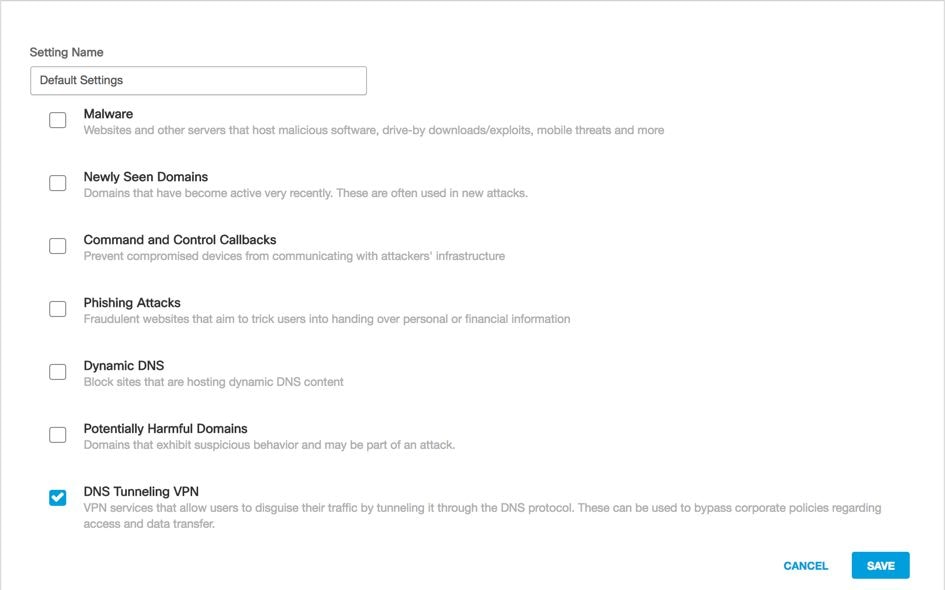
This security category can be enabled like any other under Policies > Security Settings, then editing an existing security setting. Or, it can be done within the policy configuration wizard itself:
 115014823666
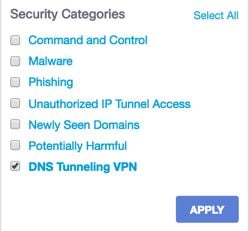
DNS Tunneling can be filtered against through the Activity Search report:
 115015008983

 Feedback