UBA Upgrade from 5.4.2 to 5.4.3 Fails at Step UpgradePostgresPackagesOnNodes
Available Languages
Applicability
UBA 5.4.2Description
During the upgrade from UBA 5.4.2 to 5.4.3, the upgrade process fails at step UpgradePostgresPackagesOnNodes with the following error.
Error Message:
Updating Subscription Management repositories.
No match for argument: /home/caspida/uba-ext-pkgs-5.4.3/rpm/postgresql/postgresql15-15.12-1PGDG.rhel8.x86_64.rpm
No match for argument: /home/caspida/uba-ext-pkgs-5.4.3/rpm/postgresql/postgresql15-contrib-15.12-1PGDG.rhel8.x86_64.rpm
No match for argument: /home/caspida/uba-ext-pkgs-5.4.3/rpm/postgresql/postgresql15-libs-15.12-1PGDG.rhel8.x86_64.rpm
No match for argument: /home/caspida/uba-ext-pkgs-5.4.3/rpm/postgresql/postgresql15-server-15.12-1PGDG.rhel8.x86_64.rpm
No match for argument: /home/caspida/uba-ext-pkgs-5.4.3/rpm/postgresql/postgresql-jdbc-42.7.5-2PGDG.rhel8.noarch.rpm
Error: Unable to find a match
ERROR: Installing postgres packages failed on: <hostname>
Upgrade failed in step: UpgradePostgresPackagesOnNodes, aborting
Investigation
Step 1: Verify RPM files Are Present
ls -la /home/caspida/uba-ext-pkgs-5.4.3/rpm/postgresql/Output confirms all five PostgreSQL RPM files exist in the directory. The files are present and valid.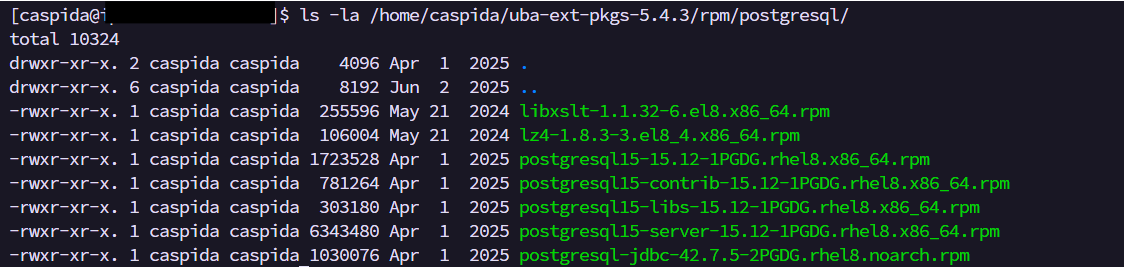
Step 2: Verify Currently installed PostgreSQL versions
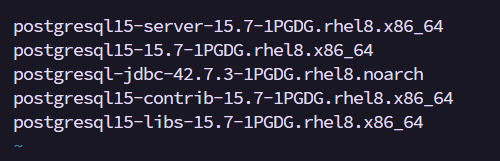
rpm -qa | grep postgresBelow Output shows the currently installed PostgreSQL package versions before upgrade.
Step 3: Perform a Dry run to identify the exact conflict:
sudo rpm -Uvh --test /home/caspida/uba-ext-pkgs-5.4.3/rpm/postgresql/*.rpmThe dry run output reveals the actual root cause:
The system has newer versions of libxslt and lz4 than what the UBA 5.4.3 external packages bundle provides. The UBA upgrade script internally uses dnf install to process all RPMs in the PostgreSQL directory.
When dnf detects these newer dependency packages, it rejects the entire transaction and reports "No match for argument" for every package, including the valid PostgreSQL RPMs.
Resolution
To resolve the issue follow the below steps:
Step 1: Manually Upgrade PostgreSQL Packages by executing the following commands:
sudo rpm -Uvh --nodeps --nodigest --nofiledigest --replacepkgs --replacefiles --force /home/caspida/uba-ext-pkgs-5.4.3/rpm/postgresql/postgresql15-libs-15.12-1PGDG.rhel8.x86_64.rpmsudo rpm -Uvh --nodeps --nodigest --nofiledigest --replacepkgs --replacefiles --force /home/caspida/uba-ext-pkgs-5.4.3/rpm/postgresql/postgresql15-15.12-1PGDG.rhel8.x86_64.rpmsudo rpm -Uvh --nodeps --nodigest --nofiledigest --replacepkgs --replacefiles --force /home/caspida/uba-ext-pkgs-5.4.3/rpm/postgresql/postgresql15-server-15.12-1PGDG.rhel8.x86_64.rpmsudo rpm -Uvh --nodeps --nodigest --nofiledigest --replacepkgs --replacefiles --force /home/caspida/uba-ext-pkgs-5.4.3/rpm/postgresql/postgresql15-contrib-15.12-1PGDG.rhel8.x86_64.rpmsudo rpm -Uvh --nodeps --nodigest --nofiledigest --replacepkgs --replacefiles --force /home/caspida/uba-ext-pkgs-5.4.3/rpm/postgresql/postgresql-jdbc-42.7.5-2PGDG.rhel8.noarch.rpmExpected Output: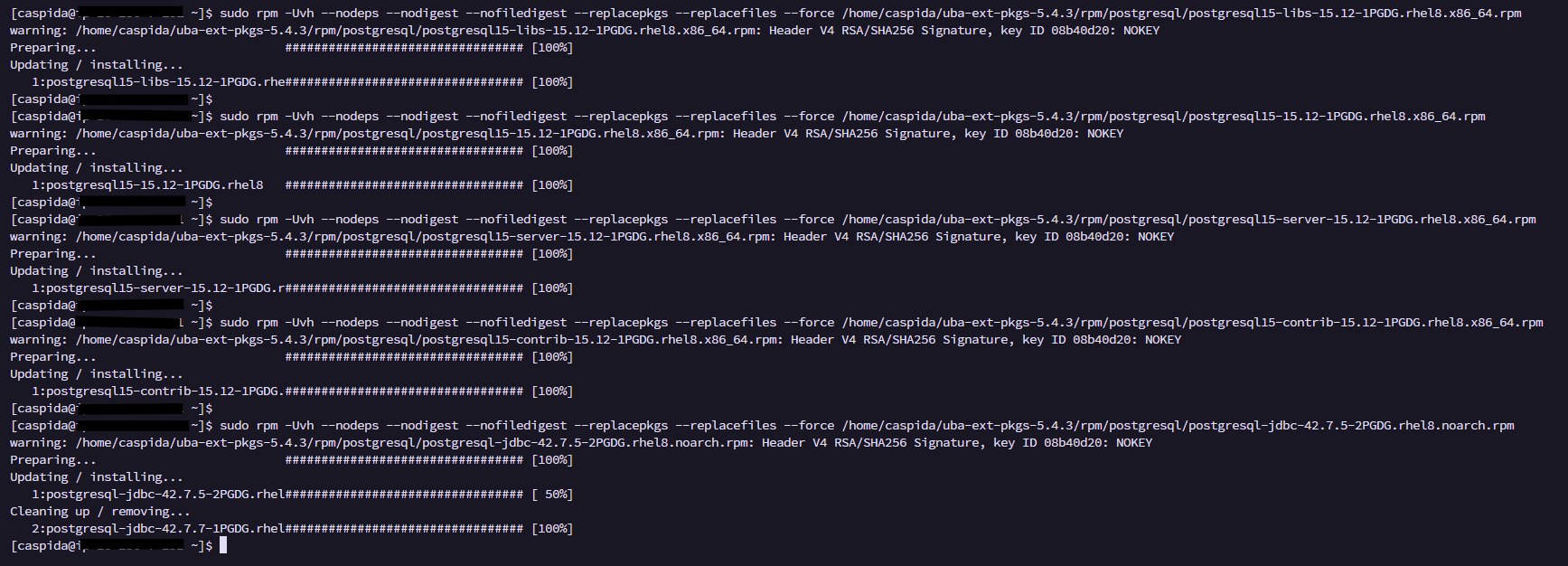
Step 2: Execute the below command to confirm the PostgreSQL packages are successfully upgraded:
sudo rpm -Uvh --test /home/caspida/uba-ext-pkgs-5.4.3/rpm/postgresql/*.rpmExpected output should show all packages as already installed with the expected versions:
Step 3: Execute the UBA Upgrade Script again:
/opt/caspida/upgrade/utils/upgrade_uba.sh -p /var/vcap/release_archives/caspida-<old-uba-version> -e /home/caspida/uba-ext-pkgs-5.4.3.tgzOutput:

Related Links
Splunk document - Reference
Revision History
| Revision | Publish Date | Comments |
|---|---|---|
1.0 |
01-Oct-2026
|
Initial Release |
 Feedback
