SOAR - Universal Forwarder Update Needed BEFORE SOAR 6.2.0 Upgrade
Available Languages
Applicability
Splunk SOAR Cloud Forwarding data from Splunk SOAR Cloud to Splunk Cloud PlatformDescription
In Splunk SOAR version 6.2.0, we are replacing the embedded Splunk Enterprise from Splunk SOAR with a Universal Forwarder to improve the scale and reliability of data forwarding from Splunk SOAR to Splunk Cloud Platform deployments.These improvements include live data streaming and enhanced performance based on decreased resource usage.
These changes include support for three new data types that you can send from Splunk SOAR to Splunk Cloud Platform.
This change also includes three new data types that you can forward from Splunk SOAR to Splunk Cloud Platform.
- Audit logs: Records of all activities in Splunk SOAR.
- Playbook run: Playbook performance metrics, including resource scoring data.
- SOAR logs: Information about Splunk SOAR, based on app logs.
Investigation
You must complete these steps if you have the following deployment combination of Forwarding data from Splunk SOAR (Cloud) to Splunk Cloud Platform
If you do not have this specific combination, no action is required.
Resolution
Take these actions before November 29, 2023Follow these steps to upgrade your data forwarding before your stack is upgraded on November 29, 2023.
Step 1. Download Universal Forwarder Credentials.
From your Splunk Cloud Platform deployment select Apps >Universal Forwarder > Download Universal Forwarder Credentials.
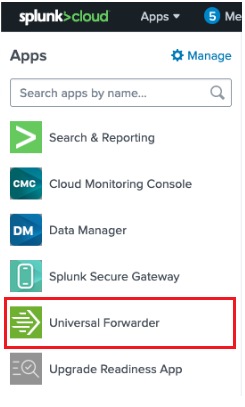
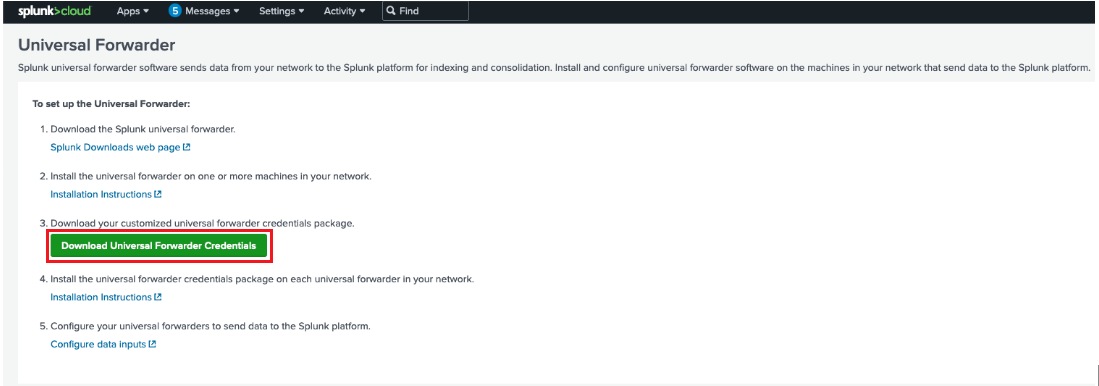
Refer to the Splunk Universal Forwarder documentation for more details.
Step 2. Upload the credentials package in Splunk SOAR
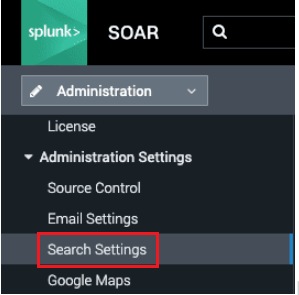
Confirm that Distributed Splunk Enterprise Deployment is selected. Upload the Splunk Universal Forwarder Credentials Package associated with your Splunk Cloud Platform instance.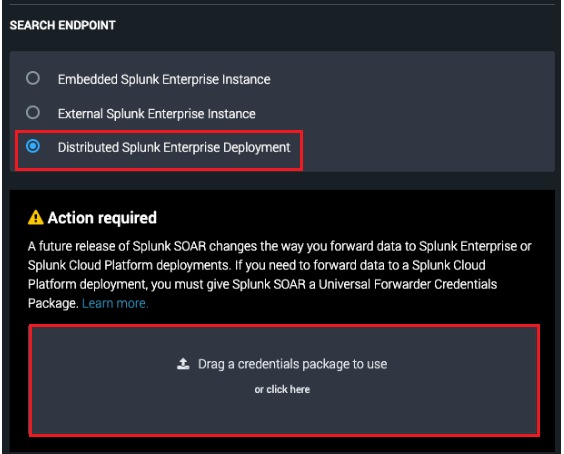
After you have uploaded and saved the Universal Forwarder Credentials Package, your connection to your Splunk Cloud Platform deployment will migrate correctly when your Splunk SOAR deployment is upgraded to release 6.2.0.
Step 3. Optional post-upgrade steps: Adding new data types
After you perform the steps above, all of your previously configured data types are automatically selected. Your forwarding will work as it did in previous releases.
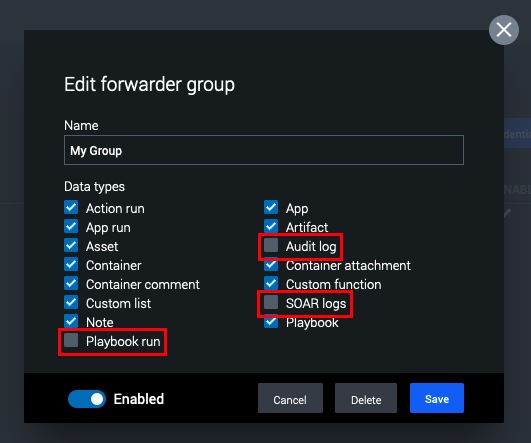
If you choose, you can add one or more of three additional forwarding data types that are added in Splunk SOAR 6.2.0.
-
Audit logs: Records of all activities in Splunk SOAR.
-
Playbook run: Playbook performance metrics, including resource scoring data.
-
SOAR logs: Information about Splunk SOAR, based on app logs.
To add one or more of these new forwarding data types, follow these steps AFTER your Splunk SOAR stack is upgraded to version 6.2.0:
-
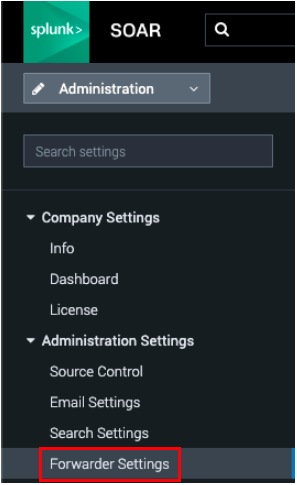
From the Home > Administration > Administration Settings >Forwarder Settings.
-
Locate the forwarder group to update and select the edit button

-
Select the Data types you want to ingest into Splunk Cloud Platform.
-
Select Save.
Taking action after your stack is upgraded if you did not act before the upgrade
If you do not complete this action before November 29, 2023, you must install your Universal Forwarder Credentials Package by following these steps:
Step 1. Download Universal Forwarder Credentials.
From your Splunk Cloud Platform deployment select Apps >Universal Forwarder > Download Universal Forwarder Credentials.
Step 2. Upload the credentials package into Splunk SOAR version 6.2.0
- Select Home > Administration > Administration Settings > Forwarder Settings > +Install Credentials Package.

- Upload the Splunk Universal Forwarder Credentials Package associated with your Splunk Cloud Platform instance
- Select the Data types you want to ingest into Splunk Cloud Platform
- There are three additional forwarding data types that are added in Splunk SOAR 6.2.0
- Audit logs: Records of all activities in Splunk SOAR
- Playbook run: Playbook performance metrics, including resource scoring data.
- SOAR logs: Information about Splunk SOAR, based on app logs
- There are three additional forwarding data types that are added in Splunk SOAR 6.2.0
-
Select Save.
After you complete these steps, data will begin to stream from Splunk SOAR to Splunk Cloud Platform.
Revision History
| Revision | Publish Date | Comments |
|---|---|---|
1.0 |
29-Sep-2026
|
Initial Release |
 Feedback