"Bad Request" error when attempting to update Finding
Available Languages
Applicability
Splunk Enterprise SecurityDescription
When attempting to update a finding within the Analyst Queue the "Bad Request" error message is displayed on screen and the changes do not persist.
Investigation
If the issue is reproduced while gathering a HAR file then the error messages below are displayed, indicating that the default incident type does not exist.
"code": "MC_0209",
"message": "Default Incident Type does not exist"
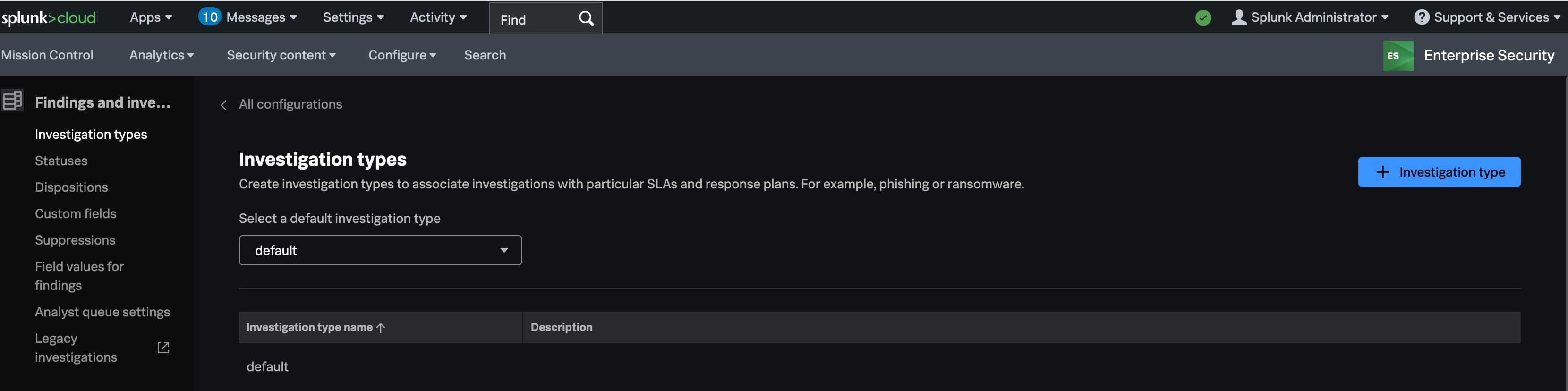
When navigating to 'Configure > Findings and Investigations > Investigation Types' verify that Investigation Types are displayed, and that the "Select A Default Investigation Type" dropdown has one of those Investigation Types selected. If the Investigation Type does not exist, or is not selected in the dropdown, then they need to be added.
Resolution
- If no Investigation Types exist, click the "+ Investigation Type" button and create a "default". After this is saved it should then be displayed under the "Investigation Type Name" column.
- Next click the "Select A Default Investigation Type" dropdown to select the newly created "default" Investigation Type that was created.
Please reference the screenshot below to see an example of how this should look after following the above steps:
Once the above steps are completed try making the changes to the finding within the Analyst Queue once more.
Revision History
| Revision | Publish Date | Comments |
|---|---|---|
1.0 |
01-Oct-2026
|
Initial Release |
 Feedback