Notables are not showing up on the Incident Review after Splunk Enterprise Security upgrade (7.0.2 to 7.3.2)
Available Languages
Applicability
Splunk Enterprise SecurityDescription
Post-upgrade to Splunk Enterprise Security version 7.3.2, notable events are not showing up in the Incident Review page, even though they exist in the notable index and the underlying search process indicates that the notable events are being generated successfully.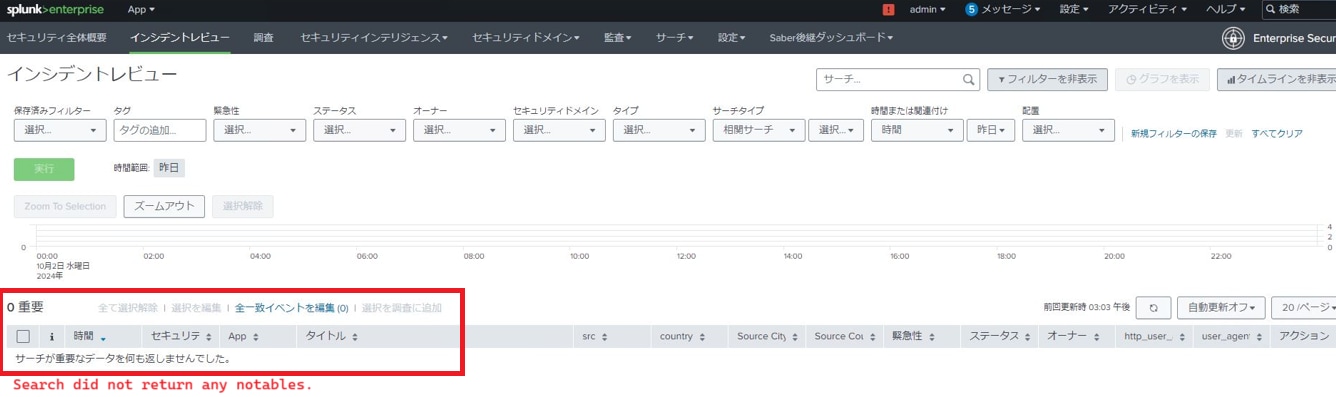
Despite confirming that the notables exist in the backend and there are no relevant errors in the logs, it was discovered that incorrect monitor stanzas in the inputs.conf file is interfering with stash processing, which is intended for handling notables.
Investigation
- Checked the index=notable:
The notables are present in the notable index, but they are not appearing in the Incident Review page.
- Created Sample Notable Events:
A sample notable was created using the makeresults command, but it still did not show up in the Incident Review page.
- Checked Splunk Logs:
There were no relevant errors found in search.log related to notable events.
The scheduler logs indicated that the notable events were being triggered successfully.
The notable events are being stored in the stash directory: /opt/var/spool/stash-new.
- Checked the Backend for Stash:
Ran the following command to check if the notables were in the stash directory:
/opt/bin/splunk_internal call/services/admin/inputstatus/TailingProcessor:FileStatus
No errors were observed after running the above command, indicating no issues at that point. - Identified Configuration Issue:
Found that the /opt/splunk/etc/system/local/inputs.conf file contained several monitor stanzas that were incorrectly configured:
disabled = 0
[monitor://$SPLUNK_HOME/var/spool/splunk/...stash_hec]
disabled = 0
[monitor://$SPLUNK_HOME/var/spool/splunk]
disabled = 0
These entries, with disabled = 0, were overriding the default batch input configuration for stash processing. Specifically, the default batch stanza:
[batch://$SPLUNK_HOME/var/spool/splunk/...stash_new]
This interference was causing the notable events to be stored in the main index rather than the intended stash processing location.
Resolution
To resolve the issue, follow these steps:
- Navigate to the file at
/opt/splunk/etc/system/local/input.conf. Ensure the following entries are correctly configured to enable the monitoring of the specified directories:[monitor://$SPLUNK_HOME/var/spool/splunk/...stash_new]
disabled = 0
[monitor://$SPLUNK_HOME/var/spool/splunk/...stash_hec]
disabled = 0
[monitor://$SPLUNK_HOME/var/spool/splunk] disabled = 0 - Locate and remove the following override entry from your configuration:
[batch://$SPLUNK_HOME/var/spool/splunk/...stash_new] - After saving the changes, restart Splunk to apply the modifications. Restart Splunk by running the following command:
$SPLUNK_HOME/bin/splunk restart
Revision History
| Revision | Publish Date | Comments |
|---|---|---|
1.0 |
29-Sep-2026
|
Initial Release |
 Feedback