Error in 'spathannotations' command: (AttributeError) module 'time' has no attribute 'clock'.
Available Languages
Applicability
Splunk Enterprise Security 7.3.1 or lessDescription
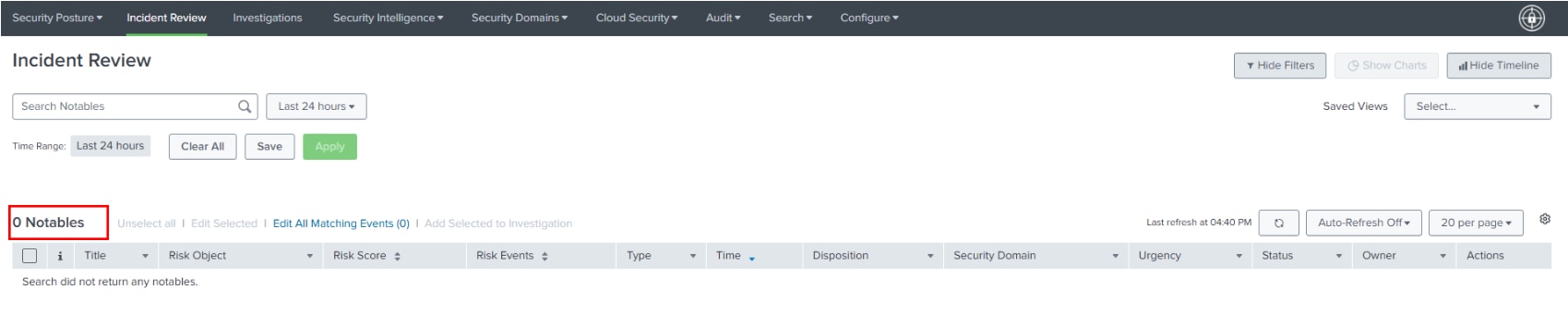
After upgrading to Splunk Enterprise 9.3.2, the Incident Review page shows 0 notables.
Investigation
Upon checking, by executing the "Incident Review - Main" rule by navigating to "Activity -> Jobs" the following error is displayed.
"Error in 'spathannotations' command: (AttributeError) module 'time' has no attribute 'clock'."

After upgrading Splunk Enterprise to version 9.3.2, the Python version is also upgraded to version 3.9, which causes an issue in the Enterprise Security app.
As a result, the Incident Review page shows 0 notables, even though the notables are present in the notable index.

Resolution
To resolve the issue, upgrade the Splunk Enterprise security version to 7.3.2.
After upgrading the Splunk Enterprise Security version to 7.3.2, the notables are displayed in the incident review dashboard.
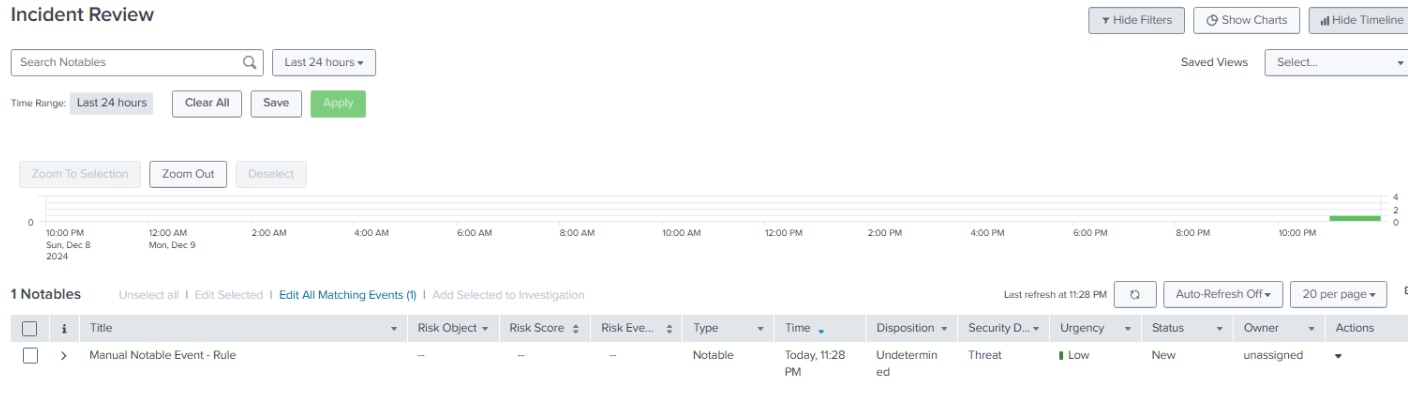
Also, the error is no longer displayed upon navigating to "Activity -> Jobs" and executing the "Incident Review - Main" search.

Related Links
Related Link: Upgrade_Splunk_Enterprise_Security
Revision History
| Revision | Publish Date | Comments |
|---|---|---|
1.0 |
29-Sep-2026
|
Initial Release |
 Feedback
