Unable to see splunk addon for microsoft O365 addon management type inputs logs in splunk
Available Languages
Applicability
Splunk Apps and Add-ons Splunk Cloud Splunk Enterprise Splunk Add-on for Microsoft Office 365Description
After the re-configuration of Tenant ID and Client ID in the splunk addon for Microsoft O365, management types input logs are not working, but before reconfiguration, it worked fine.
Investigation
- Reconfigure the Tenant ID with the different Tenant ID name from the Tenant configuration page of the Splunk Addon for Microsoft O365.
- Create new o365 management input and check internal logs using below SPL
-
index=_internal sourcetype="splunk:ta:o365:log" - Observe Warning messages multiple times and error messages found
level=ERROR pid=13409 tid=MainThread logger=splunk_ta_o365.modinputs.management_activity pos=utils.py:wrapper:72 | datainput=b'Testing_Management_Activity_Azure' start_time=1713445482 | message="Data input was interrupted by an unhandled exception." level=WARNING pid=13417 tid=MainThread logger=splunk_ta_o365.modinputs.service_message pos=service_message.py:modular_input_run:16 | | message="Splunk Add-on for Microsoft Office 365 Service Message has be retired"File "/opt/splunk/etc/apps/splunk_ta_o365/lib/requests/adapters.py", line 565, in send raise ConnectionError(e, request=request) requests.exceptions.ConnectionError: HTTPSConnectionPool(host='manage.office.com', port=443): Max retries exceeded with url: /api/v1.0/98ed61bc-45d1-4a5b-946a-54bd05626381/activity/feed/subscriptions/list?PublisherIdentifier=98ed61bc-45d1-4a5b-946a-54bd05626381 (Caused by NewConnectionError('<urllib3.connection.HTTPSConnection object at 0x7f10882cc7d0>: Failed to establish a new connection: [Errno 110] Connection timed out')) - Confirm whether Azure Tenant ID Endpoint is "Worldwide" or "USGovGCC" on the Azure side with the help of your Azure admin team
- Validate whether the same Tenant ID is configured with the same Endpoint under the Tenant configuration page of the splunk addon for Microsoft O365.
Resolution
If on Azure side "USGovGCC". endpoint is present and Splunk side "Worldwide " is configured for same Tenant ID, then change endpoint of Tenant Id to "USGovGCC" instead of "worldwide" configured under splunk addon for Microsoft O365 Tenant page and after that, management input type logs can be seen in splunk.
Step for reference: Splunk addon for Microsoft O365->configuration ->Tenant->Add-> Change Endpoint.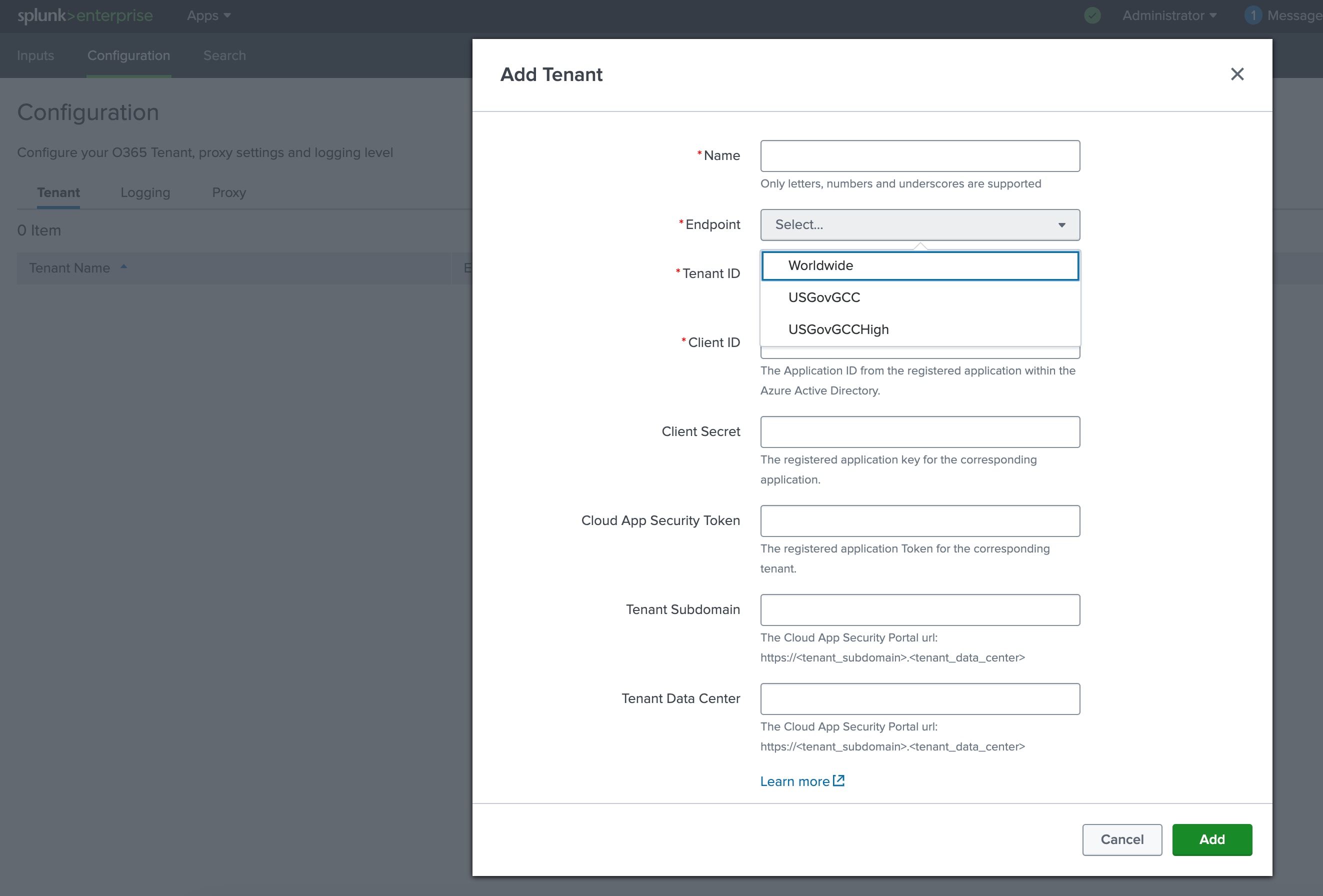
Revision History
| Revision | Publish Date | Comments |
|---|---|---|
1.0 |
29-Sep-2026
|
Initial Release |
 Feedback
Contact Cisco
- Open a Support Case

- (Requires a Cisco Service Contract)
This Document Applies to These Products
Related Articles
- Missing Microsoft Entra ID Sign-in Logs in Splunk Using the Splunk Add-on for Microsoft O365 V4.6.0 and Older
- Splunk Add-on for Microsoft O365 : increase number of thread from Web
- Splunk Add-on for Microsoft O365 : Throwing 504 Unknown ERROR for AuditSign.In Logs
- Unable to ingest the performance metrics logs in splunk using the Splunk Add-on for Microsoft Windows.