Understand Secure Web Appliance Accesslogs
Available Languages
Contents
Introduction
This document describes the structure of Secure Web Appliance (SWA) Accesslog.
Prerequisites
Requirements
Cisco recommends knowledge of these topics:
- Access To Command Line Interface (CLI) of SWA.
- Administrative Access to the SWA.
- Basic understanding of the SWA work flow.
Components Used
This document is not restricted to specific software and hardware versions.
The information in this document was created from the devices in a specific lab environment. All of the devices used in this document started with a cleared (default) configuration. If your network is live, ensure that you understand the potential impact of any command.
Accesslog Structure
In this article the Accesslog structure is explained by this sample:
1726597763.348 68855 192.168.1.10 TCP_MISS/200 97645 TCP_CONNECT 10.37.145.84:443 "AMOJARRA\amirhossein@WCCPrealm" DIRECT/www.cisco.com - PASSTHRU_CUSTOMCAT_7-DP_site-IdP_Site-NONE-NONE-NONE-DefaultGroup-NONE <"C_Cisc",-,-,"-",-,-,-,-,"-",-,-,-,"-",-,-,"-","-",-,-,"-",-,"-","-","-","-","-","-","-",11.35,0,-,"-","-",-,"-",-,-,"-","-",-,-,"-",-,-> - -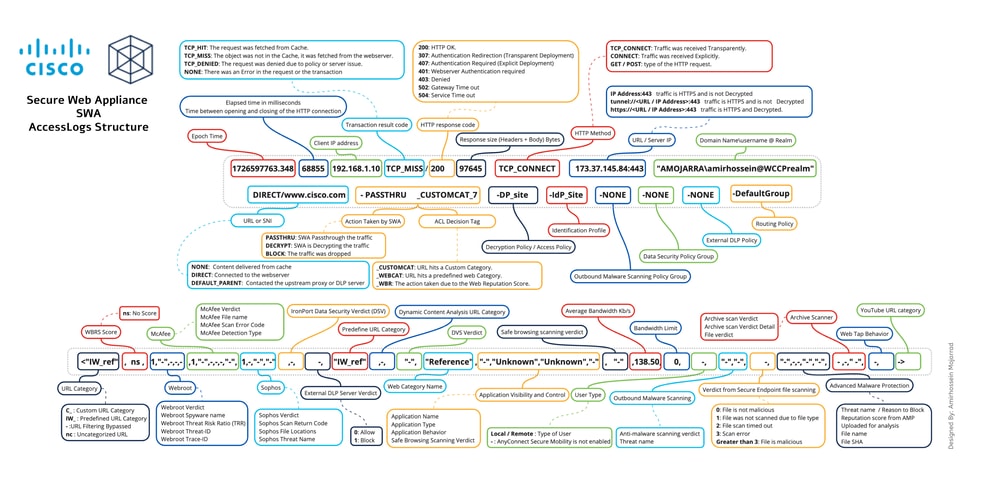 Image - Accesslog Structure

Note: The structure of Access Logs depends on the version of SWA. At the beginning of each Accesslog file there is a line that show its structure and the order of the Format Specifier.
| Section |
Sample from Accesslog |
Format Specifier |
Details |
||||||||||||||||||||||||||||||||||||||||||||||||||||||||||||||||||
Epoch time |
1726597763.348 |
%t |
Epoch time (often called Unix time or POSIX time) is a system for tracking time by counting the total number of seconds (or milliseconds/microseconds) that have elapsed since January 1, 1970, at 00:00:00 UTC The Epoch time of when the transaction was finished. You can convert this value by on-line Epoch time converter or any linux operating system. |
||||||||||||||||||||||||||||||||||||||||||||||||||||||||||||||||||
Elapsed Time |
68855 |
%e |
The amount of milliseconds the request took before it was completed/aborted and the connection closed. |
||||||||||||||||||||||||||||||||||||||||||||||||||||||||||||||||||
Source IP address |
192.168.1.10 |
%a |
Client/Source IP address. |
||||||||||||||||||||||||||||||||||||||||||||||||||||||||||||||||||
Transaction Result Code |
TCP_MISS |
%w |
Transaction Result Code indicates how the SWA resolves client requests. Here are the list of the Transaction Result Codes:
|
||||||||||||||||||||||||||||||||||||||||||||||||||||||||||||||||||
HTTP Response Code |
/200 |
%h |
The HTTP Response Code represents the status code returned by the web server in response to the client HTTP request. Here are the list of the most important HTTP Response Code, ( For more information kindly visit HTTP Response Code section in this article)
|
||||||||||||||||||||||||||||||||||||||||||||||||||||||||||||||||||
Total Size Transferred |
97645 |
%s |
Total transferred Bytes for the request. |
||||||||||||||||||||||||||||||||||||||||||||||||||||||||||||||||||
HTTP Method |
TCP_CONNECT |
%1r |
An HTTP method is a standardized way for a client to specify the desired action to be performed on a resource by a web server, such as retrieving data with GET or submitting data with POST.
|
||||||||||||||||||||||||||||||||||||||||||||||||||||||||||||||||||
Destination |
10.37.145.84:443 |
%2r |
This section, shows the destination server URL and TCP port number. In transparent redirection, before the traffic gets decrypted, SWA shows the destination IP address and port number. If the URL starts with tunnel:// it means SWA did not decrypt the traffic yet. If the URL starts with https:// it means SWA decrypts the traffic. |
||||||||||||||||||||||||||||||||||||||||||||||||||||||||||||||||||
User name and Authentication Realm |
"AMOJARRA\amirhossein@WCCPrealm" |
%A |
Credentials used for this connection. If the request gets authenticated, SWA logs the user name and the Authentication realms as: <Domain Name> \ <User Name> @ <Authentication Realm Name> If the request is not authenticated yet or is exempt from authentication, in the log you see hyphen "-" |
||||||||||||||||||||||||||||||||||||||||||||||||||||||||||||||||||
Access Type |
DIRECT/ |
%H |
Code that describes which server was contacted for the retrieving the request content. Most common values include:
|
||||||||||||||||||||||||||||||||||||||||||||||||||||||||||||||||||
Server Address |
%d |
Data source or server IP address. |
|||||||||||||||||||||||||||||||||||||||||||||||||||||||||||||||||||
MIME content-type/subtype |
- |
%c |
MIME Indicates the nature and format of a document, file or assortment of bytes. MIME types are defined and standardized in IETF RFC 6838 Two primary MIME types are important for the role of default types:
To get a full list of MIME type please visit: Media Types (iana) |
||||||||||||||||||||||||||||||||||||||||||||||||||||||||||||||||||
ACL Decision Tag |
PASSTHRU_CUSTOMCAT_7- |
%D |
An ACL decision tag is a field in an access log entry that indicates how the Web Proxy handled the transaction. It includes information from the Web Reputation filters, URL categories, and the scanning engines. Here is a list of the most important ACL Decision Tags. (For more information please visit ACL Decision Tag section in this article)
|
||||||||||||||||||||||||||||||||||||||||||||||||||||||||||||||||||
Policy Name |
DP_site- |
N/A |
Depends on the type of the traffic, this shows the:
|
||||||||||||||||||||||||||||||||||||||||||||||||||||||||||||||||||
Identity Policy |
IdP_Site- |
N/A |
Shows the Identification Profile name |
||||||||||||||||||||||||||||||||||||||||||||||||||||||||||||||||||
| Outbound Malware Scanning Policy Group |
NONE- |
N/A |
Outbound Malware Scanning Policy group name. Any space in the policy group name is replaced with an underscore ( _ ) |
||||||||||||||||||||||||||||||||||||||||||||||||||||||||||||||||||
Data Security Policy Group |
NONE- |
N/A |
Cisco Data Security Policy group name. When the transaction matches the global Cisco Data Security Policy, this value is DefaultGroup. This policy group name only appears when Cisco Data Security Filters is enabled. “NONE” appears when no Data Security Policy was applied. Any space in the policy group name is replaced with an underscore ( _ ) |
||||||||||||||||||||||||||||||||||||||||||||||||||||||||||||||||||
External DLP Policy Group |
NONE- |
N/A |
When the transaction matches the global External DLP Policy, this value is DefaultGroup. “NONE” appears when no External DLP Policy was applied. Any space in the policy group name is replaced with an underscore ( _ ). |
||||||||||||||||||||||||||||||||||||||||||||||||||||||||||||||||||
Routing Policy Group |
DefaultGroup- |
N/A |
Routing Policy group name asProxyGroupName/ProxyServerName. When the transaction matches the global Routing Policy, this value is DefaultRouting. When no upstream proxy server is used, this value is DIRECT Any space in the policy group name is replaced with an underscore ( _ ). |
||||||||||||||||||||||||||||||||||||||||||||||||||||||||||||||||||
Web Traffic Tap |
NONE |
N/A |
Web Traffic Tap Policy name. |
||||||||||||||||||||||||||||||||||||||||||||||||||||||||||||||||||
URL Category Abbreviation |
<"C_Cisc", |
%XC |
URL Category that that the request is matching.
|
||||||||||||||||||||||||||||||||||||||||||||||||||||||||||||||||||
Web Reputation Score |
-, |
%XW |
This field shows the Web Reputation (WBRS) score. ns means the URL has no score. |
||||||||||||||||||||||||||||||||||||||||||||||||||||||||||||||||||
Webroot Scanning |
-,"-",-,-,-, |
These 5 fields are related to Webroot scanning
|
|||||||||||||||||||||||||||||||||||||||||||||||||||||||||||||||||||
McAfee Scanning |
-,"-",-,-,-,"-", |
These 6 fields are related to McAfee scanning.
|
|||||||||||||||||||||||||||||||||||||||||||||||||||||||||||||||||||
Sophos Scanning |
-,-,"-","-", |
These 4 fields are related to Sophos scanning
|
|||||||||||||||||||||||||||||||||||||||||||||||||||||||||||||||||||
Cisco Data Security Scan Verdict |
-, |
%Xl |
The Cisco Data Security scan verdict based on the action in the Content column of the Cisco Data Security Policy. This list describes the possible values for this field: 0.Allow 1.Block - (hyphen).No scanning was initiated by the Cisco Data Security Filters. This value appears when the Cisco Data Security Filters are disabled, or when the URL category action is set to Allow. |
||||||||||||||||||||||||||||||||||||||||||||||||||||||||||||||||||
External DLP Scan Verdict |
-, |
%Xp |
The External DLP scan verdict based on the result given in the ICAP response. This list describes the possible values for this field: 0.Allow 1.Block - (hyphen).No scanning was initiated by the external DLP server. This value appears when External DLP scanning is disabled, or when the content was not scanned due to an exempt URL category on the External DLP Policies > Destinations page. |
||||||||||||||||||||||||||||||||||||||||||||||||||||||||||||||||||
Predefined URL Category Verdict |
"-", |
%XQ |
The predefined URL category verdict determined during request-side scanning, abbreviated. This field lists a hyphen ( - ) when URL filtering is disabled. If the request hits a Custom URL Category, you can still see the predefined URL category name in your Accesslog but the decision was taken by the custom URL category. For a list of URL category abbreviations, seeURL Category Descriptions. |
||||||||||||||||||||||||||||||||||||||||||||||||||||||||||||||||||
URL Category Verdict |
-, |
%XA |
The URL category verdict determined by the Dynamic Content Analysis (DCA) engine during response-side scanning, abbreviated. Applies to the Cisco Web Usage Controls URL filtering engine only. nc: This value appears in the request-side scanning verdict when the Dynamic Content Analysis engine is enabled and no URL category is assigned at request time, indicating the URL is un-categorized during the initial request phase before response-side scanning categorizes it |
||||||||||||||||||||||||||||||||||||||||||||||||||||||||||||||||||
Unified Inbound DVS Verdict |
"-", |
%XZ |
Unified response-side Anti-Malware scanning verdict that provides the Malware category independent of which scanning engines are enabled. Applies to transactions blocked or monitored due to server response scanning. |
||||||||||||||||||||||||||||||||||||||||||||||||||||||||||||||||||
Web Reputation Filter Threat Type |
"-", |
%Xk |
The Category Name or Threat Type is returned by the Web Reputation filters. The Category Name is returned when the Web Reputation is high and Threat Type returned when the reputation is low. Typically, this field is populated for sites at reputation of -4 and below. |
||||||||||||||||||||||||||||||||||||||||||||||||||||||||||||||||||
Google Translate Encapsulated URL |
"-", |
%X#10# |
The URL which is encapsulated inside Google translate engine. If there is no encapsulated URL, the field value be “-”. |
||||||||||||||||||||||||||||||||||||||||||||||||||||||||||||||||||
Application Control (AVC/ADC) |
"-","-","-", |
In these 3 fields statistics of Application Visibility and Control (AVC) and Application Discovery and Control (ADC) are logged.
|
|||||||||||||||||||||||||||||||||||||||||||||||||||||||||||||||||||
Safe Browsing Verdict |
"-", |
%XS |
This value indicates whether either the safe search or the site content ratings feature was applied to the transaction.
|
||||||||||||||||||||||||||||||||||||||||||||||||||||||||||||||||||
Average Bandwidth |
11.35, |
%XB |
The average bandwidth consumed serving the request, in Kb/sec. |
||||||||||||||||||||||||||||||||||||||||||||||||||||||||||||||||||
Bandwidth Limit Control |
0, |
%XT |
A value that indicates whether the request was throttled due to bandwidth limit control settings. “1” indicates the request was throttled. “0” indicates the request was not throttled. |
||||||||||||||||||||||||||||||||||||||||||||||||||||||||||||||||||
User Type |
-, |
%l |
The type of user making the request, either “[Local]” or “[Remote].” Only applies when AnyConnect Secure Mobility is enabled. When it is not enabled, the value is a hyphen (-) |
||||||||||||||||||||||||||||||||||||||||||||||||||||||||||||||||||
Outbound Malware Scanning |
"-","-", |
These 2 fields applies to transactions blocked or monitored due to client request scanning when an Outbound Malware Scanning Policy applies.
|
|||||||||||||||||||||||||||||||||||||||||||||||||||||||||||||||||||
Advanced Malware Protection |
-,"-",-,-,"-","-", |
These 6 fields are related to Secure Endpoint (Also known as Advanced Malware Protection):
|
|||||||||||||||||||||||||||||||||||||||||||||||||||||||||||||||||||
Archive Scan |
-,-,"-", |
These 3 fields indicates the status of the Archive file scanning:
|
|||||||||||||||||||||||||||||||||||||||||||||||||||||||||||||||||||
Web Tap |
-, |
%XU |
Web Tap Behavior. |
||||||||||||||||||||||||||||||||||||||||||||||||||||||||||||||||||
YouTube URL category |
-> |
%X#29# |
The YouTube URL category assigned to the transaction, abbreviated. This field shows “nc” when no category is assigned. |
HTTP Response Code
Here is the full list of HTTP Response Code
| Status code | Meaning |
| 1xx Information | |
| 100 | Continue |
| 101 | Switching protocols |
| 102 | Processing |
| 103 | Early Hints |
| 2xx Successful | |
| 200 | OK |
| 201 | Created |
| 202 | Accepted |
| 203 | Non-Authoritative Information |
| 204 | No Content |
| 205 | Reset Content |
| 206 | Partial Content |
| 207 | Multi-Status |
| 208 | Already Reported |
| 226 | IM Used |
| 3xx Redirection | |
| 300 | Multiple Choices |
| 301 | Moved Permanently |
| 302 | Found (Previously "Moved Temporarily") |
| 303 | See Other |
| 304 | Not Modified |
| 305 | Use Proxy |
| 306 | Switch Proxy |
| 307 | Temporary Redirect for Authentication (Usually seen in the transparent deployment while SWA is authenticating the user) |
| 308 | Permanent Redirect |
| 4xx Client Error | |
| 400 | Bad Request |
| 401 | Web server authentication required (Usually seen in the transparent deployment while SWA is authenticating the user) |
| 402 | Payment Required |
| 403 | Forbidden |
| 404 | Not Found |
| 405 | Method Not Allowed |
| 406 | Not Acceptable |
| 407 | Explicit Proxy Authentication Required |
| 408 | Request Timeout |
| 409 | Conflict |
| 410 | Gone |
| 411 | Length Required |
| 412 | Precondition Failed |
| 413 | Payload Too Large |
| 414 | URI Too Long |
| 415 | Unsupported Media Type |
| 416 | Range Not Satisfiable |
| 417 | Expectation Failed |
| 418 | I am a Teapot |
| 421 | Misdirected Request |
| 422 | Unprocessable Entity |
| 423 | Locked |
| 424 | Failed Dependency |
| 425 | Too Early |
| 426 | Upgrade Required |
| 428 | Precondition Required |
| 429 | Too Many Requests |
| 431 | Request Header Fields Too Large |
| 451 | Unavailable For Legal Reasons |
| 5xx Server Error | |
| 500 | Internal Server Error |
| 501 | Not Implemented |
| 502 | Bad Gateway |
| 503 | Service Unavailable |
| 504 | Gateway Timeout |
| 505 | HTTP Version Not Supported |
| 506 | Variant Also Negotiates |
| 507 | Insufficient Storage |
| 508 | Loop Detected |
| 510 | Not Extended |
| 511 | Network Authentication Required |
ACL Decision Tag
Here is the full list of the ACL decision tags:
| ACL Decision Tag | Description |
| ALLOW_ADMIN_ERROR_PAGE | The Web Proxy allowed the transaction to an notification page and to any logo used on that page. |
| ALLOW_CUSTOMCAT | The Web Proxy allowed the transaction based on custom URL category filtering settings for the Access Policy group. |
| ALLOW_REFERER | The Web Proxy allowed the transaction based on an embedded/referred content exemption. |
| ALLOW_WBRS | The Web Proxy allowed the transaction based on the Web Reputation filter settings for the Access Policy group. |
| AMP_FILE_VERDICT | Value representing a verdict from the AMP reputation server for the file: |
| 1 – Unknown | |
| 2 – Clean | |
| 3 – Malicious | |
| 4 – Unscannable | |
| ARCHIVESCAN_ALLCLEAR | Archive scan Verdict |
| ARCHIVESCAN_BLOCKEDFILETYPE | ARCHIVESCAN_ALLCLEAR – There are no blocked file types in the inspected archive. |
| ARCHIVESCAN_NESTEDTOODEEP | ARCHIVESCAN_BLOCKEDFILETYPE – There is a blocked file type in the inspected archive. The next field in the log entry (Verdict Detail) provides details, specifically the type of file blocked, and the name of the blocked file. |
| ARCHIVESCAN_UNKNOWNFMT | ARCHIVESCAN_NESTEDTOODEEP – The archive is blocked because it contains more “encapsulated” or nested archives than the configured maximum. The Verdict Detail field contains “Un-Scanable Archive-Blocked.” |
| ARCHIVESCAN_UNSCANABLE | ARCHIVESCAN_UNKNOWNFMT – The archive is blocked because it contains a file type of unknown format. The Verdict Detail is “Un-Scannable Archive-Blocked.” |
| ARCHIVESCAN_FILETOOBIG | ARCHIVESCAN_UNSCANABLE – The archive is blocked because it contain a file which cannot be scanned. The Verdict Detail is “Un-Scannable Archive-Blocked.” |
| ARCHIVESCAN_FILETOOBIG – The archive is blocked because the size of the archive is more than the configured maximum. The Verdict Detail is “Un-Scannable Archive-Blocked.” | |
| Archive scan Verdict Detail | |
| The field and the Verdict field in the log entry provides additional information about the Verdict, such as type of file blocked and name of the blocked file, “Un-Scannable Archive-Blocked,” or “-” to indicate the archive does not contain any blocked file types. | |
| For example, if an Inspectable Archive file is blocked (ARCHIVESCAN_BLOCKEDFILETYPE) based on Access Policy: Custom Objects Blocking settings, the Verdict Detail entry includes the type of file blocked, and the name of the blocked file. | |
| Refer to Access Policies: Blocking Objects and Archive Inspection Settings for more information about Archive Inspection. | |
| BLOCK_ADMIN | Transaction blocked based on some default settings for the Access Policy group. |
| BLOCK_ADMIN_CONNECT | Transaction blocked based on the TCP port of the destination as defined in the HTTP CONNECT Ports setting for the Access Policy group. |
| BLOCK_ADMIN_CUSTOM_USER_AGENT | Transaction blocked based on the user agent as defined in the Block Custom User Agents setting for the Access Policy group. |
| BLOCK_ADMIN_TUNNELING | The Web Proxy blocked the transaction based on tunneling of the non HTTP traffic on the HTTP ports for the Access Policy Group. |
| BLOCK_ADMIN_HTTPS_NonLocalDestination | Transaction blocked; client tried to bypass authentication using the SSL port as an explicit proxy. To prevent this, if an SSL connection is to the WSA itself, only requests to the actual WSA redirect host name are allowed. |
| BLOCK_ADMIN_IDS | Transaction blocked based on the MIME type of the request body content as defined in the Data Security Policy group. |
| BLOCK_ADMIN_FILE_TYPE | Transaction blocked based on the file type as defined in the Access Policy group. |
| BLOCK_ADMIN_PROTOCOL | Transaction blocked based on the protocol as defined in the Block Protocols setting for the Access Policy group. |
| BLOCK_ADMIN_SIZE | Transaction blocked based on the size of the response as defined in the Object Size settings for the Access Policy group. |
| BLOCK_ADMIN_SIZE_IDS | Transaction blocked based on the size of the request body content as defined in the Data Security Policy group. |
| BLOCK_AMP_RESP | The Web Proxy blocked the response based on the Advanced Malware Protection settings for the Access Policy group. |
| BLOCK_AMW_REQ | The Web Proxy blocked the request based on the Anti-Malware settings for the Outbound Malware Scanning Policy group. The request body produced a positive Malware verdict. |
| BLOCK_AMW_RESP | The Web Proxy blocked the response based on the Anti-Malware settings for the Access Policy group. |
| BLOCK_AMW_REQ_URL | The Web Proxy suspects the URL in the HTTP request can not be safe, so it blocked the transaction at request time based on the Anti-Malware settings for the Access Policy group. |
| BLOCK_AVC | Transaction blocked based on the configured Application settings for the Access Policy group. |
| BLOCK_CONTENT_UNSAFE | Transaction blocked based on the site content ratings settings for the Access Policy group. The client request was for adult content and the policy is configured to block adult content. |
| BLOCK_CONTINUE_CONTENT_UNSAFE | Transaction blocked and displayed the Warn and Continue page based on the site content ratings settings in the Access Policy group. The client request was for adult content and the policy is configured to give a warning to users accessing adult content. |
| BLOCK_CONTINUE_CUSTOMCAT | Transaction blocked and displayed the Warn and Continue page based on a custom URL category in the Access Policy group configured to “Warn.” |
| BLOCK_CONTINUE_WEBCAT | Transaction blocked and displayed the Warn and Continue page based on a predefined URL category in the Access Policy group configured to “Warn.” |
| BLOCK_CUSTOMCAT | Transaction blocked based on custom URL category filtering settings for the Access Policy group. |
| BLOCK_ICAP | The Web Proxy blocked the request based on the verdict of the external DLP system as defined in the External DLP Policy group. |
| BLOCK_SEARCH_UNSAFE | The client request included an unsafe search query and the Access Policy is configured to enforce safe searches, so the original client request was blocked. |
| BLOCK_SUSPECT_USER_AGENT | Transaction blocked based on the Suspect User Agent setting for the Access Policy group. |
| BLOCK_UNSUPPORTED_SEARCH_APP | Transaction blocked based on the safe search settings for the Access Policy group. The transaction was for an unsupported search engine, and the policy is configured to block unsupported search engines. |
| BLOCK_WBRS | Transaction blocked based on the Web Reputation filter settings for the Access Policy group. |
| BLOCK_WBRS_IDS | The Web Proxy blocked the upload request based on the Web Reputation filter settings for the Data Security Policy group. |
| BLOCK_WEBCAT | Transaction blocked based on URL category filtering settings for the Access Policy group. |
| BLOCK_WEBCAT_IDS | The Web Proxy blocked the upload request based on the URL category filtering settings for the Data Security Policy group. |
| BLOCK_YTCAT | The Web Proxy blocked the transaction based on the predefined YouTube category filtering settings for the Access Policy group. |
| BLOCK_CONTINUE_YTCAT | The Web Proxy blocked the transaction and displayed the Warn and Continue page based on a predefined YouTube category in the Access Policy group configured to 'Warn'. |
| DECRYPT_ADMIN | The Web Proxy decrypted the transaction based on some default settings for the Decryption Policy group. |
| DECRYPT_ADMIN_EXPIRED_CERT | The Web Proxy decrypted the transaction although the server certificate has expired. |
| DECRYPT_EUN_ADMIN_DEFAULT_ACTION | The Web Proxy decrypted the transaction based on default settings as drop connection for the decryption policy group when EUN is enabled. |
| DECRYPT_EUN_ADMIN_EXPIRED_CERT | The Web Proxy decrypted the transaction when HTTPS proxy settings drop an expired certificate with EUN enabled. |
| DECRYPT_EUN_ADMIN_INVALID_LEAF_CERT | The Web Proxy decrypted the transaction when HTTPS proxy settings drop an invalid leaf certificate with EUN enabled. |
| DECRYPT_EUN_ADMIN_MISMATCHED_HOSTNAME | The Web Proxy decrypted the transaction when HTTPS proxy settings drop the mismatched host name with EUN enabled. |
| DECRYPT_EUN_ADMIN_OCSP_OTHER_ERROR |
The Web Proxy decrypted the transaction when HTTPS proxy settings drop an OCSP with other errors with EUN enabled. |
| DECRYPT_EUN_ADMIN_OCSP_REVOKED_CERT | The Web Proxy decrypted the transaction when HTTPS proxy settings drop an OCSP revoked certificate with EUN enabled. |
| DECRYPT_EUN_ADMIN_UNRECOGNIZED_ROOT_CERT | The Web Proxy decrypted the transaction when HTTPS proxy settings drop an unrecognized root authority or issuer certificate with EUN enabled. |
| DECRYPT_EUN_CUSTOMCAT | The Web Proxy decrypted the transaction based on custom URL category filtering settings for the decryption policy group. If EUN is enabled, the traffic is dropped. |
| DECRYPT_EUN_WBRS | The Web Proxy decrypted the transaction based on the web reputation filter settings for the decryption policy group. If EUN is enabled, the traffic is dropped. |
| DECRYPT_EUN_WBRS_NO_SCORE | The Web Proxy decrypted the transaction based on the web reputation filter settings for no score URL in the decryption policy group. If EUN is enabled, the traffic is dropped. |
| DECRYPT_EUN_WEBCAT | The Web Proxy decrypted the transaction based on URL category filtering settings for the decryption policy group. If EUN is enabled, the traffic is dropped. |
| DECRYPT_WEBCAT | The Web Proxy decrypted the transaction based on URL category filtering settings for the Decryption Policy group. |
| DECRYPT_WBRS | The Web Proxy decrypted the transaction based on the Web Reputation filter settings for the Decryption Policy group. |
| DEFAULT_CASE | The Web Proxy allowed the client to access the server because none of the AsyncOS services, such as Web Reputation or Anti-Malware scanning, took any action on the transaction. |
| DENY_ADMIN | The Web Proxy denied the the transaction. This occurs for HTTPS requests when authentication is required and Decrypt for Authentication is disabled in the HTTPS proxy settings. |
| DROP_ADMIN | The Web Proxy dropped the transaction based on some default settings for the Decryption Policy group. |
| DROP_ADMIN_EXPIRED_CERT | The Web Proxy dropped the transaction because the server certificate has expired. |
| DROP_WEBCAT | The Web Proxy dropped the transaction based on URL category filtering settings for the Decryption Policy group. |
| DROP_WBRS | The Web Proxy dropped the transaction based on the Web Reputation filter settings for the Decryption Policy group. |
| MONITOR_ADMIN_EXPIRED_CERT | The Web Proxy monitored the server response because the server certificate has expired. |
| MONITOR_AMP_RESP | The Web Proxy monitored the server response based on the Advanced Malware Protection settings for the Access Policy group. |
| MONITOR_AMW_RESP | The Web Proxy monitored the server response based on the Anti-Malware settings for the Access Policy group. |
| MONITOR_AMW_RESP_URL | The Web Proxy suspects the URL in the HTTP request can not be safe, but it monitored the transaction based on the Anti-Malware settings for the Access Policy group. |
| MONITOR_AVC | The Web Proxy monitored the transaction based on the Application settings for the Access Policy group. |
| MONITOR_CONTINUE_CONTENT_UNSAFE | Originally, the Web Proxy blocked the transaction and displayed the Warn and Continue page based on the site content ratings settings in the Access Policy group. The client request was for adult content and the policy is configured to give a warning to users accessing adult content. The user accepted the warning and continued to the originally requested site, and no other scanning engine subsequently blocked the request. |
| MONITOR_CONTINUE_CUSTOMCAT | Originally, the Web Proxy blocked the transaction and displayed the Warn and Continue page based on a custom URL category in the Access Policy group configured to “Warn.” The user accepted the warning and continued to the originally requested site, and no other scanning engine subsequently blocked the request. |
| MONITOR_CONTINUE_WEBCAT | Originally, the Web Proxy blocked the transaction and displayed the Warn and Continue page based on a predefined URL category in the Access Policy group configured to “Warn.” The user accepted the warning and continued to the originally requested site, and no other scanning engine subsequently blocked the request. |
| MONITOR_CONTINUE_YTCAT | Originally, the Web Proxy blocked the transaction and displayed the Warn and Continue page based on a predefined YouTube category in the Access Policy group configured to 'Warn.' The user accepted the warning and continued to the originally requested site, and no other scanning engine subsequently blocked the request. |
| MONITOR_IDS | The Web Proxy scanned the upload request using either a Data Security Policy or an External DLP Policy, but did not block the request. It evaluated the request against the Access Policies. |
| MONITOR_SUSPECT_USER_AGENT | The Web Proxy monitored the transaction based on the Suspect User Agent setting for the Access Policy group. |
| MONITOR_WBRS | The Web Proxy monitored the transaction based on the Web Reputation filter settings for the Access Policy group. |
| NO_AUTHORIZATION | The Web Proxy did not allow the user access to the application because the user was already authenticated against an authentication realm, but not against any authentication realm configured in the Application Authentication Policy. |
| NO_PASSWORD | The user failed authentication. |
| PASSTHRU_ADMIN | The Web Proxy passed through the transaction based on some default settings for the Decryption Policy group. |
| PASSTHRU_ADMIN_EXPIRED_CERT | The Web Proxy passed through the transaction although the server certificate has expired. |
| PASSTHRU_WEBCAT | The Web Proxy passed through the transaction based on URL category filtering settings for the Decryption Policy group. |
| PASSTHRU_WBRS | The Web Proxy passed through the transaction based on the Web Reputation filter settings for the Decryption Policy group. |
| REDIRECT_CUSTOMCAT | The Web Proxy redirected the transaction to a different URL based on a custom URL category in the Access Policy group configured to “Redirect.” |
| SAAS_AUTH | The Web Proxy allowed the user access to the application because the user was authenticated transparently against the authentication realm configured in the Application Authentication Policy. |
| OTHER | The Web Proxy did not complete the request due to an error, such as an authorization failure, server disconnect, or an abort from the client. |
Malware Scanning Verdict Values
A Malware scanning verdict is a value assigned to a URL request or server response that determines the probability that it contains Malware. The Webroot, McAfee, and Sophos scanning engines return the Malware scanning verdict to the DVS engine so the DVS engine can determine whether to monitor or block the scanned object. Each malware scanning verdict corresponds to a Malware category listed on the Access Policies > Reputation and Anti-Malware Settings page when you edit the Anti-Malware settings for a particular Access Policy.
This list presents the different Malware Scanning Verdict Values and each corresponding Malware category:
| Malware Scanning Verdict Value |
Malware Category |
|---|---|
| - |
Not Set |
| 0 |
Unknown |
| 1 |
Not Scanned |
| 2 |
Timeout |
| 3 |
Error |
| 4 |
Unscannable |
| 10 |
Generic Spyware |
| 12 |
Browser Helper Object |
| 13 |
Adware |
| 14 |
System Monitor |
| 18 |
Commercial System Monitor |
| 19 |
Dialer |
| 20 |
Hijacker |
| 21 |
Phishing URL |
| 22 |
Trojan Downloader |
| 23 |
Trojan Horse |
| 24 |
Trojan Phisher |
| 25 |
Worm |
| 26 |
Encrypted File |
| 27 |
Virus |
| 33 |
Other Malware |
| 34 |
PUA |
| 35 |
Aborted |
| 36 |
Outbreak Heuristics |
| 37 |
Known Malicious and High-Risk Files |
Related Information
Revision History
| Revision | Publish Date | Comments |
|---|---|---|
1.0 |
29-Apr-2026
|
Initial Release |

 Feedback
Contact Cisco
- Open a Support Case

- (Requires a Cisco Service Contract)