Configure Sysadmin User Password Recovery
Available Languages
Introduction
This document describes how to enable the new sysadmin user password recovery feature first made available in Secure Network Analytics 7.6.0 release.
Requirements
This workflow requires SNA version 7.6.0 or greater
Problem
This only user that can perform system configuration steps on the command line interface is sysadmin.
Previously, resetting the sysadmin user password required a full appliance reboot and entering a very lengthy one time recovery string without error or the process would have to be restarted.
This made the recovery process slow, inefficient, and highly prone to manual entry errors during critical maintenance windows.
The Secure Network Analytics (SNA) 7.6.0 release introduces a "Gatekeeper" approach, where an administrator must first enable the reset capability at the appliance console level before the option becomes available in the web UI.
Solution
Enable the Feature via the CLI SystemConfig menu on the Manager.
The sysadmin user with must enable the feature so in order for it to be used in the future.
- Log in to the Manager appliance console as the sysadmin user to enter the SystemConfig menu.
- From the main menu, select
Security. - Select
Sysadmin Password. - Select
Yeswhen prompted to enable the password reset feature.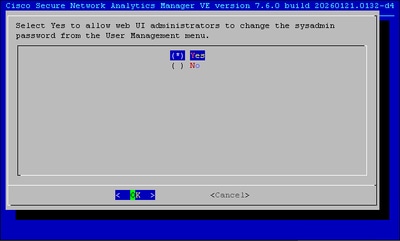
The feature has now been enabled.
Change the sysadmin user password through the web UI
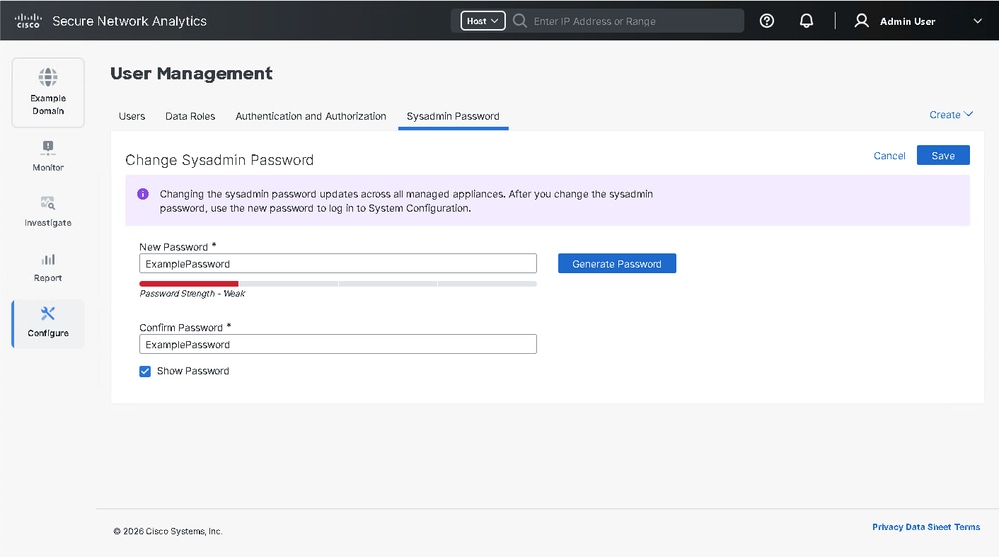
Once enabled in the console, a new, dynamic tab is added to the SNA Manager interface:
- Log in to the web UI of the Secure Network Analytics Manager Appliance.
- From the main menu, choose
Configure > User Management. - Select the
Sysadmin Passwordtab.

Note: This tab is only accessible to users to Primary Admin users
- In the New Password field, enter the new password.
- In the Confirm Password field, re-enter the new password.
- (Optional) Click Generate Password to automatically create a strong password.
- (Optional) Check the Show Password check box to view the entered passwords.
- Click Save.
Revision History
| Revision | Publish Date | Comments |
|---|---|---|
1.0 |
03-Apr-2026
|
Initial Release |

 Feedback
Contact Cisco
- Open a Support Case

- (Requires a Cisco Service Contract)