Troubleshoot FDM High Availability Configuration Failure Due to Cloud Services Enrollment Mismatch
Available Languages
Contents
Issue
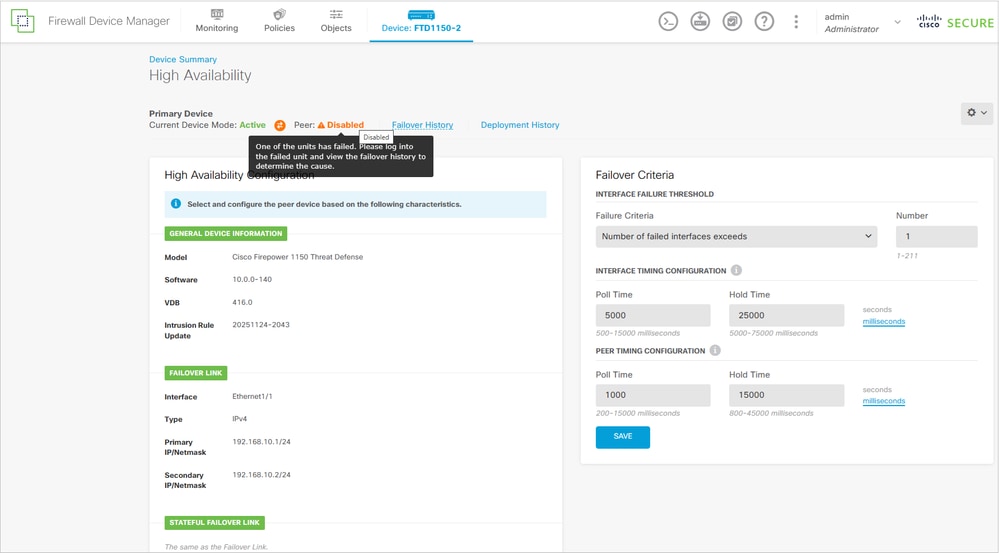
High Availability (HA) configuration fails between two Firepower 1150 devices managed by Firewall Device Manager (FDM). The configuration process does not complete successfully, preventing the establishment of an HA pair.
The FDM UI on the primary unit shows:
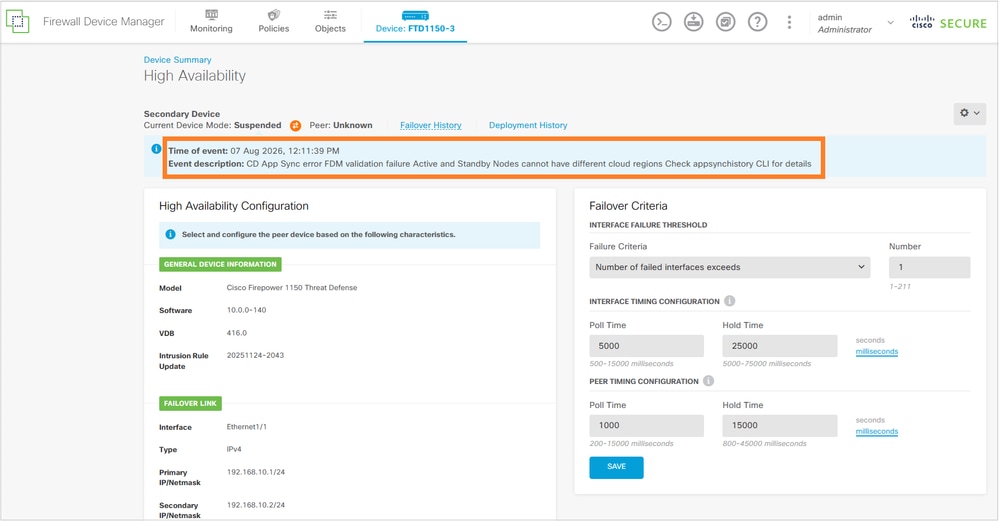
The secondary FTD unit shows:
Primary FTD CLI:
> show app-sync-history
================================APP SYNC HISTORY================================
--------------------------------------------------------------------------------
App Sync Time: 10:11:10 UTC Aug 07 2026
Role:  Active Unit
App Sync Status: FAILURE
Failed Phase: WaitRemoteConfigApply
Failure Reason: Cluster App Un Archive failure on Standby/Slave Unit Node Id: 1 FDM validation failure - Active and Standby Nodes cannot have different cloud regions. Need to do App/Sensor Configuration Rollback  App/Sensor config apply fails on following slave nodes:1 App sync application failed on standby with reason=FDM validation failure - Active and Standby Nodes cannot have different cloud regions.
Secondary FTD CLI:
device# show failover
Failover Off (pseudo-Standby)
Failover unit Secondary
Failover LAN Interface: failover-link Ethernet1/1 (up)
Reconnect timeout 0:00:00
Unit Poll frequency 1 seconds, holdtime 15 seconds
Interface Poll frequency 5 seconds, holdtime 25 seconds
Interface Policy 1
Monitored Interfaces 2 of 1288 maximum
MAC Address Move Notification Interval not set
failover replication http

> show app-sync-history
================================APP SYNC HISTORY================================
--------------------------------------------------------------------------------
App Sync Time: 10:11:06 UTC Aug 07 2026
Role:  Standby Unit
App Sync Status: FAILURE
Failed Phase: OnBoxValidators
Failure Reason: FDM validation failure - Active and Standby Nodes cannot have different cloud regions.
--------------------------------------------------------------------------------

device# show failover history
==========================================================================
From State                 To State                   Reason
==========================================================================
08:45:29 UTC Aug 7 2026
Not Detected               Disabled                   No Error
10:10:49 UTC Aug 7 2026
Disabled                   Negotiation                Set by the config command
                                                      (failover)
10:10:50 UTC Aug 7 2026
Negotiation                Cold Standby               Detected an Active peer
10:10:52 UTC Aug 7 2026
Cold Standby               App Sync                   Detected an Active peer
10:11:39 UTC Aug 7 2026
App Sync                   Disabled                   CD App Sync error
                                                      FDM validation failure - Active and Standby Nodes cannot have different cloud regions.. Check app-sync-history CLI for details
==========================================================================
Environment
Two Firepower 1150 FTD devices. Other hardware platforms are also affected.
FTD software version 7.2.8. Other software versions are also affected.
Both FTD units are managed by FDM and are enrolled in Cisco Cloud Services.
Resolution
The resolution involves aligning the cloud services enrollment status between both firewalls.
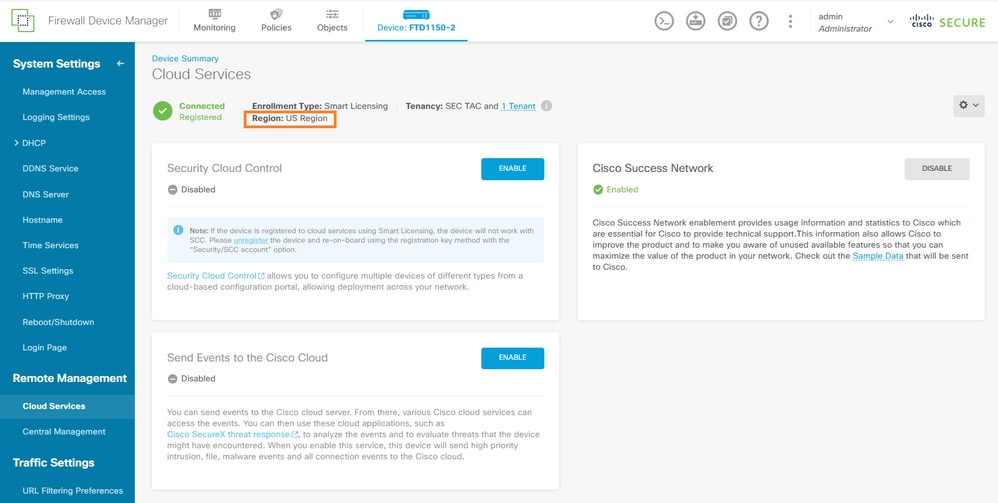
Primary cloud services is in registered in the US region:
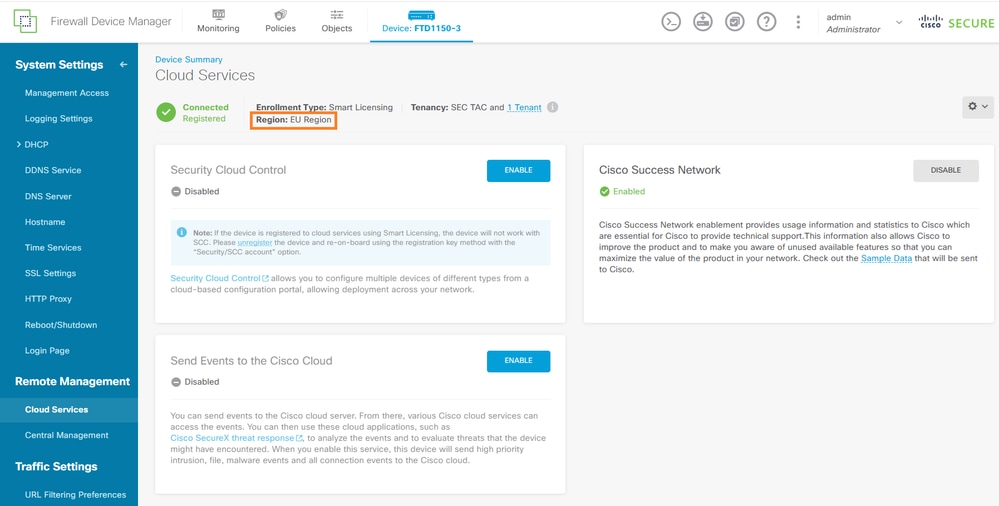
Secondary cloud services is in registered in the EU region:
In this case, the user decides to enroll the secondary firewall (FW2) to match the primary firewall (FW1).
Step 1: Enroll FW2 in Cisco Cloud Services
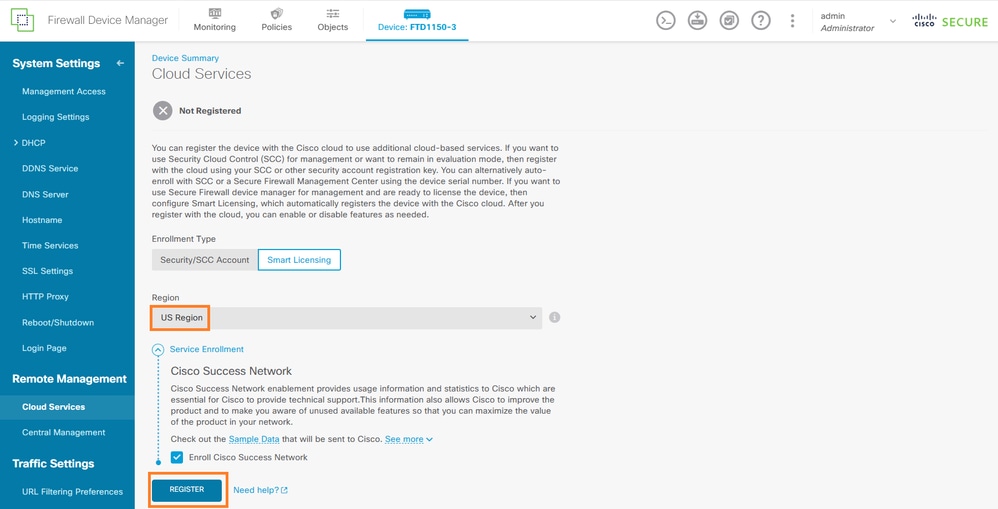
Enroll FW2 into Cisco Cloud Services using the same cloud region as FW1 (US region).
In FW2 FDM interface, navigate to Device > System Settings > Cloud Services and unregister the cloud services:
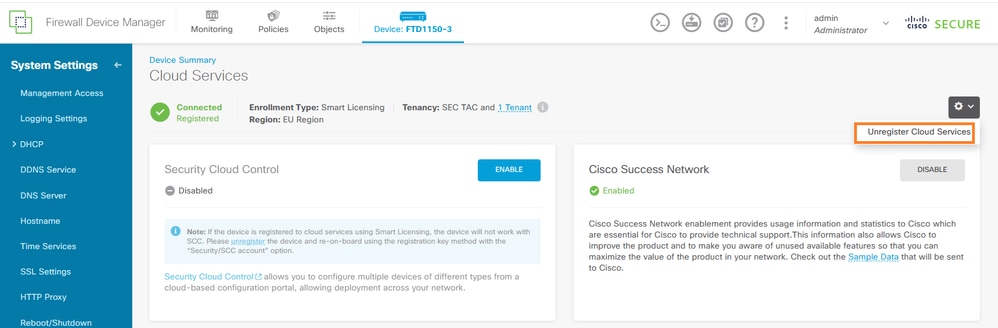
Then, enroll FW2 to the same region used by FW1:
Step 2: Retry HA Configuration
After both devices show the same cloud enrollment state, resume the HA configuration:
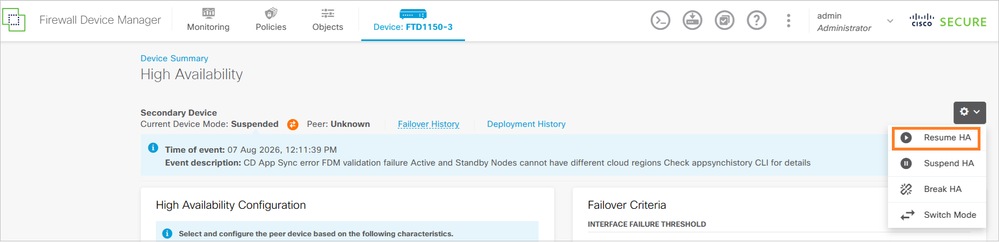
In the CLI on the secondary device you see:
>
        Detected an Active mate
Secondary: Switching to Ok for reason Detected an Active peer.
and a few minutes later:
device# show failover state
               State          Last Failure Reason      Date/Time
This host  -   Secondary
               Standby Ready  None
Other host -   Primary
               Active         None

====Configuration State===
        Sync Done - STANDBY
====Communication State===
        Mac set
In general, both devices must be either be enrolled in the same Cisco Cloud Services region, or both must not be enrolled at all.
Cause
The root cause is a Cisco Cloud Services enrollment status mismatch between the two Firepower 1150 devices. FDM blocks HA App Sync when one node is cloud-enrolled and the other is not enrolled or is enrolled in different region. This validation ensures that both devices in an HA pair maintain consistent cloud connectivity and feature availability.
The specific technical cause is that FW1 was enrolled in Cisco Cloud Services US region while FW2 was enrolled in EU region, resulting in an incompatible state for HA pair formation.
Related Content
Cisco Firepower Threat Defense High Availability Configuration Guide
Cisco Firepower Device Manager System Settings Configuration
Revision History
| Revision | Publish Date | Comments |
|---|---|---|
2.0 |
17-Sep-2026
|
Recertification |
1.0 |
07-Aug-2026
|
Initial Release |

 Feedback
Contact Cisco
- Open a Support Case

- (Requires a Cisco Service Contract)