Troubleshoot FTD Instance Interface Save Failure after Changing Chassis Subinterface VLAN ID in Change Management Mode
Available Languages
Contents
Issue
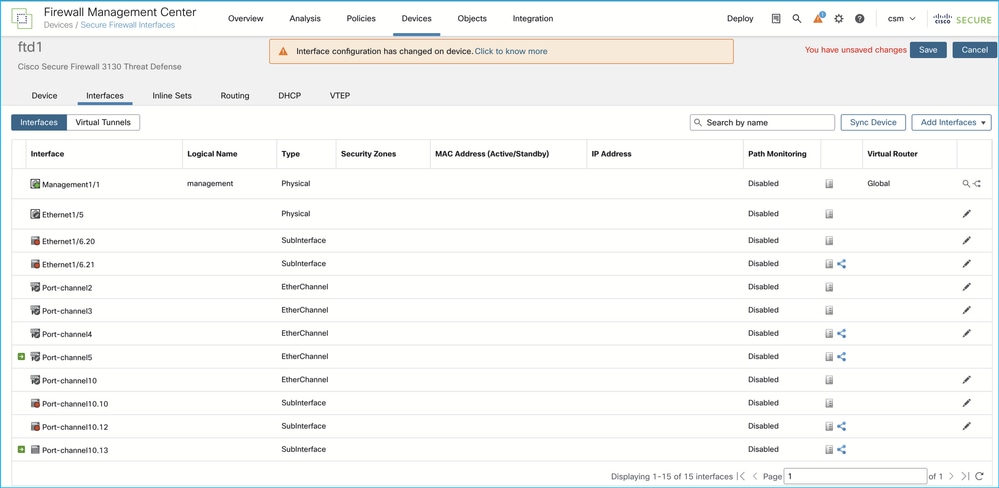
Secure Firewall Threat Defense (FTD) interface changes are not saved on the Secure Firewall Management Center (FMC) > Interfaces page. The "Interface configuration has changed on device. Click to know more" and "You have unsaved changes" messages are always shown despite clicking the Save button. Due to unsaved changes deployment is not possible:
The symptoms are observed when all conditions match:
1. FMC with change management (CM) mode manages Secure Firewall 3100 or 4200 in multi-instance mode (MI).
2. FTD has chassis-provisioned subinterfaces.
3. The user changes the VLAN of the chassis subinterface from X to Y on FMC using the chassis manager and deploys policies.
4. The user then proceeds with either of these steps:
a) Click the Sync Device button in the Interfaces tab of the FTD to synchronize the VLAN changes to FMC. Interface changes are detected but cannot be saved.
b) Alternatively, instead of clicking the Sync Device button, attempt to deploy policies:
Deployment fails with error "Deployment failed because interfaces on device are out of date. Save the configuration on the interfaces page and retry.".
On the FTD interface page, the "Interface configuration has changed on device. Click to know more" and "You have unsaved changes" messages are always shown message despite clicking the Save button. Interface changes are detected but cannot be saved.
Environment
FMC-managed Secure Firewall 3100/4200 running in multi-instance mode.
The change management mode is active on FMC.
First seen in FMC version 7.6.5. Other software versions can also be affected.
Resolution
Permanent resolution requires software upgrade to the version with the fix of Cisco bug ID CSCwu00349.
Alternatively, one of the known workaround steps can be performed:
1. Disable CM in the FMC Configuration. Note that you cannot disable CM if there is at least one ticket in the In Progress, On Hold, Rejected, or Pending Approval state. All tickets must be approved or discarded to disable change management.
2. Re-navigate to the FTD Interface page in Devices > Device Management or open a new tab/window. Basically, a new session is needed, as in the existing session (when change management was active) the Save button is non-functional.
3. In the new session, click the Save button to save changes and then deploy policies.
Cause
The error is due to Cisco bug ID CSCwu00349.
Related Content
Cisco bug ID CSCwu00349
Revision History
| Revision | Publish Date | Comments |
|---|---|---|
1.0 |
12-Jun-2026
|
Initial Release |

 Feedback
Contact Cisco
- Open a Support Case

- (Requires a Cisco Service Contract)