Troubleshoot eBGP Adjacency Establishment Failure
Available Languages
Contents
Issue
The external Border Gateway Protocol (eBGP) adjacency between the firewall and the peer devices fails. These symptoms are observed:
1. The peer state on the firewall is idle:
fw# show bgp summary
BGP router identifier 192.0.2.2, local AS number 65001
BGP table version is 1, main routing table version 1

Neighbor        V           AS MsgRcvd MsgSent   TblVer  InQ OutQ Up/Down  State/PfxRcd
198.51.100.2    4        65002 0       0              1    0    0 never  Idle
2. Only TCP SYN packets from the peer device are seen in the interface captures:
fw# cap capo interface WAN-Telekom
fw# show cap capo

26 packets captured

   1: 06:22:44.990595       198.51.100.2.31242 > 192.0.2.2.179: S 2838607371:2838607371(0) win 16384 <mss 1460>
   2: 06:22:46.990152       198.51.100.2.31242 > 192.0.2.2.179: S 2838607371:2838607371(0) win 16384 <mss 1460>
   3: 06:22:50.991007       198.51.100.2.31242 > 192.0.2.2.179: S 2838607371:2838607371(0) win 16384 <mss 1460>
   4: 06:22:58.991281       198.51.100.2.31242 > 192.0.2.2.179: S 2838607371:2838607371(0) win 16384 <mss 1460>
3. An ICMP connection to the IP address of the peer device is successfully established:
fw# ping 198.51.100.2
Type escape sequence to abort.
Sending 5, 100-byte ICMP Echos to 198.51.100.2, timeout is 2 seconds:
!!!!!
Success rate is 100 percent (5/5), round-trip min/avg/max = 1/2/10 ms
This confirms IP network level reachability between the firewall and the peer device.
4. The debugging level syslog messages indicate discarded TCP request from the peer device:
fw# show logging
…
May 20 2026 06:32:58: %FTD-7-710005: TCP request discarded from 198.51.100.2/20217 to WAN-Telekom:192.0.2.2/179
May 20 2026 06:33:00: %FTD-7-710005: TCP request discarded from 198.51.100.2/20217 to WAN-Telekom:192.0.2.2/179
May 20 2026 06:33:04: %FTD-7-710005: TCP request discarded from 198.51.100.2/20217 to WAN-Telekom:192.0.2.2/179
May 20 2026 06:33:12: %FTD-7-710005: TCP request discarded from 198.51.100.2/20217 to WAN-Telekom:192.0.2.2/179
5. The BGP debugs show the “no route to peer” message:
fw# debug ip bgp
BGP debugging is on
    for address family: IPv4 Unicast
Successfully set for module BGP at level 1

BGP: 198.51.100.2 Active open failed - no route to peer, open active delayed 21504ms (35000ms max, 60% jitter)
Environment
Topology
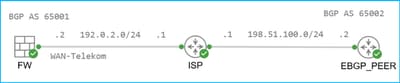
Firepower 2110 running FTD 7.4.4 and managed by the Secure Firewall Management Center (FMC). Other hardware platforms and software versions can also be affected.
The firewall has a static route to the peer address via WAN-Telekom interface connected to the Internet Service Provider (ISP):
fw# show route 198.51.100.2

Routing entry for 198.51.100.2 255.255.255.255
  Known via "static", distance 1, metric 0
  Routing Descriptor Blocks:
  * 192.0.2.1, via WAN-Telekom
Route metric is 0, traffic share count is 1
The firewall has the BGP configuration. The peer 198.51.100.2 has a different autonomous system number, hence is external:
fw# show run router
router bgp 65001
 bgp log-neighbor-changes
 bgp graceful-restart
 address-family ipv4 unicast
  neighbor 198.51.100.2 remote-as 65002
  neighbor 198.51.100.2 transport path-mtu-discovery disable
  neighbor 198.51.100.2 update-source WAN-Telekom
  neighbor 198.51.100.2 activate
Resolution
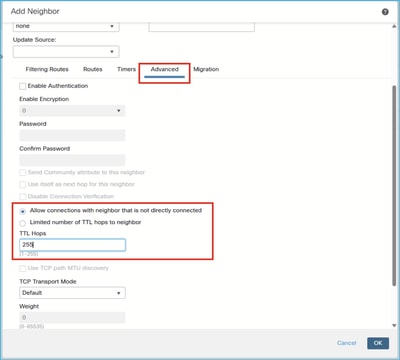
The adjacency is established after enabling the Allow connections with neighbor that is not directly connected option in the Advanced section of the BGP neighbor configuration and setting the TTL Hops to 255:
Cause
By default, the firewall allows the eBGP adjacency between the directly connected peers, that is, the peers in the same subnet. In order to allow adjacency between non-directly connected peers, the option Allow connections with neighbor that is not directly connected must be enabled. Additionally, the user can limit the number of TTL Hops to peer and set the minimum expected Time To Live value in the IP header of the TCP packet received from the peer. The default value is 1.
Verification
1. The Allow connections with neighbor that is not directly connected optionis not configured:
fw# show bgp neighbors 198.51.100.2 | i External
  External BGP neighbor not directly connected.
2. The Allow connections with neighbor that is not directly connected option is configured and TTL Hops is set to 1:
fw# show run router bgp | i 198.51.100.2
  neighbor 198.51.100.2 remote-as 65002
  neighbor 198.51.100.2 ebgp-multihop 1
  neighbor 198.51.100.2 transport path-mtu-discovery disable
  neighbor 198.51.100.2 update-source WAN-Telekom
  neighbor 198.51.100.2 activate


fw# show bgp neighbors 198.51.100.2 | i External
  External BGP neighbor not directly connected.
3. The Allow connections with neighbor that is not directly connected option is configured and TTL Hops is set to 255:
fw# show run router bgp | i 198.51.100.2
  neighbor 198.51.100.2 remote-as 65002
  neighbor 198.51.100.2 ebgp-multihop 255
  neighbor 198.51.100.2 transport path-mtu-discovery disable
  neighbor 198.51.100.2 update-source WAN-Telekom
  neighbor 198.51.100.2 activate


fw# show bgp neighbors 198.51.100.2 | i External
  External BGP neighbor may be up to 255 hops away.
Related Content
Revision History
| Revision | Publish Date | Comments |
|---|---|---|
1.0 |
20-May-2026
|
Initial Release |

 Feedback
Contact Cisco
- Open a Support Case

- (Requires a Cisco Service Contract)