Troubleshoot FTD Unable to Ping Upstream Device despite ARP Entry
Available Languages
Contents
Issue
The Firewall Threat Defense (FTD) was unable to ping the upstream device IP address, despite the firewall being able to observe the ARP entry for the upstream IP address. The ARP table showed the expected entries, indicating that Layer 2 connectivity was functioning but Layer 3 ping traffic was being blocked.
Topology
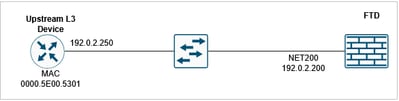
FTD CLI Symptoms
Ping to the upstream IP address is failing:
device# ping 192.0.2.250
Type escape sequence to abort.
Sending 5, 100-byte ICMP Echos to 192.0.2.250, timeout is 2 seconds:
?????
Success rate is 0 percent (0/5)
There is an ARP entry for the upstream IP address:
device# show arp
        NET200 192.0.2.250 0000.5e00.5301 47
Enable a capture with trace on the FTD interface:
device# capture CAPI interface NET200 trace match icmp host 192.0.2.200 host 192.0.2.250
FTD LINA syslogs during the ping test:
device# show log | include 192.0.2.250
May 15 2026 09:46:26: %FTD-6-302020: Built outbound ICMP connection for faddr 192.0.2.250/0 gaddr 192.0.2.200/5035 laddr 192.0.2.200/5035 type 8 code 0 Internal-Data0/1:RX[0]
May 15 2026 09:46:26: %FTD-3-313001: Denied ICMP type=0, code=0 from 192.0.2.250 on interface NET200
May 15 2026 09:46:26: %FTD-6-302021: Teardown ICMP connection for faddr 192.0.2.250/0 gaddr 192.0.2.200/5035 laddr 192.0.2.200/5035 type 8 code 0 Internal-Data0/0:RX[0]
...
Packet capture shows ICMP echo replies arriving:
device# show capture CAPI
10 packets captured
   1: 09:46:26.649456       802.1Q vlan#200 P0 192.0.2.200 > 192.0.2.250 icmp: echo request
   2: 09:46:26.649883       802.1Q vlan#200 P0 192.0.2.250 > 192.0.2.200 icmp: echo reply
   3: 09:46:28.642621       802.1Q vlan#200 P0 192.0.2.200 > 192.0.2.250 icmp: echo request
   4: 09:46:28.643002       802.1Q vlan#200 P0 192.0.2.250 > 192.0.2.200 icmp: echo reply
...
Packet trace of the ICMP echo reply shows that the packet is matching an existing connection as expected and the output interface is the FTD interface (NP Identity Ifc):
device# show capture CAPI packet-number 2 trace
10 packets captured
   2: 09:46:26.649883       802.1Q vlan#200 P0 192.0.2.250 > 192.0.2.200 icmp: echo reply
...
Phase: 3
Type: FLOW-LOOKUP
Subtype:
Result: ALLOW
Elapsed time: 4096 ns
Config:
Additional Information:
Found flow with id 1400, using existing flow
...

Result:
input-interface: NET200(vrfid:0)
input-status: up
input-line-status: up
output-interface: NP Identity Ifc
Action: allow
Time Taken: 28672 ns
Debug ICMP trace shows that the ICMP echo reply is being denied:
FTD220-5# debug icmp trace
debug icmp trace enabled at level 1

FTD220-5# ping 192.0.2.250
Type escape sequence to abort.
Sending 5, 100-byte ICMP Echos to 192.0.2.250, timeout is 2 seconds:
ICMP echo request from self:192.0.2.200 to NET200:192.0.2.250 ID=49503 seq=15001 len=72
ICMP echo reply from NET200:192.0.2.250 to self:192.0.2.200 ID=49503 seq=15001 len=72
Denied ICMP type = 0, code = 0 from 192.0.2.250on interface 4
?
...
Success rate is 0 percent (0/5)

Caution: Use debugs with caution!
To turn off the ICMP debug:
device# no debug icmp trace
debug icmp trace disabled.
Environment
FTD 10.x. Other software versions are also affected.
Resolution
The issue was resolved by identifying and correcting an ICMP rule configuration in the platform settings that was denying ping traffic.
The resolution involved these steps:
Step 1. Verify ARP Table Entries
Confirm that the ARP entries for the upstream IP address are visible in the ARP table of the firewall, which indicates Layer 2 connectivity is functioning properly:
device# show arp
Step 2. Check Platform Settings for ICMP Rules
Navigate to the platform settings configuration and examine the ICMP rule policies that can affect ping traffic. Look specifically for rules that could be blocking or denying ICMP echo request/reply packets.
Step 3. Identify and Modify Blocking ICMP Rule
Locate the ICMP rule in the platform settings that is configured to deny ping traffic.
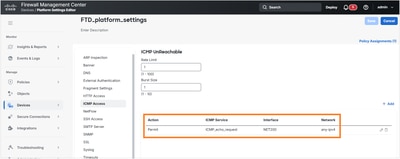
In this example the ICMP rule permits only ICMP echo requests to be accepted by the FTD interface.
FTD CLI verification:
device# show run icmp
icmp unreachable rate-limit 1 burst-size 1
icmp permit any echo NET200
Step 4. Update ICMP Rule Configuration
Modify the identified ICMP rule to allow ping traffic or remove the blocking configuration as appropriate for the network security requirements and operational needs.

The resulted ICMP rule:
device# show run icmp
icmp unreachable rate-limit 1 burst-size 1
icmp permit any echo NET200
icmp permit 192.0.2.0 255.255.255.0 echo-reply NET200
Step 5. Test Connectivity
After making the configuration changes, test the ping connectivity to the upstream IP address to verify that the issue has been resolved and that ICMP traffic is now flowing properly:
device# ping 192.0.2.250
Type escape sequence to abort.
Sending 5, 100-byte ICMP Echos to 192.0.2.250, timeout is 2 seconds:
!!!!!
Success rate is 100 percent (5/5), round-trip min/avg/max = 1/1/1 ms
Cause
The root cause of this issue was an ICMP rule configured in the platform settings that was explicitly denying ICMP echo replies traffic. While the firewall maintained proper Layer 2 connectivity (evidenced by the visible ARP entries), the platform-level ICMP rule was blocking Layer 3 ICMP echo reply packets, preventing successful ping operations to the upstream IP address. This type of configuration can occur when security policies are implemented to restrict ICMP traffic but can inadvertently affect legitimate network connectivity testing and monitoring.
Related Content
Revision History
| Revision | Publish Date | Comments |
|---|---|---|
3.0 |
30-Sep-2026
|
Recertification |
2.0 |
19-May-2026
|
Initial Release |
1.0 |
19-May-2026
|
Initial Release |

 Feedback
Contact Cisco
- Open a Support Case

- (Requires a Cisco Service Contract)