Troubleshoot Firewall Sending Logs to Previously-Configured (Legacy) Syslog Server
Available Languages
Contents
Issue
The firewall sends syslog messages to a previously-configured (legacy) syslog server at IP address 198.51.100.100. This IP address is absent in the firewall configuration.
Environment
Affected platforms are specifically Firepower 2100 running ASA in platform mode.
Resolution
Step 1. Find the Source IP Address of the Syslog Messages
Based on the analysis of the messages received by the legacy syslog server the originator IP address is the management IP address of the Firepower chassis.
IP address configured in the Firepower eXtensible Operating System (FXOS) is 192.0.2.100:
2026-04-27 15:22:49    User.Error    192.0.2.100    Apr 27 09:22:49 firepower FPRM: <<%FPRM-3-NTP_CONFIG_FAILED>> [F1329][major][ntp-config-failed][sys/svc-ext/datetime-svc] Ntp Configuration failed, please check the error message in Ntp host
2026-04-27 15:22:54   User.Error     192.0.2.100    Apr 27 09:22:54 firepower FPRM: <<%FPRM-3-NTP_CONFIG_FAILED>> [F1329][cleared][ntp-config-failed][sys/svc-ext/datetime-svc] Ntp Configuration failed, please check the error message in Ntp host
Step 2. Check and Verify FXOS Syslog Configuration
FXOS Command Line Interface (CLI) configuration does not contain the address of the legacy syslog server:
device # scope monitoring
device /monitoring # show configuration | i 198.51.100.100
device /monitoring # show configuration all | i 198.51.100.100
At the same time, the output of the show syslog command in the monitoring scope shows the IP address of the server:
device # scope monitoring
device /monitoring # show syslog

console
    state: Disabled
    level: Critical

platform
    state: Enabled
    level: Information
    Name     Hostname             State    Level         Facility
    -------- -------------------- -------- ------------- --------
    Server 1 198.51.100.10        Enabled  Warnings      Local7
    Server 2 198.51.100.100       Enabled  Warnings      Local7 <---- legacy server
    Server 3 none                 Disabled Critical      Local7

sources
    faults: Enabled
    audits: Enabled
    events: Disabled
Firepower Chassis Manager (FCM) User Interface (UI) > Platform Settings > Syslog does not indicate the syslog server configuration:
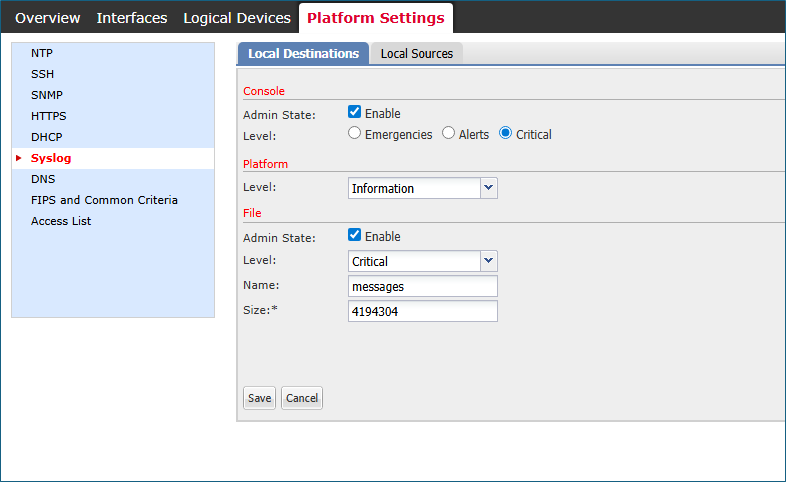 fcm_syslogs_configuration.png
Step 3. Attempt to Modify or Delete the Syslog Server
device# scope monitoring

device /monitoring # delete  <---
  snmp-trap  SNMP trap hostname or IP address
  snmp-user  SNMPv3 User

device /monitoring # set syslog  <---
  console   Console
  file      File
  platform  Platform

device /monitoring # set syslog platform <---
  level  Level
The conclusion is that neither FXOS CLI nor FCM UI provide a way to create, modify or delete any syslog server, including 198.51.100.100.
Cause
Consider three software defects:
Cisco bug ID CSCvn19025
The software versions with the fix of this defect disallow FXOS remote syslog configuration in the CLI or FCM UI.
Cisco bug ID CSCvt85766
The fix of this defect removes the "remote destinations" section from the FXOS show syslog command output.
Versions without the fix:
device# scope monitoring
device /monitoring # show syslog

console
    state: Enabled
    level: Critical

platform
    state: Enabled
    level: Information

file
    state: Enabled
    level: Critical
    name:  messages
    size:  4194304

remote destinations <----------------
    Name     Hostname             State    Level         Facility
    -------- -------------------- -------- ------------- --------
    Server 1 192.0.2.1            Enabled  Information   Local7
    Server 2 192.0.2.2            Enabled  Information   Local7
    Server 3 none                 Disabled Critical      Local7

sources
    faults: Enabled
    audits: Enabled
    events: Disabled
Versions with the fix lack the remote destinations section:
device # scope monitoring
device /monitoring # show syslog

console
    state: Enabled
    level: Critical

platform
    state: Enabled
    level: Information
    Name     Hostname             State    Level         Facility
    -------- -------------------- -------- ------------- --------
    Server 1 192.0.2.1            Enabled  Information   Local7
    Server 2 192.0.2.2            Enabled  Information   Local7
    Server 3 none                 Disabled Critical      Local7

sources
    faults: Enabled
    audits: Enabled
    events: Disabled
Despite missing the remote destinations section, the syslog servers are visible in the platform section.
Cisco bug ID CSCwu12470
After the software upgrade to the version with the fix of Cisco bug ID CSCvn19025 the management of remote syslog servers, that is creation, modification, or deletion, is disallowed in the FXOS CLI or FCM UI. This limitation is also applicable to the servers configured before the upgrade. Despite this, after the software upgrade, the FXOS software shows the syslog servers in the platform section of the show syslog command output and sends the syslog messages to these servers. Users are unable to administer existing FXOS remote syslog configuration, which is tracked in the Cisco bug ID CSCwu12470.
Related Content
Cisco bug ID CSCvn19025
Cisco bug ID CSCvt85766
Cisco bug ID CSCwu12470
Revision History
| Revision | Publish Date | Comments |
|---|---|---|
2.0 |
19-Aug-2026
|
Recertification. |
1.0 |
29-Apr-2026
|
Initial Release |

 Feedback
Contact Cisco
- Open a Support Case

- (Requires a Cisco Service Contract)