Troubleshoot Chassis Configuration Import Failure with Error "The archive file does not contain configurations for the selected device. Use a valid archive file to import configurations"
Available Languages
Introduction
This document describes troubleshooting of multi-instance chassis configuration import failure on Secure Firewall Management Center (FMC).
Prerequisites
Requirements
Basic product knowledge.
Components Used
The information in this document was created from the devices in a specific lab environment. All of the devices used in this document started with a cleared (default) configuration. If your network is live, ensure that you understand the potential impact of any command.
The information in this document is based on these software and hardware versions:
- Secure Firewall 3100, 4200 in multi-instance mode
- Cisco Secure Firewall Threat Defense (FTD) 7.4.x, 7.6.x, 7.7.x and 10.0.x
- FMC 7.4.x, 7.6.x, 7.7.x and 10.0.x
Background Information
In the context of this article, “same-chassis import” and “cross-chassis import” definitions are used.
- Same-chassis import – configuration exported from chassis1 is imported back to chassis1. The source and the target chassis have the same hardware model (for example, CSF 4225), and both chassis serial numbers (SN) match. FMC natively supports same-chassis import via Devices > Device Management > Manage in the Chassis column or click Edit (edit icon) > System Configuration tab > Import/Export. This is true as long as the requirements documented in the Import or Export the Chassis Configuration section of the configuration guide are satisfied.
- Cross-chassis import - configuration exported from chassis1 is imported into chassis2. The source and the target chassis have the same hardware model but different serial numbers (SN). An example use case of the cross-chassis import is the hardware replacement (RMA).
How to Verify Chassis Serial Number?
Use one of these options to verify the chassis serial number:
- FMC user interface:
1. In Devices > Device Management > Manage in the Chassis column or click Edit (edit icon) > Summary tab, open the Hardware Statistics tab, and refer to the Serial column:
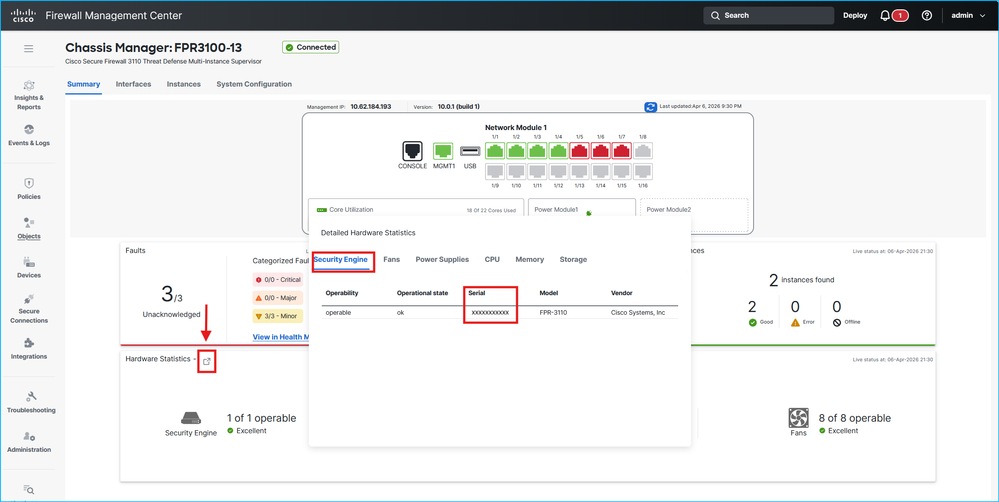 Chassis serial number verification
- FirePOWER eXtensible Operating System Command Line Interface (CLI):
1. Log in to the chassis using console or Secure Shell connection.
2. Refer to the Serial (SN) column in the output of the show chassis inventory command:
firepower-3110# show chassis inventory

Chassis    PID             Vendor            Serial (SN) HW Revision
---------- --------------- ----------------- ----------- -----------
         1 FPR-3110        Cisco Systems, In XXXXXXXXXXX 1.0
Problem
By default, in FMC running software versions up to 10.0.x, cross-chassis import fails with the error message “The archive file does not contain configurations for the selected device. Use a valid archive file to import configurations". Additionally, in the output of the FMC pigtail command in expert mode shows errors similar to these lines:
> expert
$ sudo pigtail all
ACTQ: 10-25 15:19:41 pid=22600 [DEV_CONF_IMP] $VAR1 = {
ACTQ: 10-25 15:19:41 pid=22600           'devices' => {
ACTQ: 10-25 15:19:41 pid=22600                          '1f117d75-7236-4efa-b633-688065cc0311' => undef
ACTQ: 10-25 15:19:41 pid=22600                        },
ACTQ: 10-25 15:19:41 pid=22600           'currentState' => 'FAILED',
ACTQ: 10-25 15:19:41 pid=22600           'file' => {
ACTQ: 10-25 15:19:41 pid=22600                       'state' => 'SFO_UNPACKED'
ACTQ: 10-25 15:19:41 pid=22600                     },
ACTQ: 10-25 15:19:41 pid=22600           'domain' => 'e276abec-e0f2-11e3-8169-6d9ed49b625f',
ACTQ: 10-25 15:19:41 pid=22600           'type' => 'DEVICE_IMPORT',
ACTQ: 10-25 15:19:41 pid=22600           'securityZones' => {},
ACTQ: 10-25 15:19:41 pid=22600           'errorMsg' => 'The archive file does not contain configurations for the selected device. Use a valid archive file to import configurations'
ACTQ: 10-25 15:19:41 pid=22600         };
ACTQ: 10-25 15:19:41 pid=22600 Task failure (8d7e3e98-92e4-11ef-a4e3-030a6e8b1f98) Device Configuration Import : The archive file does not contain configurations for the selected device. Use a valid archive file to import configurations  at /usr/local/sf/lib/perl/5.32.1/SF/EOFileBackup/DeviceImportExportHandlers.pm line 927.
This issue is tracked in 2 defects with available workarounds:
- Cisco bug ID CSCwn79846
- Cisco bug ID CSCwn13091
Solution
Native support for cross-chassis import is planned in future versions. As a workaround, use one of these options:
- If the running software version has the fix of the Cisco bug ID CSCwn79846, a special flag on FMC is required to support cross-chassis configuration import.
- If the running software version does not have the fix of Cisco bug ID CSCwn79846, then the workaround for Cisco bug ID CSCwn13091 is required to support cross-chassis configuration import. Refer to Cisco bug ID CSCwn13091.
- Note that performing the workaround steps of Cisco bug ID CSCwn79846 or Cisco bug ID CSCwn13091 triggers symptoms of Cisco bug ID CSCwn80067.
In all cases contact TAC.
Related Information
- "Import or Export the Chassis Configuration" section in Cisco Secure Firewall Management Center Device Configuration Guide, 10.x
- Cisco bug ID CSCwn79846
- Cisco bug ID CSCwn13091
- Cisco bug ID CSCwn80067
Revision History
| Revision | Publish Date | Comments |
|---|---|---|
1.0 |
07-Apr-2026
|
Initial Release |

 Feedback
Contact Cisco
- Open a Support Case

- (Requires a Cisco Service Contract)