Troubleshoot Traceroute from FTD That Does Not Display Hop Information despite Successful ICMP Ping
Available Languages
Contents
Issue
All of these symptoms are seen:
Traceroute failure: Traceroute commands initiated directly from the Cisco Firewall Threat Defense (FTD) device consistently return only * * * for all hops when targeting external IP addresses.
Successful connectivity: ICMP ping tests to the same destination are successful, and ICMP traffic is explicitly allowed in the Access Control Policy.
This behavior prevents visibility into path hops for traffic originating from the FTD device, impacting network path troubleshooting efforts.
Example
Ping to the destination is working:
firepower# ping 192.168.203.89
Type escape sequence to abort.
Sending 5, 100-byte ICMP Echos to 192.168.203.89, timeout is 2 seconds:
!!!!!
Success rate is 100 percent (5/5), round-trip min/avg/max = 1/2/10 ms
But traceroute is not working:
firepower# traceroute 192.168.203.89
Type escape sequence to abort.
Tracing the route to 192.168.203.89
 1*  *  *
 2*  *  *
 3*  *  *
...
 30*  *  *
firepower#
Environment
Cisco Secure Firewall Threat Defense (FTD).
First time observed at: 7.4, 7.4.2.3, 7.6.2. Other versions could also be affected.
Cisco Secure Firewall Management Center (FMC / cdFMC / FDM) for management.
Static NAT rules in use, including bi-directional configurations.
Traceroute commands executed from FTD CLI (Lina mode).
ICMP permitted in access control policy.
Topology

Resolution
The possible solutions depend on the purpose of the configured NAT rule.
Solution 1
If the goal was to translate the internal server IP only for outbound access you can configure the NAT rule as unidirectional.
On FMC this can be done from the NAT rule Advanced options:
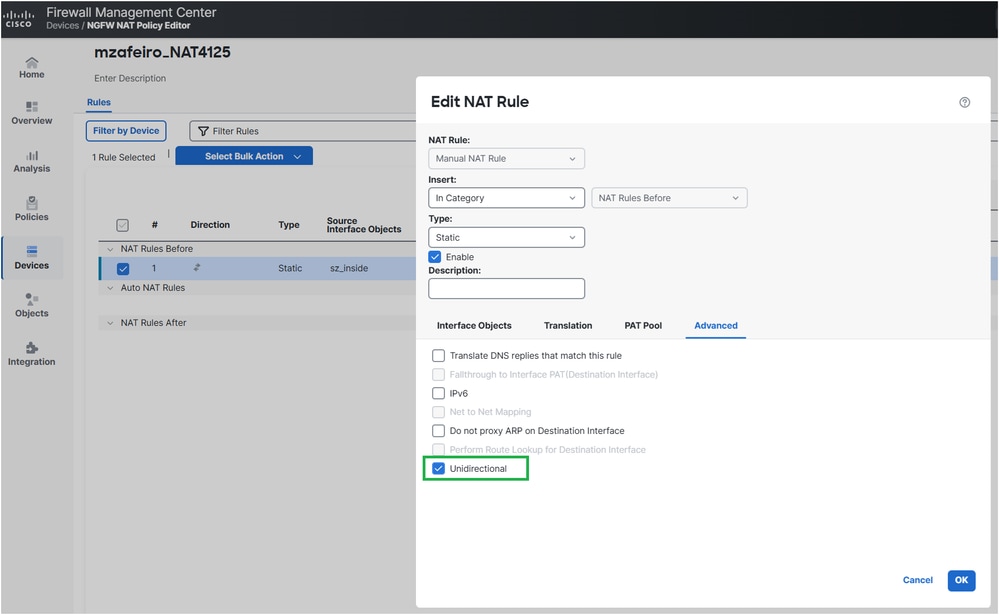
The deployed NAT configuration:
firepower# show run nat
nat (INSIDE,OUTSIDE) source static server_host interface unidirectional
firepower#
Verification
firepower# traceroute 192.168.203.89
Type escape sequence to abort.
Tracing the route to 192.168.203.89
 1  192.168.201.88 2 msec 2 msec 2 msec
 2  192.168.203.89 1 msec *  1 msec
Solution 2
If the goal is for the internal server to be reachable from outside then you can make the NAT rule more specific by configuring port forwarding:
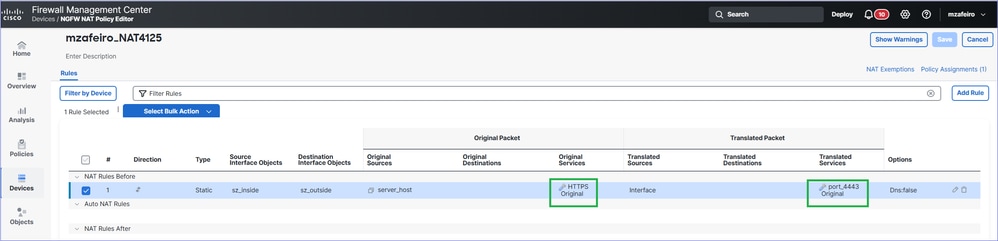
The deployed NAT configuration:
firepower# show run nat
nat (INSIDE,OUTSIDE) source static server_host interface service SVC_25769850586 SVC_25769850587
Verification
firepower# traceroute 192.168.203.89
Type escape sequence to abort.
Tracing the route to 192.168.203.89
 1  192.168.201.88 2 msec 2 msec 2 msec
 2  192.168.203.89 1 msec *  1 msec
How it Works
Ping
1.- The firewall sends an echo request (ICMP Type 8 Code 0) message.
2.- A new firewall connection is created for ICMP.
3.- The firewall receives an echo reply (ICMP Type 0 Code 0) message.
4.- The message matches the connection created at step 2.
5.- The echo reply message is consumed by the firewall.
Traceroute
1.- The firewall sends three UDP packets staring from ports, 33434, 33435 and 33436 towards the destination with TTL 1.
2.- A new firewall connection is created for UDP.
3.- The firewall receives either an ICMP TTL exceeded in transit (Type 11 Code 0) or an ICMP Port unreachable (Type 3 Code 3).
4.- Once ICMP packets arrive on the firewall, they are treated as connections different than the UDP packets from step 2.
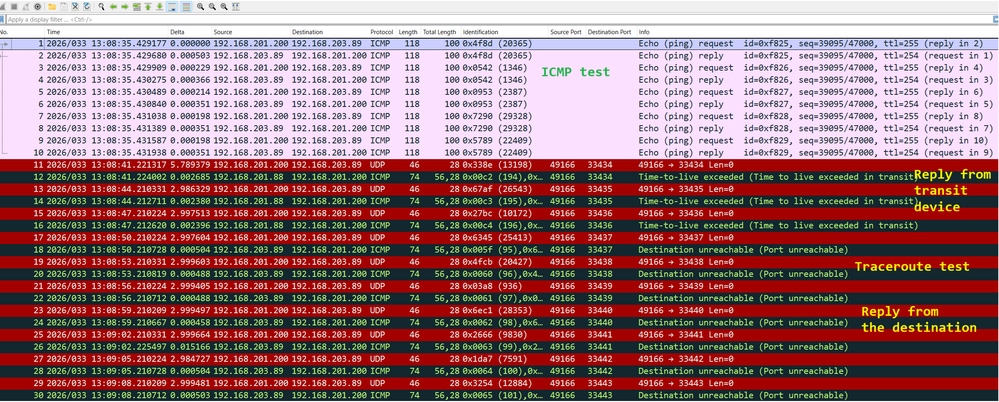
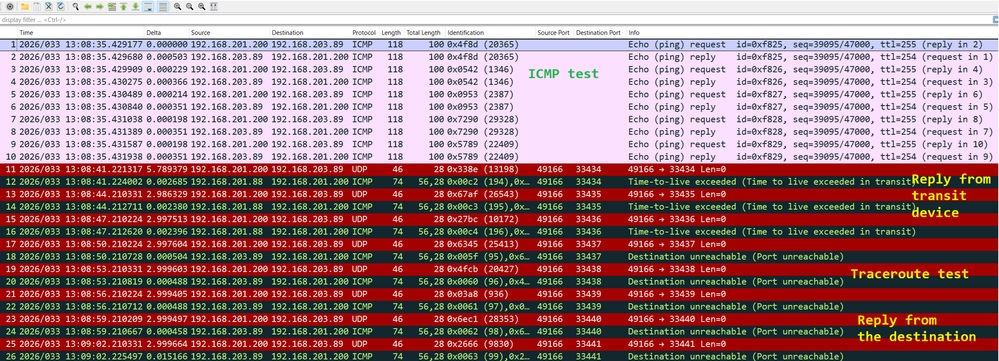
This can be seen in Wireshark:
Troubleshoot
Step 1
Enable packets captures on the firewall egress interface with trace to see how the firewall treats the ingress packets:
firepower# capture CAPI trace interface OUTSIDE match ip host 192.168.203.89 host 192.168.201.100
Step 2
Test using ping:
firepower# ping 192.168.203.89
Type escape sequence to abort.
Sending 5, 100-byte ICMP Echos to 192.168.203.89, timeout is 2 seconds:
!!!!!
Success rate is 100 percent (5/5), round-trip min/avg/max = 1/1/1 ms
Then test with traceroute:
firepower# traceroute 192.168.203.89
Type escape sequence to abort.
Tracing the route to 192.168.203.89
 1*  *  *
 2*  *  *
 3*  *  *
 4*  *  *
 5*  *  *
 6*  *  *
 7*  *  *
…
Step 3
Check the capture contents:
Packets 1-10 are related to the ICMP ping test.
Packets 11-16 are related to traceroute. The replies are from the first hop.
Packets 17-28 are also related to traceroute. The replies are from the destination end point.
firepower# show capture CAPI
190 packets captured
1: 13:50:27.345471       802.1Q vlan#201 P0 192.168.201.200 > 192.168.203.89 icmp: echo request
2: 13:50:27.345975       802.1Q vlan#201 P0 192.168.203.89 > 192.168.201.200 icmp: echo reply
3: 13:50:27.346219       802.1Q vlan#201 P0 192.168.201.200 > 192.168.203.89 icmp: echo request
4: 13:50:27.346600       802.1Q vlan#201 P0 192.168.203.89 > 192.168.201.200 icmp: echo reply
5: 13:50:27.346814       802.1Q vlan#201 P0 192.168.201.200 > 192.168.203.89 icmp: echo request
6: 13:50:27.347165       802.1Q vlan#201 P0 192.168.203.89 > 192.168.201.200 icmp: echo reply
7: 13:50:27.347378       802.1Q vlan#201 P0 192.168.201.200 > 192.168.203.89 icmp: echo request
8: 13:50:27.347714       802.1Q vlan#201 P0 192.168.203.89 > 192.168.201.200 icmp: echo reply
9: 13:50:27.347928       802.1Q vlan#201 P0 192.168.201.200 > 192.168.203.89 icmp: echo request
10: 13:50:27.348279       802.1Q vlan#201 P0 192.168.203.89 > 192.168.201.200 icmp: echo reply
11: 13:50:33.229724       802.1Q vlan#201 P0 192.168.201.200.49168 > 192.168.203.89.33434:  udp 0
12: 13:50:33.232562       802.1Q vlan#201 P0 192.168.201.88 > 192.168.201.200 icmp: time exceeded in-transit
13: 13:50:36.220279       802.1Q vlan#201 P0 192.168.201.200.49168 > 192.168.203.89.33435:  udp 0
14: 13:50:36.222827       802.1Q vlan#201 P0 192.168.201.88 > 192.168.201.200 icmp: time exceeded in-transit
15: 13:50:39.220172       802.1Q vlan#201 P0 192.168.201.200.49168 > 192.168.203.89.33436:  udp 0
16: 13:50:39.222675       802.1Q vlan#201 P0 192.168.201.88 > 192.168.201.200 icmp: time exceeded in-transit
17: 13:50:42.220157       802.1Q vlan#201 P0 192.168.201.200.49168 > 192.168.203.89.33437:  udp 0
18: 13:50:42.220737       802.1Q vlan#201 P0 192.168.203.89 > 192.168.201.200 icmp: 192.168.203.89 udp port 33437 unreachable
19: 13:50:45.220264       802.1Q vlan#201 P0 192.168.201.200.49168 > 192.168.203.89.33438:  udp 0
20: 13:50:45.220752       802.1Q vlan#201 P0 192.168.203.89 > 192.168.201.200 icmp: 192.168.203.89 udp port 33438 unreachable
21: 13:50:48.220157       802.1Q vlan#201 P0 192.168.201.200.49168 > 192.168.203.89.33439:  udp 0
22: 13:50:48.220645       802.1Q vlan#201 P0 192.168.203.89 > 192.168.201.200 icmp: 192.168.203.89 udp port 33439 unreachable
23: 13:50:51.220157       802.1Q vlan#201 P0 192.168.201.200.49168 > 192.168.203.89.33440:  udp 0
24: 13:50:51.220645       802.1Q vlan#201 P0 192.168.203.89 > 192.168.201.200 icmp: 192.168.203.89 udp port 33440 unreachable
25: 13:50:54.220264       802.1Q vlan#201 P0 192.168.201.200.49168 > 192.168.203.89.33441:  udp 0
26: 13:50:54.220752       802.1Q vlan#201 P0 192.168.203.89 > 192.168.201.200 icmp: 192.168.203.89 udp port 33441 unreachable
27: 13:50:57.220157       802.1Q vlan#201 P0 192.168.201.200.49168 > 192.168.203.89.33442:  udp 0
28: 13:50:57.220645       802.1Q vlan#201 P0 192.168.203.89 > 192.168.201.200 icmp: 192.168.203.89 udp port 33442 unreachable
Step 4
Trace the ingress ICMP packets from the ping test.
Packet #2 is the reply on the ICMP ping request sent in Packet #1.
firepower# show capture CAPI packet-number 2 trace
190 packets captured
2: 13:50:27.345975       802.1Q vlan#201 P0 192.168.203.89 > 192.168.201.200 icmp: echo reply
…
Phase: 4
Type: FLOW-LOOKUP
Subtype:
Result: ALLOW
Elapsed time: 488 ns
Config:
Additional Information:
Found flow with id 143799, using existing flow
…
Phase: 6
Type: ADJACENCY-LOOKUP
Subtype: Resolve Nexthop IP address to MAC
Result: ALLOW
Elapsed time: 1952 ns
Config:
Additional Information:
Found adjacency entry for Next-hop 0.0.0.0 on interface  identity
Adjacency :Active
MAC address 0000.0000.0000 hits 483359 reference 2

Result:
input-interface: OUTSIDE(vrfid:0)
input-status: up
input-line-status: up
output-interface: NP Identity Ifc
Action: allow
Time Taken: 18056 ns
1 packet shown
The key points of the trace are:
The packet matched an existing flow.
The output interface is the firewall itself (identity interface).
Step 5
Trace the ingress ICMP packets from the traceroute test.
Packet #12 is the reply from the transit host:
firepower#  show capture CAPI packet-number 12 trace
190 packets captured
12: 13:50:33.232562       802.1Q vlan#201 P0 192.168.201.88 > 192.168.201.200 icmp: time exceeded in-transit

Phase: 3
Type: UN-NAT
Subtype: static
Result: ALLOW
Elapsed time: 6344 ns
Config:
nat (INSIDE,OUTSIDE) source static server_host interface
Additional Information:
NAT divert to egress interface INSIDE(vrfid:0)
Untranslate 192.168.201.200/49168 to 192.168.200.50/49168

Phase: 7
Type: ACCESS-LIST
Subtype:
Result: ALLOW
Elapsed time: 97 ns
Config:
access-group CSM_FW_ACL_ global
access-list CSM_FW_ACL_ advanced permit ip any any rule-id 268436480
access-list CSM_FW_ACL_ remark rule-id 268436480: ACCESS POLICY: mzafeiro_empty - Default
access-list CSM_FW_ACL_ remark rule-id 268436480: L4 RULE: DEFAULT ACTION RULE
Additional Information:
 This packet will be sent to snort for additional processing where a verdict will be reached
...
Phase: 18
Type: FLOW-CREATION
Subtype:
Result: ALLOW
Elapsed time: 16104 ns
Config:
Additional Information:
New flow created with id 143805, packet dispatched to next module
...
Phase: 20
Type: SNORT
Subtype: identity
Result: ALLOW
Elapsed time: 39496 ns
Config:
Additional Information:
user id: no auth, realm id: 0, device type: 0, auth type: invalid, auth proto: basic, username: none, AD domain: none,
src sgt: 0, src sgt type: unknown, dst sgt: 0, dst sgt type: unknown, abp src: none, abp dst: none, location: none

Result:
input-interface: OUTSIDE(vrfid:0)
input-status: up
input-line-status: up
output-interface: INSIDE(vrfid:0)
output-status: up
output-line-status: up
Action: allow
Time Taken: 158341 ns
The packet is part of a new connection (it didn’t match an existing flow).
The packet is subject to Network Address Translation (specifically, the UN-NAT means destination NAT).
The packet is treated as a firewall transit traffic and is subject to Access Control Policy (ACP) and Snort inspection.
The output (egress) interface is INSIDE. This is due to the NAT translation.
Cause
In this case, the problem is caused by this static NAT rule:
firepower# show run nat
nat (INSIDE,OUTSIDE) source static server_host interface
Related Content
Revision History
| Revision | Publish Date | Comments |
|---|---|---|
4.0 |
09-Jul-2026
|
Reuploaded the images and fixed some text. |
2.0 |
22-Apr-2026
|
Al text, formatting. |
1.0 |
09-Apr-2026
|
Initial Release |

 Feedback
Contact Cisco
- Open a Support Case

- (Requires a Cisco Service Contract)