FMC LDAPS External Authentication Certificate - Invalid File Format Error
Available Languages
Contents
Issue
When attempting to use a renewed certificate for LDAPS (LDAP over SSL) External Authentication on Cisco Firepower Management Center (FMC) version 7.6.5, the system displays this error message in the External Authentication page:
"Invalid file format. Upload a file with .pem, .crt, or .cer extension."
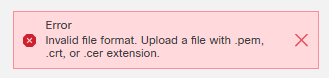
This error prevents the LDAPS configuration from working correctly and denies external users the ability to login to the FMC.
Additional error details from the FMC messages logs show the certificate as not renewed when running a test login from the FMC External Authentication page:
[Wed May 06 15:14:08.156870 2026] [cgi:error] [pid 5067:tid 23059043894848] [client 10.X.X.36:49727] AH01215: Action is Test: /usr/local/sf/htdocs/platinum/authconfig.cgi, referer: https://example.fmc.net/platinum/authconfig.cgi?id=uuid
[Wed May 06 15:14:08.156971 2026] [cgi:error] [pid 5067:tid 23059043894848] [client 10.X.X.36:49727] AH01215: checkLDAPFilter: <(&(objectClass=user)(memberof:1.2.840.113556.1.4.1941:=CN=GRPD-FMC,OU=Network Engineers,OU=Groups,OU=EXAMPLE,DC=sfmc,DC=net))> valid at /usr/local/sf/lib/perl/5.32.1/SF/AuthConfigObject.pm line 951, <DATA> line 275.: /usr/local/sf/htdocs/platinum/authconfig.cgi, referer: https://example.fmc.net/platinum/authconfig.cgi?id=uuid
[Wed May 06 15:14:08.157014 2026] [cgi:error] [pid 5067:tid 23059043894848] [client 10.X.X.36:49727] AH01215: Checking cert expiration error: expired_cert_given at /usr/local/sf/lib/perl/5.32.1/SF/X509Certificates.pm line 629, <DATA> line 275.: /usr/local/sf/htdocs/platinum/authconfig.cgi, referer: https://example.fmc.net/platinum/authconfig.cgi?id=uuid
[Wed May 06 15:14:08.157065 2026] [cgi:error] [pid 5067:tid 23059043894848] [client 10.X.X.36:49727] AH01215: Invalid certificate! Probably binary format! at /usr/local/sf/lib/perl/5.32.1/SF/UI/Platinum/AuthConfig.pm line 1510, <DATA> line 275.: /usr/local/sf/htdocs/platinum/authconfig.cgi, referer: https://example.fmc.net/platinum/authconfig.cgi?id=uuid
Environment
Cisco Firepower Management Center (FMC) with previous LDAPS External Authentication configuration
Certificate renewal process involving intermediate certificate expiration
Resolution
Ensure the certificate file meets FMC formatting requirements for LDAPS authentication:
1.- The certificate file must be PEM-encoded and include the entire certificate chain in this order:
-----BEGIN CERTIFICATE-----
(certificate for your server)
-----END CERTIFICATE-----
-----BEGIN CERTIFICATE-----
(the intermediate certificate)
-----END CERTIFICATE-----
-----BEGIN CERTIFICATE-----
(the root certificate for the CA)
-----END CERTIFICATE-----
2.- Verify that the certificate file contains:
No extra blank lines or spaces before -----BEGIN CERTIFICATE----- markers
No additional text after -----END CERTIFICATE----- markers
Proper base64 encoding between certificate markers
No binary format encoding
3.- Ensure the certificate includes:
Server certificate for the LDAP server
Intermediate CA certificate
Root CA certificate
Basic constraints marked as "critical" if CA is set to "True"
Alternative Resolution
If certificate formatting issues persist, consider implementing Single Sign-On (SSO) authentication as an alternative to LDAPS certificate-based authentication. This approach eliminates the immediate certificate formatting requirements while providing secure external authentication capabilities.
Cause
The issue is caused by an improperly formatted certificate file being uploaded during the LDAPS certificate renewal process. Specifically, the renewed certificate did not meet FMC requirements for:
Correct PEM encoding format
Complete certificate chain structure
Proper certificate headers and footers
Absence of binary encoding or extra formatting characters
The FMC validation process detected the certificate format issues and rejected the file as invalid, preventing successful upload and configuration of the renewed LDAPS certificate.
Related Content
Revision History
| Revision | Publish Date | Comments |
|---|---|---|
1.0 |
27-Oct-2026
|
Initial Release |

 Feedback
Contact Cisco
- Open a Support Case

- (Requires a Cisco Service Contract)