Troubleshoot FTD Scheduled Backup Failure to SFTP Server in FMC-Managed Environment
Available Languages
Contents
Issue
In a deployment of Cisco Secure Firewall Threat Defense (FTD) devices managed by Secure Firewall Management Center (FMC), scheduled automatic FTD backups fail to appear on the configured SFTP server. Manual FTD backups and FMC backups to the same SFTP server succeed. This results in lack of availability of automated FTD configuration backups for disaster recovery and compliance purposes.
Environment
The information in this document is based on these software and hardware versions:
Cisco Secure Firewall Threat Defense (FTD) version 7.4. Other software versions can also be affected.
Cisco Secure Firewall Management Center (FMC) version 7.7. Other software versions can also be affected.
Resolution
The resolution involves modifying the scheduled FTD backup task configuration in the FMC to enable proper backup retrieval and export functionality.
Step 1: Access the Scheduled FTD Backup Task in FMC
Navigate to the FMC UI (Tools > Scheduling) and locate the existing scheduled FTD backup task that is configured but not successfully uploading backups to the SFTP server.
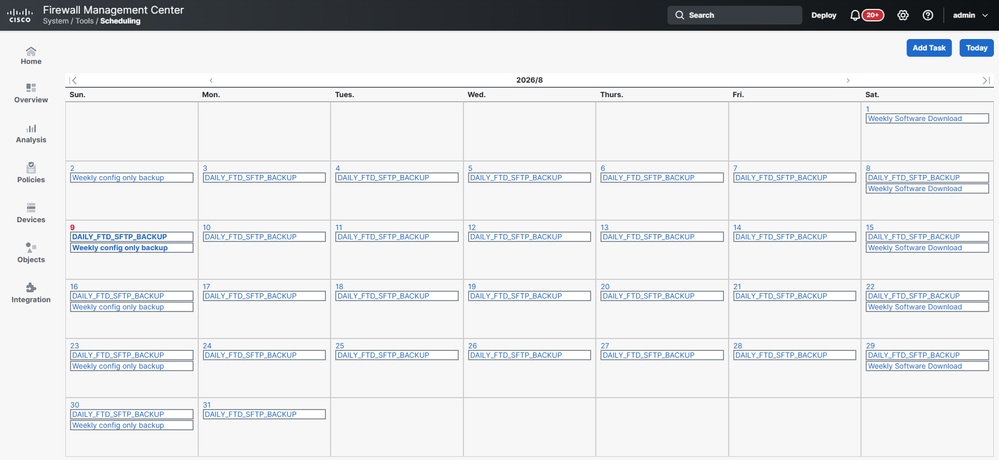
Step 2: Edit the Scheduled Backup Task Configuration
Edit the scheduled FTD backup task configuration and enable the "Retrieve to Management Center" option. This option ensures that the backup is first retrieved to the FMC before being exported to the configured SFTP server.
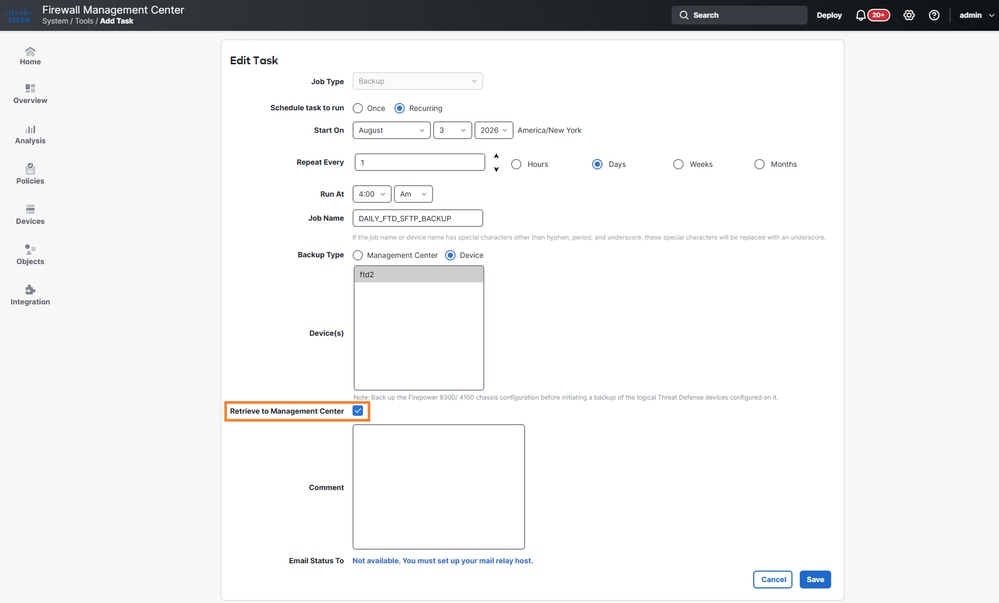
Step 3: Allow Scheduled Backup Task to Execute
After making the configuration change, allow the scheduled backup task to run according to its configured schedule to test the modified configuration.
Step 4: Verify Backup Retrieval and Export
Verify that the backup is successfully retrieved to the FMC and then properly exported to the configured SFTP server.
Step 5: Test and Validate Results
Monitor subsequent scheduled backup executions to ensure consistent operation and validate that the automated FTD backup process is functioning as expected.
Cause
The scheduled FTD backup task was not configured with the Retrieve to Management Center option enabled. Without this option scheduled FTD backups are not retrieved and not sent to the remote server. Manual backups are not affected by this option.
Related Content
Cisco bug ID CSCwv85459
Revision History
| Revision | Publish Date | Comments |
|---|---|---|
2.0 |
21-Sep-2026
|
Recertification |
1.0 |
03-Aug-2026
|
Initial Release |

 Feedback
Contact Cisco
- Open a Support Case

- (Requires a Cisco Service Contract)