Troubleshoot FMC and FTD Version Compatibility Error "Cannot register the device with newer version"
Available Languages
Contents
Issue
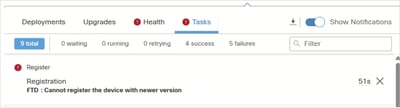
When attempting to register new Cisco Secure Firewall Threat Defense (FTD) 1230 devices running 7.7.0 with an existing Firewall Management Center (FMC) running version 7.6.2.1-3, the registration process fails with the error message "Cannot register the device with newer version." This error occurs because the FTD device is running a newer software version than the FMC, which violates the version compatibility requirements for device registration and management.
The issue often manifests when organizations upgrade their hardware to newer firewall models that ship with more recent FTD software versions while maintaining existing FMC infrastructure on older software versions. The registration failure prevents centralized management of the new devices through the existing FMC deployment.
 inline_image_0.png
Environment
FMC running version 7.6.2.1-3. Other software versions can be also affected.
A 1230 device with FTD software version 7.7.0 (factory shipped version). Other hardware and software versions can be also affected.
Firewall devices (for example, 2110, 2140, 3110, 3130) running 7.4.2.x software version already registered to the FMC. Other software versions can be also used.
Resolution
The resolution involves upgrading the FMC to newer version (for example, 7.7.12-3) to establish compatibility with both the new FTD version 7.7.0 devices and maintain backward compatibility with legacy devices running FTD 7.4.2.x versions.
FMC and FTD Version Compatibility Matrix
The compatibility matrix was confirmed for the mixed environment:
Device Type |
Model |
Current Software Version |
Target Software Version |
Compatibility with FMC 7.7.12-3 |
|---|---|---|---|---|
FMC |
Virtual FMC on VMware |
7.6.2.1-3 |
7.7.12-3 |
Management Platform |
FTD |
3130 |
7.4.2 |
7.4.2 (no change) |
Supported |
FTD |
3110 |
7.4.2 |
7.4.2 (no change) |
Supported |
FTD |
2140 |
7.4.2.4 |
7.4.2.4 (no change) |
Supported |
FTD |
2110 |
7.4.2.4 |
7.4.2.4 (no change) |
Supported |
FTD |
1230 |
7.7.0 |
7.7.12-3 |
Supported |
Upgrade Procedure
Step 1. Upgrade the FMC to a version equal or higher than the FTD devices.
In this case the target FMC version is 7.7.12.3. This provides backwards compatibility with all FTD versions from 7.2.x to 7.7.x.
Step 2. Upgrade the 1230 FTD devices to 7.7.12-3.
While the 1230 devices can be registered with FMC 7.7.12-3 running their factory FTD software version 7.7.0, upgrading to 7.7.12-3 ensures the latest fixes and security updates.
Step 3. Maintain existing device versions.
The other firewall devices (2110, 2140, 3110, 3130) running FTD software version 7.4.2 and 7.4.2.4 remain fully supported and manageable by FMC 7.7.12-3 without requiring software updates.
Cause
The root cause is a version compatibility mismatch between the FMC and FTD devices. The FMC requires a software version equal to or higher than the FTD devices it manages. When FTD devices ship with newer software versions than the existing FMC deployment, registration fails because the FMC lacks the necessary software components to manage the newer FTD software version.
Related Content
Revision History
| Revision | Publish Date | Comments |
|---|---|---|
1.0 |
12-May-2026
|
Initial Release |

 Feedback
Contact Cisco
- Open a Support Case

- (Requires a Cisco Service Contract)