Configure Rate-Based Attack Prevention with Snort 3 Rate Filter on Secure FTD
Available Languages
Issue
The focus is on how to structure rules to cover multiple subnets, understanding best practices for implementation, and determining appropriate threshold values (counts per second) for alerting or blocking, specifically in the context of SYN flood attack prevention.
Environment
- Cisco Secure Firewall Firepower running FTD 7.4.2.4
- Firepower 2110 hardware platform
- Managed by Firepower Management Center (FMC) 7.6.2.1
- Snort 3 Intrusion Prevention System with rate_filter inspector enabled
- Multiple internal subnets requiring protection from SYN floods
- No active faults present; configuration guidance for proactive defense
Resolution
These steps detail how to configure and implement rate-based attack prevention using the Snort 3 rate_filter inspector on Cisco Secure Firewall FTD, including an explanation of rule structure for multiple subnets and best-practice recommendations. These actions are intended to help establish baselines for normal traffic and to enable effective detection or blocking of SYN flood attacks.

Note: It is not within the TAC work scope to suggest or recommend any specific values for these rule filters. Each environment is different and requires an in-depth analysis of traffic patterns and network design to determine the best values for these filters.
1: Navigate to the Snort 3 rate_filter
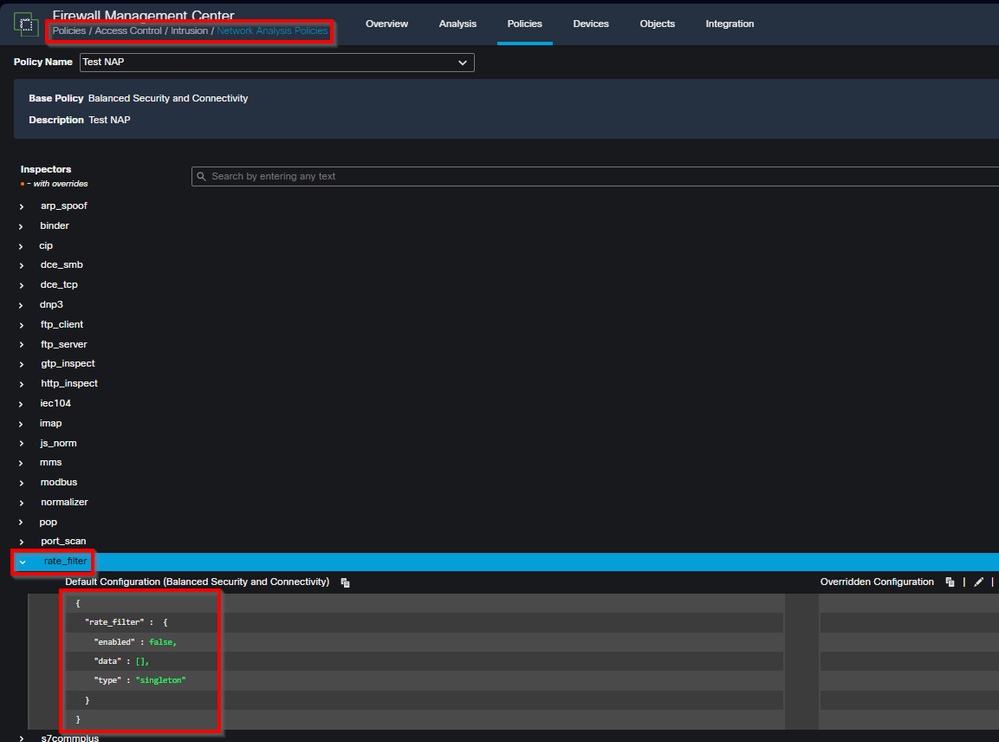
These filters are configured under Policies > Access Control: Intrusion > Network Analysis Policies by clicking on Snort 3 Version for the NAP policy and then clicking the rate_filter drop-down from the left panel.
 inline_image_0.png
2: Understand the Snort 3 Rate Filter Rule Structure
The rate_filter inspector in Snort 3 allows you to define rules that monitor specific types of traffic (such as SYN packets) and take actions (alert or drop) when a defined threshold is exceeded. These rules can be targeted at multiple subnets.
Example rate_filter configuration for multiple subnets:
{
  "rate_filter": {
    "data": [
      {
        "apply_to": ["10.1.2.0/24", "10.1.3.0/24"],
        "count": 5,
        "gid": 135,
        "sid": 1,
        "new_action": "alert",
        "seconds": 10,
        "timeout": 15,
        "track": "by_src"
      }
    ],
    "enabled": true,
    "type": "singleton"
  }
}
Explanation of parameters:
apply_to: List of IP addresses or subnets to which the filter applies (supports multiple subnets).
count + seconds: Threshold for event (for example, 5 SYN packets within 10 seconds).
gid / sid: Identifies the Snort event (such ss GID 135, SID 1 for SYN flood detection).
new_action: Action to take when threshold is exceeded (for example, alert, drop).
timeout: Duration before a new alert/action is triggered for the same condition.
track: Tracking mode (for example, by_src for per-source IP, by_dst for per-destination IP).
3: Best Practices for Threshold Tuning and Policy Deployment
Begin in alert mode: Set new_action to alert and use conservative thresholds (such as higher count and seconds) to avoid false positives.
Baseline network traffic: Monitor generated events to understand what "normal" SYN rates look like for your environment and subnets.
Iteratively tune parameters: Adjust count, seconds, and timeout based on observed traffic patterns and operational needs.
Move to blocking: Once confident that thresholds accurately reflect abnormal behavior, change new_action from alert to drop or equivalent to actively block attacks.
Separate filters as needed: Consider different rate limits for different segments or roles (for example, servers vs. user subnets) if traffic patterns vary.
Continuous monitoring: Maintain alerting and monitoring on rate_filter events to quickly identify tuning issues or active threats.
Cause
None. The configuration was requested for proactive security and as guidance due to a prior SYN flood incident.
Related Content
- Snort 3 Inspector Reference: Rate Filter
- Cisco Secure Firewall Management Center Device Configuration Guide, 7.4: Rate-Based Attack Prevention
- Cisco Technical Support & Downloads
Revision History
| Revision | Publish Date | Comments |
|---|---|---|
1.0 |
14-Apr-2026
|
Initial Release |

 Feedback
Contact Cisco
- Open a Support Case

- (Requires a Cisco Service Contract)