Secure Firewall Virtual Deployment Fails Due to Windows File Extractor
Available Languages
Contents
Issue
Deployment of the Cisco Secure Firewall Virtual device (ASAv, FTDv, FMCv or FMCv300) appliance in VMware vCenter or ESXi fails with this error shown during VM deployment:

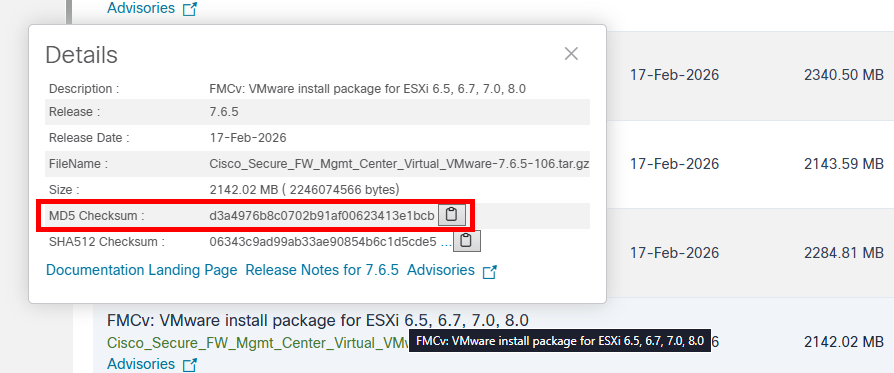
The MD5 checksum of the package is verified at the software.cisco.com site. After downloading the file from the site, the MD5 remains the same and there is not yet any evidence of any corrupted file.
When the package is extracted, the contents contain a *.mf file such as "Cisco_Secure_FW_Mgmt_Center_Virtual_VMware-ESXi-7.6.5-106.mf". This file contains the Cisco-provided SHA1 hashes for the image files.
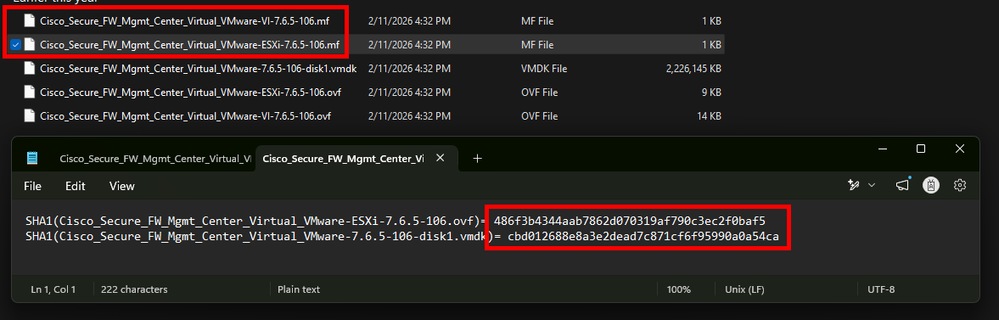
When using the Windows native "Extract All..." feature instead of a 3rd party file extractor, the images within become corrupted and the SHA1 hashes of those files do not match the *.mf file hashes from Cisco.
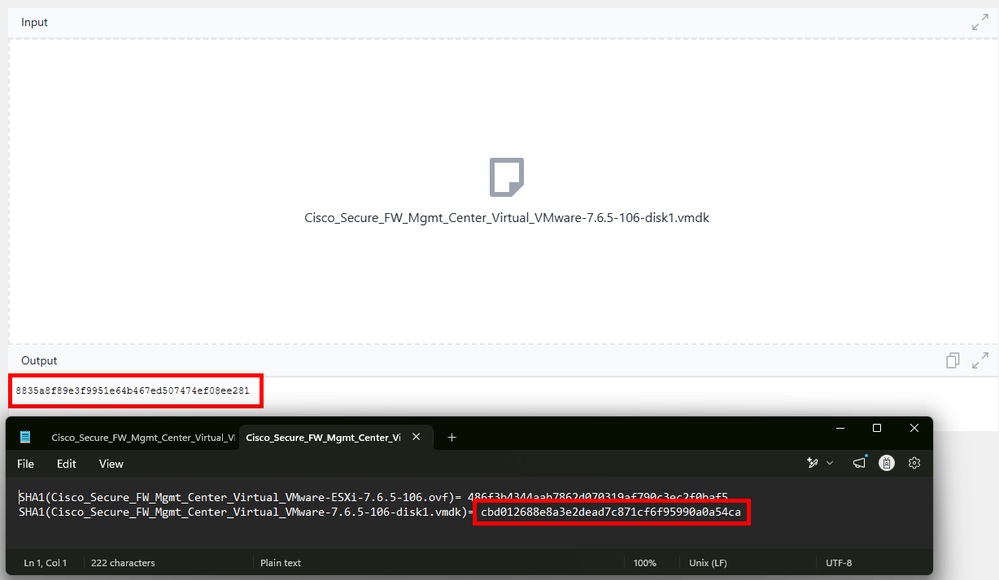
Since the SHA1 hashes do not match, the files become invalid for use in VMWare and results in the 500 error.
! Failed to deploy OVF package.
Cause: A general system error occurred:
Transfer failed: Invalid response code: 500.
Environment
VMware vCenter Server 9.0, VMware ESXi 8.0.3
Cisco Secure Firewall Virtual device Installation packages using VMDK files
Windows operating system used for package extraction and upload to vCenter or ESXi
Resolution
Workaround:
1.- Confirm matching MD5 hashes before and after download of the zipped VMWare package.
2.- Download and install a 3rd-pary file extractor such as 7-Zip from an official website to use instead of the Windows native extraction tool.
3.- Extract the zipped package using the 3rd-pary file extractor and note the SHA1 hashes for each file from the Cisco *.mf files in a notepad.
4.- Generate the SHA1 hash for the required image file (OVF/VMDK) with any online hash tool and ensure it matches the one showing in the Cisco *.mf files.
5.- Deploy the FMCv using the appropriate OVF file based on your deployment method:
For vCenter deployments: Use the VI OVF and VMDK file
For standalone ESXi deployments: Use the ESXi OVF and VMDK file
Cause
The issue is caused by file corruption during extraction when using the native Windows file extractor to unpack the .tar.gz installation package. Although the downloaded package MD5 checksum is valid, the Windows native extraction utility alters file integrity during extraction, resulting in invalid OVF/VMDK files that cause VMware to return a generic HTTP 500 error during deployment. This behavior aligns with Cisco bug ID CSCwp33802, which documents problems extracting Secure Firewall virtual images using Windows native tools. This is resolved with Firepower 10.0.0 images.
Related Content
Revision History
| Revision | Publish Date | Comments |
|---|---|---|
1.0 |
23-Oct-2026
|
Initial Release |

 Feedback
Contact Cisco
- Open a Support Case

- (Requires a Cisco Service Contract)