Automate Message Release in PVO Quarantines Using SMA API
Available Languages
Contents
Introduction
This document describes how to automate message management and release on a Cisco SMA via the REST API in order to process large volumes of messages.
Prerequisites
Requirements
Cisco recommends that you have knowledge of these topics:
- Cisco SMA product knowledge
- Familiarity with REST API basics, Postman, curl and JQ for JSON processing
- Valid credentials for SMA API access
- Command line
- Network access to the SMA
- Tools installed: curl (for requests), JQ (for JSON manipulation), and a client like Postman for initial testing
- Appropriate user role on the SMA to perform message release actions
Components Used
This document is not restricted to specific software and hardware versions.
The information in this document was created from the devices in a specific lab environment. All of the devices used in this document started with a cleared (default) configuration. If your network is live, ensure that you understand the potential impact of any command.
Background Information
Automating message release is essential for environments with high email volume. By using the API, administrators can filter specific messages (for example, by sender) and release them programmatically, reducing operational time and the risk of human error compared to manual management in the GUI.
Initial Testing
In order to manage the quarantine, start by performing an initial query to verify connectivity and confirm the data structure.
https://dhxyz-sma2.iphmx.com/sma/api/v2.0/quarantine/messages?quarantineType=pvo&quarantines=TEST_QUARANTINE&limit=25&offset=0&orderBy=received&orderDir=desc&startDate=2026-03-15T00:00:00.000Z&endDate=2026-03-16T00:00:00.000ZData Structure
- API Endpoint: The base URL for the SMA API (for example, https://dhxyz-sma2.iphmx.com/sma/api/v2.0/quarantine/messages).
- Quarantine Name: The specific PVO quarantine identifier (for example, TEST_QUARANTINE) from which you intend to retrieve messages.
- Date Range: The startDate and endDate used to define the specific timeframe for the search.
- Limit: The maximum number of records to return in a single API response. This helps manage payload size and prevents timeouts when dealing with large queues.
- Offset: The starting index of the result set. This is used for pagination; for example, setting an offset of 25 skips the first 25 messages, allowing you to retrieve the next batch of results.
Verify the Results using both the GUI and the API
When retrieving the information, you can see the same amount of messages in the API call and in the GUI.
 postman GET request
 TEST_QUARANTINE messages
Initial Testing with CURL
Generate your Base64 authentication token for the authorization header:
echo -n 'username:password' | base64Retrieve All Messages
Execute the curl request to extract the messages into a local file:
curl -X GET "https://dhxyz-sma2.iphmx.com/sma/api/v2.0/quarantine/messages?quarantineType=pvo&quarantines=TEST_QUARANTINE&limit=25&offset=0&orderBy=received&orderDir=desc&startDate=2026-03-15T00:00:00.000Z&endDate=2026-03-16T00:00:00.000Z" \
    -H "Authorization: Basic token-generated-in-base64" \
    -H "Accept: application/json" \
    -o response.json
Verify Total Count
Check the total number of messages received:
$ grep "totalCount" response.json | awk '{ print $2, $3}'
{"totalCount": 24},
Filter MIDs Per Domain
Use JQ to filter the MIDs of the messages you wish to release (for example, filtering by domain).
$ jq '[.data[] | select(.attributes.sender | endswith("@labcisco.com")) | .mid]' response.json > mids-labcisco-domain.json
$ cat mids-labcisco-domain.json
[
  440,
  439,
  438,
  437,
  436,
  435,
  434,
  433,
  425,
  414
]
The number of MIDs, can be match if you make a search into the TEST_QUARANTINE into the SMA GUI.
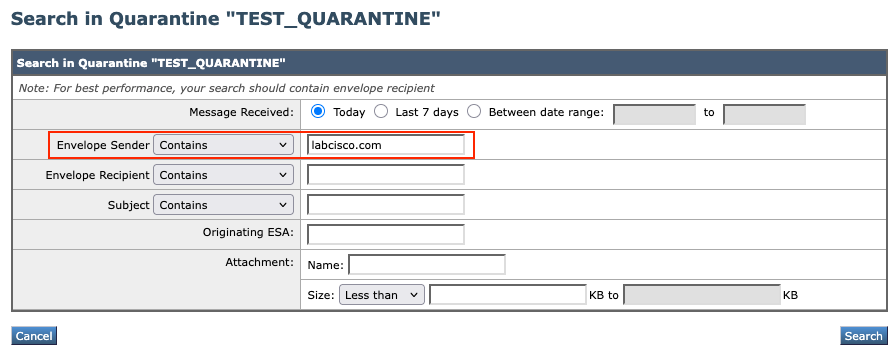 quarantine search
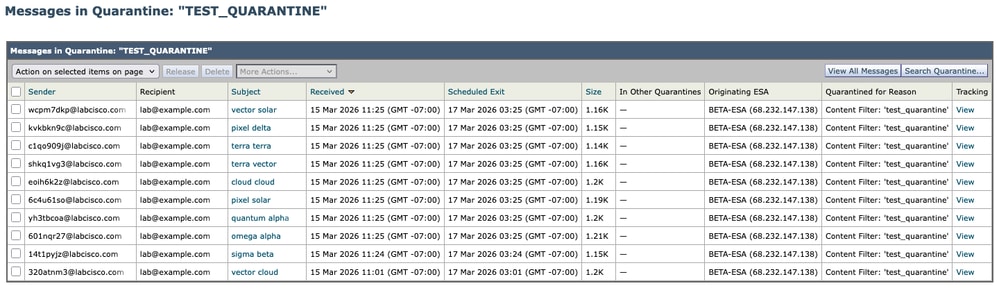 quarantine results
Filter MIDs and Create Payload
Filter the MIDs and generate the payload file.
$ jq '{action:"release", quarantineType:"pvo", quarantineName:"TEST_QUARANTINE", mids:[.data[] | select(.attributes.sender | endswith("@labcisco.com")) | .mid]}' response.json > payload.json
$ cat payload.json
{
  "action": "release",
  "quarantineType": "pvo",
  "quarantineName": "TEST_QUARANTINE",
  "mids": [
    440,
    439,
    438,
    437,
    436,
    435,
    434,
    433,
    425,
    414
  ]
}
Execute the Release (POST)
Send the release request to the SMA:
$ curl -X POST "https://dhxyz-sma2.iphmx.com/sma/api/v2.0/quarantine/messages" \
        -H "Authorization: Basic token-generated-in-base64" \
        -H "Content-Type: application/json" \
        -d @payload.json
{"data": {"action": "release", "totalCount": 10}}
Verify the Results
Checking mail_logs
When checking mail_logs for released messages, you can filter by grep "release" mail_logs and the same MIDs you filter above, the same be the ones that got released.
Sun Mar 15 11:48:21 2026 Info: MID 436 released from quarantine "TEST_QUARANTINE" (manual) t=1393
Sun Mar 15 11:48:21 2026 Info: MID 425 released from quarantine "TEST_QUARANTINE" (manual) t=1411
Sun Mar 15 11:48:21 2026 Info: MID 414 released from quarantine "TEST_QUARANTINE" (manual) t=2787
Sun Mar 15 11:48:21 2026 Info: MID 433 released from quarantine "TEST_QUARANTINE" (manual) t=1397
Sun Mar 15 11:48:21 2026 Info: MID 440 released from quarantine "TEST_QUARANTINE" (manual) t=1387
Sun Mar 15 11:48:21 2026 Info: MID 439 released from quarantine "TEST_QUARANTINE" (manual) t=1388
Sun Mar 15 11:48:21 2026 Info: MID 434 released from quarantine "TEST_QUARANTINE" (manual) t=1396
Sun Mar 15 11:48:21 2026 Info: MID 437 released from quarantine "TEST_QUARANTINE" (manual) t=1391
Sun Mar 15 11:48:21 2026 Info: MID 435 released from quarantine "TEST_QUARANTINE" (manual) t=1395
Sun Mar 15 11:48:21 2026 Info: MID 438 released from quarantine "TEST_QUARANTINE" (manual) t=1390
Checking Direcly in the GUI
If you make the same search for the domain you released the messages, you see that the search has no results, since all the messages were released.
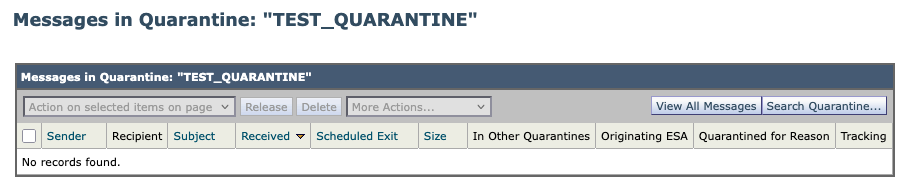 quarantine new results
Checking using API
Postman
Re-run the GET command from Retrieve All Messages in order to confirm that the totalCount has decreased or that the specific MIDs are no longer present.
 postman GET query
CURL
$ curl -X GET "https://dhxyz-sma2.iphmx.com/sma/api/v2.0/quarantine/messages?quarantineType=pvo&quarantines=TEST_QUARANTINE&limit=25&offset=0&orderBy=received&orderDir=desc&startDate=2026-03-12T00:00:00.000Z&endDate=2026-03-14T00:00:00.000Z" \
          -H "Authorization: Basic token-generated-in-base64" \
          -H "Accept: application/json" \
          -o response.json
$ jq '[.data[] | select(.attributes.sender | endswith("@labcisco.com")) | .mid]' response.json > mids-labcisco-domain.json
$ cat mids-labcisco-domain.json
[]
Bulk Message Release (500 Messages)
In order to handle bulk operations effectively, you must understand how to manage large datasets using pagination. When you need to process a large number of messages, you must calculate the limit and offset parameters to ensure you retrieve the complete set of data without exceeding API response constraints.
Adjusting API Parameters for Bulk Operations
When retrieving a large volume of messages, use this logic to configure your request:
- Limit: This defines the number of records returned per request. While you can set this to a high number (for example, 500 or 1000) to capture more data at once, be mindful of system performance and potential timeouts.
- Offset: This defines the starting point of your result set. If your total number of messages exceeds your limit, you must perform multiple requests, incrementing the offset by the limit value in each subsequent call (for example, offset=0, offset=500, offset=1000).
Scaling Your Workflow
The process used in the previous 10-message example serves as the foundation for all bulk operations. In order to scale your workflow, simply iterate through the queue by systematically incrementing the offset parameter. By 'playing' with these values—adjusting the limit to define your batch size and the offset to navigate through the pages — you can effectively retrieve and process your entire quarantine queue, regardless of the total message count.
Related Information
- AsyncOS API 16.0 for Cisco Secure Email and Web Manager-Getting Started Guide - GD (General Deployment)
- Cisco Technical Support & Downloads
Revision History
| Revision | Publish Date | Comments |
|---|---|---|
1.0 |
07-Apr-2026
|
Initial Release |

 Feedback
Contact Cisco
- Open a Support Case

- (Requires a Cisco Service Contract)