Monitor Cisco ESA with SNMP
Available Languages
Contents
Introduction
This document describes how to monitor Cisco Secure Email Gateway using SNMP, including MIB structure, OID usage, and practical queries.
Prerequisites
Requirements
Cisco recommends that you have knowledge of these topics:
- Basic knowledge of SNMP protocol
- Access to Cisco ESA appliance
- Familiarity with Linux command line
- Cisco ESA with SNMP service enabled
- SNMP client installed (such as Net-SNMP tools)
- IronPort MIB files available and loaded
- Community string or SNMP v3 credentials
Components Used
The information in this document is based on these software and hardware versions:
- Cisco Secure Email Gateway (ESA)
- Linux client with Net-SNMP tools
- MIB files: IRONPORT-SMI.txt, ASYNCOS-MAIL-MIB.txt
Configure SNMP
The SNMP configuration on ESA is done via CLI. In order to enable SNMP on Cisco ESA, access the CLI and run snmpconfig.
The default setup involves:
- Enabling SNMP service
- Choosing the management interface and port (usually 161)
- Enabling SNMPv3 (default security: authPriv with SHA and AES)
- Setting authentication and privacy passphrases
- Enabling SNMPv1/v2c, specifying the community string (for example, ironport)
- Defining allowed IPv4 networks for SNMP requests
- Configuring SNMP trap version and trap target IP address
- Setting system location and contact information
After enabling SNMP, you can see a summary similar to this:
esa1.ironport.com> snmpconfig

Current SNMP settings:
Listening on interface "Management" <ESA-IP-ADDRESS> port 161.
SNMP v3: Enabled. Security level: authPriv
Authentication Protocol: SHA
Encryption Protocol: AES
SNMP v1/v2: Enabled, accepting requests from subnet <ACCEPTED-IPs>, .
SNMP v1/v2 Community String: ironport
Trap version: V3
Trap target: <ESA-IP-ADDRESS>
Location: esxi data center
System Contact: ciscoros soc
Once SNMP is enabled and configured, the appliance is ready to accept SNMP queries from permitted source IPs.
SNMP Client Setup and Querying on Linux
For this example, a Debian server was used. Note that the installation steps can vary depending on your distribution package manager.
Install SNMP Tools
sudo apt-get install snmp snmp-mibs-downloaderVerify that snmpwalk binary is installed.
diegoher@debian-server:/usr/share/snmp/mibs$ snmpwalk --version
NET-SNMP version: 5.9
Load MIB Files
Place IronPort MIB files in the /usr/share/snmp/mibs folder.
 debian-server oids

Note: MIB files can be found in the SNMP article shared at the end of this document.
Using an OID to Monitor CPU Utilization
This command queries the ESA for its current CPU utilization. The OID points directly to the CPU metric defined in the MIB. The output displays a value, such as INTEGER: 37, indicating the device CPU usage at 37%. This enables administrators to monitor device performance in real time and intervene if utilization exceeds acceptable limits.
snmpwalk -v2c -c ironport <ESA-IP-ADDRESS> .1.3.6.1.4.1.15497.1.1.1.2Using OIDs in SNMP commands provides direct access to specific metrics for effective monitoring and troubleshooting.
Enable Symbolic Names
export MIBS=ALLSetting export MIBS=ALL allows SNMP tools to use human-readable names defined in the MIB files instead of long numeric OIDs. This makes queries easier to write, understand, and troubleshoot, since you can refer to objects by meaningful names like workQueueMessages rather than sequences of numbers.
Run SNMP Queries
Use snmpwalk to query ESA for key metrics. SNMP queries allow you to retrieve real-time status and performance data from your Cisco ESA. By using symbolic names, you can easily monitor specific objects such as queue status, license expiration, and hardware utilization without needing to reference complex numeric OIDs.
Work Queue Messages
diegoher@debian-server:/usr/share/snmp/mibs$ snmpwalk -v2c -c ironport <ESA-IP-ADDRESS> workQueueMessages
ASYNCOS-MAIL-MIB::workQueueMessages.0 = Gauge32: 0
This output shows that there are currently zero messages in the ESA work queue. The value represents the real-time number of emails waiting to be processed.
CPU Utilization
diegoher@debian-server:/usr/share/snmp/mibs$ snmpwalk -v2c -c ironport <ESA-IP-ADDRESS perCentCPUUtilization
ASYNCOS-MAIL-MIB::perCentCPUUtilization.0 = INTEGER: 37
This indicates that the CPU of ESA is currently at 37% utilization. The value gives you insight into the processing load of the appliance at the moment the query was executed.
License Key Expiration Table
diegoher@debian-server:/usr/share/snmp/mibs$ snmpwalk -v2c -c ironport <ESA-IP-ADDRESS> keyExpirationTable
ASYNCOS-MAIL-MIB::keyExpirationIndex.1 = INTEGER: 1
ASYNCOS-MAIL-MIB::keyExpirationIndex.2 = INTEGER: 2
ASYNCOS-MAIL-MIB::keyExpirationIndex.3 = INTEGER: 3
ASYNCOS-MAIL-MIB::keyExpirationIndex.4 = INTEGER: 4
ASYNCOS-MAIL-MIB::keyExpirationIndex.5 = INTEGER: 5
ASYNCOS-MAIL-MIB::keyExpirationIndex.6 = INTEGER: 6
ASYNCOS-MAIL-MIB::keyExpirationIndex.7 = INTEGER: 7
ASYNCOS-MAIL-MIB::keyExpirationIndex.8 = INTEGER: 8
ASYNCOS-MAIL-MIB::keyDescription.1 = STRING: Bounce Verification
ASYNCOS-MAIL-MIB::keyDescription.2 = STRING: Data Loss Prevention
ASYNCOS-MAIL-MIB::keyDescription.3 = STRING: External Threat Feeds
ASYNCOS-MAIL-MIB::keyDescription.4 = STRING: Incoming Mail Handling
ASYNCOS-MAIL-MIB::keyDescription.5 = STRING: IronPort Anti-Spam
ASYNCOS-MAIL-MIB::keyDescription.6 = STRING: IronPort Email Encryption
ASYNCOS-MAIL-MIB::keyDescription.7 = STRING: Outbreak Filters
ASYNCOS-MAIL-MIB::keyDescription.8 = STRING: Sophos Anti-Virus
ASYNCOS-MAIL-MIB::keyIsPerpetual.1 = INTEGER: true(1)
ASYNCOS-MAIL-MIB::keyIsPerpetual.2 = INTEGER: true(1)
ASYNCOS-MAIL-MIB::keyIsPerpetual.3 = INTEGER: true(1)
ASYNCOS-MAIL-MIB::keyIsPerpetual.4 = INTEGER: true(1)
ASYNCOS-MAIL-MIB::keyIsPerpetual.5 = INTEGER: true(1)
ASYNCOS-MAIL-MIB::keyIsPerpetual.6 = INTEGER: true(1)
ASYNCOS-MAIL-MIB::keyIsPerpetual.7 = INTEGER: true(1)
ASYNCOS-MAIL-MIB::keyIsPerpetual.8 = INTEGER: true(1)
ASYNCOS-MAIL-MIB::keySecondsUntilExpire.1 = Gauge32: 0
ASYNCOS-MAIL-MIB::keySecondsUntilExpire.2 = Gauge32: 0
ASYNCOS-MAIL-MIB::keySecondsUntilExpire.3 = Gauge32: 0
ASYNCOS-MAIL-MIB::keySecondsUntilExpire.4 = Gauge32: 0
ASYNCOS-MAIL-MIB::keySecondsUntilExpire.5 = Gauge32: 0
ASYNCOS-MAIL-MIB::keySecondsUntilExpire.6 = Gauge32: 0
ASYNCOS-MAIL-MIB::keySecondsUntilExpire.7 = Gauge32: 0
ASYNCOS-MAIL-MIB::keySecondsUntilExpire.8 = Gauge32: 0- keyExpirationIndex.X: Each index represents an unique feature key installed on the Cisco ESA.
- keyDescription.X: Provides the name or description of each feature key, such as 'Bounce Verification', 'Data Loss Prevention', 'IronPort Anti-Spam', and 'Sophos Anti-Virus'.
- keyIsPerpetual.X: Indicates whether the license for each feature is perpetual. The value true (1) means the license does not expire.
- keySecondsUntilExpire.X: Shows how many seconds remain until the license expires. A value of 0 confirms that the license is perpetual or has already expired.
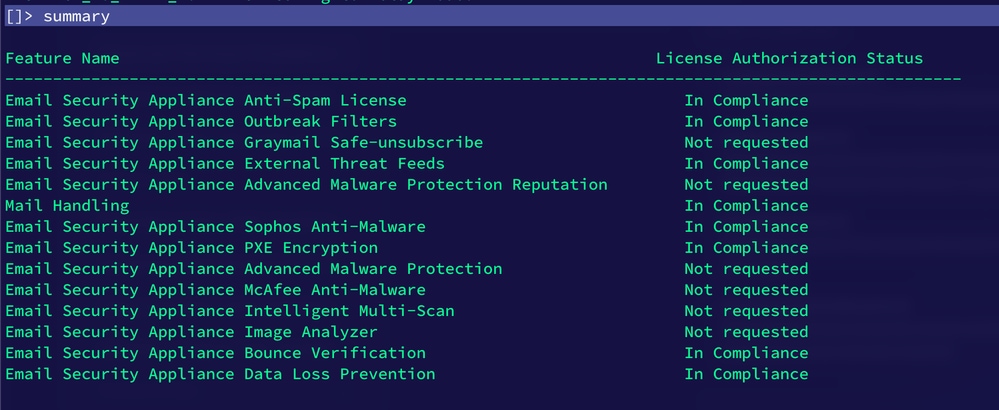 license example
This output confirms the current feature keys of the appliance, their descriptions, and the license status. All listed licenses are perpetual, as indicated by keyIsPerpetual and keySecondsUntilExpire. This information helps ensure that essential security features remain active and valid on your Cisco ESA.
Difference between Numeric OIDs and Symbolic Names
Numeric OIDs:
- They are universal and always work, even if the MIB files are not loaded on the system.
- Example: .1.3.6.1.4.1.15497.1.1.1.2.
- They are less readable and can be difficult to remember.
Symbolic names:
- These are user-friendly names defined in the MIB files, such as perCentCPUUtilization.
- They make commands easier to write and understand.
- They require the MIB files to be correctly loaded and the MIBS environment variable to be configured.
- Example: snmpwalk -v2c -c ironport 10.31.124.165 perCentCPUUtilization.
Is it the same?
Both methods query the same metric and yield identical results, but symbolic names are more practical and human-readable, while numeric OIDs are more reliable in environments where MIB files can not be present or loaded.
Related Information
Revision History
| Revision | Publish Date | Comments |
|---|---|---|
1.0 |
06-Apr-2026
|
Initial Release |

 Feedback
Contact Cisco
- Open a Support Case

- (Requires a Cisco Service Contract)