Steps to integrate Cisco Email Threat defense(ETD) with Cisco Secure Access:
Available Languages
Introduction
This document illustarte the steps to integrate Cisco Email Threat Defense(ETD) with Cisco Secure Access(SA) for Email DLP in ETD SMTP Inline Mode. This ensures that all the outbound emails passing through ETD will be scanned for DLP with the help of Cisco Secure Access(SA).
Overview
In today’s distributed work environment, email remains the primary communication tool for businesses and, consequently, the most frequent target for cyberattacks and data exfiltration. To address these evolving challenges, Cisco offers a comprehensive approach to email security through Email Threat Defense (ETD) and Secure Access Email Data Loss Prevention (DLP).
By combining the threat-detection capabilities of Cisco Email Threat Defense with the robust data protection of Secure Access Email DLP, organizations can establish a multi-layered defense strategy. This approach not only secures the inbox from external actors but also ensures that sensitive corporate data remains under strict control, regardless of where the user is located or how they access their email.
Prerequisites
Access to below console.
- Cisco Email Threat Defense Console (ETD) in Inline mode.
The ETD console serves as the centralized management plane for your email security posture. Accessing this console is the first step in configuring your environment to defend against advanced threats.
- Why "Inline Mode" matters:When ETD is configured inInline Mode, it acts as a mail transfer agent (MTA) or a direct integration that sits in the path of the email flow. This allows the system to inspect, block, or modify messagesbeforethey are delivered to the recipient’s inbox.
- Cisco Secure Access Console(SA)
Cisco Secure Access is the unified cloud-delivered security platform that integrates various security services, including Data Loss Prevention (DLP), into a single, cohesive architecture.
- Why the SA Console is required:The Secure Access console is the orchestration hub for your organization's security policies. While ETD handles the threat-specific email flow, the Secure Access console is where you define the broaderDLP policiesthat govern how sensitive data is identified and handled across your enterprise.
- Console Role:This console allows administrators to create and apply data-classification rules (e.g., identifying PII, credit card numbers, or internal project codes). By accessing the SA console, you can ensure that your email DLP policies are synchronized with your overall security strategy, enabling consistent enforcement across both email traffic.
Configure
Integration Steps
Step 1: Generate API Credentials in Cisco Secure Access
To begin, you must generate the necessary API credentials within the Secure Access console to authorize the connection.
- Log in to theCisco Secure Accessdashboard.
- Navigate toAdmin>API Keys.
- Select the option to create a new API key.
- Assign the following scopes to the key:AdminandPolicy.
- [Screenshot: Secure Access API Key Configuration]
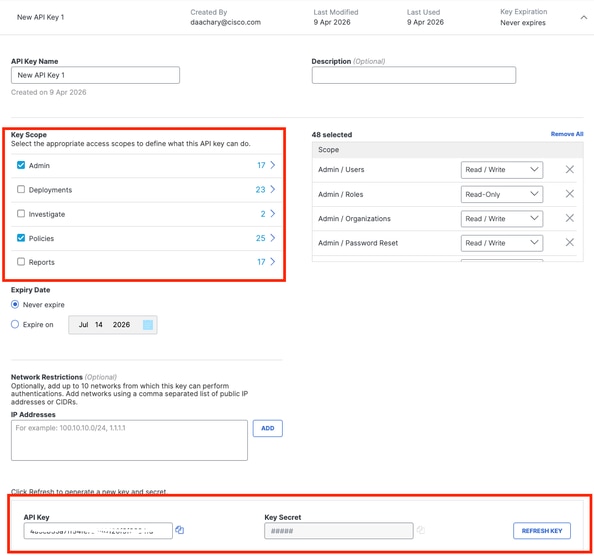
Step 2: Configure Key Expiration
Define the lifecycle of your API key based on your organization’s security policy.
- Option 1: Never Expire– Provides uninterrupted service without manual rotation.
- Option 2: Specific Date– Sets a defined expiration timeline.
- Important Note:If you choose to set an expiration date, ensure you plan for a rotation process. You must reconfigure the API keys in the ETD console before the expiration date to prevent a disruption in your DLP services.
Step 3: Secure Your Credentials
Once the key is generated, the system will display the API Key and Key Secret.
- Action:Copy and store these credentials in a secure location (e.g., a password manager).
- Warning:TheKey Secretwill not be visible after you navigate away from this screen. If lost, you will need to generate a new key pair.
Step 4: Access the ETD Configuration
With your credentials secured, proceed to the ETD console to finalize the linkage.
- Log in to theCisco ETDconsole.
- Navigate toConfiguration>Global Settings.
- [Screenshot: ETD Global Settings Navigation]
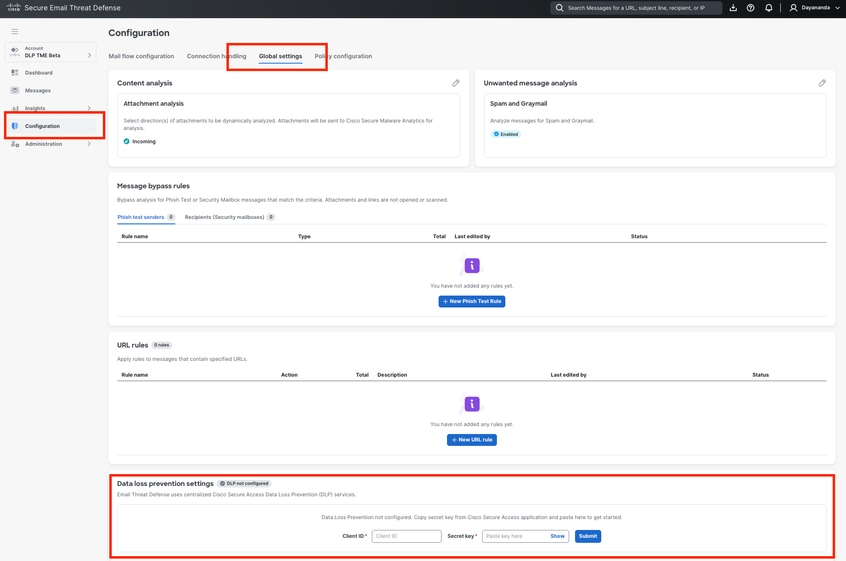
Step 5: Finalize Integration
Complete the handshake by inputting the credentials obtained from Secure Access.
- Within theGlobal Settingsmenu, locate theData Loss Prevention (DLP)section.
- Enter theClient ID(API Key) andSecret Key(Key Secret) that you saved in Step 3.
- Save your changes.
Upon successful validation, the integration between Cisco ETD and Cisco Secure Access is complete, and your DLP policies will be ready for enforcement across your email traffic.
Now the integration of ETD and Secure Access is completed.
NOTE: Please refer to "How to configure an Email DLP policy in Cisco Secure Access (SA) and Cisco Email Threat Defense (ETD)"to create DLP policy in Cisco Secure Access for Email DLP.
Troubleshooting Notes
If you encounter issues during or after the integration process, review the following common scenarios and remediation steps:
1. API Credentials Not Accepted in ETD
- Symptom:When entering the Client ID and Secret Key in ETD, the system returns an authentication error.
- Resolution:
- Verify that the API key was created with the exact required scopes:“Admin”and“Policy”. If other scopes were selected or these were missed, the connection will fail.
- Ensure there are no leading or trailing spaces copied accidentally when pasting the Client ID or Secret Key into the ETD console.
2. Lost or Forgotten Key Secret
- Symptom:You navigated away from the Secure Access API creation screen and can no longer view the Key Secret.
- Resolution:For security reasons, the Key Secret is only displayed once at the time of creation. If you did not save it securely, you must delete the incomplete API key in Secure Access and generate a new one.
3. DLP Policies Are Not Enforcing on Email Traffic
- Symptom:The integration shows as successful, but configured DLP policies are not catching or blocking sensitive emails.
- Resolution:
- Check API Expiration:If you selected "Select a specific date" for the API key expiry (Step 2), verify that the key has not expired. If it has, you must generate and apply a new key pair.
- Verify ETD Deployment Mode:Ensure that Cisco ETD is deployed inInline Mode. ETD must be in the direct mail flow path to actively block or modify messages based on Secure Access DLP verdicts.
- Sync Time:After the initial integration, allow a few minutes for the backend systems to synchronize policies before testing DLP rules.
4. Service Disruption After a Period of Stability
- Symptom:DLP enforcement suddenly stops working after functioning correctly for months.
- Resolution:This is most commonly caused by an expired API key. Navigate toAdmin -> API Keysin Cisco Secure Access to check the status of the key used for ETD. Implement a key rotation process to update the credentials in ETDbeforethe expiration date is reached.
Summary
Integrating Cisco Email Threat Defense (ETD) with Cisco Secure Access (SA) is a critical step in establishing a unified Data Loss Prevention (DLP) strategy. By generating a secure API key with "Admin" and "Policy" scopes in the Secure Access console and configuring those credentials within ETD’s Global Settings, administrators create a seamless communication bridge between the two platforms.
Once this handshake is complete, ETD can actively hand off email metadata to the Secure Access DLP engine. This allows your organization to manage all data protection policies from a single, centralized dashboard (Secure Access) while maintaining deep visibility and enforcement over your email traffic (ETD).
Revision History
| Revision | Publish Date | Comments |
|---|---|---|
1.0 |
22-Jun-2026
|
Initial Release |
 Feedback
Contact Cisco
- Open a Support Case

- (Requires a Cisco Service Contract)