Secure Email Threat Defense: Multifactor Authentication and Access Controls
Available Languages
Introduction
This document describes the capabilities that Cisco Email Threat Defense (ETD) provides to control administrator access to the management console.
Prerequisites
Requirements
Cisco recommends that you have knowledge of these topics in order to configure ETD authentication with Duo:
- A Cisco ETD subscription
- Access to Cisco Security Cloud Control (SCC)
- An authentication solution for enhanced security, in this case, Cisco Duo.
Components Used
This document is restricted to Email Treat Defense and Secure Cloud Control.
The information in this document was created from the devices in a specific lab environment. All of the devices used in this document started with a cleared (default) configuration. If your network is live, ensure that you understand the potential impact of any command.
Background Information
This document focuses on how Cisco ETD leverages Cisco SCC and integrates with Cisco Duo to deliver secure authentication and granular access control.
In modern cloud-based solutions, access control is one of the most critical components in ensuring data security, regulatory compliance, and operational integrity. Unauthorized access—especially to administrator accounts can lead to severe consequences such as compromised systems, data leaks, and service disruptions.
Cisco delivers robust security capabilities across its cloud portfolio, including Multifactor Authentication (MFA) technology, which is an integral part of services like Cisco ETD. MFA adds a critical verification step beyond traditional passwords, requiring users to authenticate via an additional factor such as a mobile application approval, security token, or biometric verification.
To streamline and strengthen the administrator authentication process, ETD leverages Cisco SCC, a centralized authentication and policy management service.
Through SCC, ETD gains access to a broad set of security features, including:
- MFA enforcement to mitigate credential theft risks.
- Integration with third‑party identity providers such as Cisco Duo, Microsoft Entra ID, Okta, and others to support flexible authentication workflows and enterprise identity federation.
- Centralized policy administration, allowing consistent access rules across Cisco cloud services.
Cisco Duo extends these capabilities by adding advanced policy-based access management. Using SCC as the integration channel, ETD can apply granular controls of Duo such as source IP restrictions, device health checks, and user group‑based rules directly to administrator access.
For example, organizations can define a policy that only allows access from specific trusted network ranges. Any connection attempt outside the authorized IP list can be automatically blocked, as illustrated in the accompanying diagrams. This combination of MFA + contextual policies enables a defense in-depth approach, ensuring that even if credentials are compromised, attackers are still prevented from accessing the system unless they also meet additional security criteria.
By uniting Cisco ETD, Cisco SCC, and Cisco Duo, enterprises can implement a secure, scalable, and user‑friendly access control model, aligning with industry best practices while enhancing protection for critical cloud services.
Scenarios
Several authentication and access control scenarios can be implemented with ETD to secure administrative access:
- Embedded MFA – Use the built-in MFA of Cisco or integrate Microsoft MFA.
- Cisco SCC with Cisco Duo – Combine the centralized authentication of Cisco SCC with the advanced MFA capabilities of Duo.
- Cisco SCC with an external identity provider (for example, Microsoft Entra ID) – Extend authentication policies by integrating with enterprise identity solutions.
This document describe the configuration steps for Scenario 2: Cisco SCC with Cisco Duo, although the process can be adapted for other technologies.

Note: This document provides an overview of the basic steps required to enable access control in Email Threat Defense (ETD) using the multifactor authentication capabilities of Cisco Duo. Implementing Duo integration helps enhance security by ensuring that only authorized users can access the platform. For comprehensive guidance, configuration options, and advanced deployment scenarios, see Cisco Security Cloud Control for centralized security policy and access management and Cisco Duo for detailed instructions on multifactor authentication setup and best practices.
Cisco SCC Configuration
To integrate Cisco ETD with Cisco Duo, the first step is to configure the authentication domain in Cisco SCC. This establishes the trust relationship that allows Cisco SCC to work with external identity and MFA providers.
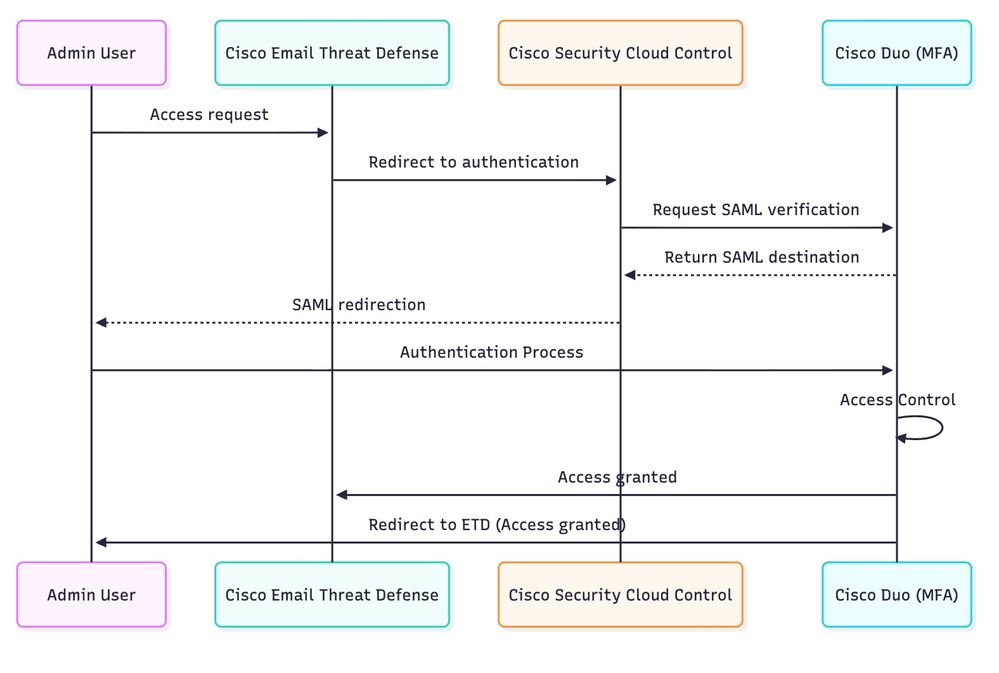 Diagram
Step 1. Access the Cisco SCC Console.
Log in to the Cisco SCC portal https://security.cisco.com/.
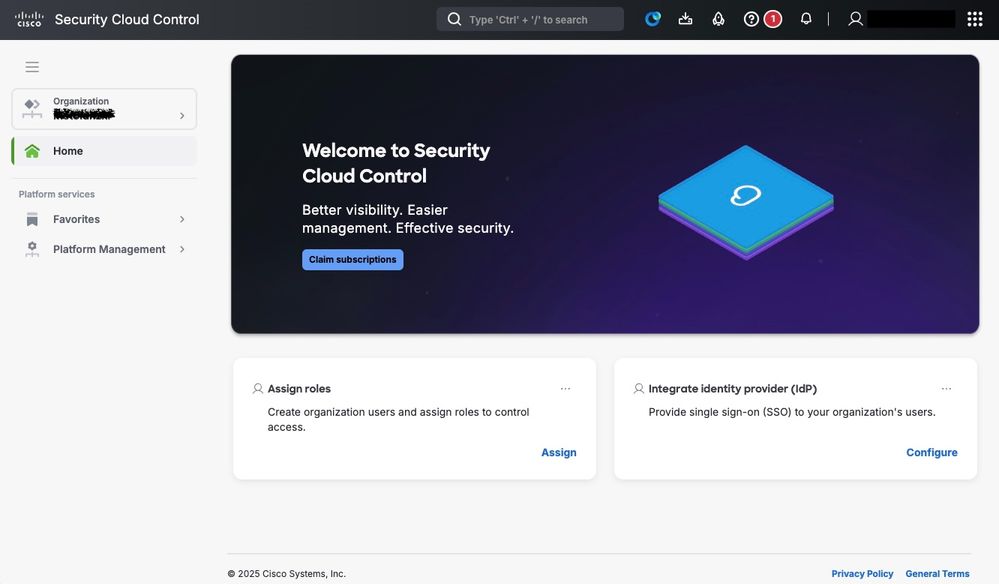
Step 2. Navigate to Domain Management.
From the main menu, navigate to Platform Management > Domains.
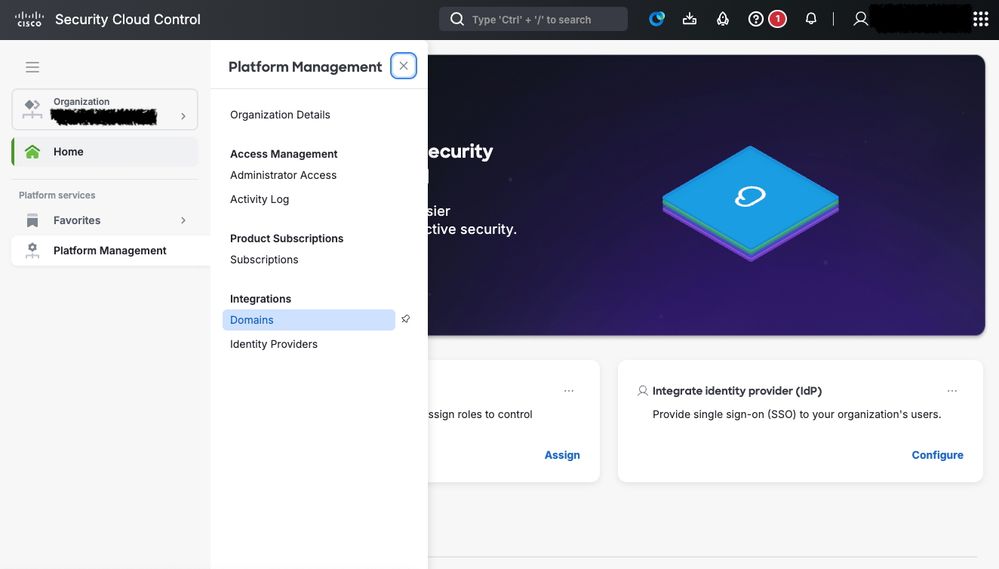 Secure Cloud Control Domain configuration
Step 3. Add a New Domain.
Click Add Domain in order to begin the process of registering your authentication domain.
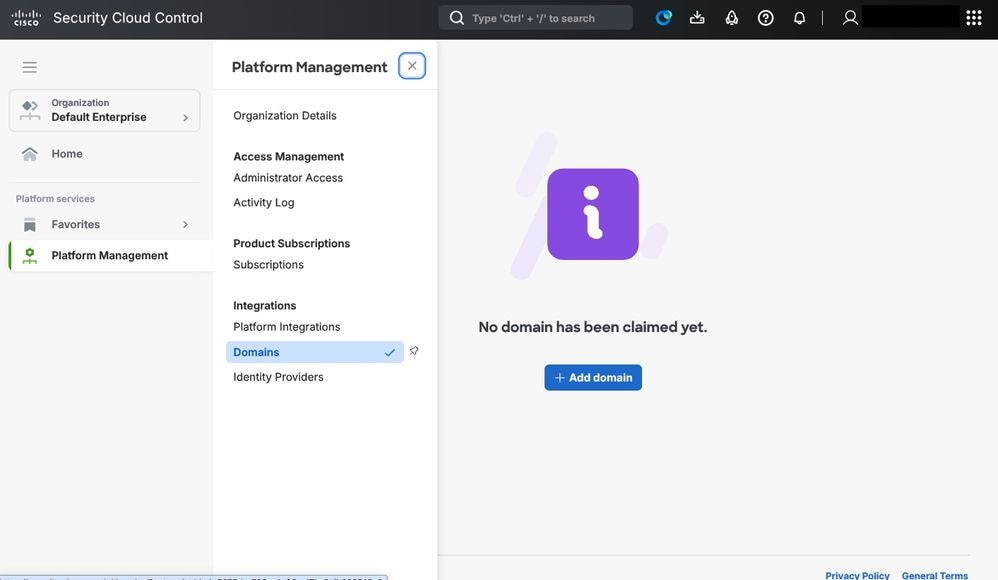 Security Cloud Control: Domain
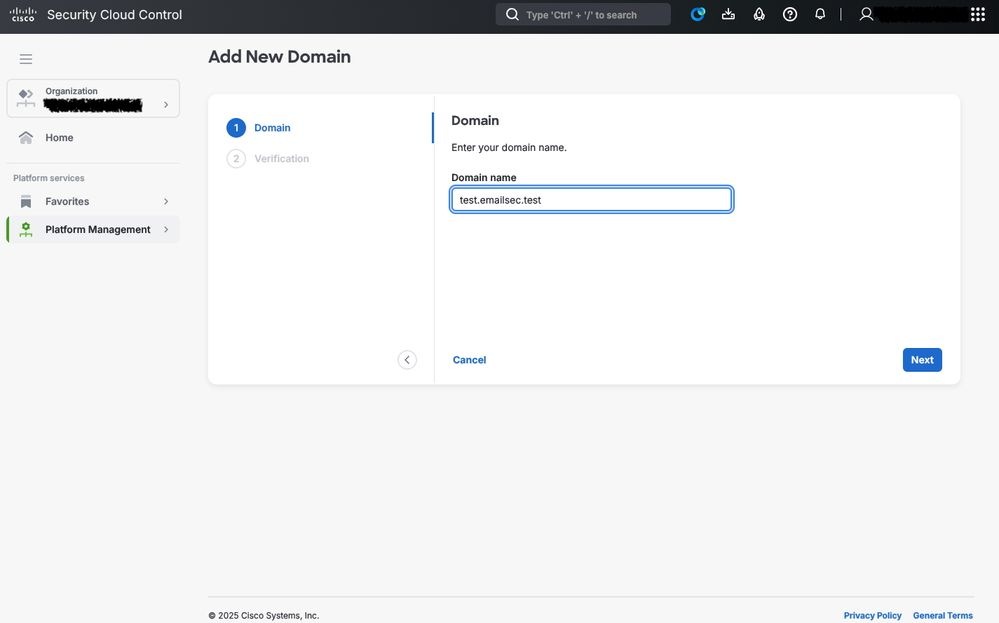
Step 4. Provide the Domain Information.
Complete the form with the details of the domain that is used for authentication. This typically includes:
- The domain name (for example, test.emailsec.test)
- Contact information (administrative and technical)
- Authentication parameters, depending on the chosen identity provider
Step 5. Domain Verification via DNS.
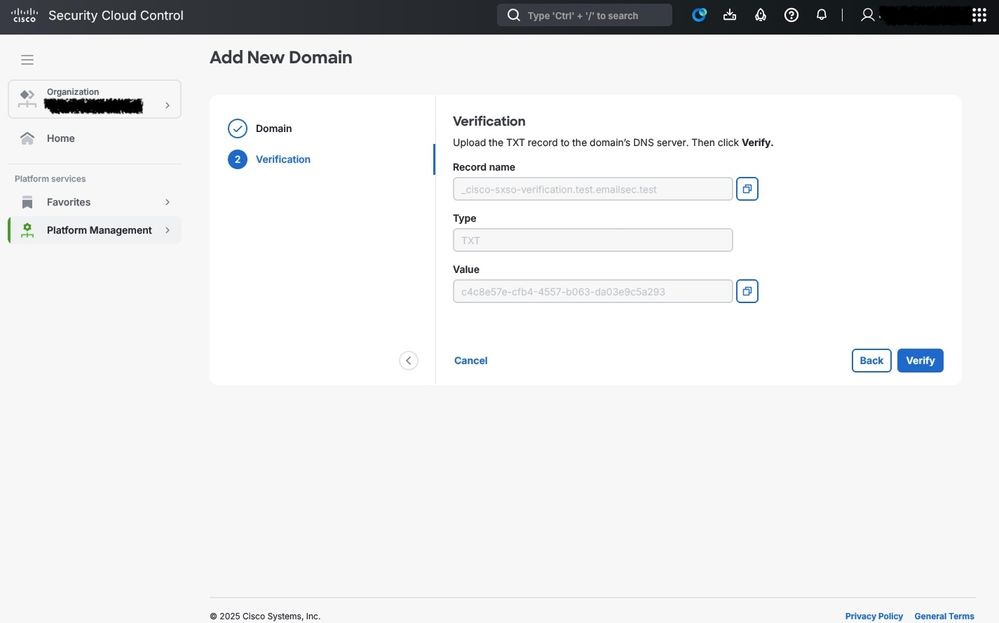
Once the domain has been registered, Cisco requires proof of ownership.
- A verification record is provided by CSCC
- This record must be added to your the DNS configuration of your domain (usually as a TXT record)
- Cisco Secure Cloud automatically validates the DNS entry to confirm that the domain belongs to your organization

Caution: The verification process must be completed successfully before you can proceed with the integration. Depending on DNS propagation, validation takes several minutes to a few hours.
Connecting ETD with Cisco Duo using Cisco SCC
Once the domain of the administrator has been successfully configured (which serves as the foundation for applying stricter access controls and managing privileges), the next step is to integrate the contracted MFA service.
In this scenario, Cisco Duo is implemented as the primary solution for access control, secure login, and MFA verification. This integration enhances the security posture of the environment by requiring administrators to authenticate their identity through multiple verification steps, reducing the risk of unauthorized access and ensuring compliance with organizational security policies.
Cisco Duo and Cisco Cloud Control Integration
Step 1. Access to the Cisco SCC Console.
Log in to the Cisco Security Cloud Control portal https://security.cisco.com/.
Navigate to Platform Management and click Identity Providers.
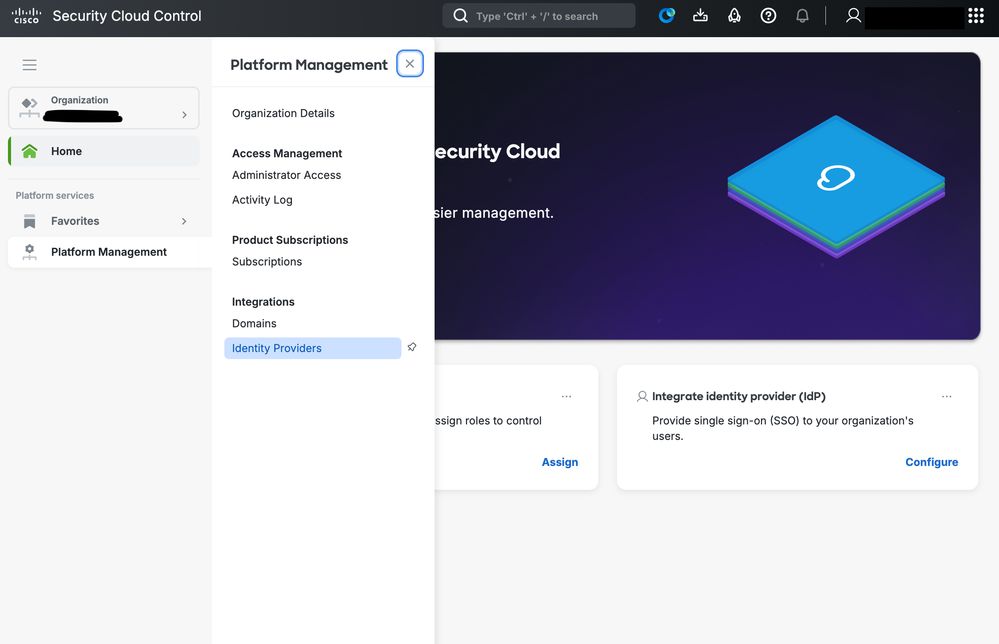 SCC IDP configuration
Use a custom name in order to identify the Identity provider.
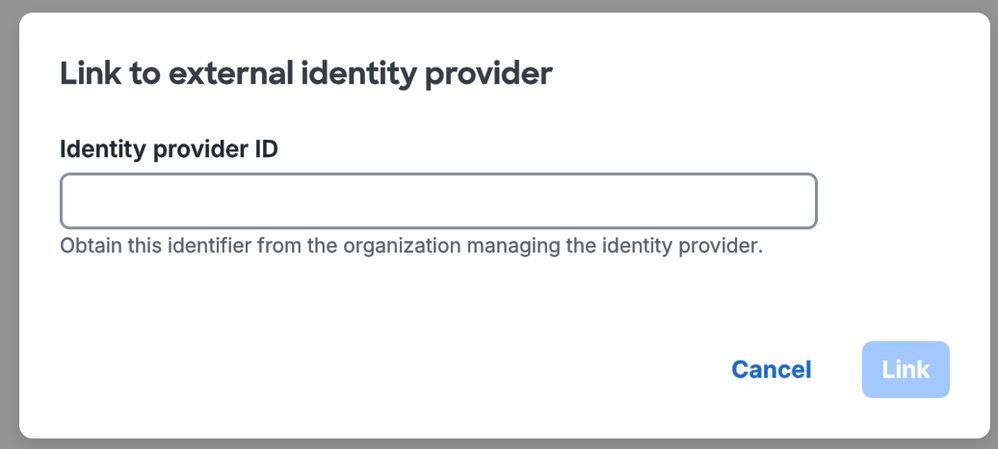
Now the setup starts. At this moment, you get access to Cisco SCC and Cisco Duo.
Step 2. In SCC, disable Enable DUO-based MFA in Security Cloud Sing On, as in showed in the picture, and click Next.
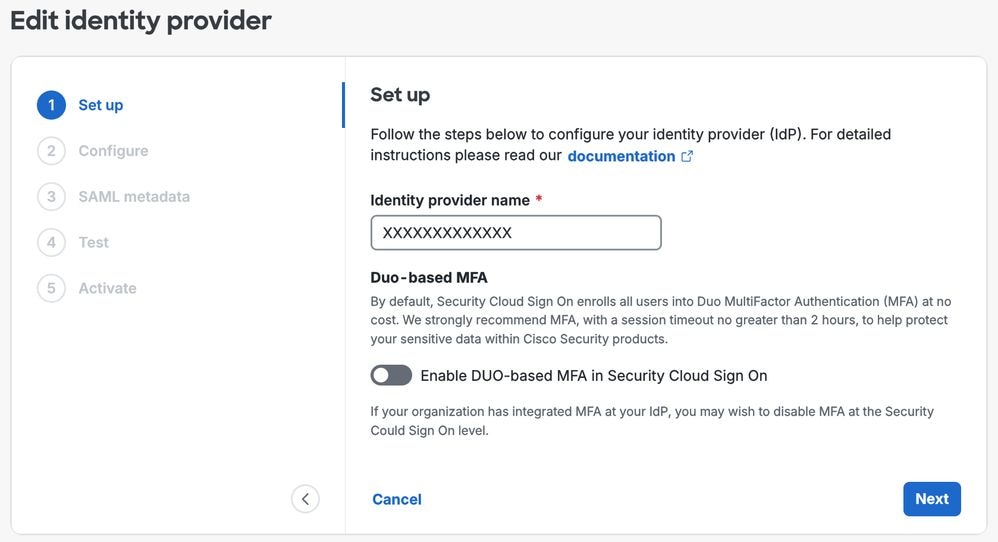 Identity Provider Configuration
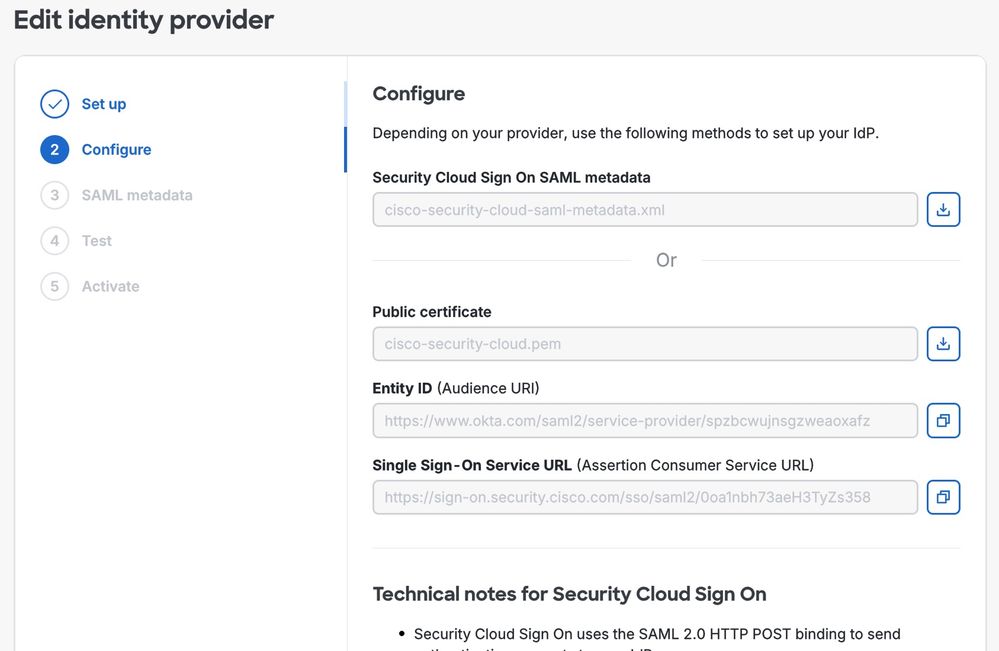
Step 3. The relevant data is created and this is used during the Cisco Duo configuration. Ensure to copy all the required values and associated data, and store them in a secure location. These details are essential for future integration steps, so ensure they are accessible only to authorized personnel and protected in accordance with the security policies of your organization.
Step 4. Open Cisco Duo, navigate to the Applications section and click Add application.
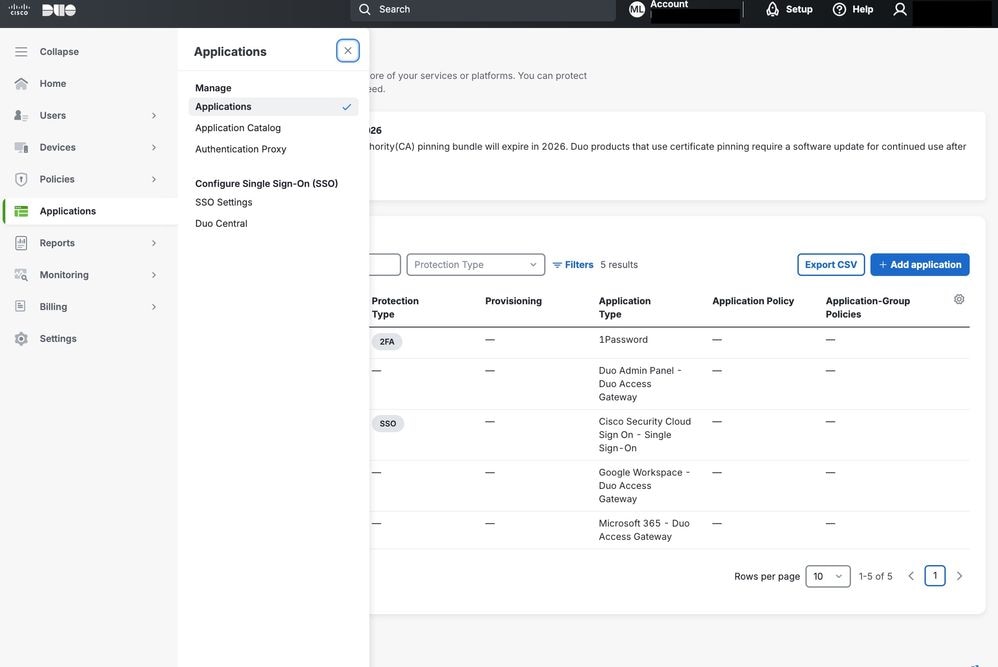 Cisco DUO applications
In the menu, search for Cisco Security Cloud and click Add in order to start the integration.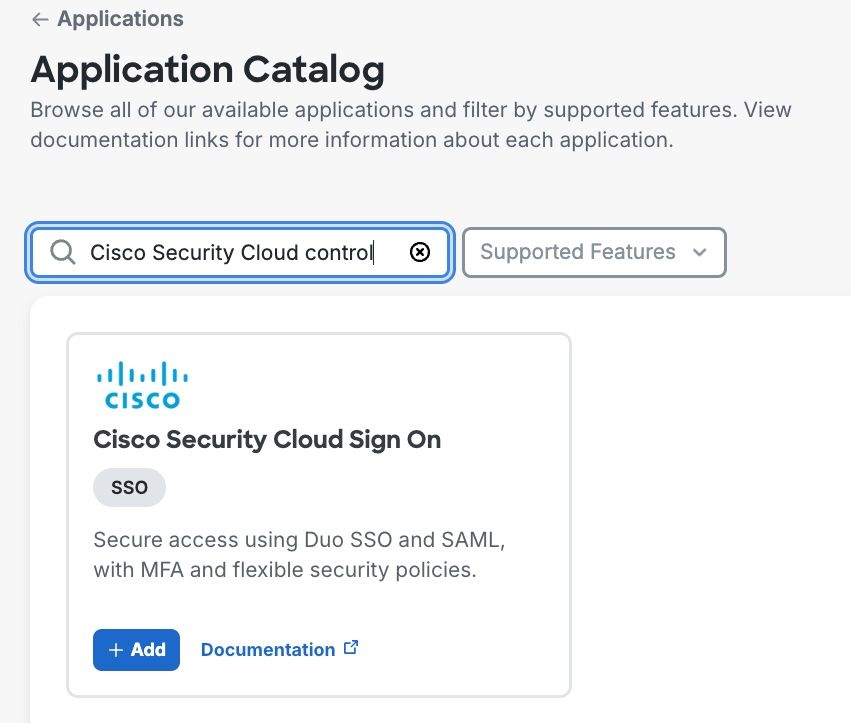
Step 5. Configure the relevant information in the Cisco Duo application.
Copy the Entity ID and Singles Sign-On Service URL from Cisco SCC into Cisco Duo.
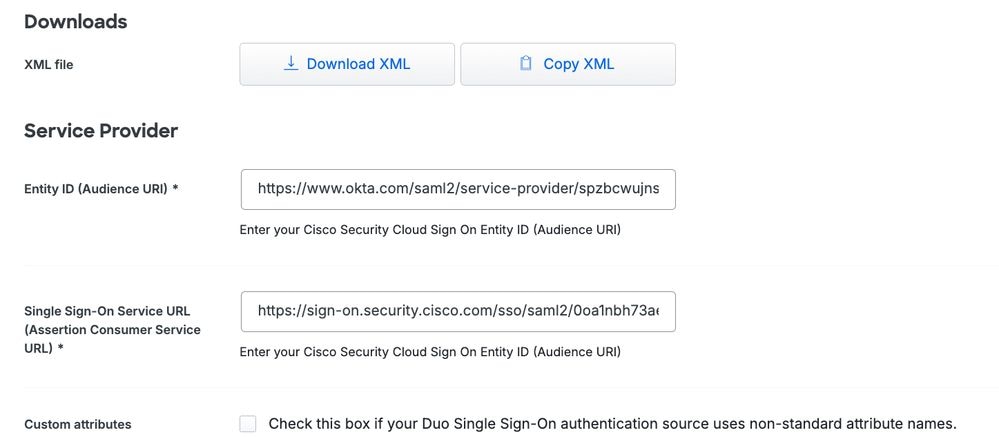
Step 6. Download the XML and upload the file into Cisco SCC.
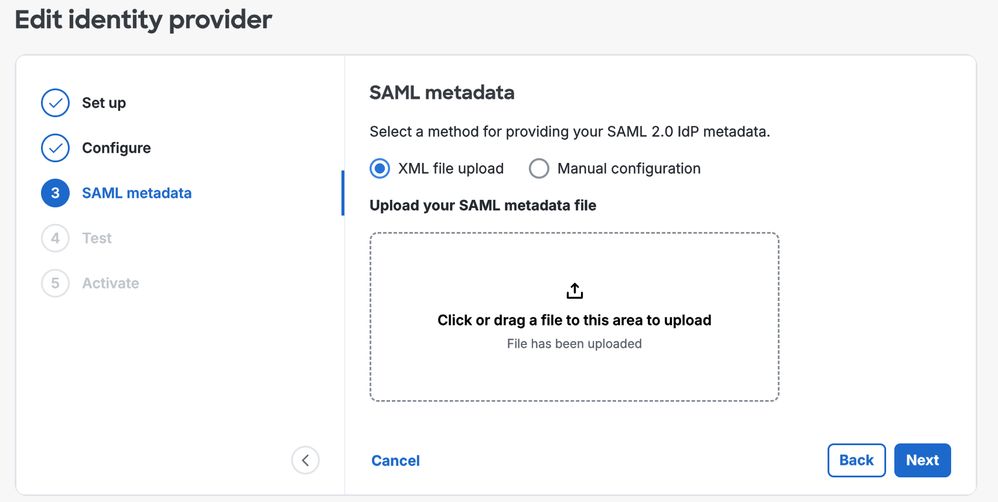
Note: The remaining parameters that can be configured in the application from the Cisco Duo console must be adjusted according to your specific requirements. Detailed explanations for each of these settings can be found in the official Cisco Duo documentation. Examples of configurable parameters include the assigned application name, the set of users to whom the policy applies, and other customization options that can tailor the security controls in order to meet the needs of your organization.
Policy Configuration in Cisco Duo for Cisco ETD
At this stage, all components are connected, and the next step is to configure a policy that applies to the authentication process of the administrator within the Cisco ETD console.
In this example, the focus is specifically on access control based on IP address. However, Cisco Duo offers many other access control options.
A new policy can be created and assigned to the application, enabling enforcement of the desired authentication rules and security restrictions for administrator logins.
For more detailed information on all available controls and configuration options in Cisco Duo, refer to the official Cisco Duo documentation.
This resource provides comprehensive guidance on setup, customization, and best practices in order to help optimize security policies.
By navigating to the Policies section in Cisco Duo, a policy can be created and assigned to the Cisco ETD connection through Cisco Duo.
This policy can be applied per user or group, depending on access requirements.
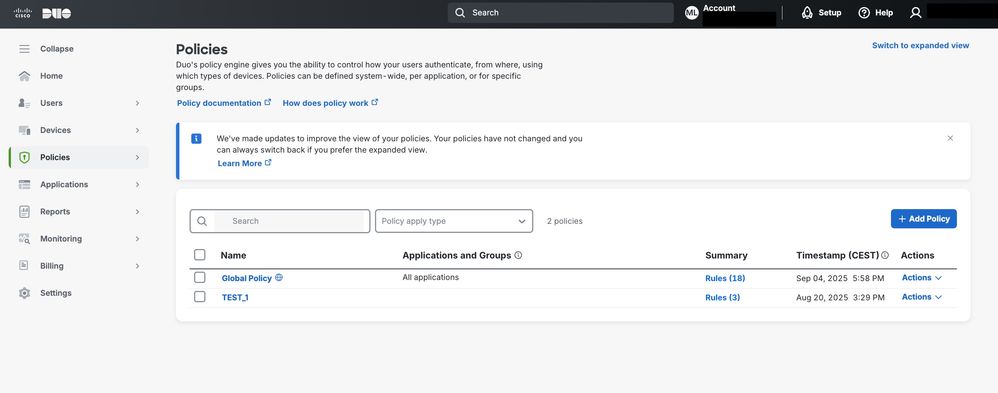 Cisco Duo
In this example, as shown in the image, source IP access control is enabled by configuring the Authorized Networks section.
This configuration allows access only from specified trusted IP ranges, enhancing security for Cisco ETD.
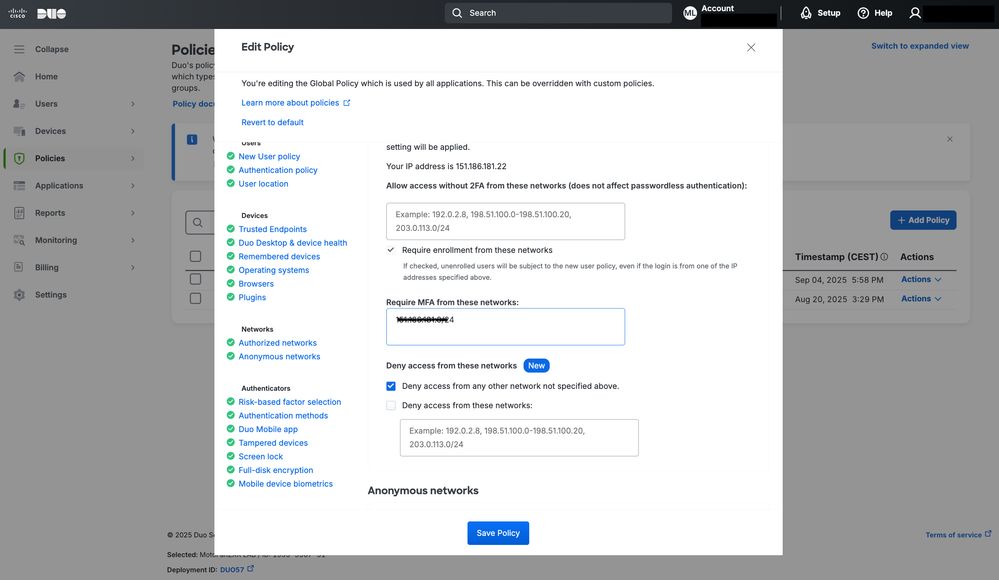 Cisco Duo Policy configuration
Conclusions
Cisco ETD offers flexible options in order to protect administrator access through MFA and integration with identity providers.
By combining Cisco SCC with Cisco Duo, organizations can implement stronger authentication policies, reduce the risk of unauthorized access, and align with industry best practices for secure cloud service management.
In addition to MFA, administrators can leverage policy-based controls of Cisco Duo to restrict access based on specific criteria, such as the source IP address. For example, as illustrated in the next image, an access attempt from an IP address outside the authorized range is automatically blocked by the system. This ensures that only requests originating from trusted networks are allowed, adding an extra layer of protection against potential attacks.
By implementing IP‑based access control along with MFA, organizations achieve a defense‑in‑depth approach—combining identity verification with network location validation in order to safeguard critical management interfaces in the cloud.
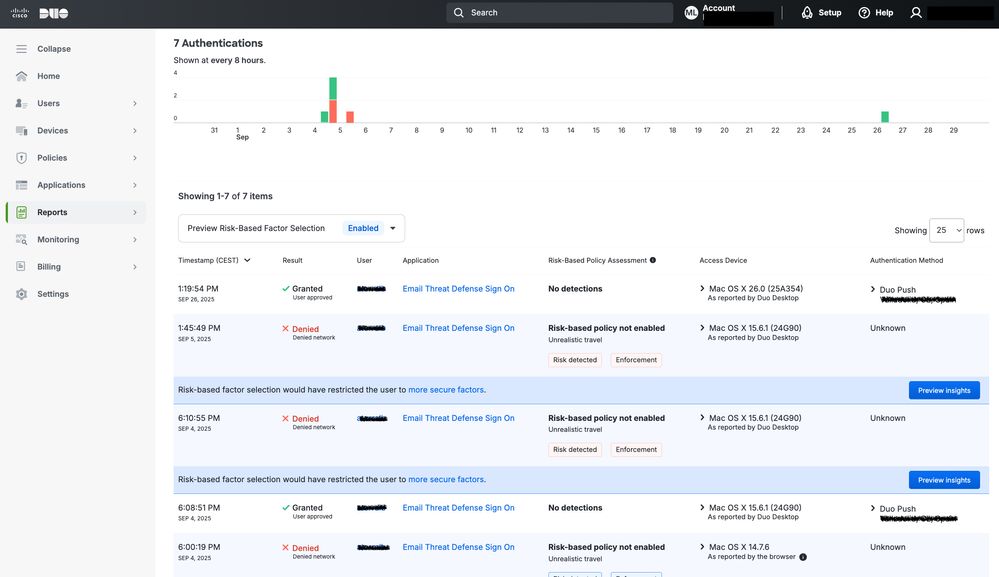 Cisco Duo Reports
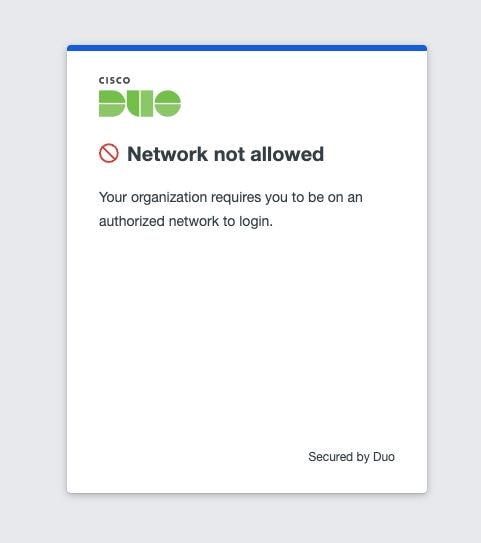 Network control result

Warning: It is important to understand that this change affects all applications that use the same authentication domain; not just ETD, but also other products that rely on the same authentication process, such as access to the Cisco Secure Access console.
Revision History
| Revision | Publish Date | Comments |
|---|---|---|
1.0 |
06-Mar-2026
|
Initial Release |
 Feedback
Contact Cisco
- Open a Support Case

- (Requires a Cisco Service Contract)