Configure AsyncOS External Authentication with ISE (RADIUS)
Available Languages
Contents
Introduction
This document describes configuring RADIUS External Authentication between Cisco Secure Email Gateway and Cisco Identity Services Engine.
Prerequisites
Requirements
Cisco recommends that you have knowledge of these topics:
- Authentication, Authorization, and Accounting (AAA)
- RADIUS CLASS Attribute.
- Cisco ISE Identity Management and Authorization Policies.
- Cisco Secure Email Gateway (ESA) and Secure Email and Web Manager (SMA) user roles
Components Used
The information in this document is based on these software and hardware versions:
- Cisco ISE 2.4
- Cisco Secure Email Gateway (ESA) 13.5.1, 13.7.0
- Cisco Secure Email and Web Manager (SMA) 13.6.2
The information in this document was created from the devices in a specific lab environment. All of the devices used in this document started with a cleared (default) configuration. If your network is live, ensure that you understand the potential impact of any command.
Related Products
Versions outside those listed in the Components Used section were not tested.
Background Information
RADIUS Class Attribute
The Class attribute is an arbitrary value that the RADIUS server returns in the Access-Accept response and includes in accounting packets. It is configured in Cisco ISE on a per-group basis.
When a user matches an ISE group that has Attribute 25 tied to it, ISE returns the Class value on Access-Accept. The Secure Email Gateway then reads that value and applies the local role defined in its mapping table.

Note: In the ISE Authorization Profile, the ASA VPN common task is used as the container that populates RADIUS Attribute 25 (Class). The value entered there is what the appliance reads for role mapping.
Configure
Network Diagram
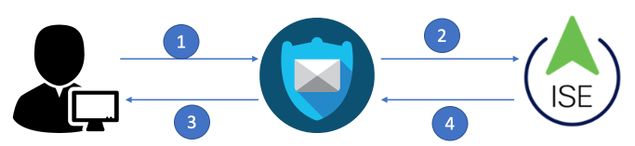
Cisco Identity Services Engine accepts authentication requests from the appliance and matches them against a user identity and group.
Step 1. Create an Identity Group for Authentication
Log in to the ISE server. Navigate to Administration > Identity Management > Groups > User Identity Group and create an identity group.

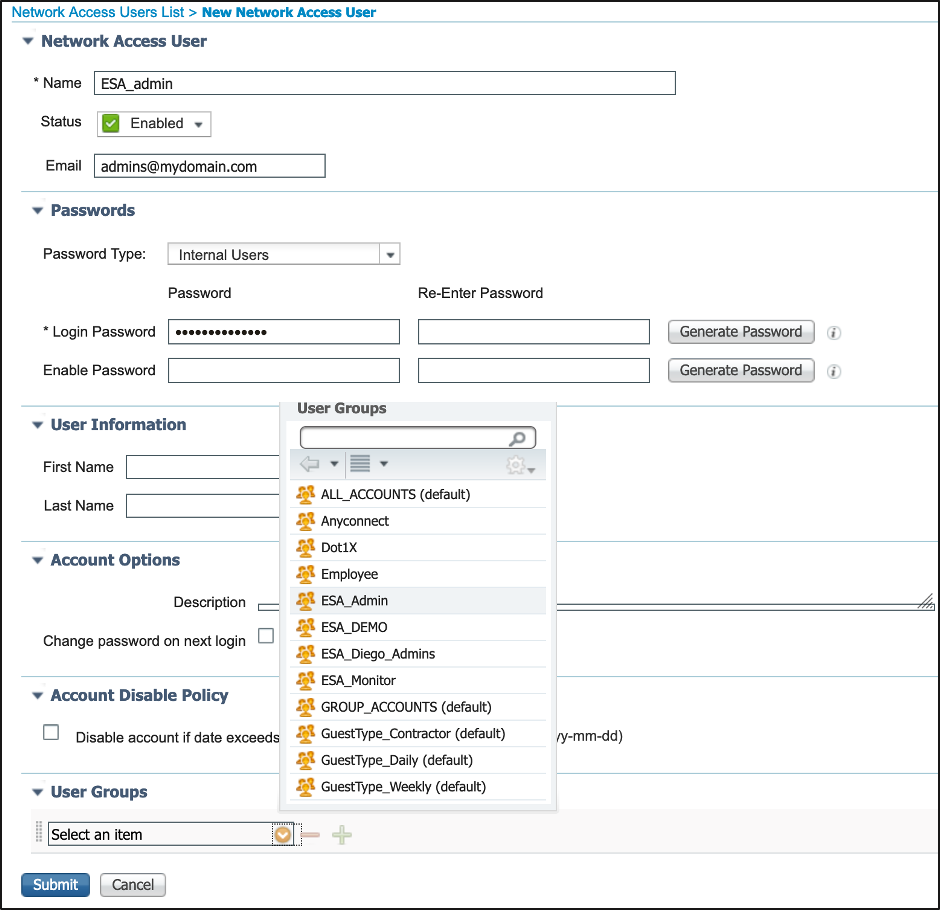
Step 2. Create Local Users for Authentication
Create new users, or assign existing users, to the identity group created in Step 1. Navigate to Administration > Identity Management > Identities and create or assign users to the group.
Step 3. Create Authorization Profiles
RADIUS authentication can succeed without an authorization profile; however, no roles are assigned. To assign roles, navigate to Policy > Policy Elements > Results > Authorization > Authorization Profiles.

Step 4. Create an Authorization Policy
This step lets ISE identify log in attempts and map them to the correct authorization profile. On a successful match, ISE returns Access-Accept along with the Class value defined in the profile.
Navigate to Policy > Policy Sets and select Add (+ symbol).

Assign a name and select the plus symbol to add the required conditions. This lab environment uses a Radius NAS-IP-Address condition. Save the new policy.

To match the authorization requests correctly, add the conditions. Select the symbol > and add conditions. This lab environment uses InternalUser-IdentityGroup and matches each authorization profile.

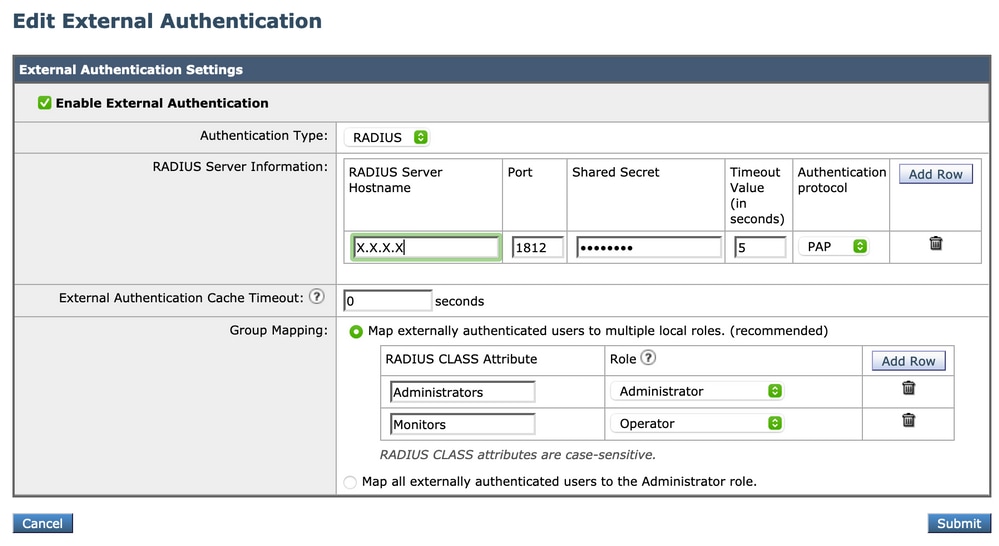
Step 5. Enable External Authentication on the Appliance
Log in to the appliance. Navigate to System Administration > Users > External Authentication and select Enable External Authentication.

Enter these values:
- RADIUS server hostname
- Port
- Shared secret
- Timeout Value (in seconds)
- Authentication protocol
Select Map externally authenticated users to multiple local roles (recommended).

Note: The Authentication Protocol selected here (for example, PAP) must match the allowed protocols in the ISE Policy Set. A mismatch causes authentication to fail.
Submit and commit the changes.
Verify
Use this section to confirm your configuration works properly.
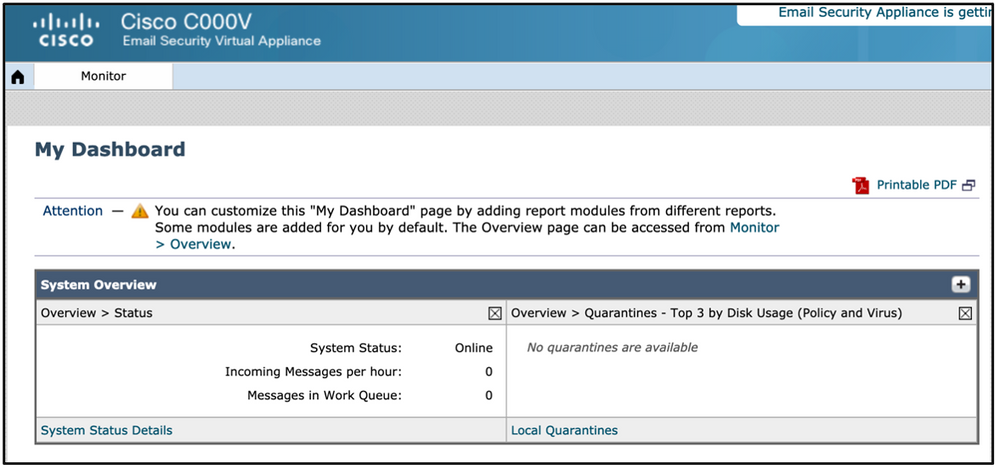
- Log in to the appliance with an externally authenticated user.
- Confirm access is granted.
- Confirm the assigned role matches the role expected from the returned Class value.
- In ISE, confirm the expected authorization rule was hit and the correct Class value was returned (Operations > RADIUS > Live Logs).
Troubleshoot
This section provides the information you can use to troubleshoot your configuration.
Symptom: Login fails on the appliance with the message "Invalid username or password".
Likely cause: A mismatch in the authorization policy, the returned Class value, or the authentication protocol.
Resolution:
- In the appliance External Authentication settings, temporarily selectMap all externally authenticated users to the Administrator role.(Image 11)
- Submit and commit the changes, then attempt a new login.
- If login now succeeds, the issue is in role mapping. Recheck the ISE Authorization Profile (Class / Attribute 25) and the Authorization Policy setup.
- ReviewOperations > RADIUS > Live Logsin ISE to confirm which authorization profile was matched and what Class value was returned.
Related Information
Revision History
| Revision | Publish Date | Comments |
|---|---|---|
2.0 |
21-Jul-2026
|
Updated Machine Translation, SEO, Alt Text, Style Requirements, and Formatting. |
1.0 |
26-May-2021
|
Initial Release |

 Feedback
Contact Cisco
- Open a Support Case

- (Requires a Cisco Service Contract)