Configure TXT Upload Blocking via DLP in Secure Access
Available Languages
Contents
Introduction
This document describes the steps to block .TXT file uploads in Cisco Secure Access using DLP.
Issue
TXT file uploads must be blocked in Cisco Secure Access by using DLP policy controls.
Environment
Required knowledge
Required knowledge includes these topics:
- Cisco Secure Access administration.
- Data Loss Prevention (DLP).
Access requirements
- Administrative access to Cisco Secure Access is required.
Components used
This document is not restricted to specific software and hardware versions.
The information in this document was created from the devices in a specific lab environment. All of the devices used in this document started with a cleared (default) configuration. If the network is live, ensure that the potential impact of any change is understood.
Resolution
For a list of currently supported file types, refer to Cisco Secure Access – Supported File Types.
- Confirm that the traffic is decrypted before applying DLP policies.
DLP inspection requires access to decrypted content; encrypted traffic cannot be scanned for DLP matches.
Configuration Steps
| Category |
Steps |
Step 1. Create Data Classification |
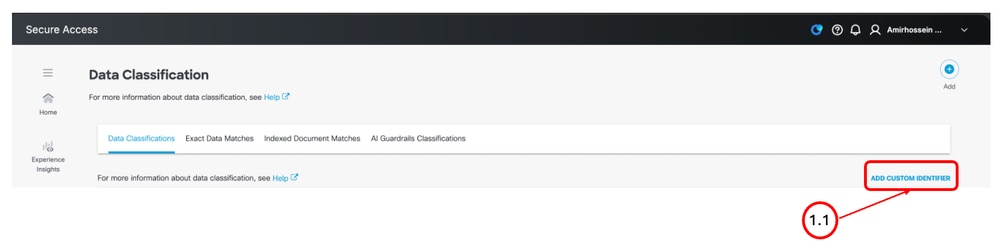
Step 1.1. From the Cisco Secure Access management portal, navigate to Secure > Data Classification and click Add Custom Identifier.
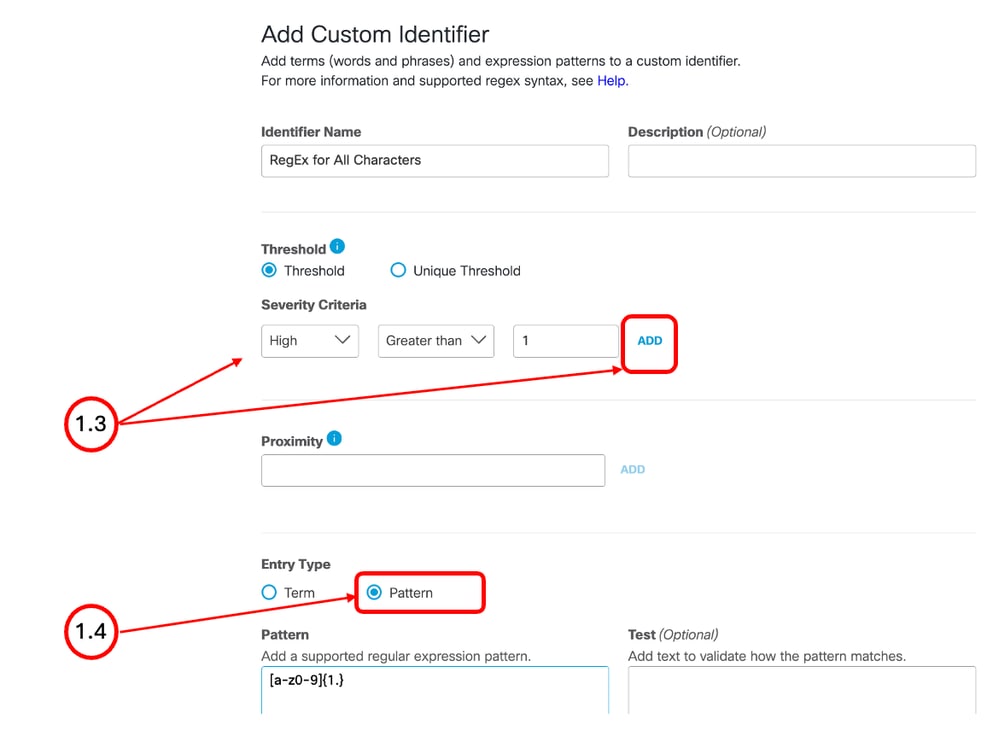
Step 1.2. Define a name for the new identifier. Step 1.3. From the Threshold section, configure Severity Criteria and click Add. Step 1.4. Define each regular expression separately and click Add.
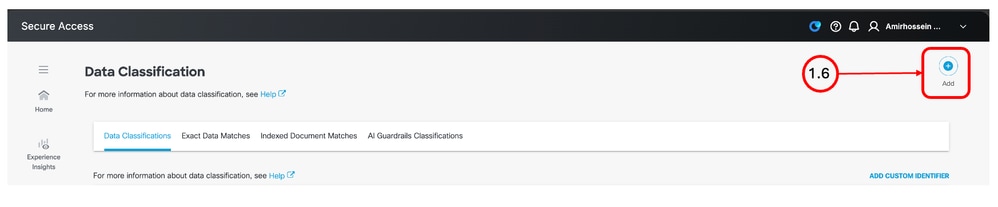
Step 1.5. Click Save. Step 1.6. Click Add to create a new data classification.
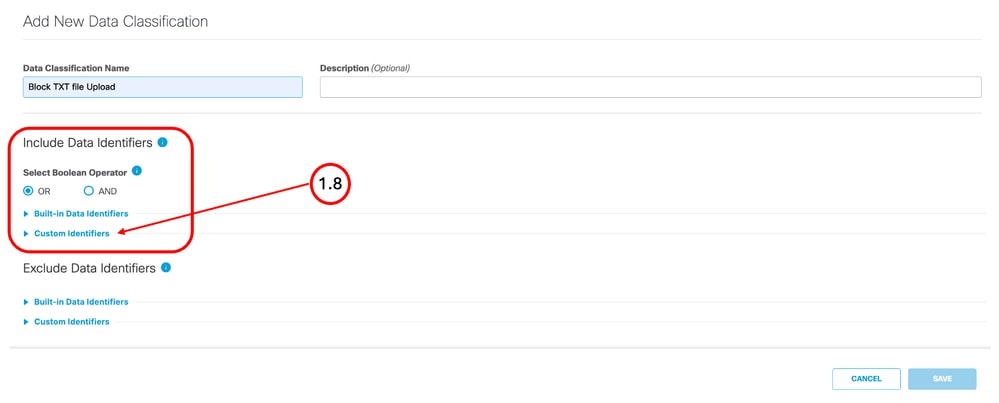
Step 1.7. Define a Name. Step 1.8. From the Include Data Identifiers section, click Custom Identifier and choose the identifier or identifiers that you created in the previous steps.
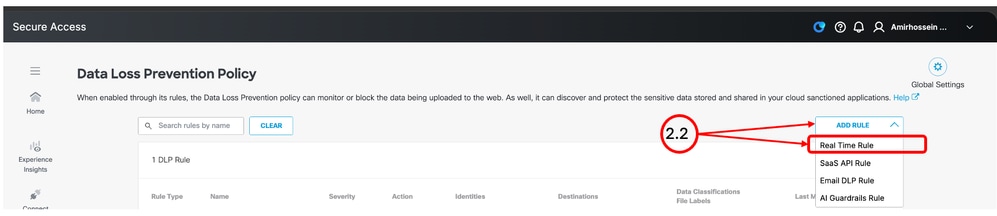
Step 1.9. Click Save. Step 2. Configure the DLP PolicyStep 2.1. From the Cisco Secure Access management portal, navigate to Secure > Data Loss Prevention Policy. Step 2.2. Click Add Rule and select Real Time Rule.
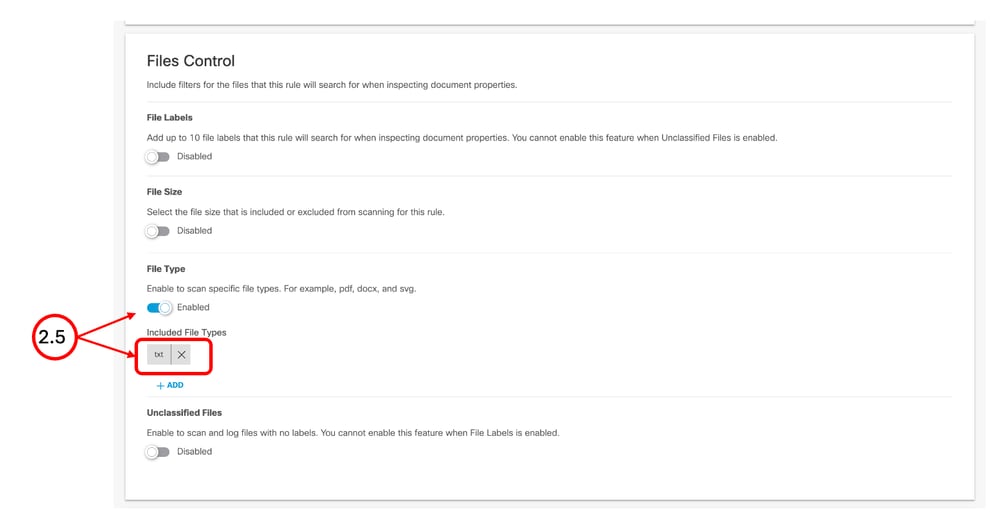
Step 2.3. Define the Policy Name. Step 2.4. From the Data Classifications section, select the data classification that you created in Step 1. Step 2.5. From the Files Control section, enable File Type and select TXT.
Step 2.6. From the Action section, choose Block.
Step 2.7. Save the changes. Step 2.8. After the policy is deployed, attempt to upload a TXT file containing content that matches the configured data classification. Step 2.9. Confirm that the upload is blocked and that a corresponding event is logged under Monitor > Data Loss Prevention. |

Monitoring
To check DLP activity and related logs, navigate to Monitor > Data Loss Prevention. Use the available filters to narrow the results and identify the relevant DLP events.
Sample Regular Expressions
Matches Japanese Hiragana, Katakana, and Kanji characters:
[ぁ-ゖァ-ヺ一-龯]{1,}
Matches uppercase Latin letters:
[A-Z]{1,}
Matches lowercase Latin letters and digits:
[a-z0-9]{1,}
Matches common punctuation characters:
[.,;:!?]
Matches single quotes, double quotes, and backticks:
['"`]
Matches parentheses, square brackets, and curly brackets:
[()\[\]{}]
Matches common symbols and special characters:
[@#$%^&*+=|\\/_~-]
Matches Latin characters in the À-ÿ Unicode range:
[À-ÿ]
Matches Cyrillic characters:
[Ѐ-ӿ]
Matches Greek and Coptic characters:
[Ͱ-Ͽ]
Matches Arabic-script characters:
[-ۿ]
Matches CJK Unified Ideographs:
[㐀-䶿]
Matches selected Polish characters with diacritics:
[ĄąĆćĘꣳŃńÓ󌜏źŻż]
Matches Korean Hangul syllables:
[가-힣]
Related Content
Cisco Secure Access complete list of DLP-supported file types
Cisco Secure Access DLP-supported file types — Cisco Community
Cisco Secure Access DLP configuration and policy reference
Revision History
| Revision | Publish Date | Comments |
|---|---|---|
1.0 |
15-Sep-2026
|
Initial Release |

 Feedback
Contact Cisco
- Open a Support Case

- (Requires a Cisco Service Contract)