Cisco Secure Client SAML Authentication Navigation Timeout Errors During RAVPN Connection
Available Languages
Contents
Issue
Users experience intermittent Remote Access VPN (RAVPN) connection failures on Windows using Cisco Secure Client during SAML authentication. The failures occur immediately after installing Cisco Secure Client and manifest as specific error messages displayed in pop-up dialogs:
"Authentication failed due to navigation timeout."
"Authentication failed due to problem navigating to the single sign-on URL."
The failure occurs after Identity Provider (IdP) authentication when the embedded WebView2 browser attempts to redirect or post the SAML response to the Cisco SSE SAML ACS URL. This results in a timeout condition that prevents VPN access for affected users. The issue has been observed affecting multiple users in the same organization, with the authentication process timing out approximately 30 seconds after attempting to navigate to the SAML ACS endpoint.
Users report that when pressing the RAVPN connection button to establish the VPN connection, the timeout error pop-up is displayed and the RAVPN establishment fails. The problem persists even after restarting the operating system.
Environment
Cisco Secure Client version 5.1.13.177 on Windows
SAML authentication configured with Cisco SSE
Remote Access VPN (RAVPN) deployment
Immediate Workaround
The following temporary workarounds have been confirmed to resolve the navigation timeout issue:
1: Network Connectivity Reset
Disconnect the Wi-Fi connection and reconnect, then attempt the RAVPN connection multiple times. Once successful, the problem typically does not recur even after OS restarts.
2: RAVPN Service Restart
Manually stop and restart the RAVPN service to allow subsequent successful connections.
3: System Reboot
Restart the affected system to reset the authentication state.
Diagnostic Information Collection
For comprehensive troubleshooting, the following diagnostic information should be collected during an active failure:
DART bundles captured during authentication failure
Network packet captures (capture traffic using Wireshark on all Active Adaptors (open Wireshark - click capture - options and use Shift to select multiple interfaces) during the authentication process
Netsh ETL traces
Procedure to collect Netsh trace
Open an elevated (Run as Administrator) command prompt window on the test PC.
Run the command: “netsh trace start scenario=InternetClient traceFile=C:\file_NetTrace.etl maxSize=1000 provider=Microsoft-Windows-TCPIP provider=Microsoft-Windows-WinHttp capture=yes level=5 overwrite=yes”
Reproduce the issue
Once issue is reproduced, stop logging using command: “netsh trace stop”
Collect the logs C:\file_NetTrace.etl
Fiddler traces of web traffic
Download Fiddler capture from this link https://www.telerik.com/download/fiddler-everywhere (use the Intel Chip (x86-64)
Install it on a machine where the issue is reproducible.
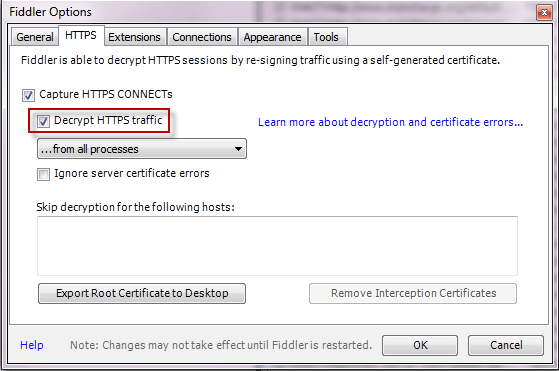
Open the application and enable HTTPS decryption
Click Tools à Options à HTTPS.
Click the Decrypt HTTPS Traffic box.
 inline_image_0.png
If you get the cert to trust, pls trust the CA from fiddler and delete it later once the issue is reproduced and
Secondly if you encounter any issues with SSL connectivity while launching, then bypass VPN gateway traffic (connect.ilemgroup.com) or initiate IPsec based SAML connectivity (most preferable) so that no need of bypassing any gateway traffic.
Close all unnecessary applications and background processes.
Close and reopen the tool, data collection starts automatically, and you will see new records adding into the main form.
Reproduce the issue.
Press F12 to stop tracing.
Go File à Save à All Sessions, then save the trace into a .saz file.
Process Monitor logs - https://download.sysinternals.com/files/ProcessMonitor.zip
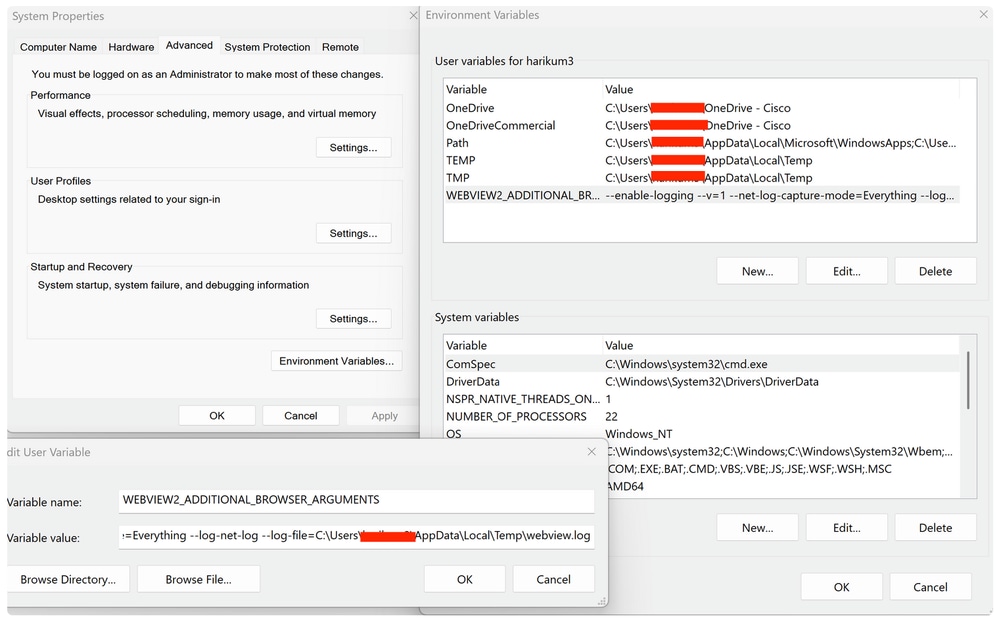
WebView2 specific logs
Setting variable/Value on user and system environment as snapped below
 Screenshot_2026-05-12_at_9.43.19_AM.png
While initiating VPN, below terminal would trigger
 inline_image_1.png
C > Users > userid > Appdata > Local > Temp
 inline_image_2.png
SAML debug logs from the identity provider
Resolution
Cause
The root cause is a navigation timeout occurring in the embedded WebView2 browser component during the SAML authentication flow. Specifically, the timeout occurs when the WebView2 browser attempts to post the SAML response from the Identity Provider to the Cisco SSE SAML ACS (Assertion Consumer Service) endpoint. The timeout condition is triggered after approximately 30 seconds of attempting to complete this navigation step.
The issue appears to be related to timing or network latency conditions that delay the SAML response processing, causing the WebView2 component to exceed its internal timeout threshold. The problem manifests immediately after Cisco Secure Client installation and affects the SAML authentication workflow specifically, while other VPN functionality remains intact once authentication is successfully completed through the workaround methods.
Related Content
Revision History
| Revision | Publish Date | Comments |
|---|---|---|
2.0 |
12-May-2026
|
Initial Release |
1.0 |
12-May-2026
|
Initial Release |

 Feedback
Contact Cisco
- Open a Support Case

- (Requires a Cisco Service Contract)