Introduction
This document describes how to configure an IPsec VTI tunnel between Secure Access to Sonicwall firewall using static routing.
Prerequisites
Requirements
Cisco recommends that you have knowledge of these topics:
- Sonicwall ( NSv270 - SonicOSX 7.0.1 ) firewall
- Secure Access
- Cisco Secure Client - VPN
- Cisco Secure Client - ZTNA
- Clientless ZTNA
Components Used
The information in this document is based on:
- Sonicwall ( NSv270 - SonicOSX 7.0.1 ) firewall
- Secure Access
- Cisco Secure Client - VPN
- Cisco Secure Client - ZTNA
The information in this document was created from the devices in a specific lab environment. All of the devices used in this document started with a cleared (default) configuration. If your network is live, ensure that you understand the potential impact of any command.
Background Information
Network Diagram
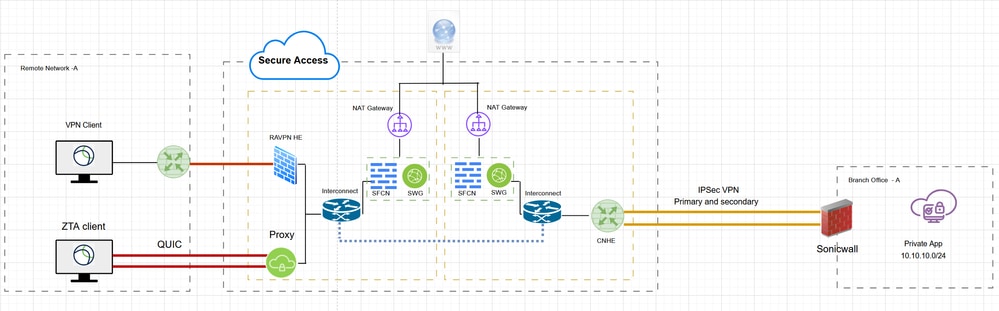
Network Diagram
Configure
Configure Network Tunnel Group (VPN) on Secure Access
In order to configure VPN tunnel between Secure Access and Sonicwall
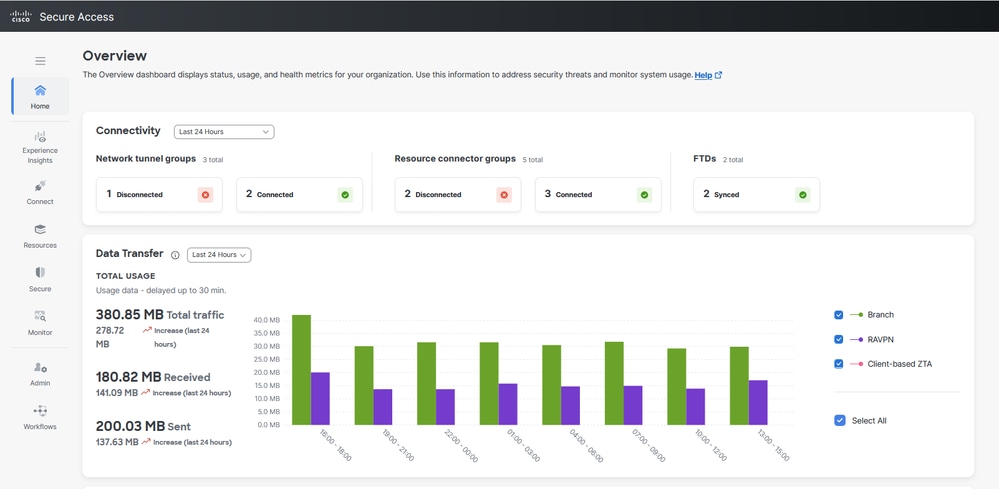
Secure Access - Main Page
- Click on Connect > Network Connections
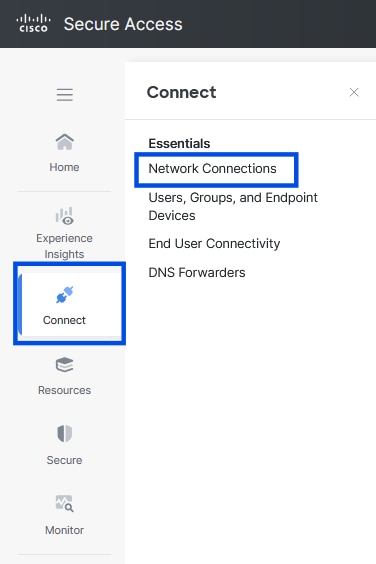
Secure Access - Network Connections
- Under Network Tunnel Groups click on + Add
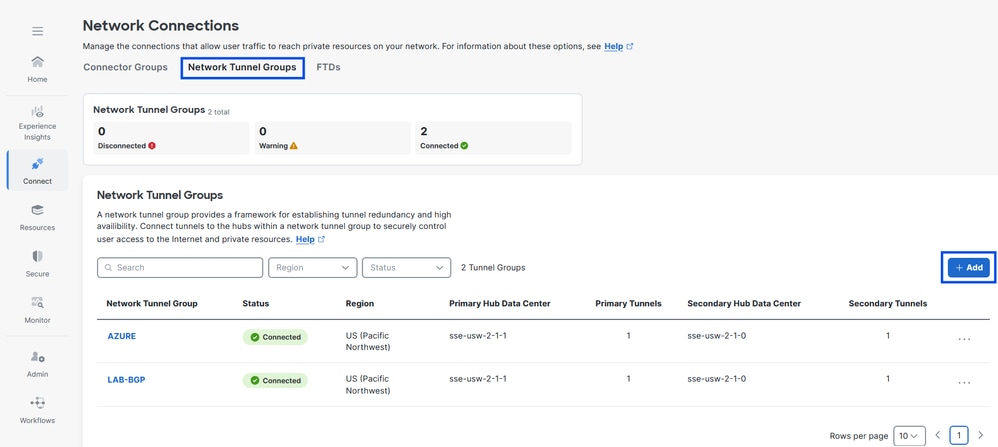
Secure Access - Network Tunnel Groups
- Configure Tunel Group Name , Region and Device Typ
- Click Next
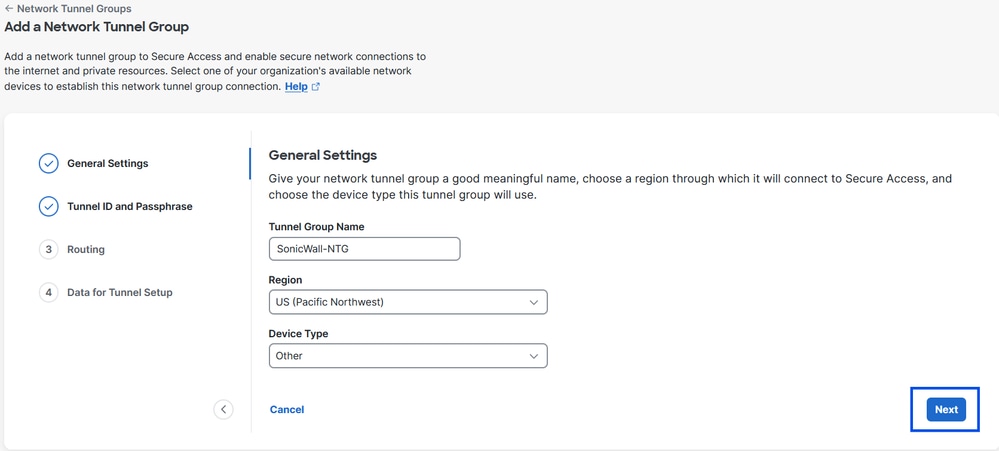
Secure Access - Netwrok Tunnel Group - General Settings

Note: Choose the region nearest to the location of your firewall.
- Configure the Tunnel ID Fromat and Passphrase
- Click Next
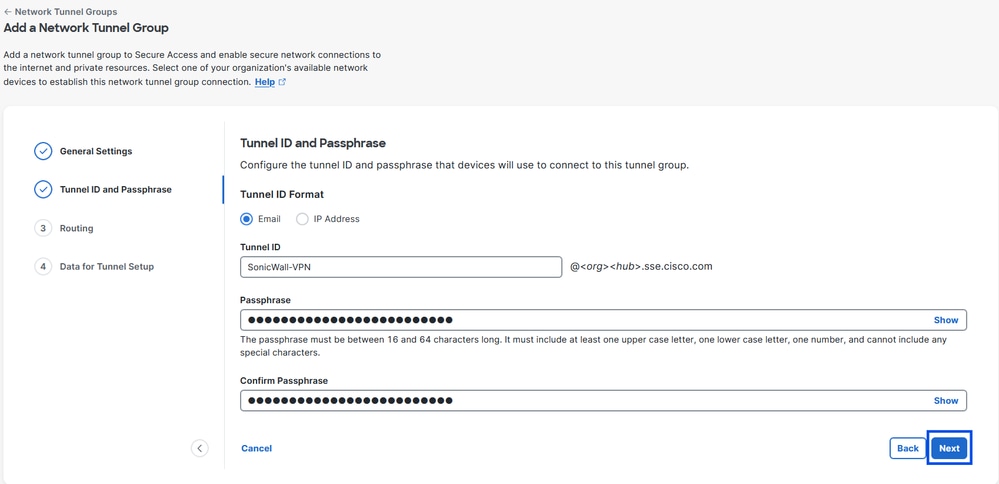
Secure Access - Tunnel ID and Passphrase
- Configure the IP address ranges, hosts or subnets that you have configured on your network and want to pass the traffic through Secure Acess
- Click Add
- Click Save
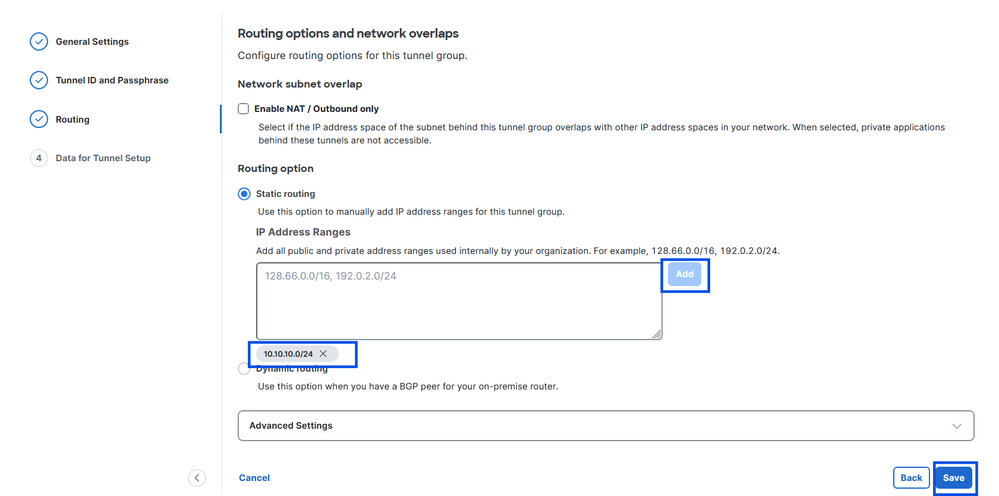
Secure Access - Tunnel Groups - Routing Options
After you click on Save , the information about the tunnel gets displayed. Please save that information for next configuration step
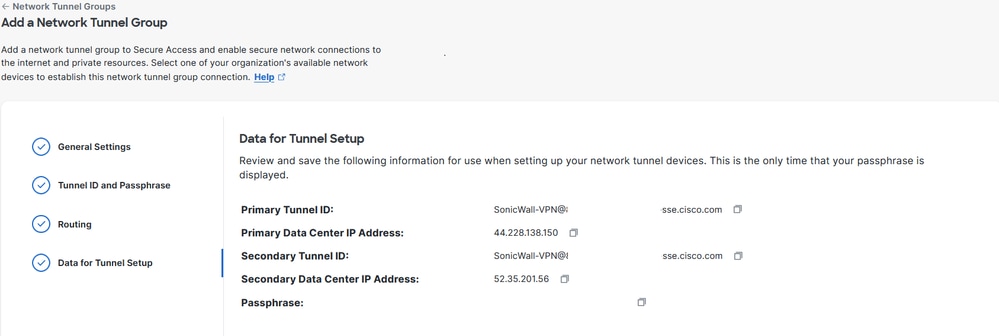
Secure Access - Data for Tunnel Setup
Configure the Tunnel on Sonicwall
Configure the Tunnel - Rules and Settings
Navigate to the Sonicwall Dashboard.
- Network > IPsec VPN > Rules and Settings
- Click on + Add
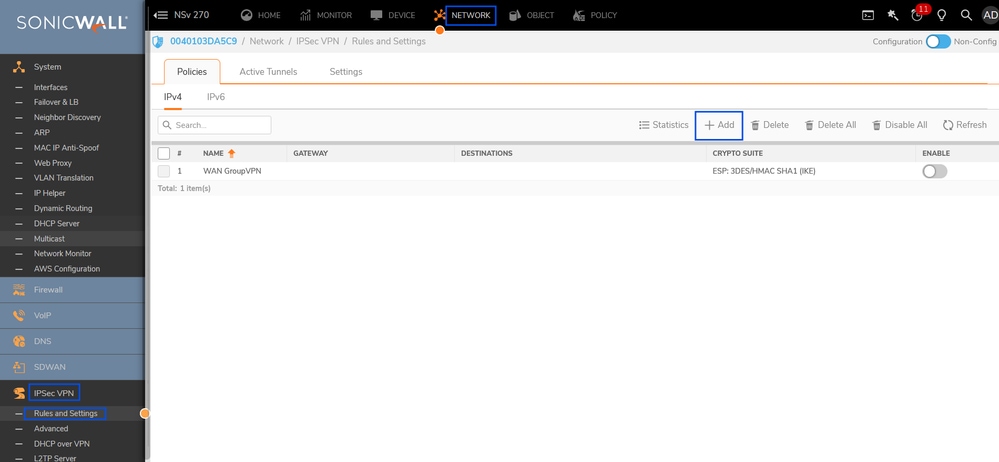
Sonicwall - IPSec VPN - Rules and Settings
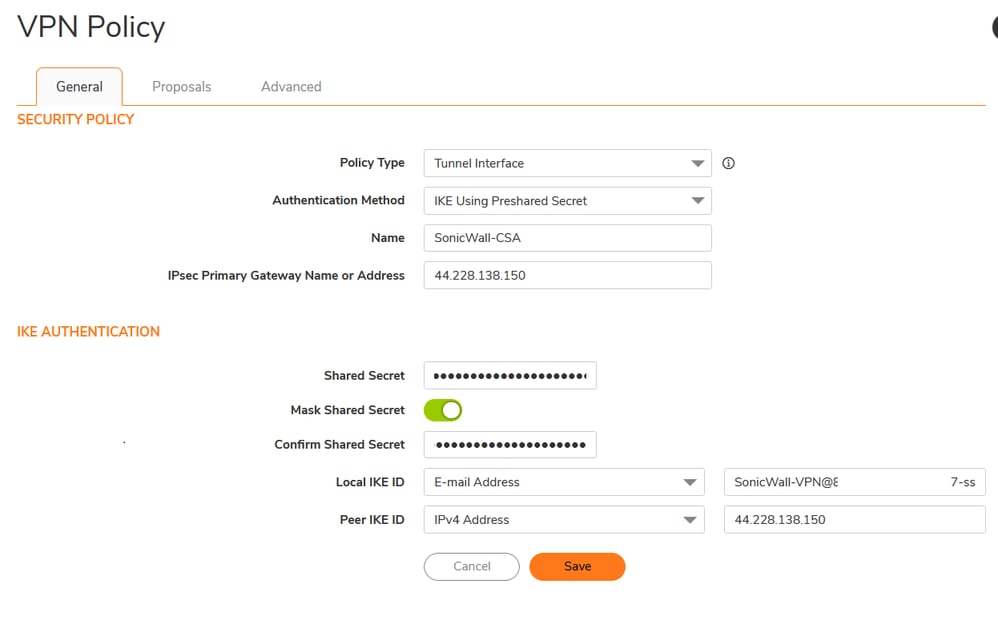
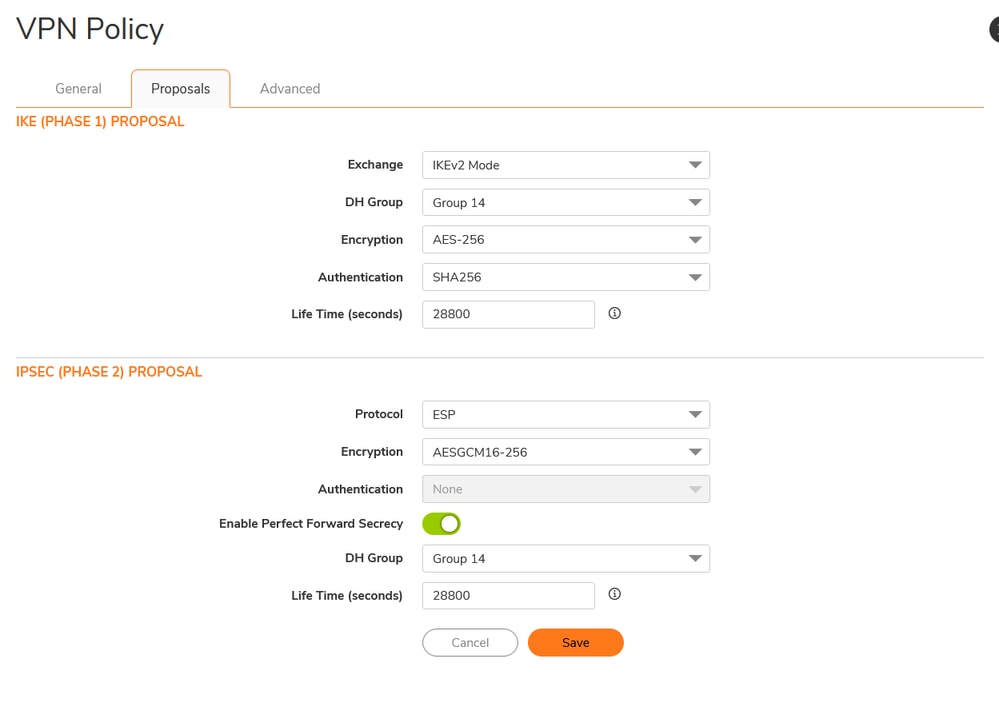
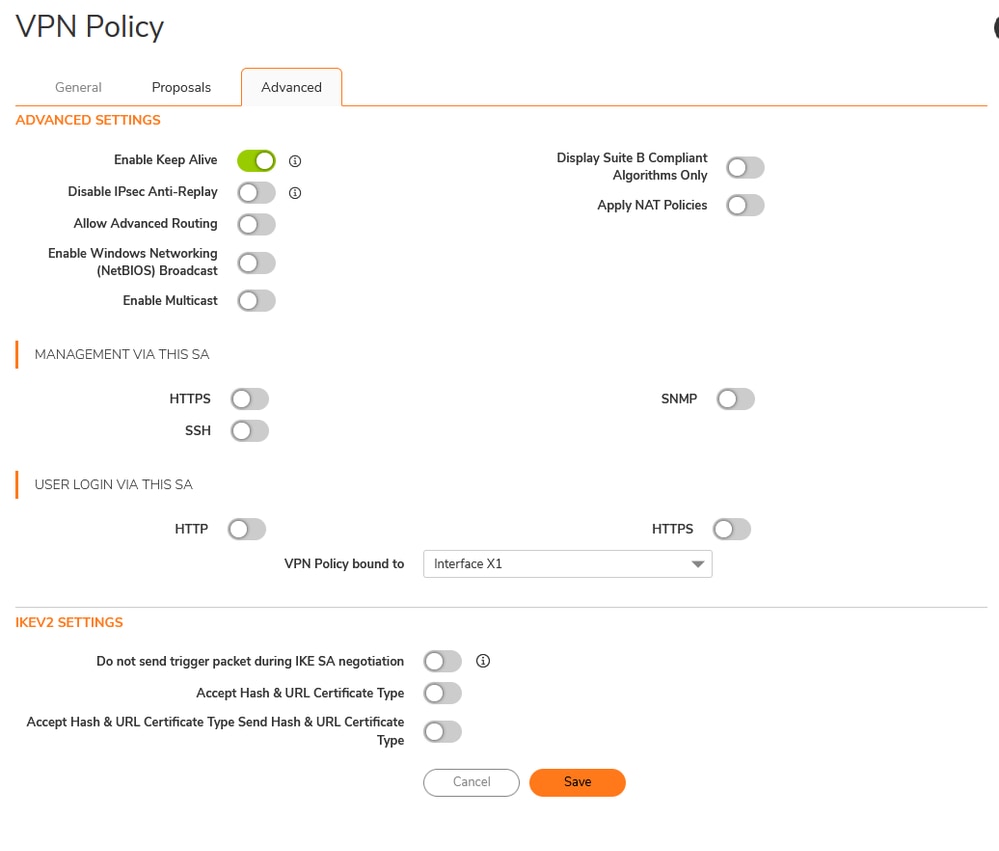
Add VPN Tunnel Interface
Navigate to the Sonicwall Dashboard.
- Network > System > Interface
- Click on + Add Interface
- Select VPN Tunnel Interface

Sonicwall - Interfaces
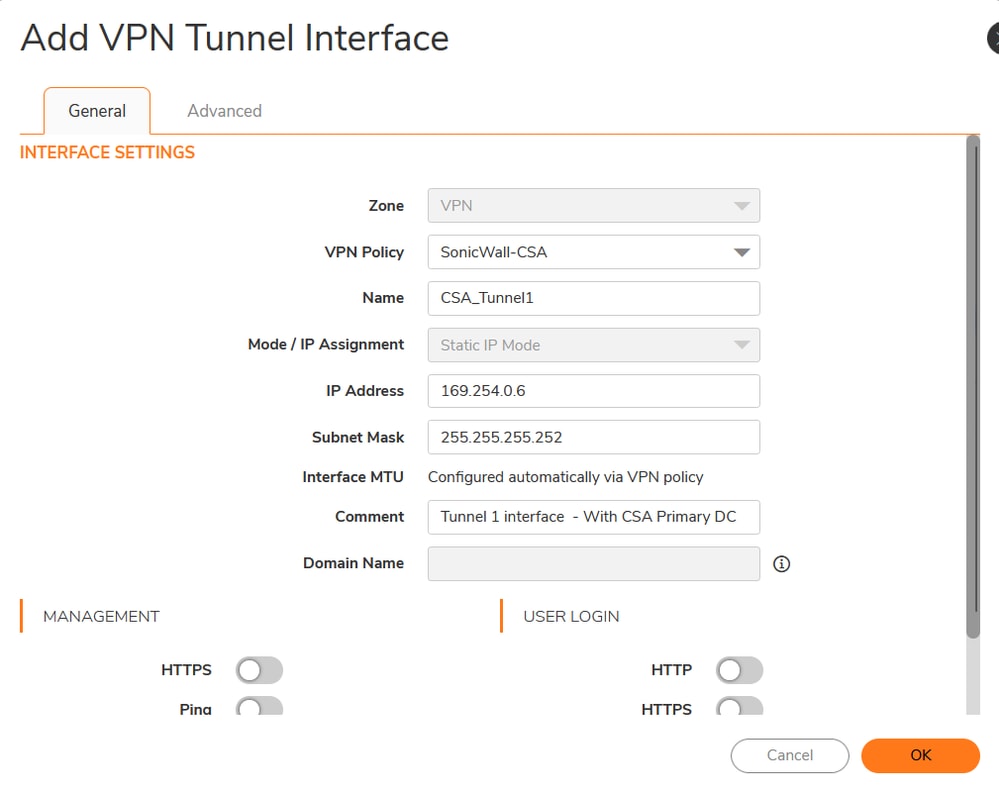
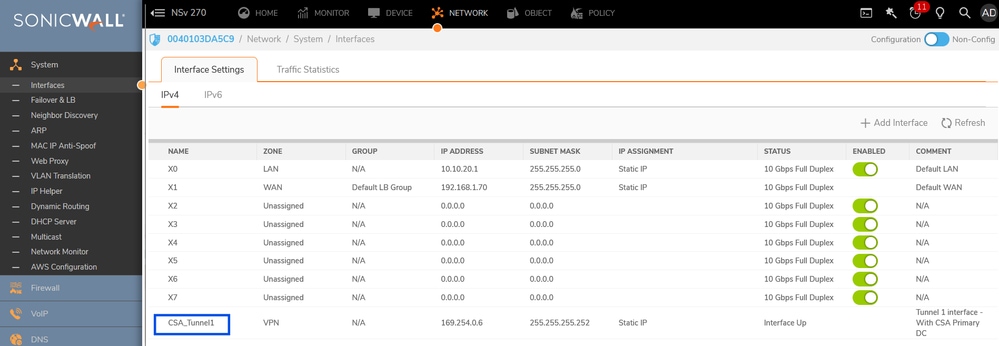
Sonicwall - Interfaces - VPN Tunnel Interface
Add Network Object and Groups
Navigate to the Sonicwall Dashboard.
- Object > Match Objects >Addresses
- Address Objects
- Click on +Add

Sonicwall - Object- Address Objects
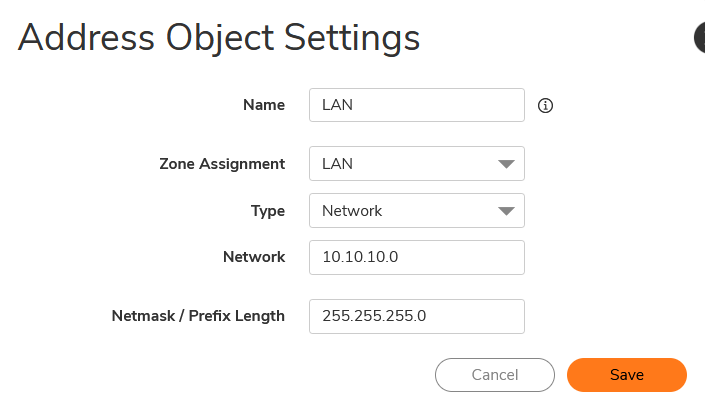
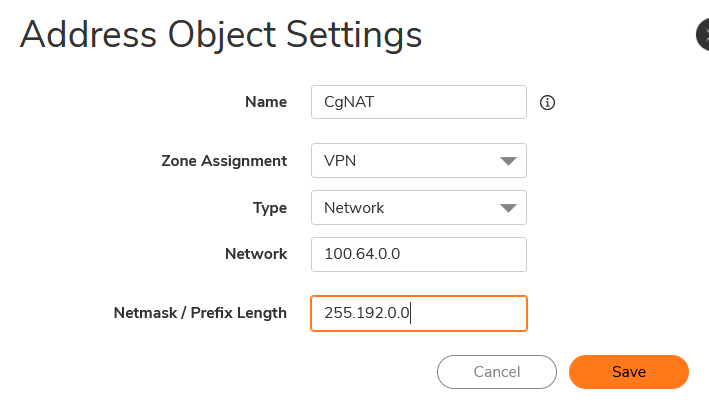
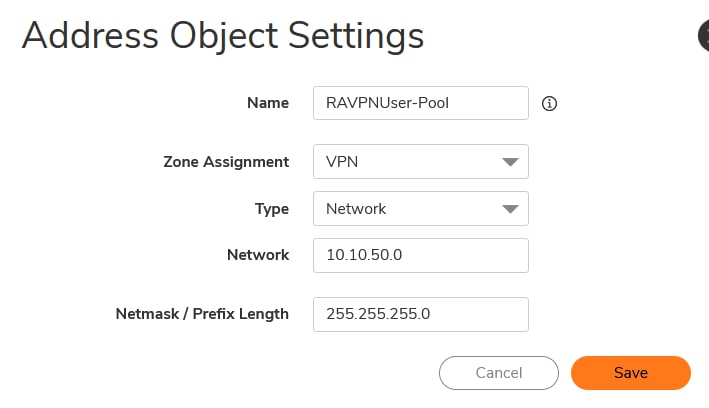
- Create Address Groups
- Click on +Add
- Select the Address Object and add them into Address Groups
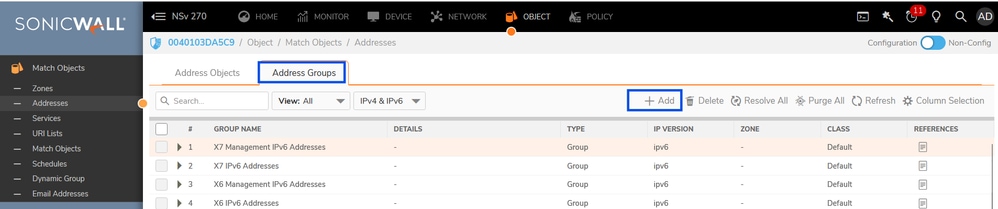
Sonicwall - Object- Address Groups
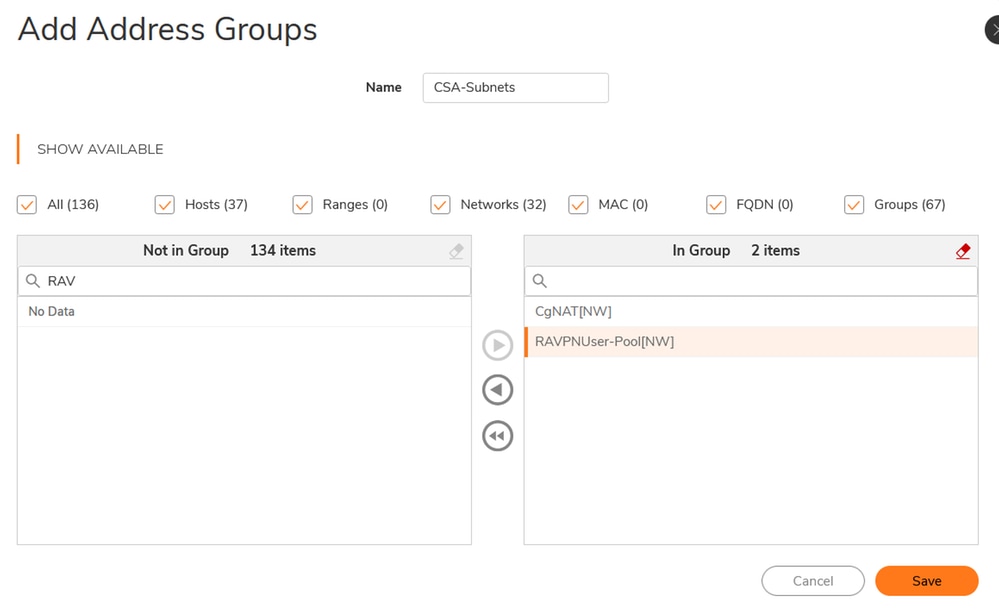
Add Route
Navigate to the Sonicwall Dashboard.
- Policy > Rules and Policies > Routing Rules
- Click on + Add
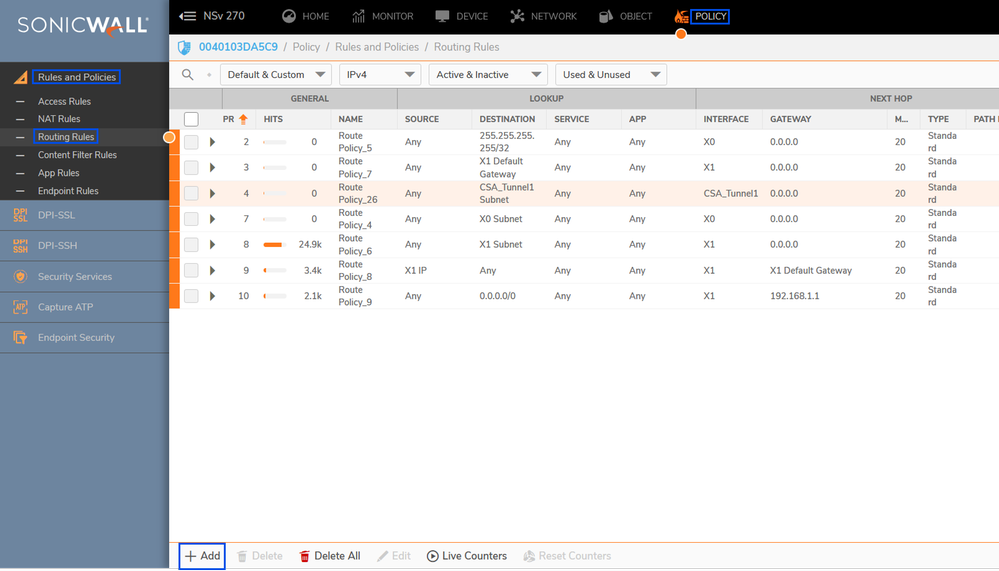
Sonicwall - Routing Rules
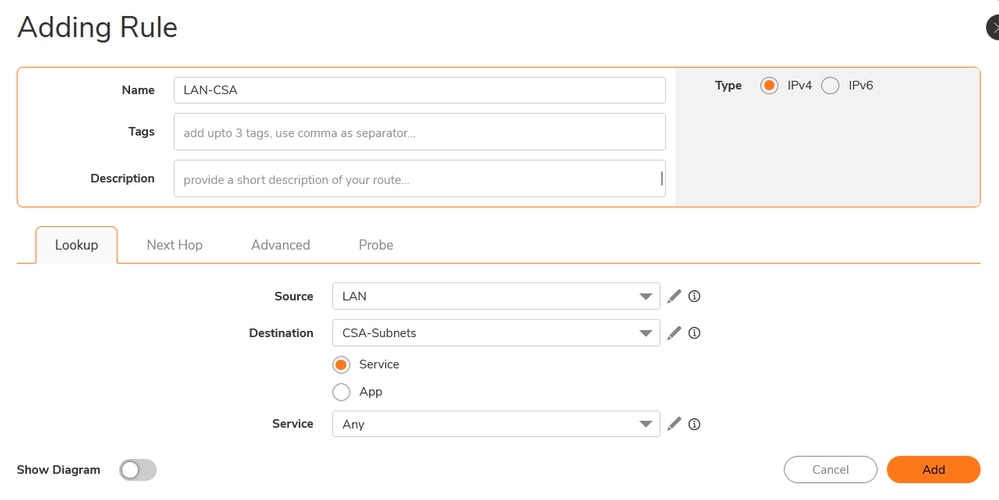
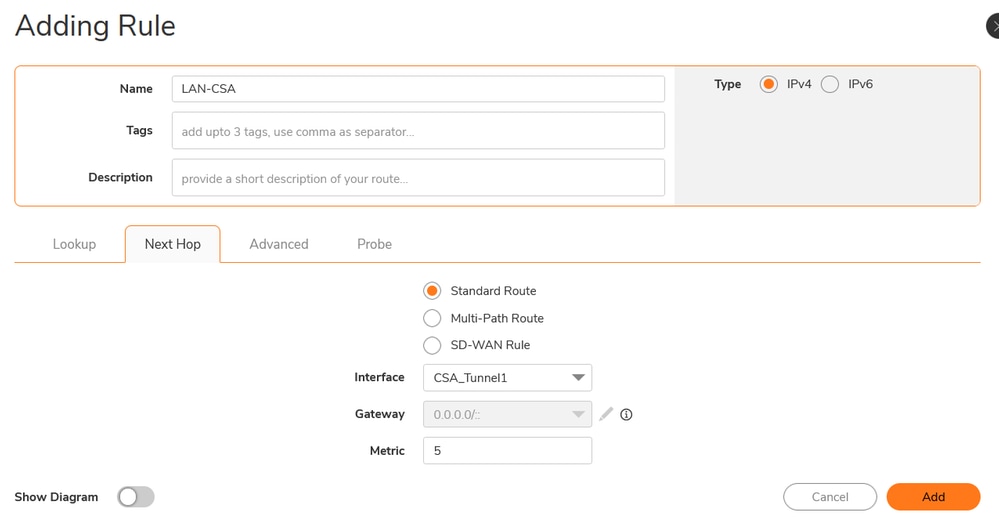

Sonicwall - Routing Rules
Add Access Rules
Navigate to the Sonicwall Dashboard.
- Policy > Rules and Policies > Access Rules
- Click on + Add
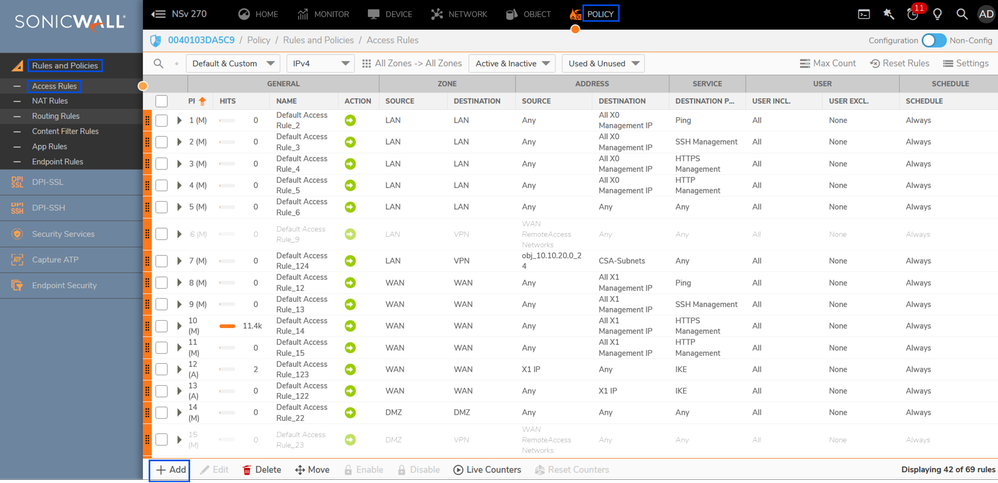
Sonicwall - Access Rules
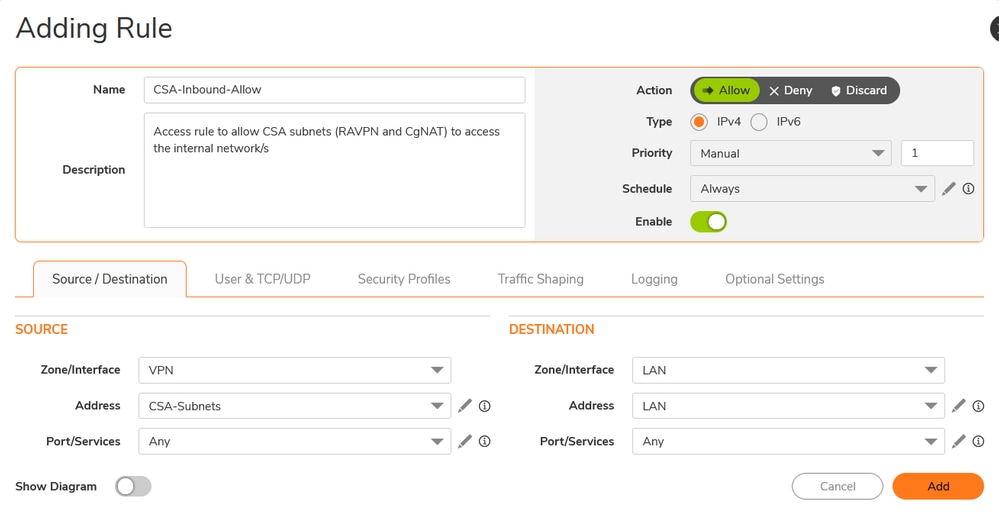

Sonicwall - Access Rules
Verify
- Tunnel Status on Secure Access
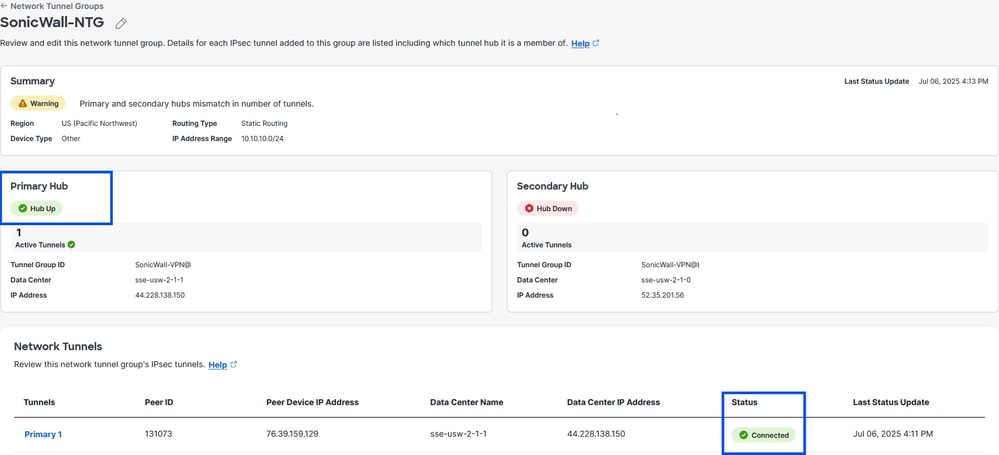
Secure Access - Network Tunnel Group - VPN status
- Tunnel Status on Sonicwall firewall
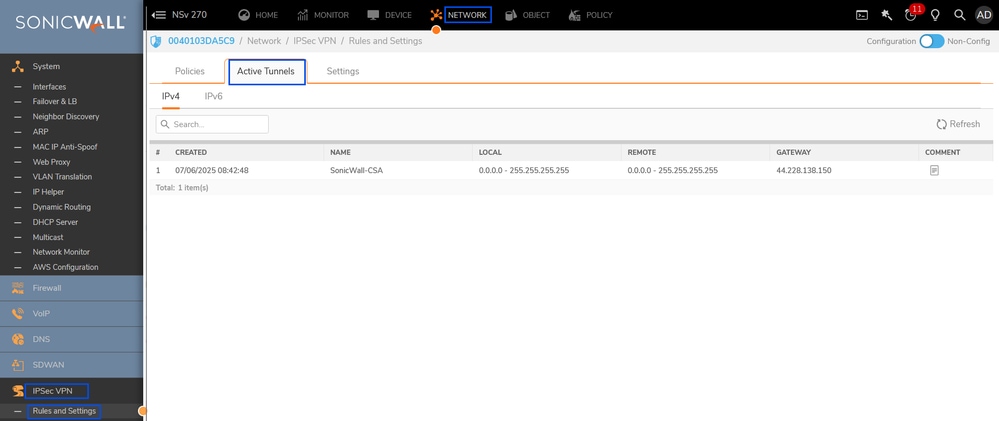
Sonicwall - IPSec VPN status
You can do the same process to configure tunnel between Secure Access Secondary datacenter and Sonicwall
Now , the tunnel is UP on Secure Access and Sonicwall, you can contiue configuring the access to the private resources via RA-VPN , Broswer-Based ZTA, or Client Based ZTA on Secure Access Dashboard
Troubleshoot
User PC
- Verify User is able to Connect/Enroll to RAVPN/ZTNA successfully or not. If not , troubleshoot further why control plane connection is failing.
- Verify the Network that user is trying to access is supposed to go via RAVPN tunnel or ZTNA . If not , verify configuration on headend .
Secure Access
- Verify traffic steering configuration on RAVPN connection profile to confirm Destination network is configured to send over the tunnel to Secure Access.
- Verify Private Resource is defined with valid protocol/ports and ZTNA/RAVPN connection mechanisms are checked.
- Verify Access-policy is configured to allow RAVPN/ZTNA user to access Private Resource Network and its placed in an order that no other rule is taking precedence to block the traffic.
- Verify IPSec tunnel is UP and Secure Access showing valid Client Routes via static routing which covers Private Resource that user is trying to access.
Sonicwall
- Verify IPSec tunnel is UP or not ( IKE & IPSec SA) .
- Verify client route or routes are properly advertised.
- Verify traffic sources from RAVPN/ZTNA user destined to private resource behind Sonicwall is reaching Sonicwall firewall through tunnel by taking packet capture on Sonicwall.
- Verify traffic reached private resource and responding back to RAVPN/ZTNA client or not. If yes, verify those packets are reaching Sonicall X0 (LAN) interface.
- Verify Sonicwall is forwarding the return traffic through IPSec tunnel towards Secure Access.
Related Information

 Feedback