Configure and Validate Regular Expressions in Cisco ESA and CES
Available Languages
Download Options
Bias-Free Language
The documentation set for this product strives to use bias-free language. For the purposes of this documentation set, bias-free is defined as language that does not imply discrimination based on age, disability, gender, racial identity, ethnic identity, sexual orientation, socioeconomic status, and intersectionality. Exceptions may be present in the documentation due to language that is hardcoded in the user interfaces of the product software, language used based on RFP documentation, or language that is used by a referenced third-party product. Learn more about how Cisco is using Inclusive Language.
Contents
Introduction
This document describes how ESA and CES use regular expressions in filters, key behavior differences, and the need for testing before enforcement.
Background Information
This document describes how Cisco Email Security Appliance (ESA) and Cisco Cloud Email Security (CES) handles regular expressions when used within Message Filters and Content Filters. It is specifically focused on understanding how regular expressions behave in these components and how they interact with email headers, body content, and attachments.
It is important to clarify from the beginning that the regular expression engine used in the DLP module behaves differently. Therefore, everything described in this document applies exclusively to Message Filters and Content Filters and does not apply to DLP policies.
When working with regular expressions in ESA, administrators must understand that email content is not evaluated in the same way it is visually displayed in a mail client. Email messages contain envelope information, structured headers, MIME parts, and potentially encoded content. As a result, comparisons performed by filters can produce unexpected results if the message structure and regex behavior are not fully understood.
For this reason, any new filter that uses regular expressions can always be enabled in Monitor Mode before enforcement. This allows validation against real traffic and prevents unintended blocking or performance impact.
Dictionaries and Search Terms
When creating a Message Filter or a Content Filter, the term entered in many conditions is interpreted as a regular expression. This is a critical concept: even when the administrator intends to match literal text, ESA can process the input using regex logic.
This does not apply uniformly to all condition types. For example, when searching for a specific IP address in certain structured conditions, the value is not interpreted as a regular expression. However, when searching within the Subject header, the message body, a specific header field, or an attachment filename, the value is typically treated as a regex pattern.
A common example illustrates this clearly. Suppose the goal is to block emails with the subject:
Receipt number (123456)Since parentheses are special characters in regular expressions (used for grouping), they must be escaped.
The correct expression would be:
Receipt number \(123456\)If the parentheses are not escaped, the regex engine interpret them as grouping operators rather than literal characters. Depending on the pattern, this can cause unintended matches or diferent behavior than expected.
Because of this, it is essential to understand which characters have special meaning in regex and ensure they are properly escaped when literal matching is required.
Examples of Special Characters and Their Escaped Syntax
The first column shows a sample text containing special characters, and the second column shows how the correct regular expression syntax must be written to match that literal text in Cisco ESA (Python-style regex).
|
Literal Text to Match |
Correct Regular Expression Syntax |
|---|---|
| Receipt numer (123456) | Receipt number \(123456\) |
| user@example.com | user@example\.com |
| www.test.abc | www\.test\.abc |
| file_name.txt | file_name\.txt |
| price is 10.50 | price is 10\.50 |
| C:\Users\Admin | C:\\Users\\Admin |
| [CONFIDENTIAL] | \[CONFIDENTIAL\] |
| {invoice} | \{invoice\} |
| +34 600 123 456 | \+34 600 123 456 |
| question? | question\? |
| 100% guaranteed | 100% guaranteed (% does not require escaping) |
| asterisk * symbol | asterisk \* symbol |
| A|B | A\|B |
| caret ^start | caret \^start |
| dollar $100 | dollar \$100 |
Limiting the Use of Regular Expressions
Regular expressions must be used carefully and only when necessary. While they provide powerful matching capabilities, excessive or poorly designed expressions can increase message processing time and produce unintended matches.
One particular construct that requires caution is .* , which represents “any character, zero or more times.” When placed at the beginning or end of an expression, it can cause excessive backtracking and unnecessary processing overhead.
Cisco documentation indicates that entries using .* at the beginning or end can cause the system to lock under certain conditions when matching specific MIME parts. For this reason, Cisco recommends avoiding the use of leading or trailing .* whenever possible.
In many scenarios, administrators use patterns such as .*invoice.*when they could simple write invoice and produce the same practical result in ESA. Since the scanning engine already searches the relevant content areas, surrounding a word with .* is often redundant and computationally inefficient.

Caution: The general recommendation is to keep regular expressions as simple and precise as possible.
Message Filters, Content Filters and Dictionaries
Cisco ESA provides multiple mechanisms to evaluate messages and apply actions. Message Filters operate at the beginning of the pipeline and use a scripting-style syntax. They are extremely flexible and allow advanced logic involving envelope data, headers, and attachment properties. However, because they execute early in the processing chain, inefficient Message Filters can negatively impact performance.
Content Filters are configured through the graphical interface and operate after the message has been accepted. For most content inspection use cases, Content Filters are easier to manage and safer from a performance standpoint.
Within both Message Filters and Content Filters, regular expressions can be introduced either directly in a condition or indirectly through the use of dictionaries.
Dictionaries allow administrators to centralize reusable search terms. Each entry is written on a separate line and can be plain text or a regular expression. Dictionaries also support non-ASCII characters, making them suitable for multilingual environments.
In some situations, certain complex regular expression constructs can not behave identically inside dictionaries. When this occurs, the regular expression must be placed directly in the filter condition instead of inside the dictionary.
Cisco ESA allows the creation of up to 150 content dictionaries. By default, 100 dictionaries can be configured unless the limit is modified via the CLI using the dictionaryconfig command.
Dictionaries can also implement term weighting. Each term can be assigned a numeric weight, and when ESA scans a message, it multiplies the number of occurrences of that term by its weight. The resulting score is compared against a threshold defined in the filter. This scoring model allows more flexible and graduated policy enforcement.
Additionally, dictionaries can include Smart Identifiers, which are algorithmic detectors for structured numeric patterns such as social security numbers or banking identifiers.
Regular Expression Engine
Cisco ESA uses regular expressions based on the Python re module style. While this provides compatibility with common Python regex syntax, not every advanced feature supported in full Python environments is necessarily supported in ESA.
For exact string matching, expressions must be anchored using ^ at the beginning and $ at the end. Without these anchors, the regex engine can match substrings rather than full values.
For example, the expression:
sun.comMatch strings such as:
thegodsunocommandoHowever, the expression:
^sun\.com$Match only the exact string sun.com.
When matching an empty string, it is important not to use "", since this effectively matches all strings. Instead, the correct expression is:
^$Since Cisco ESA uses Python-style regular expressions, there are a couple of ways to perform a case-insensitive comparison.
By default, as mentioned, regular expressions are case-sensitive. That means searching for:
fooOnly match foo, but not FOO, Foo, or fOo.
If you want to perform a case-insensitive match, you can use the inline flag (?i) at the beginning of the regular expression. This tells the regex engine to ignore case for the rest of the pattern.
For example:
(?i)fooThis expression match:
- foo
- FOO
- Foo
- fOo
If you want to match the entire string exactly, ignoring case, you can combine the case-insensitive flag with anchors:
(?i)^foo$This ensures that the full value is exactly “foo”, regardless of capitalization.
Another (less practical) alternative would be to explicitly define all possible combinations using character classes, for example:
[Ff][Oo][Oo]However, this approach becomes difficult to maintain and is not recommended when the (?i) flag can be used instead.
In most ESA scenarios, the preferred and cleanest method for case-insensitive matching is to use:
(?i)at the beginning of the regular expression.
Non-ASCII Characters and Word Boundaries
In languages that use double-byte character sets, the concepts of word boundaries or case can not behave as expected. Complex expressions that depend on constructs such as \w can produce inconsistent results when encoding or locale is unknown.
In such cases, it can be advisable to disable word-boundary enforcement in dictionary configuration or simplify the expression to avoid dependency on ambiguous character classes.
When working with non-ASCII dictionaries, CLI display can not render characters correctly depending on terminal encoding. In those cases, exporting the dictionary to a text file, editing it externally, and re-importing it is the recommended approach.
Writing Efficient Filters
Efficiency is critical when writing filters, especially in high-volume environments. A common mistake is writing long chains of OR conditions for similar matches.
For example, checking dozens of attachment extensions individually forces the regex engine to initialize repeatedly. This increases CPU usage and reduces maintainability.
Instead of writing many separate comparisons, grouping them using alternation within a single regular expression significantly reduces processing overhead. This reduces the number of times the regex engine is invoked and makes the filter easier to maintain.
Efficient filter design is not only about readability — it directly impacts system performance.
PDFs and Regular Expressions
Matching content inside PDF files can produce unexpected results depending on how the PDF was generated. Some PDFs do not contain logical spaces or line breaks in their internal representation. The scanning engine attempts to reconstruct logical spacing based on word positioning.
If a word is constructed using multiple fonts or font sizes, the internal representation can fragment the text. For example, the word “callout” can internally be interpreted as “call out” or “c a l lout.”
In such cases, attempting to match the expression “callout” can fail because the internal representation does not contain that exact contiguous string. Administrators must be aware of this limitation when designing content-based policies targeting PDF attachments.
Testing Regular Expressions
Testing regular expressions before deploying them into production is a critical operational requirement. A regular expression that appears syntactically correct can behave very differently when evaluated against real email traffic. Without proper testing, a filter can generate false positives, fail to detect intended patterns, introduce performance overhead, or unintentionally disrupt legitimate mail flow.
Testing must be approached as a structured, two-stage process in order to minimize risk before enabling a filter in production.
Phase 1 – Regular Expression Design and Validation
The first phase focuses on designing and validating the regular expression itself before integrating it into Cisco ESA.
1. Use of regex101 or Similar Tools
Online platforms such as http://regex101.com (or equivalent tools) are highly useful during the design phase. When using these tools, the Python flavor must be selected to approximate ESA’s regex engine.
These platforms allow administrators to:
-
Validate syntax correctness
-
Confirm that special characters are properly escaped
-
Test both matching and non-matching cases
-
Visualize grouping and quantifier behavior
-
Identify potentially greedy constructs such as .*
However, these tools simulate standard Python regex behavior and can support features not fully implemented in Cisco ESA. Therefore, they must be considered preliminary validation tools rather than definitive compatibility tests.
2. Use of AI Models (ChatGPT, Copilot, ...)
AI-based assistants can accelerate regex creation, especially for complex matching scenarios. By describing the desired behavior in natural language, administrators can obtain an initial regex proposal that can then be refined.
AI tools are particularly helpful for:
-
Generating complex grouped expressions
-
Converting business requirements into regex syntax
-
Simplifying long OR-based conditions into grouped alternations
Nevertheless, AI-generated expressions must always be reviewed critically. They can introduce inefficiencies, unsupported constructs, or overly complex logic. AI assistance must be treated as a drafting aid, not as final validation. Every AI-generated expression must still be tested using structured validation methods.
Phase 2 – Filter Behavior Validation in Cisco ESA
Once the expression itself has been validated, the second phase focuses on confirming how it behaves inside Cisco ESA when applied to real message processing.
1. Using the Trace Feature in the CES Console
The Trace feature in the Cisco Email Security (CES) console allows administrators to simulate and analyze how a specific message is processed. This is one of the most reliable methods for validating filter behavior before enforcement.
Trace provides visibility into:
-
How the message is parsed
-
Which filters are evaluated
-
Whether the condition is triggered
-
The order of rule execution
Because ESA performs MIME parsing, header normalization, and content decoding, behavior inside the appliance can differ from external regex testing tools. For detailed instructions, administrators must consult the official Cisco documentation:
Using Trace ensures that the filter behaves as expected within the real processing engine.
2. Creating the Filter with a Logging Action
Another safe and recommended approach is to deploy the filter with a non-disruptive action, such as logging, instead of applying an aggressive action like dropping, bouncing, or quarantining messages.
By configuring the filter to log an entry when matched, administrators can:
-
Observe match frequency
-
Detect unexpected triggers
-
Validate performance impact
-
Analyze real traffic behavior
This approach effectively places the filter in a controlled monitoring phase within production traffic. Once sufficient validation has been completed and the behavior is confirmed to be correct, the action can be safely changed to enforcement mode.
Introducing the Expression in a Content Filter and in a Dictionary
Once the regular expression has been properly designed and validated, the next step is understanding how it must be entered inside Cisco ESA. The syntax can appear slightly different depending on whether the expression is configured directly in a Content Filter condition or inside a Dictionary. This difference often causes confusion.
Introducing the Expression in a Content Filter
When configuring a Content Filter condition (for example, matching the Subject header), the regular expression must be entered in the condition field. If we want to match the literal text:
Receipt number (123456)We must escape the parentheses because they are special characters in regular expressions.
Therefore, the regex itself must be written as:
Receipt number \(123456\)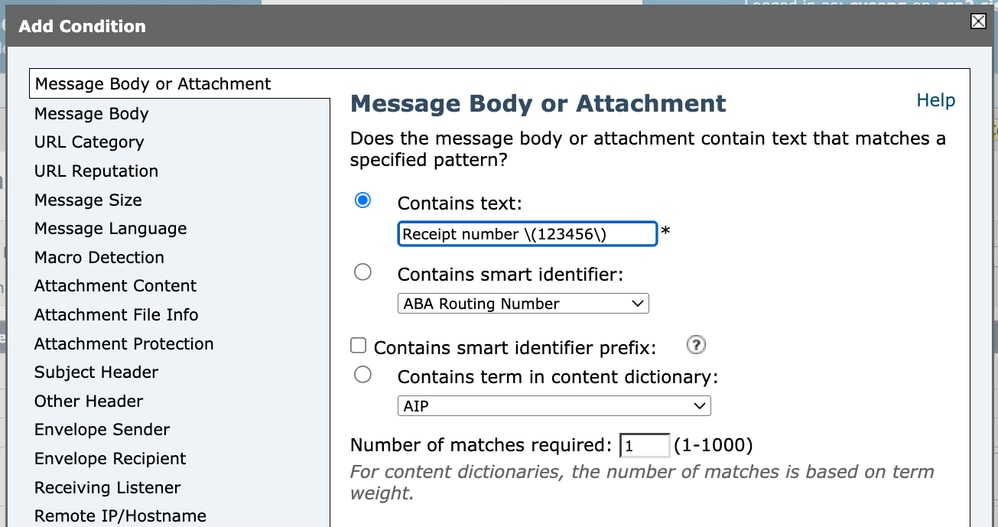 Content Filter 1
However, when viewing the full filter condition in the GUI or advanced configuration output, it can appear as:
subject == "Receipt number \\(123456\\)" Content Filter 2
This can be confusing at first glance. The reason for the double backslashes (\\) is that the backslash itself is also a special character inside quoted strings. In this context, one backslash is used to escape the parenthesis for the regex engine, and the second backslash is used to escape the backslash inside the quoted string.
In practical terms:
\(123456\) is the actual regular expression.
\\( is how the system represents \( inside a quoted configuration string.
Although it appears different when displayed, the logical regular expression being evaluated remains:
Receipt number \(123456\)
This is simply a matter of string escaping in configuration output.
Introducing the Expression in a Dictionary
When adding the same expression to a Dictionary, the entry is introduced directly as:
Receipt number \(123456\)In this case, it continue to be displayed exactly as written. Unlike the Content Filter GUI representation, dictionaries do not require additional escaping layers in their visual configuration format.
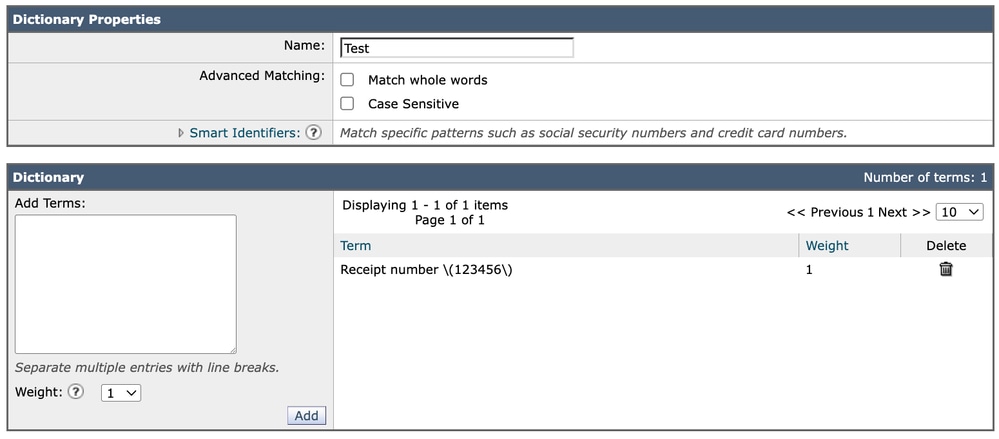 Dictionary
Each dictionary entry is evaluated as either plain text or a regular expression depending on its structure. If special characters are included (such as parentheses in this case), the expression must already be properly escaped when entered.
About “Match Whole Words”
When configuring a dictionary, there is an option called “Match Whole Words.” In many cases, it is recommended not to rely on this setting when working with regular expressions.
The reason is that word-boundary behavior can be controlled more precisely using regex anchors.
For example:
^ ensures the match starts at the beginning.
$ ensures the match ends at the end.
Using anchors such as:
^Receipt number \(123456\)$Provides explicit and predictable control over exact matching behavior. This approach avoids potential ambiguity related to how word boundaries are interpreted, especially in multilingual or non-ASCII environments.
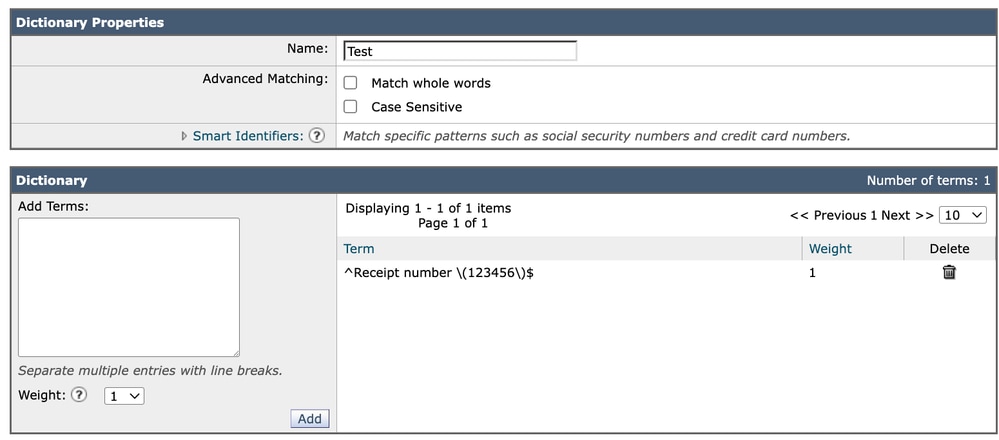 Dictionary 2
For this reason, it is generally preferable to manage match precision directly within the regular expression rather than relying on the “Match Whole Words” option.
Understanding these subtle differences between Content Filters and Dictionaries ensures that expressions behave consistently and reduces the risk of configuration mistakes during implementation.
Regex Cost Ranking in Cisco ESA
When working with regular expressions in Cisco ESA, performance impact depends largely on how much text the engine must scan and how much backtracking it must perform. Since ESA must evaluate entire message bodies, MIME parts, and even decoded attachments, inefficient patterns can significantly increase CPU usage.
It is a practical ranking from highest computational cost to lowest.
Most Expensive — High Risk Patterns
These expressions can dramatically impact performance, especially on large messages.
Nested Quantifiers (Worst Case)
Examples:
(.*)+
(.+)+
(\S+)+
These are extremely dangerous because they create exponential backtracking scenarios.
A quantifier inside another quantifier forces the regex engine to try many combinations before failing.
In real traffic, this can cause serious CPU spikes.
Recommendation: Avoid unbounded and ambiguous nested quantifiers.
Greedy .* Followed by a Required Pattern
Example:
.*text
.*\/\?text
This pattern first consumes the entire message, then backtracks character by character until it finds the required substring.
If the pattern is not present — or appears near the end — the engine backtracks and tests the required token at many positions, which increases CPU cost.
In ESA, where bodies can be large and include MIME content, this becomes expensive very quickly.
Recommendation: Do not prepend .* to detect substrings. ESA already searches the evaluated content, and leading wildcards only increase backtracking and CPU usage.
text$
\/\?text$
Large Alternations with Shared Prefixes
Example:
(a.*b|a.*c|a.*d)When multiple alternatives share structure, the engine evaluates each branch sequentially.
If early branches nearly match but fail late, the engine retries extensively.
This increases evaluation time significantly.
Medium Cost — Use With Caution
These patterns are not catastrophic but can still be inefficient.
Broad .* Usage
Example:
https://.*\?textWhile not exponential, .* still allows unlimited matching. If the expected substring does not appear quickly, the engine scans large portions of the message.
In ESA, this is common when scanning email bodies for phishing URLs.
Lazy Quantifiers (+?, *?)
Example:
\S+?
.*?
Lazy quantifiers change the matching strategy (shortest-first). They can reduce overmatching in some patterns, but in large ‘search’ workloads they can increase attempts when the terminating token is late or missing.
In many ESA use cases, they do not provide real benefit and can introduce unnecessary internal retries.
Very Generic Character Classes
Examples:
\S+
.+
These allow a wide match range, increasing the number of potential backtracking paths.
More specific character classes are always preferable.
Low Cost — Safe and Efficient Patterns
These are recommended for production ESA environments.
Fixed Literals
Examples:
text
iw\.adc
Literal strings are the most efficient possible matches. The engine performs straightforward comparisons with minimal overhead.
Use anchors to limit search scope
When the match is expected at a specific position, consider anchoring the pattern using ^ or $. Anchors restrict the evaluation to fixed positions and prevent the engine from scanning the entire content unnecessarily. This can reduce backtracking and improve performance, particularly in large message bodies or structured headers.
^Invoice$Specific Character Classes
[A-Za-z0-9.-]+
[^/\s]+
These restrict what can match, dramatically reducing the search space and limiting backtracking.
Structured and Constrained Patterns
Example:
https?:\/\/[A-Za-z0-9.-]+(?:\/[^?\s]*)*\/\?text- The domain is fixed.
- No use of .*.
- does not contain catastrophic nested patterns (example, (.*)+)
- No unnecessary lazy operators.
- Each section is constrained.
This significantly reduces CPU impact compared to broad wildcard matching.
Practical Guidance for Cisco ESA
When designing regex for Message or Content Filters:
- The more specific the pattern, the better the performance.
- Avoid .* unless it is truly necessary — and especially avoid placing required tokens after it.
- Never use nested quantifiers.
- Prefer explicit character classes over wildcards.
- Always test new expressions in Monitor Mode before enforcement.
Regex Performance Comparison (Cisco ESA Context)
|
Pattern |
Recommended |
Backtracking Risk |
ESA Impact |
Recommended Alternative |
|
https?:\/\/.*/\?text.* |
No |
High |
Higher |
^https?:\/\/[A-Za-z0-9.-]+(?:\/[^?\s]*)*\/\?text |
|
https?:\/\/.*\?text |
⚠ With caution |
Medium–High |
Medium–High |
^https?:\/\/[^?\s]+\?text$ |
|
https?:\/\/.* |
No |
Medium–High |
Medium |
^https?:\/\/[A-Za-z0-9.-]+(?:\/[^\s]*)* |
|
.*password |
No |
High |
Higher |
password$ |
|
.*text.* |
No |
High |
Higher |
text |
|
.*(invoice|payment|transfer) |
No |
High |
Higher |
(invoice|payment|transfer)$ |
|
(.+)+ |
Never |
Very High (Exponential) |
Severe |
Restructure without nested quantifiers (example .+) |
|
.*@.* |
No |
High |
Higher |
[A-Za-z0-9._%+-]+@[A-Za-z0-9.-]+\.[A-Za-z]{2,} |
|
\S+? |
Not ideal |
Medium |
Medium |
\S+ or more specific class like [A-Za-z0-9.-]+ |
|
.*\/admin |
No |
High |
Higher |
\/admin$ |
|
.*(login|verify).* |
No |
High |
Higher |
(login|verify) |
|
^.*text |
No |
High |
Higher |
text$ (or ^text if position matters) |
Conclusion
Regular expressions are a powerful and flexible tool within Cisco ESA, enabling precise content inspection and advanced policy enforcement in both Message Filters and Content Filters. However, with that flexibility comes responsibility. Poorly designed or insufficiently tested expressions can lead to false positives, missed detections, performance degradation, or unintended disruption of legitimate email traffic.
For this reason, the use of regular expressions in ESA must always been structured and disciplined approach. The creation phase must ensure that the expression is syntactically correct, properly escaped, efficient, and logically aligned with the intended objective. External tools and AI-assisted generation can significantly accelerate this process, but they must never replace careful validation.
Equally important is the validation phase within the ESA environment itself. Because ESA processes messages through MIME parsing, header normalization, and content decoding, real-world behavior can differ from theoretical expectations. Using tools such as Trace and deploying filters initially in logging or monitoring mode allows administrators to confirm correct behavior without operational risk.
In summary, regular expressions must be kept as simple as possible, tested thoroughly, and deployed cautiously. A well-designed and properly validated filter not only enforces policy effectively, but also protects system stability and ensures predictable behavior in production environments.
Documetation
For additional technical details and official guidance on how regular expressions are implemented and used within Cisco ESA, administrators must consult the Cisco product documentation
The section “Regular Expressions in Rules” provides an overview of how regular expressions are evaluated within Message Filters and Content Filters, including syntax considerations and usage within rule conditions.
The section “Guidelines for Using Regular Expressions” offers practical recommendations on correct syntax, anchoring expressions, handling special characters, and avoiding common mistakes that can affect performance or matching accuracy.
Reviewing these official resources is strongly recommended when designing or troubleshooting filters that rely on regular expressions, as they provide authoritative guidance aligned with the specific AsyncOS version in use.
Revision History
| Revision | Publish Date | Comments |
|---|---|---|
1.0 |
26-Feb-2026
|
Initial Release |
Contributed by
- Alberto TorralbaTechnical Marketing Engineer
 Feedback
Contact Cisco
- Open a Support Case

- (Requires a Cisco Service Contract)