Troubleshooting the ISE Alarm Error “Profiler SNMP Request Failure: Server= NAD Address= Error Message=Request timed out”
Available Languages
Contents
- Issue
- Environment
- Resolution
- Step 1: Identify affected NAD.
- Step 2: Ensure the SNMP is running on the affected Network Access Device NAD client
- Step 3: Ensure the SNMP version and SNMP community string or SNMP Auth/Privacy Protocol Password match, on both the NAD and in ISE
- Step 4: Validate reachability, and required UDP ports (161,162) between ISE PSN and NAD client
- Cause
- Related Content
Issue
While reviewing alarms in ISE you see this SNMP profiler error:
“Profiler SNMP Request Failure: Server= <NAD DEVICE Name> NAD Address=<x.x.x.x> Error Message=Request timed out”
Environment
Cisco Identity Services Engine (ISE) version 3.0.0 and later
ISE Profiling service enabled
Network Access Devices (NADs) configured for SNMP communication
Resolution
Step 1: Identify affected NAD.
Navigate to Dashboard > Alarms
Check alarm details and note the affected NAD device name or IP.
You can identify the specific NAD client IP address by referencing the "NAD Address" field within the "Profiler SNMP Request Failure" error message.
Step 2: Ensure the SNMP is running on the affected Network Access Device NAD client
Log into the CLI of the NAD client and run this command to check if the SNMP feature is enabled.
show running-config | include snmp
Example SNMP v3:

Example SNMP v2c:

Step 3: Ensure the SNMP version and SNMP community string or SNMP Auth/Privacy Protocol Password match, on both the NAD and in ISE
Validate your SNMP v2c configuration using the steps:
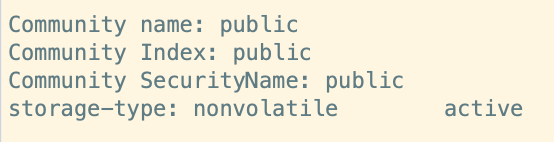
Login into the NAD client CLI and run the command “show snmp community”.
Switch Output:
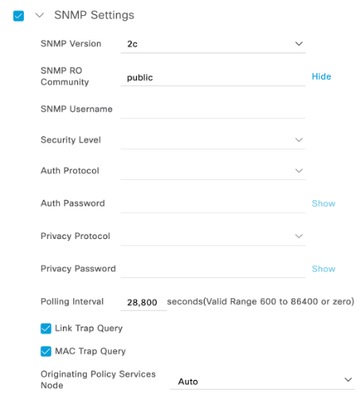
On ISE: Navigate to Administration > Network Resources > Network Devices.
Edit the identified NAD entry to ensure the SNMP community string and SNMP version matches with the output from “show snmp community”.
ISE SNMP v2c:
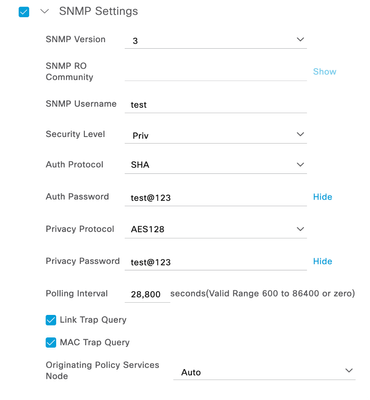
The switch masks SNMP v3 Auth/Privacy passwords. To ensure these credentials remain accurate, re-enter them using the steps :
Log into the ISE GUI.
Navigate to Administration > Network Resources > Network Devices.
Edit the identified NAD entry and go to the SNMP Settings. By clicking on the ‘Show’ on the Auth Password and Privacy Password. You could reveal the password for it.
Log into the Switch CLI.
Run the command configure terminal.
After that run this command to update the SNMP v3 credentials on the switch.
Switch Command :
snmp-server user <username> <groupname> v3 auth sha <auth-password> priv aes 128 <priv-password>
Example :
snmp-server user test snmpgroup v3 auth sha test@123 priv aes 128 test@123
Step 4: Validate reachability, and required UDP ports (161,162) between ISE PSN and NAD client
Perform a ping test from the Profiler-enabled PSN node to the NAD client.
Perform a ping test from the from the NAD client to the PSN node.
Ensure ports 161 and 162 are open between the PSN node and NAD.
Test using telnet from the NAD client to the Profiler-enabled node to confirm that ports 161 and 162 are open.
telnet <ISE IP-address> 161
telnet <ISE IP-address> 162
Cause
The SNMP Request Failure alarm occurs when ISE fails to successfully query the Network Access Device. This is typically caused by configuration mismatches regarding SNMP community strings, versions, or v3 credentials between the two devices. Additionally, network issues such as firewalls blocking UDP ports 161 or 162, or missing SNMP server configurations on the NAD, frequently prevent successful communication.
Related Content
Allow the required ISE ports and FQDNs on the network
Configure SNMP Community Strings
Revision History
| Revision | Publish Date | Comments |
|---|---|---|
1.0 |
24-Oct-2026
|
Initial Release |

 Feedback
Contact Cisco
- Open a Support Case

- (Requires a Cisco Service Contract)