Troubleshooting the Cisco ISE Domain Controller Discovery Process During Active Directory Join
Available Languages
Contents
Issue
Cisco Identity Services Engine (ISE) cannot discover your Domain Controllers (DCs) and the ISE Active Directory (AD) join fails.
Environment
Cisco Identity Services Engine (ISE) – 3.x and above
Microsoft Active Directory (AD) – 2016 and above
Domain Name System (DNS) – UDP/TCP 53
Lightweight Directory Access Protocol (LDAP) – TCP 389; TCP 636 if Secure LDAP (LDAPS) is used
Connectionless Lightweight Directory Access Protocol (CLDAP) – UDP 389
Resolution
Cisco ISE discovers DCs during the AD join process, and it uses multiple criteria to decide which DC to choose.
DNS Discovery:
ISE uses DNS Service (SRV) record queries to discover available DCs, Global Catalogs (GCs), and Key Distribution Center (KDCs). The DNS server returns the list of available DCs, GCs and KDCs
If ISE does not receive this information, it cannot continue the AD join process and reports a DNS-related error.
From the ISE CLI, verify the AD SRV records using :
nslookup
Example:
nslookup ldap.tcp.example.com querytype SRV

nslookup kerberos.tcp.example.com querytype SRV

nslookup ldap.tcp.dc._msdcs.example.com querytype SRV
The queries should return valid DC hostnames. Then verify that the returned DC hostname resolves to the correct IP address:
nslookup dc01.example.com
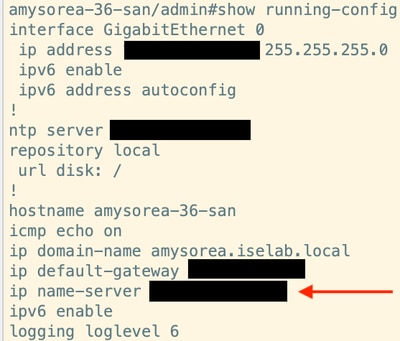
Your DNS server configured in the ISE running configuration returns the list of available servers.
Verify your ISE DNS server configuration by running this command
show running-config
For CLDAP, use a packet capture on ISE while performing the AD join or running the relevant AD diagnostic.
For example, capture traffic between ISE and the DC and verify:
ISE → DC01 : UDP/389  CLDAP Request
DC01 → ISE : UDP/389  CLDAP Response
The response should be received from each reachable DC. If ISE sends the CLDAP request but receives no response, check firewall/ACL rules, routing, and UDP 389 connectivity between ISE and the DC.
Site Identification
ISE uses CLDAP information to identify and prefer DCs in same Active Directory site whenever possible.
Verify that the ISE subnet belongs to the correct AD site. Also, verify that the expected DCs belong to the same AD site.
Connectivity Monitoring
ISE periodically uses CLDAP to monitor DC availability.
Check for intermittent UDP 389 connectivity, packet loss, or delayed CLDAP responses between ISE and the DCs using packet captures.
A CLDAP response taking more than 2.5 seconds generates a warning. If no DC responds, the AD join fails.
Cause
ISE cannot discover a DC.
DNS does not return the required AD records.
ISE cannot reach the discovered DCs.
DCs do not respond to CLDAP requests.
The ISE subnet maps to the wrong AD site.
The selected DC does not accept the LDAP connection.
Related Content
- Identity Service Engine (ISE) and Active Directory Integration Guide
- Cisco Technical Support & Downloads
Revision History
| Revision | Publish Date | Comments |
|---|---|---|
1.0 |
24-Oct-2026
|
Initial Release |

 Feedback
Contact Cisco
- Open a Support Case

- (Requires a Cisco Service Contract)