Capture Existing ISE Node Configuration Before Rebuild
Available Languages
Contents
Issue
You need to document an existing ISE Node configuration before you deregister, rebuild and reregister.
Environment
Cisco ISE version: version 3.1 and later
Deployment type: Distributed
Policy Administration Node (PAN)
Monitoring Node (MNT)
Policy Service Node (PSN)
Network Access Device (NAD), for example, a switch or wireless controller
Resolution
If you intend to rebuild and/or reregister the deregistered target node later, you must document the target node configuration before you deregister it.
Take A Full Configuration Backup of the Deployment
Document the Target Node ISE Deployment Settings
1.- Log in to the Primary PAN GUI.
2.- Navigate to Administration > System > Deployment.
3.- Check the target node to be deregistered and select Edit.
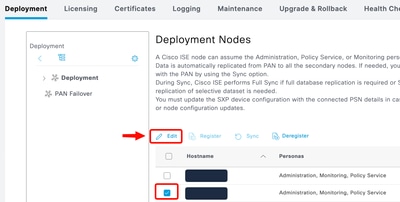
4.- Make notes or take screenshots of the entire configuration in both the General Settings and Profiling Configuration tabs.
Document the Target Node System Certificates
1.- Navigate to Administration > Certificates > System Certificates.
2.- Expand the target node entry.
3.- Make notes or take screenshots of the entire certificate configuration of the target node.
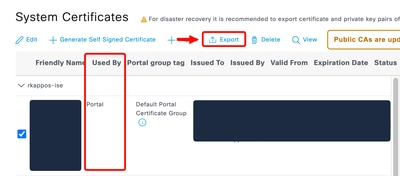
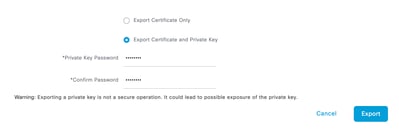
4.- Select each certificate Used By the target node ISE components one at a time, and Export the certificates and private keys.
5.- Make a note of the passwords you create when you export each certificate.

Note: You cannot re-import a certificate and key without the password.
Document the Target Node Running System Configuration
1.- Use Secure Shell (SSH) in order to log into the target node.
2.- Run this command in order to show the running configuration and save the output to a text file.
show running-config
Document AD Join Credentials
After you rebuild an ISE Node, you must re-join the new node to your Active Directory (AD) if it was previously AD joined. You must ensure that you have AD Global Administrator credentials ready in order to to join the new ISE node to the domain.
Cause
ISE node rebuild scenarios typically occur due to hardware failure, system corruption, migration to new hardware, or disaster recovery requirements that necessitate restoration from backup or a clean rebuild.
Related Content
Revision History
| Revision | Publish Date | Comments |
|---|---|---|
1.0 |
28-Sep-2026
|
Initial Release |

 Feedback
Contact Cisco
- Open a Support Case

- (Requires a Cisco Service Contract)