Configure Controlled Application Restart in ISE 3.3
Available Languages
Introduction
This document describes how to configure the Controlled Application Restart for the Admin Certificate in ISE 3.3.
Prerequisites
Requirements
Cisco recommends that you have knowledge of these topics:
- ISE Nodes/Personas
- ISE Certificate Renewal/Edit/Creation
Components Used
The information in this document is based on these hardware and software versions:
- 2 Node Deployment
- Identity Service Engine (ISE) Software Version 3.3
The information in this document was created from the devices in a specific lab environment. All of the devices used in this document started with a cleared (default) configuration. If your network is live, ensure that you understand the potential impact of any command.
Background Information
In ISE, when the Admin certificate of the Primary Admin Node (PAN) is changed, all nodes in the deployment are reloaded. First the PAN and then the rest of the nodes, which causes a disruption in all services. When the Admin certificate is replaced in any other node, the only node that is restarted is that single node.
ISE 3.3 introduces a new feature that allows you to schedule when the nodes reload. This provides better control over the restart of each node, and helps to avoid disruption in all the services.
Configure
There are different options to change the Admin certificate of the PAN node such as:
- Create Certificate Signing Request (CSR) and assigning the Admin role.
- Import certificate, private key, and assigning the Admin role.
- Create self-signed certificate and assigning the Admin role.
This document describes the method using a CSR.
Create a Certificate Signing Request (CSR)
1. On ISE, navigate to Administration > System > Certificates > Certificate Signing Requests.
2. Click Generate Certificate Signing Request (CSR).
3. In Usage, select Admin.
4. In Node(s), select the Primary Admin node.
5. Complete the certificate information.
6. Click Generate.
7, Export the file and sign it with a valid authority.
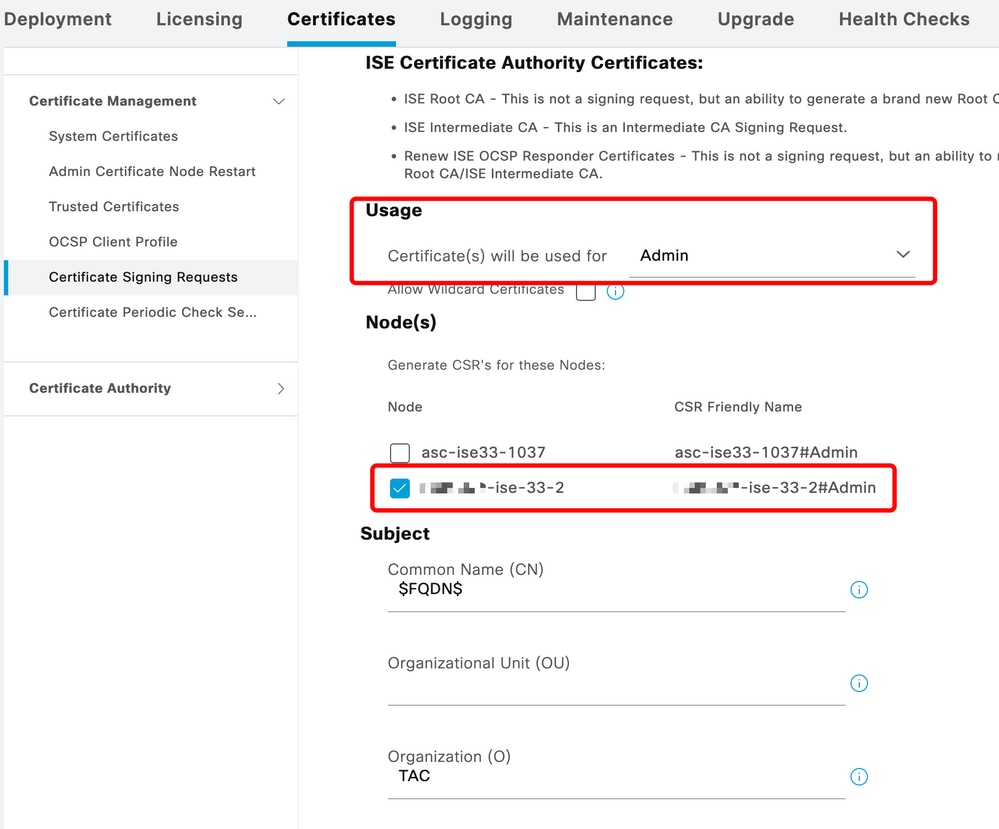 CSR Creation
Import the Root CA that Signed your CSR
1. On ISE, navigate to Administration > System > Certificates > Trusted Certificates.
2. Click Import.
3. Click Choose File and select the Root CA Certificate.
4. Write a Friendly Name.
5. Enable the checkboxes.
6. Trust for Authentication within ISE.
7. Trust for Authentication of Cisco Services.
8. Click Submit.
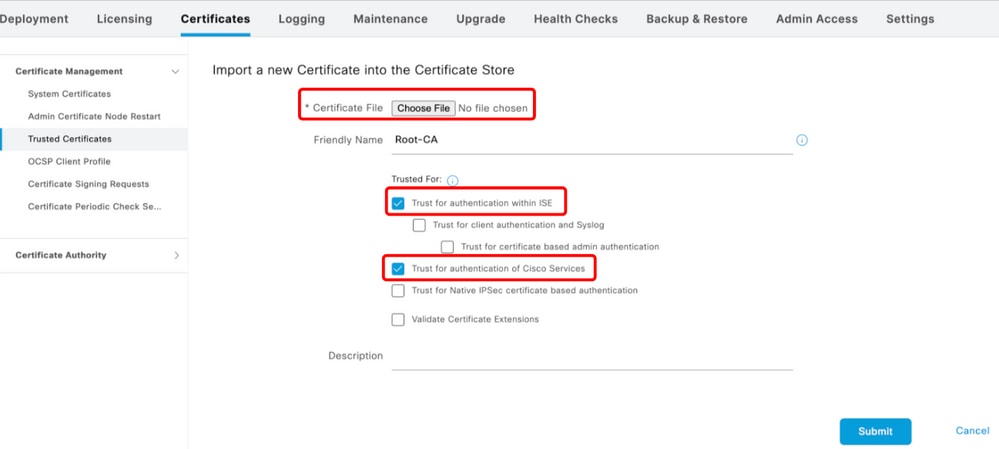 Import Root Certificate
Import the Signed CSR
1. On ISE, navigate to Administration > System > Certificates > Certificate Signing Requests.
2. Select the CSR and click Bind Certificate.
3. Click Choose File and select the Signed Certificate.
4. Configure a Friendly Name.
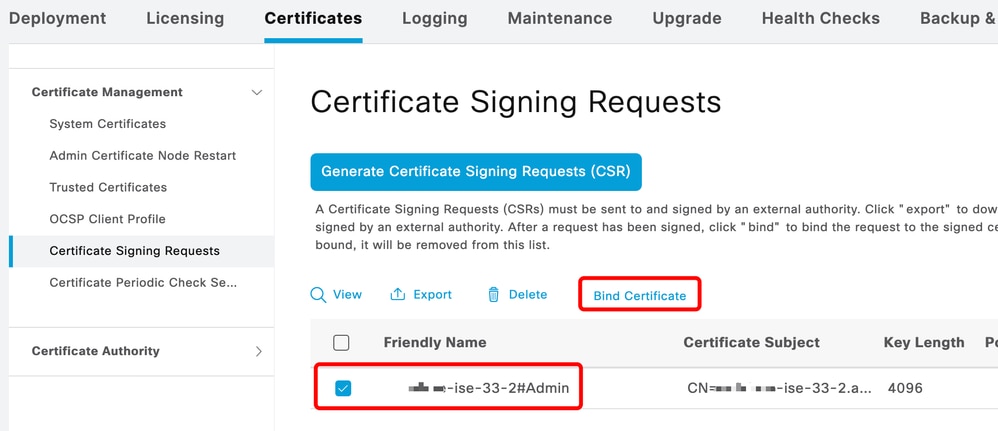 Bind Certificate
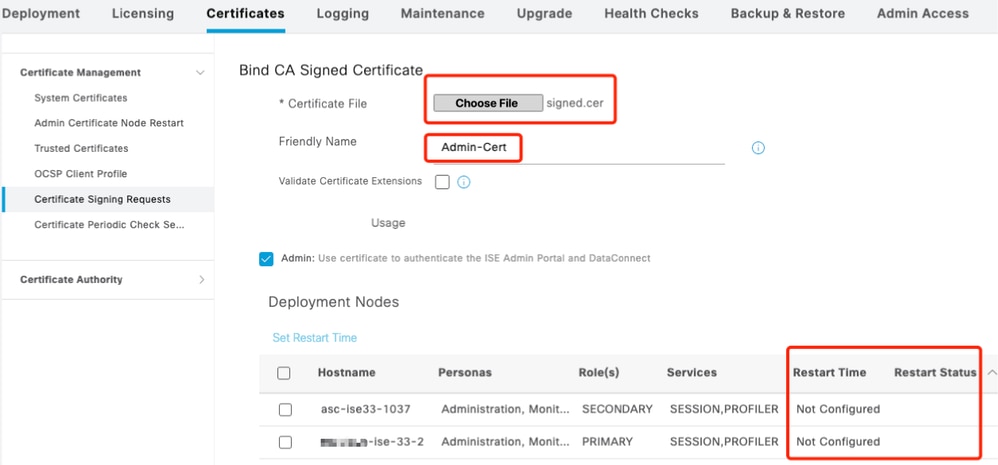 Bind Certificate
Configure the Restart Time
1. Now, you can see a new section and you can configure the restart process.
2. You configure a time per node or select both nodes and apply the same configuration.
3. Choose one node and click Set Restart Time.
4. Choose the date, time and click Save.
5. Verify the time and if everything is correct, click Submit.
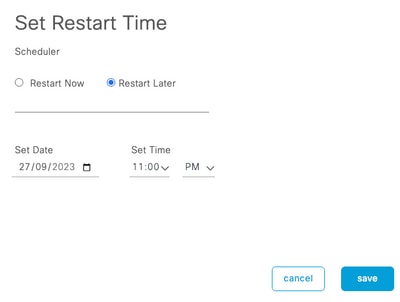 Set Restart Time
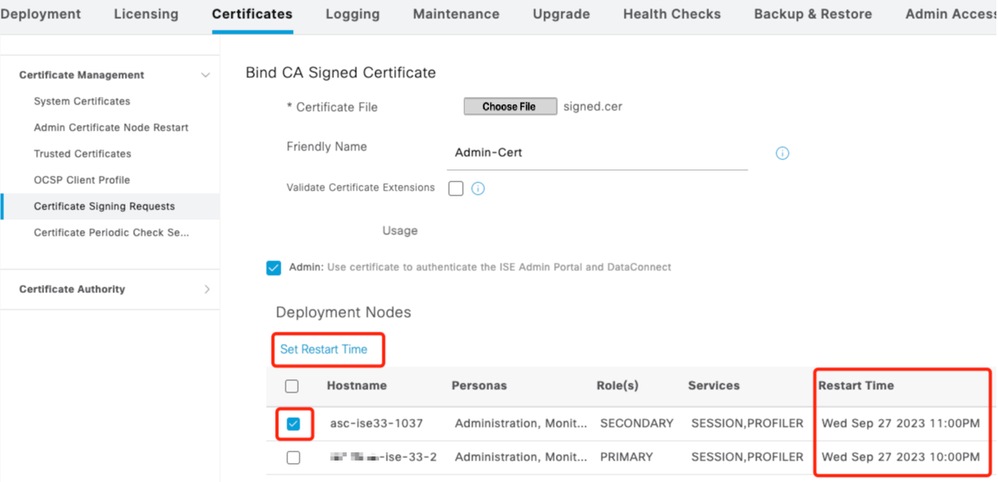 Confirm Restart Time
Verify
A new tab is available, navigate to Administration > System > Certificates > Admin Certificate Node Restart. You can validate the configuration and change it if needed.
To change it, click Set Restart Time or Restart Now.
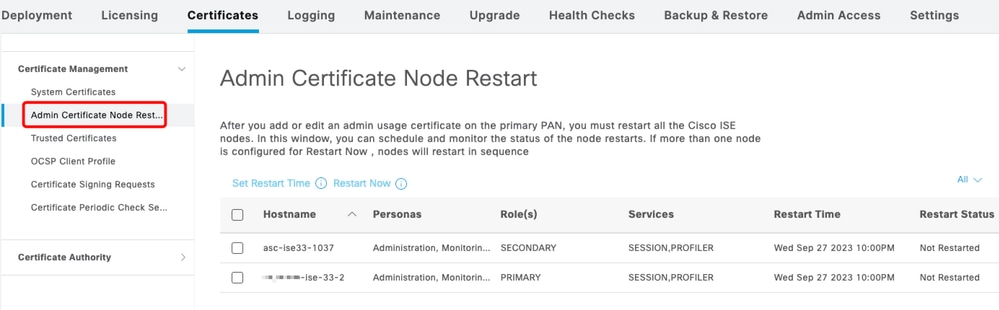 Verify Restart Status
You can validate the node status during the process. The next image is an example of when one node is reloaded and the other is in progress:
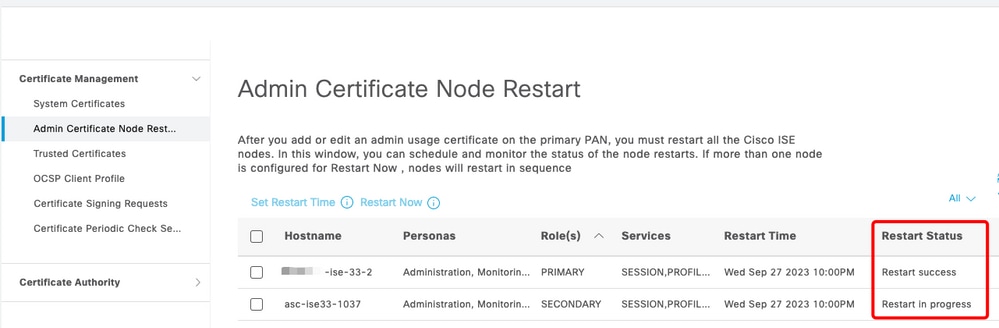 PAN Restarted
To verify the changes and reload with the reports and to review the configuration changes, navigate to Operations > Reports > Reports > Audit > Change Configuration Audit.
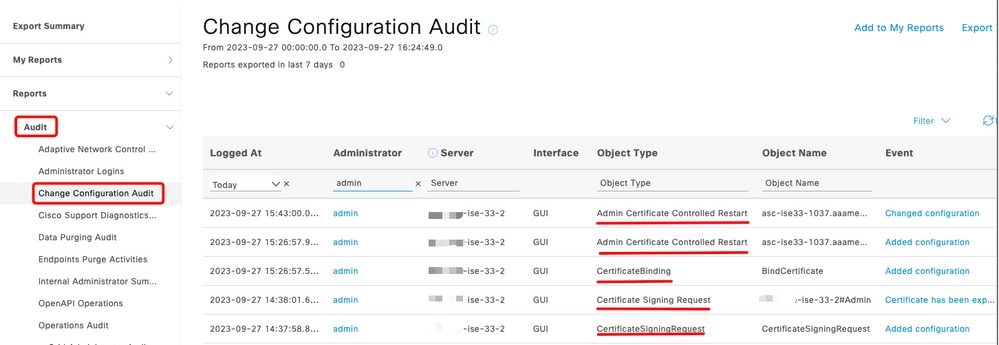 Configuration Report
To check the restart, navigate to Operations > Reports > Reports > Audit > Operations Audit.
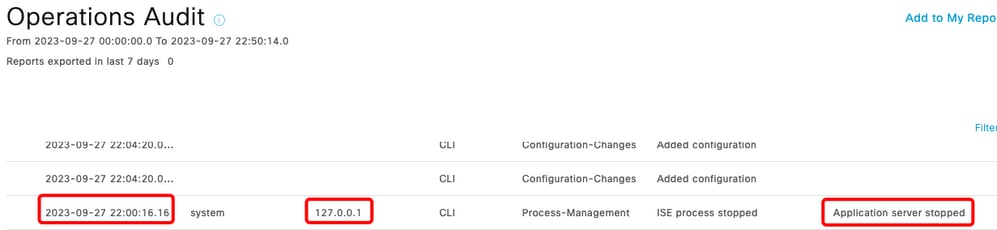 Restart Report
Sample logs from ***-ise-33-2, ise-psc.log:
Configuration applied:

2023-09-27 15:26:12,109 INFO  [DefaultQuartzScheduler_Worker-6][[]] admin.caservice.certmgmt.scheduler.AdminCertControlledRestartStatusJob -:::::-
Restart is Not configured , Hence skipping restart status check for asc-ise33-1037
2023-09-27 15:26:57,775 INFO  [admin-http-pool6][[]] cpm.admin.infra.action.RestartAction -::admin:::-
adminCertRestartData  received --{"items":[{"hostName":"asc-ise33-1037","restartTime":"2023-09-27:10:00PM"},
{"hostName":"***-ise-33-2","restartTime":"2023-09-27:10:00PM"}]}

Restart starts:

2023-09-27 21:59:11,952 INFO  [DefaultQuartzScheduler_Worker-6][[]] admin.caservice.certmgmt.scheduler.AdminCertControlledRestartStatusJob -:::::-
Executing AdminCertControlledRestartStatusJob [AdminCertControlledRestart[id=4af7d9c4-31d9-48e0-83dc-19a6cf378528,hostname=***-ise-33-2,
noderestartconfig=2023-09-27:10:00PM,noderestartstatus=Not Restarted,details=Not Restarted,maxdate=Thu Oct 12 2023 14:26:59 GMT-0600 (hora estandar central)],
AdminCertControlledRestart[id=38b811df-03b5-4a64-87b6-363290b6b4ce,hostname=asc-ise33-1037,noderestartconfig=2023-09-27:10:00PM,
noderestartstatus=Not Restarted,details=Not Restarted,maxdate=Thu Oct 12 2023 14:43:01 GMT-0600 (hora estandar central)]]
2023-09-27 21:59:12,113 INFO  [DefaultQuartzScheduler_Worker-6][[]] admin.caservice.certmgmt.scheduler.AdminCertControlledRestartStatusJob -:::::-
Restart configured , proceeding to trackRestartStatus for ***-ise-33-2
2023-09-27 21:59:12,113 INFO  [DefaultQuartzScheduler_Worker-6][[]] admin.caservice.certmgmt.scheduler.AdminCertControlledRestartStatusJob -:::::-
Restart configured , proceeding to trackRestartStatus for asc-ise33-1037
2023-09-27 22:00:00,003 INFO  [DefaultQuartzScheduler_Worker-3][[]] admin.caservice.certmgmt.scheduler.AdminCertControlledRestartSchedulerJob -:::::-
Executing AdminCertControlledRestartSchedulerJob
2023-09-27 22:00:00,022 INFO  [DefaultQuartzScheduler_Worker-3][[]] admin.caservice.certmgmt.scheduler.AdminCertControlledRestartSchedulerJob -:::::-
Executing AdminCertControlledRestartSchedulerJob [AdminCertControlledRestart[id=4af7d9c4-31d9-48e0-83dc-19a6cf378528,hostname=***-ise-33-2,
noderestartconfig=2023-09-27:10:00PM,noderestartstatus=Not Restarted,details=Not Restarted,maxdate=Thu Oct 12 2023 14:26:59 GMT-0600 (hora estandar central)],
AdminCertControlledRestart[id=38b811df-03b5-4a64-87b6-363290b6b4ce,hostname=asc-ise33-1037,noderestartconfig=2023-09-27:10:00PM,
noderestartstatus=Not Restarted,details=Not Restarted,maxdate=Thu Oct 12 2023 14:43:01 GMT-0600 (hora estandar central)]]
2023-09-27 22:00:00,288 INFO  [DefaultQuartzScheduler_Worker-3][[]] admin.caservice.certmgmt.scheduler.AdminCertControlledRestartSchedulerJob -:::::-
Restart failed or not restarted yet , hence preparing restart for ***-ise-33-2
2023-09-27 22:00:00,288 INFO  [DefaultQuartzScheduler_Worker-3][[]] admin.caservice.certmgmt.scheduler.AdminCertControlledRestartSchedulerJob -:::::-
Configured Date is now , hence proceeding for restart ,  for ***-ise-33-2
023-09-27 22:00:00,288 INFO  [DefaultQuartzScheduler_Worker-3][[]] cpm.infrastructure.certmgmt.api.AdminCertControlRestartUIAPI -:::::-
updateRestartStatus updating restarted status
2023-09-27 22:00:00,288 INFO  [DefaultQuartzScheduler_Worker-3][[]] cpm.infrastructure.certmgmt.api.AdminCertControlRestartUIAPI -:::::-
Updating the data for node: ***-ise-33-2
2023-09-27 22:00:00,313 INFO  [DefaultQuartzScheduler_Worker-3][[]] admin.caservice.certmgmt.scheduler.AdminCertControlledRestartSchedulerJob -:::::-
Restart failed or not restarted yet , hence preparing restart for asc-ise33-1037
2023-09-27 22:00:00,313 INFO  [DefaultQuartzScheduler_Worker-3][[]] admin.caservice.certmgmt.scheduler.AdminCertControlledRestartSchedulerJob -:::::-
Configured Date is now , hence proceeding for restart ,  forasc-ise33-1037
2023-09-27 22:00:00,324 INFO  [DefaultQuartzScheduler_Worker-3][[]] admin.caservice.certmgmt.scheduler.AdminCertControlledRestartSchedulerJob -:::::-
restartNowList : ***-ise-33-2.aaamexrub.com,asc-ise33-1037.aaamexrub.com
Sample logs from ***-ise-33-2, restartutil.log:
[main] Wed Sep 27 22:00:09 EST 2023:---------------------------------------------------------------
[main] Wed Sep 27 22:00:09 EST 2023:RestartUtil: BEGIN - Restart called with args apponly:1377:***-ise-33-2.aaamexrub.com,asc-ise33-1037.aaamexrub.com
[main] Wed Sep 27 22:00:09 EST 2023:---------------------------------------------------------------
[main] Wed Sep 27 22:00:14 EST 2023:RestartUtil: Restarting Local node
[main] Wed Sep 27 22:00:14 EST 2023:[/usr/bin/sudo, /opt/CSCOcpm/bin/cpmcontrol.sh, restart_appserver_es]
[main] Wed Sep 27 22:27:13 EST 2023:RestartUtil: Restarted local node and waiting for it to come up...
[main] Wed Sep 27 22:37:47 EST 2023:RestartUtil: Restart success for  local node .
[main] Wed Sep 27 22:37:48 EST 2023:RestartUtil: Restarting node asc-ise33-1037.aaamexrub.com
[main] Wed Sep 27 22:37:54 EST 2023:RestartUtil: statusLine>>>HTTP/1.1 200
[main] Wed Sep 27 22:37:54 EST 2023:RestartUtil: Waiting for node asc-ise33-1037.aaamexrub.com to come up after restart...
[main] Wed Sep 27 22:52:43 EST 2023:RestartUtil: Restart successful on node: asc-ise33-1037.aaamexrub.com
[main] Wed Sep 27 22:52:43 EST 2023:RestartUtil: cred file deleted
[main] Wed Sep 27 22:52:43 EST 2023:---------------------------------------------------------------
[main] Wed Sep 27 22:52:43 EST 2023:RestartUtil:END-  Restart called with args apponly:1377:***-ise-33-2.aaamexrub.com,asc-ise33-1037.aaamexrub.com
[main] Wed Sep 27 22:52:43 EST 2023:---------------------------------------------------------------
[main] Wed Sep 27 23:00:10 EST 2023: Usage RestartUtil local||remote  apponly|full
Sample logs from asc-ise33-1037, restartutil.log:
main] Wed Sep 27 19:00:10 UTC 2023: Usage RestartUtil local||remote  apponly|full
[main] Thu Sep 28 04:37:14 UTC 2023:---------------------------------------------------------------
[main] Thu Sep 28 04:37:14 UTC 2023:RestartUtil: BEGIN - Restart called with args apponly:1377:localhost
[main] Thu Sep 28 04:37:14 UTC 2023:---------------------------------------------------------------
[main] Thu Sep 28 04:37:16 UTC 2023:RestartUtil: Restarting Local node
[main] Thu Sep 28 04:37:16 UTC 2023:[/usr/bin/sudo, /opt/CSCOcpm/bin/cpmcontrol.sh, restart_appserver_es]
[main] Thu Sep 28 04:52:41 UTC 2023:RestartUtil: Restarted local node and waiting for it to come up...

[main] Thu Sep 28 04:53:12 UTC 2023:RestartUtil: Restart success for  local node .
[main] Thu Sep 28 04:53:12 UTC 2023:RestartUtil: cred file deleted
[main] Thu Sep 28 04:53:12 UTC 2023:---------------------------------------------------------------
[main] Thu Sep 28 04:53:12 UTC 2023:RestartUtil:END-  Restart called with args apponly:1377:localhost
[main] Thu Sep 28 04:53:12 UTC 2023:---------------------------------------------------------------
Troubleshoot
For additional information on this feature, you can review these files:
- ise-psc.log
- restartutil.log
To view them in real-time from the command line, you can run these commands:
show logging application restartutil.log tail
show logging application ise-psc.log tail
Related Information
• Cisco Technical Support & Downloads
Revision History
| Revision | Publish Date | Comments |
|---|---|---|
2.0 |
08-Oct-2026
|
Updated introduction, spelling, grammar, spacing, inserted horizontal lines to separate sections for readability, fixed CCW alerts. |
1.0 |
18-Apr-2024
|
Initial Release |

 Feedback
Contact Cisco
- Open a Support Case

- (Requires a Cisco Service Contract)