Install Patch on ISE
Available Languages
Contents
Introduction
This document describes ways to install ISE patches and FAQs during installation.
Prerequisites
Requirements
Basic knowledge of the Identity Service Engine (ISE).
Components Used
The information in this document is based on these software and hardware versions:
- Cisco Identity Service Engine 3.X
The information in this document was created from the devices in a specific lab environment. All of the devices used in this document started with a cleared (default) configuration. If your network is live, ensure that you understand the potential impact of any command.
Background Information
Cisco releases ISE patches on a semi-regular basis. These patches contain bug fixes and, when necessary, security fixes (for example, the Heartbleed and Poodle vulnerabilities discovered with SSL). This ensures that bug fixes are applied, security vulnerabilities are plugged in, and the solution works seamlessly.
When you install a patch on an ISE node, the node is rebooted. Restart the services after the installation is complete. Wait several minutes before you can log in again.
You can schedule patch installations during a maintenance window to avoid a temporary outage.
Install only patches that are applicable for the Cisco version deployed in your network. Cisco reports any mismatch in versions as well as any errors in the patch file.
You cannot install a patch of a lower version than the patch that is currently installed on Cisco. Similarly, you cannot roll back changes of a lower-version patch if a higher version is currently installed on Cisco.
When you install a patch from the Primary Administration Node (PAN) that is part of a distributed deployment, Cisco ISE installs the patch on the primary node and then on all the secondary nodes in the deployment. If the patch installation is successful on the PAN, Cisco ISE then continues patch installation on the secondary nodes. If it fails on the PAN, the installation does not proceed to the secondary nodes. However, if the installation fails on any of the secondary nodes for any reason, it still continues with the next secondary node in your deployment.
When you install a patch from the PAN that is part of a two-node deployment, Cisco installs the patch on the primary node and then on the secondary node.
If the patch installation is successful on the PAN, Cisco then continues patch installation on the secondary node. If it fails on the PAN, the installation does not proceed to the secondary node.
Patch Installation With GUI
To download the ISE Patches from Cisco.com, Navigate to Downloads > Products > Security > Access Control and Policy > Identity Services Engine > Identity Services Engine Software(here).
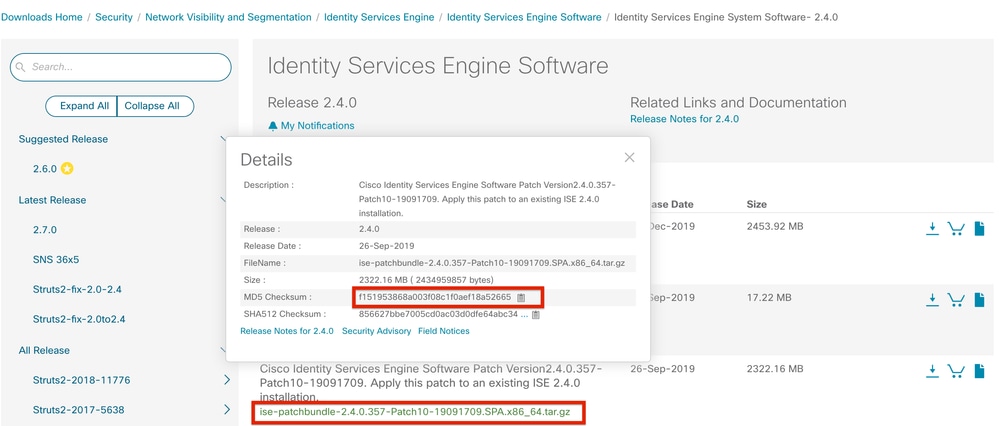
In order to apply the patch on ISE, log in to ISE Primary Administration Node (PAN) GUI and execute these instructions:
Step 1. Navigate to Administration > System > Maintenance > Patch Management > Install.
Step 2. Click Browse and choose the patch file that was downloaded from Cisco.com.
Step 3. Click Install to install the Patch.
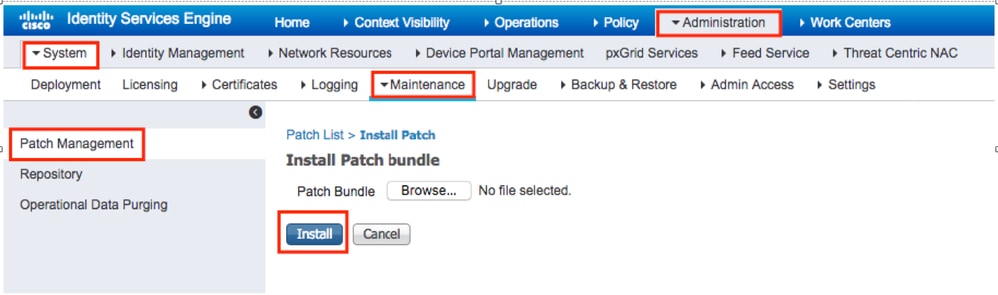
Patch Installation With CLI
Step 1. Configure an ISE repository and place the required ISE patch in the repository. To configure the ISE repository refer How to Configure Repository on ISE
Step 2. Log in to ISE CLI with SSH.
Step 3. Ensure the ISE CLI can list the repository content.
ise1/admin# show repository FTP_repository

ise-patchbundle-3.3.0.430-Patch2-24041511.SPA.x86_64.tar.gz
ise-patchbundle-3.3.0.430-Patch3-24070910.SPA.x86_64.tar.gz
ise-patchbundle-3.3.0.430-Patch4-24102504.SPA.x86_64.tar.gz
Step 4. In order to install patch on a specific ISE node from the CLI, run the patch install command in EXEC mode.
patch install <patch_file_name> <repository_name>
Log in to the CLI of the ISE node via SSH and run these commands:
ise1/admin# patch install ise-patchbundle-3.3.0.430-Patch4-24102504.SPA.x86_64.tar.gz FTP_repository
% Warning: Patch will be installed only on this node. Install using Primary Administration node GUI to install on all nodes in deployment. Continue? (yes/no) [yes] ? yes
Initiating Application Patch installation...

Getting bundle to local machine...
Unbundling Application Package...
Verifying Application Signature...
Patch successfully installed

Broadcast message from root@ISE (pts/3) (Tue Dec 17 09:36:52 2024):

Trying to stop processes gracefully. Reload might take approximately 3 mins


% This application Install or Upgrade requires reboot, rebooting now...

Broadcast message from root@ISE (pts/3) (Tue Dec 17 09:37:21 2024):

The system is going down for reboot NOW
Install the Patch on all the ISE Nodes in the Deployment
When you install a patch from the PAN that is part of a distributed deployment, Cisco ISE installs the patch on the primary node and then all the secondary nodes in the deployment. If the patch installation is successful on the Primary PAN, Cisco ISE then continues patch installation on the secondary nodes. If it fails on the PAN, the installation does not proceed to the secondary nodes.
However, if the installation fails on any of the secondary nodes for any reason, it still continues with the next secondary node in your deployment.
Roll Back the Patch on all ISE Nodes in the Deployment
To roll back a patch from Cisco ISE nodes in a deployment, you must first roll back the change from the PAN. If this is successful, the patch is then rolled back from the secondary nodes. If the rollback process fails on the PAN, the patches are not rolled back from the secondary nodes. However, if the patch rollback fails on any secondary node, it still continues to roll back the patch from the next secondary node in your deployment.
While Cisco ISE rolls back the patch from the secondary nodes, you can continue to perform other tasks from the PAN GUI. The secondary nodes restart after the rollback.
To roll back the ISE patches, log in to ISE GUI and navigate to Administration > System > Maintenance > Patch Management and select the required patch and click Rollback as shown:
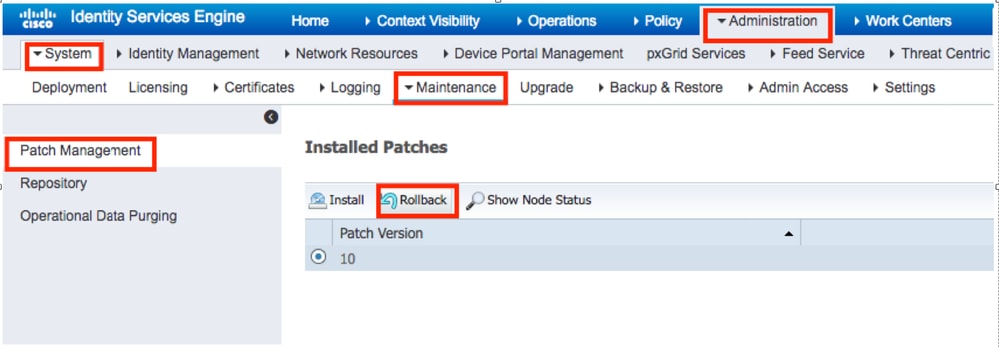
Roll Back the Patch from the ISE CLI
Step 1. SSH to the ISE node in which you would like to remove the patch.
Step 2. Verify the installed patches on the ISE node with the show version command:
ise1/admin# show version

Cisco Application Deployment Engine OS Release: 3.3
ADE-OS Build Version: 3.3.P.097
ADE-OS System Architecture: x86_64

Copyright (c) 2005-2023 by Cisco Systems, Inc.
All rights reserved.
Hostname: ise-aaa-dnac1


Version information of installed applications
---------------------------------------------

Cisco Identity Services Engine
---------------------------------------------
Version : 3.3.0.430
Build Date : Tue Jul 4 00:31:18 2023
Install Date : Sat Nov 9 22:42:47 2024

Cisco Identity Services Engine Patch
---------------------------------------------
Version : 1
Install Date : Tue Dec 17 09:57:23 2024

Cisco Identity Services Engine Patch
---------------------------------------------
Version : 4
Install Date : Tue Dec 17 11:49:53 2024
Step 3. Run the patch remove <application name> <patch file number to be removed> command.
For example, patch remove ise 4:
ise1/admin# patch remove ise 4
Continue with application patch uninstall? [y/n] y
% Warning: Patch is removed only from this node. Remove patch with Primary Administration node GUI to remove from all nodes in deployment.

Patch successfully uninstalled

% This application Install or Upgrade requires reboot, rebooting now...
Broadcast message from root@ISE (pts/1) (Sun Mar 8 03:16:29 2020):
Trying to stop processes gracefully. Reload takes approximately 3 mins
Broadcast message from root@ISE (pts/1) (Sun Mar 8  03:16:29 2020):
Trying to stop processes gracefully. Reload takes approximately 3 mins
Broadcast message from root@ISE (pts/1) (Sun Mar 8 03:17:41 2020):
The system is going down for reboot NOW
Broadcast message from root@ISE (pts/1) (Sun Mar 8 03:17:41 2020):
The system is going down for reboot NOW
To uninstall the previous patch, uninstall the latest patch first and then the previous patch version.
ise1/admin#patch remove ise 1
Continue with application patch uninstall? [y/n] y
% Warning: Patch is removed only from this node. Remove patch with Primary Administration node GUI to remove from all nodes in deployment.
Continue? (yes/no) [yes] ? yes
% Patch cannot be rolled back while a newer version exists, which needs to rolled back first.
Verify
In order to view the ISE patch installation progress, navigate to Administration > System > Maintenance > Patch Management > Show Node Status as shown in the image:
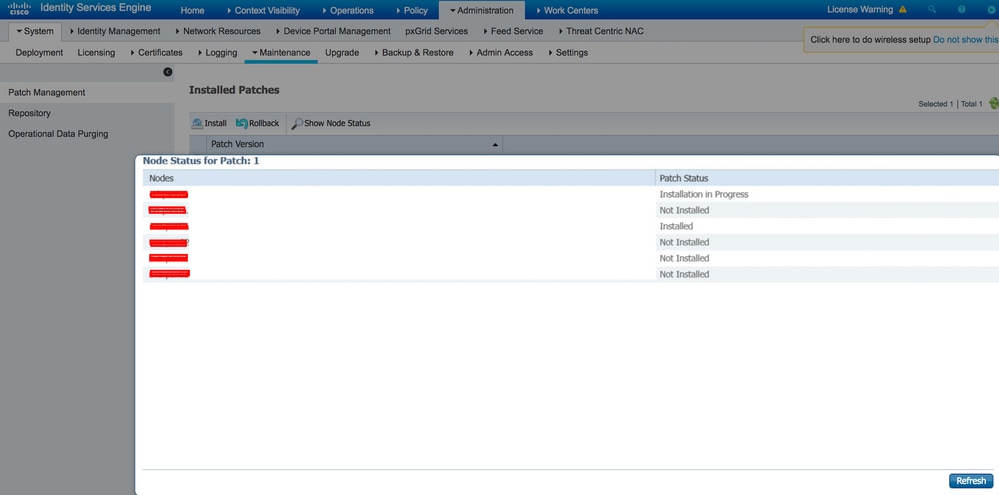
Verify patch installation status from ISE node. Log to the same ISE server and run the show version command:
ise1/admin# show version

Cisco Application Deployment Engine OS Release: 3.3
ADE-OS Build Version: 3.3.P.097
ADE-OS System Architecture: x86_64

Copyright (c) 2005-2023 by Cisco Systems, Inc.
All rights reserved.
Hostname: ise-aaa-dnac1


Version information of installed applications
---------------------------------------------

Cisco Identity Services Engine
---------------------------------------------
Version : 3.3.0.430
Build Date : Tue Jul 4 00:31:18 2023
Install Date : Sat Nov 9 22:42:47 2024

Cisco Identity Services Engine Patch
---------------------------------------------
Version : 4
Install Date : Tue Dec 17 11:49:53 2024
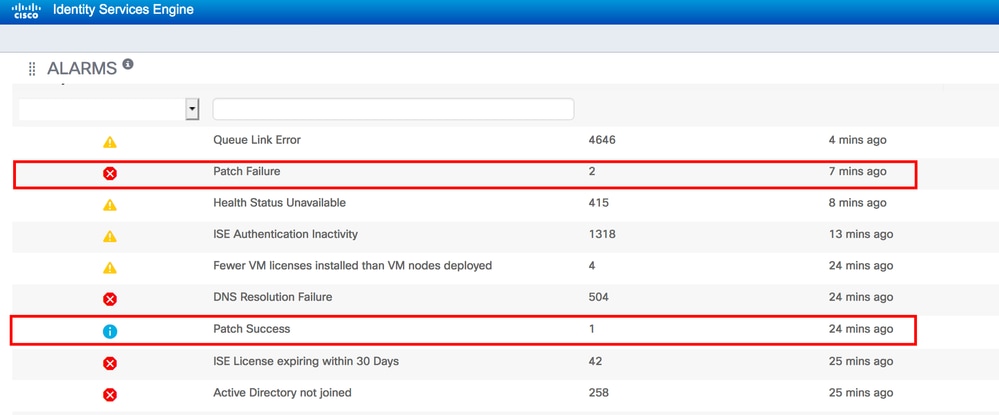
Verify successful and failed patch messages in ISE alarms:
Successful Patch Installation Log Reference
ise1/admin# sh logging system ade/ADE.log tail
2024-12-17T09:28:29.162564+00:00 ise1 CARSSetup[2783958]: ADEAUDIT 2030, type=PATCH INSTALL, name=PATCH INSTALL STARTED, username=system, cause=Application patch install has been inititated, adminipaddress=127.0.0.1, interface=CLI, detail=Patch Install initiated with bundle - ise-patchbundle-3.3.0.430-Patch4-24102504.SPA.x86_64.tar.gz, repo - SFTP-REPO
2024-12-17T09:28:29.104724+00:00 ise1 ADE-SERVICE[1379]: [2783958]:[info] user: cars_install.c[5641] [system]: Illegal characters or double dots not found in name ise-patchbundle-3.3.0.430-Patch4-24102504.SPA.x86_64.tar.gz
2024-12-17T09:28:29.105444+00:00 ise1 ADE-SERVICE[1379]: [2783958]:[info] user: cars_install.c[5641] [system]: Illegal characters or double dots not found in name SFTP-REPO
2024-12-17T09:28:29.162700+00:00 ise1 ADE-SERVICE[1379]: [2783958]:[info] application:install cars_install.c[2568] [system]: Install initiated with bundle - ise-patchbundle-3.3.0.430-Patch4-24102504.SPA.x86_64.tar.gz, repo - SFTP-REPO
2024-12-17T09:28:29.171681+00:00 ise1 ADE-SERVICE[1379]: [2783958]:[info] application:install cars_install.c[2734] [system]: Stage area - /storeddata/Installing/.1734427709
2024-12-17T09:28:29.193007+00:00 ise1 ADE-SERVICE[1379]: [2783958]:[info] application:install cars_install.c[2737] [system]: Getting bundle to local machine
2024-12-17T09:28:29.193704+00:00 ise1 ADE-SERVICE[1379]: [2783958]:[info] transfer: cars_xfer.c[159] [system]: sftp copy in of ise-patchbundle-3.3.0.430-Patch4-24102504.SPA.x86_64.tar.gz requested
2024-12-17T09:28:29.194062+00:00 ise1 ADE-SERVICE[1379]: [2783958]:[info] transfer: cars_xfer_util.c[2643] [system]: Server validation successful x.x.x.x
2024-12-17T09:28:29.194784+00:00 ise1 ADE-SERVICE[1379]: [2783958]:[info] transfer: sftp_handler.c[689] [system]: DEBUG: local user: admin UID: 0 sftp_run_parent FD: 9 remote host: x.x.x.x remote user: admin command: get /ise-patchbundle-3.3.0.430-Patch4-24102504.SPA.x86_64.tar.gz /storeddata/Installing/.1734427709/ise-patchbundle-3.3.0.430-Patch4-24102504.SPA.x86_64.tar.gz
2024-12-17T09:29:24.127455+00:00 ise1 ADE-SERVICE[1379]: [2783958]:[info] transfer: cars_xfer_util.c[2666] [system]: Properties file /tmp/.cars_repodownload.props does not exist
2024-12-17T09:29:24.127573+00:00 ise1 ADE-SERVICE[1379]: [2783958]:[info] application:install cars_install.c[2794] [system]: Got bundle at - /storeddata/Installing/.1734427709/ise-patchbundle-3.3.0.430-Patch4-24102504.SPA.x86_64.tar.gz
2024-12-17T09:29:24.156171+00:00 ise1 ADE-SERVICE[1379]: [2783958]:[info] application:install cars_install.c[2867] [system]: Unbundling package ise-patchbundle-3.3.0.430-Patch4-24102504.SPA.x86_64.tar.gz
2024-12-17T09:29:41.327286+00:00 ise1 ADE-SERVICE[1379]: [2783958]:[info] application:install cars_install.c[2969] [system]: Verifying signature for package ise-patchbundle-3.3.0.430-Patch4-24102504.SPA.x86_64.tar.gz
2024-12-17T09:29:51.072928+00:00 ise1 ADE-SERVICE[1379]: [2783958]:[info] application:install cars_install.c[2993] [system]: Signed bundle /storeddata/Installing/.1734427709/ise-patchbundle-3.3.0.430-Patch4-24102504.SPA.x86_64.tar.gz confirmed with release key
2024-12-17T09:30:09.180007+00:00 ise1 ADE-SERVICE[1379]: [2783958]:[info] application:install cars_install.c[3172] [system]: Unbundling done. Verifying input parameters...
2024-12-17T09:30:09.180604+00:00 ise1 ADE-SERVICE[1379]: [2783958]:[info] application:install cars_install.c[3214] [system]: Manifest file is at - /storeddata/Installing/.1734427709/manifest.xml
2024-12-17T09:30:09.180652+00:00 ise1 ADE-SERVICE[1379]: [2783958]:[info] application:install cars_install.c[3283] [system]: Manifest file appname - ise
2024-12-17T09:30:09.180953+00:00 ise1 ADE-SERVICE[1379]: [2783958]:[info] application:install cars_install.c[3388] [system]: Patch bundle contains patch(4) for app version(3.3.0.430)
2024-12-17T09:30:09.183179+00:00 ise1 ADE-SERVICE[1379]: [2783958]:[info] application:install ci_util.c[322] [system]: Comparing installed app version:(3.3.0.430) and version of app the patch is meant for:(3.3.0.430)
2024-12-17T09:30:09.183259+00:00 ise1 ADE-SERVICE[1379]: [2783958]:[info] application:install cars_install.c[3443] [system]: Manifest file pkgtype - CARS
2024-12-17T09:30:09.183288+00:00 ise1 ADE-SERVICE[1379]: [2783958]:[info] application:install cars_install.c[4152] [system]: Verifying zip...
2024-12-17T09:30:32.843082+00:00 ise1 root: info:[patchinstall.sh] Current Disable_RSA_PSS=0
2024-12-17T09:30:32.847037+00:00 ise1 root: info:[patchinstall.sh] STARTING PATCH INSTALL SCRIPT. PATCHDIR: /storeddata/Installing/.1734427709 INSTALLDIRS:
2024-12-17T09:30:32.850535+00:00 ise1 root: info:[patchinstall.sh] NEW PATCH VER: 4 PRIOR PATCH VER: 0
2024-12-17T09:30:32.708937+00:00 ise1 ADE-SERVICE[1379]: [2783958]:[info] application:install cars_install.c[4241] [system]: Executing patch install script patchinstall.sh from patch.zip
2024-12-17T09:30:35.742426+00:00 ise1 root: info:[application:operation:cpmcontrol.sh] In Stop Monit
2024-12-17T09:30:35.755071+00:00 ise1 root: Monit daemon with pid [21765] killed
2024-12-17T09:30:36.816209+00:00 ise1 root: info:[application:operation:cpmcontrol.sh] Done Stop Monit
2024-12-17T09:30:37.125419+00:00 ise1 ADEOSShell[2791127]: ADEAUDIT 2062, type=USER, name=M&T Log Processor, username=system, cause=M&T Log Processor Stopped, adminipaddress=127.0.0.1, interface=CLI, detail=Stopping M&T Log Processor
2024-12-17T09:30:45.772624+00:00 ise1 root: info:[application:operation:adprobe.sh] adprobe:Stopping wmi probe...
2024-12-17T09:30:45.799438+00:00 ise1 root: info:[application:operation:adprobe.sh] adprobe:wmi probe is disabled
2024-12-17T09:30:45.871771+00:00 ise1 root: info:[application:operation:syslogprobe.sh] syslogprobe:Stopping syslog probe...
2024-12-17T09:30:45.898168+00:00 ise1 root: info:[application:operation:syslogprobe.sh] syslogprobe:syslog probe is disabled
2024-12-17T09:30:45.967252+00:00 ise1 root: info:[application:operation:restprobe.sh] restprobe:Stopping rest probe...
2024-12-17T09:30:45.994671+00:00 ise1 root: info:[application:operation:restprobe.sh] restprobe:rest probe is disabled
2024-12-17T09:30:46.074828+00:00 ise1 root: info:[application:operation:agentprobe.sh] agentprobe:Stopping agent probe...
2024-12-17T09:30:46.103781+00:00 ise1 root: info:[application:operation:agentprobe.sh] agentprobe:agent probe is disabled
2024-12-17T09:30:46.619128+00:00 ise1 root: info:[application:operation:appservercontrol.sh] Stopping ISE Application Server...
2024-12-17T09:30:46.621415+00:00 ise1 ADEOSShell[2791750]: ADEAUDIT 2062, type=USER, name=Application server status, username=system, cause=Application server stopped, adminipaddress=127.0.0.1, interface=CLI, detail=Application server stopped
2024-12-17T09:33:00.041627+00:00 ise1 root: info:[patchinstall.sh] ISE 3.3.0.430 patch 4 installFileSystem() INVOKED
2024-12-17T09:33:00.074901+00:00 ise1 root: info:[patchinstall.sh] Updating patched file: /storeddata/Installing/.1734427709/filesystem/opt/sp-hub/libs/cxf-core-3.5.7.jar
2024-12-17T09:33:00.085182+00:00 ise1 root: info:[patchinstall.sh] Updating patched file: /storeddata/Installing/.1734427709/filesystem/opt/sp-hub/libs/cxf-rt-ws-policy-3.5.7.jar
2024-12-17T09:33:00.094910+00:00 ise1 root: info:[patchinstall.sh] Updating patched file: /storeddata/Installing/.1734427709/filesystem/opt/sp-hub/libs/cxf-rt-bindings-soap-3.5.7.jar
2024-12-17T09:33:00.107845+00:00 ise1 root: info:[patchinstall.sh] Updating patched file: /storeddata/Installing/.1734427709/filesystem/opt/sp-hub/libs/prrt-interface-3.3.0.904.6-x86_64.jar
2024-12-17T09:33:00.117375+00:00 ise1 root: info:[patchinstall.sh] Updating patched file: /storeddata/Installing/.1734427709/filesystem/opt/sp-hub/libs/cxf-rt-transports-http-3.5.7.jar
Broadcast message from root@ise1 (pts/3) (Tue Dec 17 09:36:52 2024):

Trying to stop processes gracefully. Reload takes approximately 3 mins

Broadcast message from root@ise1 (pts/3) (Tue Dec 17 09:37:21 2024):

The system is going down for reboot NOW

Session terminated, killing shell... ...killed.
Revision History
| Revision | Publish Date | Comments |
|---|---|---|
4.0 |
30-Sep-2024
|
Updated Alt Text and Formatting. |
3.0 |
08-Nov-2023
|
Recertification |
2.0 |
09-Sep-2022
|
Revised to mask file names, commands, user actions, and directory navigation from machine translation. Minor grammar, punctuation, structure, format. |
1.0 |
20-Apr-2020
|
Initial Release |

 Feedback
Contact Cisco
- Open a Support Case

- (Requires a Cisco Service Contract)