Configure and Troubleshoot NTP Settings on Firepower and Secure Firewall
Available Languages
Contents
Introduction
This document describes how to configure, verify and troubleshoot Network Time Protocol (NTP) on Cisco Firepower and Cisco Secure Firewall devices.
Prerequisites
Requirements
There are no specific requirements for this document.
Components Used
- FPR4140 running FXOS 2.3(1.130) and 2.8(1.105).
- FPR2110 running ASA platform mode.
- FPR1140 running ASA appliance mode.
- CSF220 running FTD 10.x.
The information in this document was created from the devices in a specific lab environment. All of the devices used in this document started with a cleared (default) configuration. If your network is live, ensure that you understand the potential impact of any command.
Background Information
The NTP operation depends on the platform.
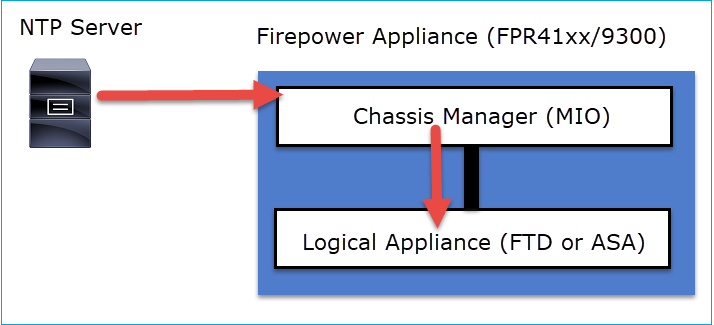
FPR4100/FPR9300, FPR2100 (platform mode)
The ASA or FTD time is taken from the chassis Firepower Chassis Manager (FCM) Management Input/Output (MIO). MIO is the supervisor of the Firepower chassis.
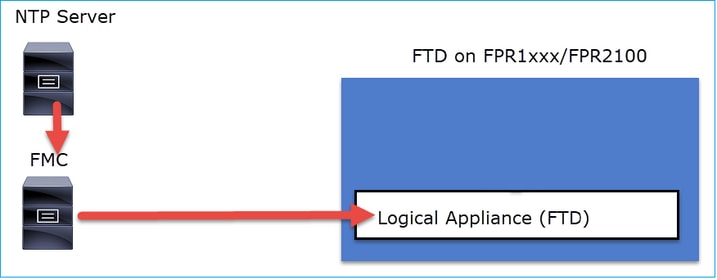
FPR1000, FPR2100 (appliance mode), CSF200/3100/4200/6100
On FTD, the time is taken from the FMC or from an NTP server:
For this deployment, check these documents:
- Configure NTP Time Synchronization for Threat Defense
- Troubleshoot Issues with Network Time Protocol (NTP) on Firepower Systems
Additional Information:
NTP is used for time synchronization. NTP uses as a transport the UDP port number 123.
Configure
NTP on FPR4100/9300
Key Points
- To configure NTP on a FPR4100/9300 appliance, log in to FCM and navigate to the Platform Settings tab.
- The NTP on the logical devices (ASA or FTD) is synchronized with the MIO.
- There is no possibility to synchronize NTP on FTD with Firewall Management Center (FMC), even if you choose that option, NTP on FTD is synchronized with MIO. Thus, it is highly recommended that FMC and FCM use the same NTP server.
- The FMC is not a full-blown NTP server. It can just provide time settings to its managed devices through the sftunnel. Thus, it cannot be used as the NTP server for the FPR4100/9300 chassis.
- Proper NTP configuration is required for a successful Smart License installation.
NTP on CSF200/1200/3100/4200/6100
- Configure the NTP settings on the logical application itself. The ASA in appliance mode or in case of FTD on-box management from the Firewall Device Manager (FDM).
- In case the FTD is managed by FMC (off-box management), configure the NTP on the FMC.
Configure the NTP on FPR2100/4100/9300
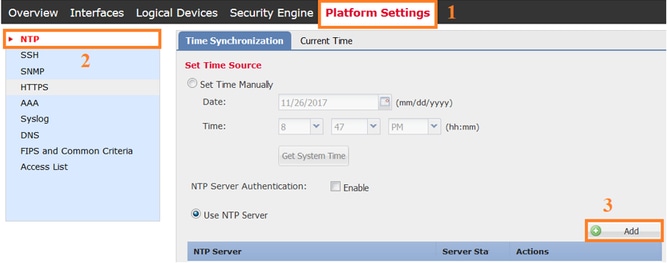
- To configure NTP on a FPR2100 appliance in platform mode, navigate to the Platform Settings tab from the chassis manager.
Step 1. Log in to the chassis manager GUI with the local user credentials and navigate to Platform Settings > NTP. Select the Add button:
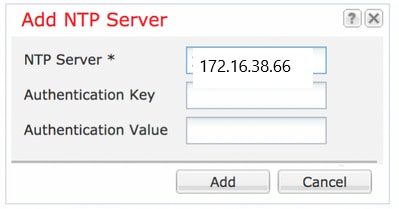
Step 2. Specify the NTP server IP address or hostname (if you use a hostname for the NTP server, you must configure a DNS server).
- In case of an ASA in platform mode, the NTP on the logical device is synchronized with the MIO.
- For FTD on FPR2100 that is using appliance mode, you configure the NTP on FMC.
- For ASA on FPR2100 that is using appliance mode, you configure the NTP on the ASA.
Verify
Verify the NTP Synchronization on FPR4100/9300 Appliances
Monitor the Server Status.
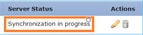
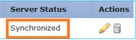
Server Status Reference
- Not available: The default status shown immediately after the NTP server configuration.
- Unreachable/Invalid: Shown in these scenarios:
- When the NTP server IP address or host name is unreachable by the NTP protocol.
- When the NTP server IP address or host name is reachable, but the remote host is not an NTP server.
- Other internal failures, such as, when the query fails to execute, exception thrown, undefined time sync status is encountered, and so on.
- Synchronization in progress: The server is reachable and supports the NTP protocol, the initial time converge is still going on and has not completed yet.
- Synchronized: The host is declared as the system sync peer and the time clock is in synchronization with it.
- Candidate: The host is the candidate (standby) peer. A candidate NTP server means it is a valid one and has successfully communicated with the Firepower appliance, but the module has been synchronized with another NTP server so it is the standby one. It can be elected as the next in-sync peer if the current one is deleted.
- Outlier: An NTP server that is discarded due to significant difference (time offset and round-trip delay) compared to the rest of the NTP servers.
Verify the NTP peer status:
FPR4100# connect fxos
FPR4100(fxos)# show ntp peer-status
Total peers : 4
* - selected for sync, + -  peer mode(active),
- - peer mode(passive), = - polled in client mode
    remote               local                 st   poll   reach delay
------------------------------------------------------------------------
=172.16.38.66           10.62.148.196           1 1024      17   0.20996
*172.31.201.67          10.62.148.196           1 1024     377   0.03035
=172.16.38.65           10.62.148.196           1 1024     377   0.19914
=172.31.20.115          10.62.148.196           1 1024     377   0.02905
Verify the NTP server configuration and synchronization:
FPR4100# scope system
FPR4100 /system # scope services
FPR4100 /system/services # show ntp-server detail
NTP server hostname:
    Name: 172.16.38.65Time Sync Status: Candidate
    NTP SHA-1 key id: 0
    Error Msg:

    Name: 172.16.38.66
    Time Sync Status: Time Sync In Progress
    NTP SHA-1 key id: 0
    Error Msg:

    Name: 172.31.20.115
    Time Sync Status: Candidate
    NTP SHA-1 key id: 0
    Error Msg:

    Name: 172.31.201.67
    Time Sync Status: Time Synchronized
    NTP SHA-1 key id: 0
    Error Msg:
Verify the NTP association:
FPR4100# connect module 1 console
Firepower-module1>show ntp association

     remote           refid      st t when poll reach   delay   offset  jitter
==============================================================================
*203.0.113.126   172.31.201.67   2 u   39   64  370    0.070    0.445   0.210

ind assid status  conf reach auth condition  last_event cnt
===========================================================
  1 16696  961a   yes   yes  none  sys.peer    sys_peer  1

associd=16696 status=961a conf, reach, sel_sys.peer, 1 event, sys_peer,
srcadr=203.0.113.126, srcport=123, dstadr=203.0.113.1, dstport=123,
leap=00, stratum=2, precision=-21, rootdelay=29.053, rootdisp=70.496,
refid=172.31.201.67,
reftime=e24d4bd9.3b680f6d  Fri, Apr 24 2020 11:28:25.232,
rec=e24d4d34.170bd724  Fri, Apr 24 2020 11:34:12.090, reach=370,
unreach=0, hmode=3, pmode=4, hpoll=6, ppoll=6, headway=0,
flash=20 pkt_stratum, keyid=0, offset=0.445, delay=0.070,
dispersion=2.152, jitter=0.210, xleave=0.017,

filtdelay=     0.08    0.11    0.08    0.10    0.07    0.08    0.09    0.07,
filtoffset=    0.17    0.18    0.29    0.29    0.45    0.45    0.69    0.69,
filtdisp=      0.00    0.03    0.99    1.02    2.03    2.06    3.03    3.06

associd=16696 status=961a conf, reach, sel_sys.peer, 1 event, sys_peer,
remote host:           203.0.113.126:123
local address:         203.0.113.1:123
time last received:    39
time until next send:  26
reachability change:   170025
packets sent:          5048
packets received:      5048
bad authentication:    0
bogus origin:          0
duplicate:             0
bad dispersion:        27
bad reference time:    0
Verify the NTP sysinfo:
FPR4100# connect module 1 console
Firepower-module1> show ntp sysinfo
associd=0 status=0615 leap_none, sync_ntp, 1 event, clock_sync,
version="ntpd 4.2.8p11@1.3728-o Sat Dec  8 06:11:47 UTC 2018 (2)",
processor="x86_64", system="Linux/3.10.62-ltsi-WR10.0.0.29_standard",
leap=00, stratum=3, precision=-24, rootdelay=29.129, rootdisp=24.276,
refid=203.0.113.126,
reftime=e24dd3bf.170a6210  Fri, Apr 24 2020 21:08:15.090,
clock=e24dd437.59b86104  Fri, Apr 24 2020 21:10:15.350, peer=16696, tc=6,
mintc=3, offset=0.009911, frequency=7.499, sys_jitter=0.023550,
clk_jitter=0.004, clk_wander=0.001

associd=0 status=0615 leap_none, sync_ntp, 1 event, clock_sync,
system peer:        203.0.113.126:123
system peer mode:   client
leap indicator:     00
stratum:            3
log2 precision:     -24
root delay:         29.129
root dispersion:    24.276
reference ID:       203.0.113.126
reference time:     e24dd3bf.170a6210  Fri, Apr 24 2020 21:08:15.090
system jitter:      0.023550
clock jitter:       0.004
clock wander:       0.001
broadcast delay:    -50.000
symm. auth. delay:  0.000

uptime:                 204908
sysstats reset:         204908
packets received:       19928
current version:        6069
older version:          0
bad length or format:   0
authentication failed:  0
declined:               0
restricted:             0
rate limited:           0
KoD responses:          0
processed for time:     6040

associd=0 status=0615 leap_none, sync_ntp, 1 event, clock_sync,
pll offset:            0.006196
pll frequency:         7.49899
maximum error:         0.097039
estimated error:       3e-06
kernel status:         pll nano
pll time constant:     6
precision:             1e-06
frequency tolerance:   500
pps frequency:         0
pps stability:         0
pps jitter:            0
calibration interval   0
calibration cycles:    0
jitter exceeded:       0
stability exceeded:    0
calibration errors:    0

time since reset:       204908
receive buffers:        10
free receive buffers:   9
used receive buffers:   0
low water refills:      1
dropped packets:        0
ignored packets:        0
received packets:       19930
packets sent:           26811
packet send failures:   0
input wakeups:          224931
useful input wakeups:   20034
Additional verification:
FTD220 /eth-uplink # scope eth-uplink ; scope fabric a
FTD220 /eth-uplink/fabric # show ntp-overall-status

NTP Overall Time-Sync Status: Time Synchronized
Verify the NTP Synchronization Between MIO and Logical Device (Blade) on FPR4100/9300 Appliances
On FPR4100/9300 the NTP settings are pushed to FTD via the MIO (chassis). The NTP configuration from the FTD CLI or the FMC UI is not possible.
Each FTD blade uses an internal reference-id: 203.0.113.126 to communicate with the MIO for time sync and based on that, it shows whether it is synchronized or not. The FTD CLI reflects this. The NTP IP in this example is the internal ref-id, not the actual NTP Server IP. A change of the NTP server IP in the FCM does not affect this output since the reference-id is always the same:
 > show ntp
NTP Server                : 203.0.113.126
Status                    : Being Used
Offset                    : -0.078 (milliseconds)
Last Update               : 43 (seconds)
Verify the NTP Configuration on FRP2100 platform mode and CSF200/1200/3100/4200/6100:
FTD220# scope system
FTD220 /system # scope services
FTD220 /system/services # show ntp-server detail

NTP server hostname:
    Name: 172.31.201.67
    Time Sync Status: Time Synchronized
    Error Msg:
On FTD you can also verify the NTP settings from the CLISH mode:
> show ntp
NTP Server : 172.31.201.67
Status : Being Used
Offset : +0.819 (milliseconds)
Last Update : 3 (seconds)

NTP Server : 127.127.1.1
Status : Available
Offset : +0.000 (milliseconds)
Last Update : 418 (seconds)
If the FTD gets its time from FMC you see the IP address 127.0.0.2:
FTD220 /system/services # show ntp-server detail expand

NTP server hostname:
Name: 127.0.0.2
Time Sync Status: Time Synchronized
Error Msg:

In this case, from CLISH you also see the IP address 127.0.0.2:
> show ntp
NTP Server : 127.0.0.2
Status : Being Used
Offset : +0.008 (milliseconds)
Last Update : 6 (seconds)

NTP Server : 127.127.1.1
Status : Available
Offset : +0.000 (milliseconds)
Last Update : - (seconds)
Troubleshoot Common Issues
1. FXOS not Able to Resolve the NTP Server Hostname
The FCM UI shows:

Recommended Action
Use the ping command to verify the NTP server hostname resolution
FPR4100(local-mgmt)# ping ntp.esl.cisco.com
Invalid Host Name.
Possible Causes
- The DNS Server is not configured.
- The DNS Server is not able to resolve the hostname.
2. Connectivity Issues Between FXOS and the NTP Server on UDP Port 123
The FCM UI shows:

Recommended Action
Take captures on the chassis management interface and verify the bidirectional communication on UDP port 123:
FPR4100(fxos)# ethanalyzer local interface mgmt capture-filter "udp port 123"
Capturing on 'eth0'
1 2020-04-30 20:09:54.150237760 10.62.148.196 → 172.16.4.161 NTP 90 NTP Version 3, client
2 2020-04-30 20:14:14.150172804 10.62.148.196 → 172.16.4.161 NTP 90 NTP Version 3, client
3 2020-04-30 20:23:13.150171682 10.62.148.196 → 172.16.4.161 NTP 90 NTP Version 3, client
Possible Causes
- The configured server is not an NTP Server.
- A device in the path (for example, firewall) blocks or modifies the traffic.
3. Intermittent Connectivity Issues Between FXOS and NTP Server
The FCM UI shows:

Recommended Actions
Initiate the NTP synchronization process from the FXOS CLI
FPR4100# connect fxos
FPR4100(fxos)# ntp sync-retry
Take captures on chassis management interface with ethanalyzer CLI command tool.
Possible Cause
- Intermittent connectivity issues between FXOS and the NTP Server
Related Defects
Check the Release Notes for known/fixed defects.
Related Information
Revision History
| Revision | Publish Date | Comments |
|---|---|---|
5.0 |
26-May-2026
|
Updated spacing, grammar, and spelling. |
4.0 |
25-May-2026
|
Recertification |
3.0 |
14-May-2025
|
Minor formatting issues. |
2.0 |
28-Nov-2022
|
Removed PII.
Added Alt Text.
Updated font tags, title and introduction, style requirements, machine translation, gerunds and formatting. |
1.0 |
03-May-2020
|
Initial Release |

 Feedback
Contact Cisco
- Open a Support Case

- (Requires a Cisco Service Contract)