Introduction
This document describes how to update Cisco Cyber Vision sensors using Self Update and Extension Update methods, with deployment and troubleshooting guidance.
Background Information
Cisco Cyber Vision offers two primary mechanisms for updating sensors: Self Update and Extension Update. With the enhancements introduced in release 4.4.0, the self-update feature is now broadly available, allowing users to update all sensors regardless of deployment method.
Self Update
Updates are performed via the RabbitMQ (RMQ) tunnel using port 5671 (the same port used for sensor-center communication).
-
Supported Deployments:
- All sensor deployment methods (extension, web, or CLI)
- As of release 4.4.0, the self-update foundation is available for all sensors, regardless of how they were installed
- Release 4.4.1 and later: All sensors can be updated automatically via the self-update feature.
Only specific binary files within the sensor container are updated; the entire container is not replaced.
In order to update sensors, navigate to More Actions > Update Sensors in the Center Sensor Explorer GUI.
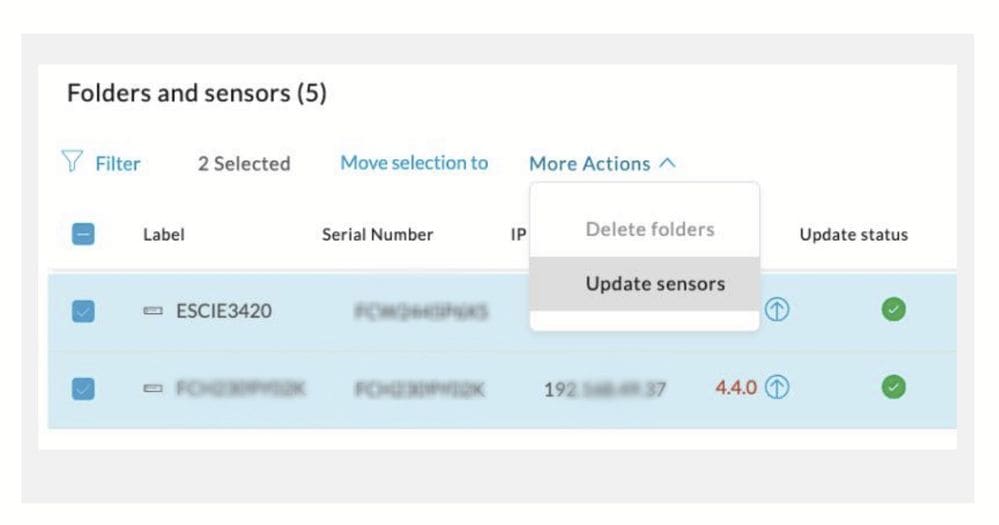

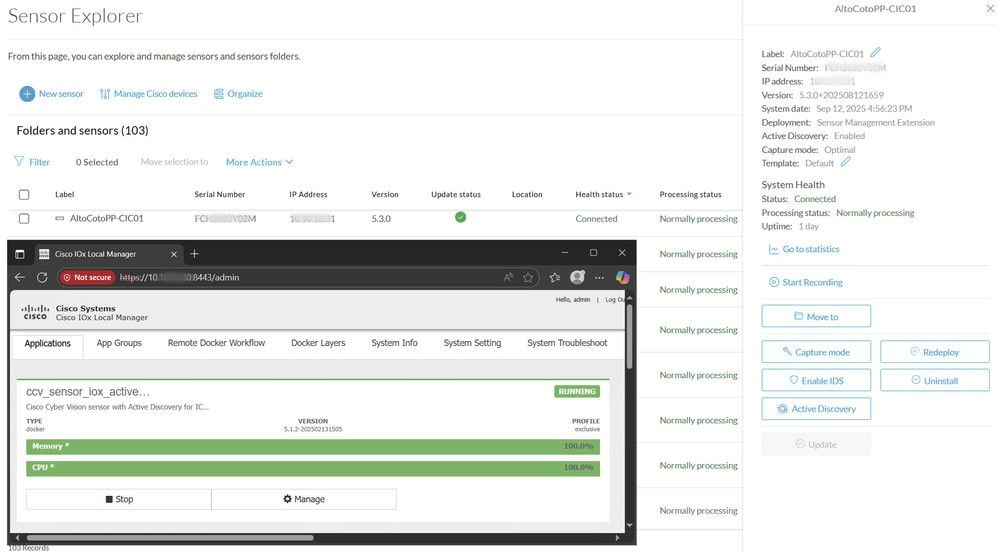
Note: After a self-update, it is expected that the sensor version displayed in the Center GUI (Sensor Explorer) will reflect the new updated release, while the IOx Local Manager will continue to show the earlier version (refer the next image).
This occurs because the self-update method updates only the internal sensor services by downloading packages through the standard sensor-to-center connection, rather than upgrading the entire IOx container.
-
Job Handling:
- Updates are managed in batches by the Center
- If an update fails on one sensor, jobs for other sensors continue
If diagnostic files and sensor logs are collected too late after a failure, relevant information is often missing.
Extension Update
Updates are performed using an HTTPS connection on port 443 between the Platform and the Center.
Only available for sensors deployed via the extension method.
The entire sensor container is replaced during the update.
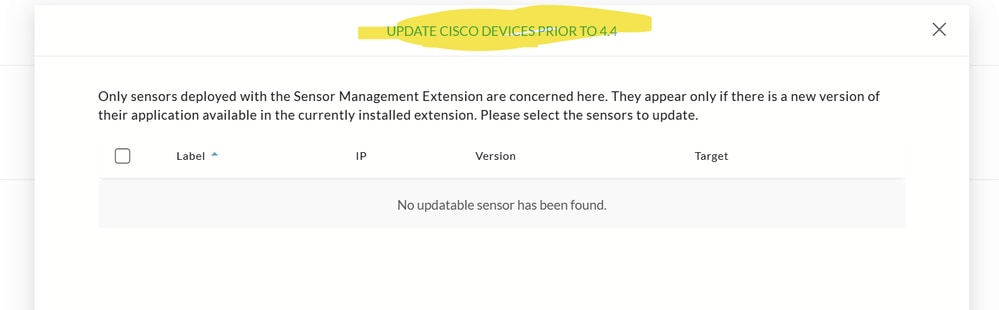
In order to update all sensors with the extension, navigate to Admin > Sensors > Sensor Explorer > Manage Cisco Devices > Update Cisco Devices, or use the redeploy button in the right-side panel of the sensor.
For a complete procedure, use any sensor installation guide from version 4.2.0 or later.
Note: Beginning with release 5.2.1, Cisco Cyber Vision no longer supports updating devices via the extension method for sensors running versions later than 4.4.
Troubleshooting Tips
- For self update, collect diagnostic files and sensor logs immediately after a failure for effective troubleshooting.
- For extension update, analyze HTTPS traffic between Platform and Center and use Center diagnostic logs.

 Feedback